How to write a README that stays true
Table of contents
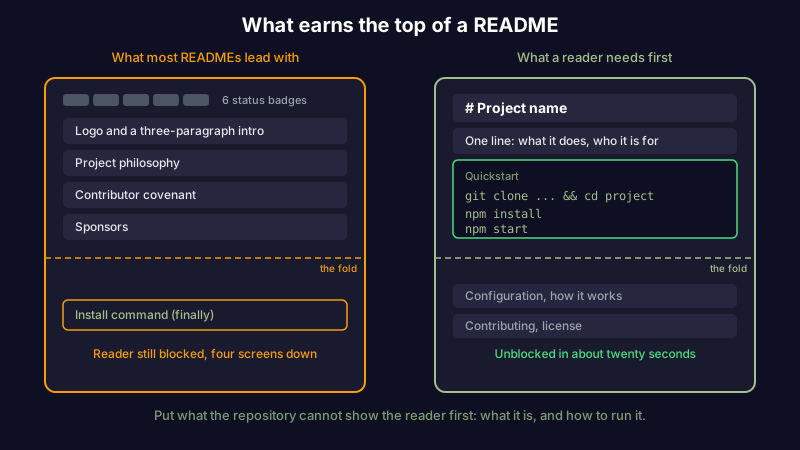
It is eleven at night and you have just cloned a repository you need working by morning. You open the README. It has a logo, six status badges, three paragraphs on the project's philosophy, a contributor covenant, and a sponsors section. What it does not have, anywhere, is the one command that starts the thing.
This is the normal failure. A README is the first file anyone opens, so it accumulates everything a project is proud of and very little of what a reader showed up to find. The result reads like a brochure when the reader needed a map.
Learning how to write a README is mostly learning what to leave out. The hard part is not the prose. It is deciding which of the ten things you could say are the two the reader cannot proceed without, and putting those first.
What is a README?
A README is the plain-text front page of a project, named README.md and placed at the root of the repository. The .md extension is Markdown, so headings, lists, links, and fenced code blocks all render automatically on GitHub, GitLab, and almost everywhere else. It is a file in your repository, versioned and reviewed alongside the code, which makes it a small piece of docs as code: it lives where the code lives and goes stale the same way.
The platform treats the README as the repository's homepage. GitHub renders it directly under the file list, which is why it is the single most-read document most projects will ever ship. GitHub's own guide on READMEs covers where the file can live and how it renders. What no platform guide tells you is what to put in it, and that is the only question that decides whether the file earns its place at the top of the page.
Why most READMEs fail
A reader arriving at your repository is holding one of a few questions. What is this? Can I use it? How do I run it? How do I contribute? Most READMEs answer none of these in the first screen, because they are written from the author's point of view rather than the reader's.
Here is the test that fixes almost everything: a README should spend its space on what the repository cannot already show. The file list, the language, the license badge, the commit history, the fact that there are tests: a reader can see all of that in ten seconds without being told. What they cannot see is why the project exists, how to get it running, and the decisions that would otherwise take an afternoon to reverse-engineer.
| The repository already shows this | Only the README can tell you this |
|---|---|
| Which language and framework it uses | What problem it solves, in one sentence |
| That there are tests, from the test directory | The exact commands to install and run it |
| The directory structure | Which directory to start reading in |
| That a config file exists | Which config values you must set before it works |
| The license, from the license file | Whether it is maintained or abandoned |
| The commit history | The one non-obvious gotcha that wastes everyone's first hour |
Every row on the left is noise when it appears in the README. Every row on the right is the reason someone opened the file. A good README is mostly the right-hand column.
If you keep notes while you build, the raw material for the right-hand column is already in them: the command you finally got working, the environment variable that was not documented, the reason you chose one library over another. A README is often less a writing task than a selection task, pulling the handful of durable facts out of a working log. That is exactly the kind of capture Scribelet is built for, so the notes you take while debugging become the README you ship. You can try it free.
The README worth copying
Most template galleries hand you twelve sections and leave you to delete the ten you do not need. That is backward. Start from the shortest README that is still complete, and add a section only when a real reader would be blocked without it. Here is that starting point, in copy-paste Markdown:
# Project name

One sentence: what this does and who it is for.

## Quickstart

    git clone https://github.com/you/project
    cd project
    npm install
    npm start

That is the whole happy path. If a reader has to read past this to run
the project, move the missing step up here.

## Configuration

Set these before first run:

- DATABASE_URL: where to find Postgres
- API_KEY: get one at the provider's dashboard

## How it works

Two or three sentences, or a link to a design doc. Enough that a
contributor knows which directory to open first.

## Contributing

How to run the tests, and the one house rule that is not obvious.

## License

MIT. See the LICENSE file.
The order is the point. The project name and one-line description answer "what is this?" in the first two lines. The quickstart answers "how do I run it?" before the reader has to scroll. Everything a reader needs to use the project lives above the fold, and everything they need to contribute lives below it. Most READMEs invert this, opening with badges and backstory and burying the install command under a heading called "Getting Started" that is three screens down.
The quickstart is also where the single most expensive omission lives: the prerequisite you forgot you had. The project runs on your machine because you installed a specific runtime version, a database, or a system library months ago and never thought about it again. A reader has none of that. If the project needs Node 20, or Postgres running locally, or a particular build tool, say so in one line before the install commands. A quickstart that assumes the reader's machine already looks like yours is the most common reason the happy path fails on the first try, and it is the cheapest failure to prevent.
Delete anything that is not pulling weight. A wall of status badges, a table of contents for a file you can read in two minutes, a "built with" list that restates the package manifest, a roadmap nobody updates: each of these costs the reader a scroll and returns nothing. The spec that formalizes this minimalism, standard-readme, is worth reading once; so is Make a README, which argues the same case from the opposite direction. The shared conclusion is that a README is short on purpose, and length is the symptom, not the goal.
README versus the other docs
Half of what bloats a README belongs in a different document. The README is the front door, not the whole house. When you find yourself writing three paragraphs on why the architecture is the way it is, or a step-by-step recovery procedure for a production incident, that content has a better home.
| The reader wants | Put it in |
|---|---|
| What this is and how to run it | The README |
| Why a specific design decision was made | An architecture decision record |
| The full design of a feature before it is built | A software design document |
| Step-by-step operational recovery | A runbook |
| How to open a good pull request or issue | A pull request template and an issue template |
Routing content to the right document keeps each one short enough to stay true. A README that tries to be the design doc and the runbook as well becomes the thing nobody trusts, because no single reader needs all of it and everyone learns to skim past the parts that are not theirs. A short, accurate README that links out beats a long one that tries to hold everything.
A good README also quietly lowers the bus factor. The quickstart, the config list, and the one non-obvious gotcha are exactly the knowledge that otherwise lives only in the head of whoever set the project up. Writing them down is the cheapest insurance a team can buy against the person who knows how to run the thing being on holiday.
Writing a README an AI agent can read
There is a newer reader to design for, and it is not a person. When a coding assistant or an autonomous agent is pointed at your repository, the README is usually the first file it reads, and it treats that file as the authoritative statement of what the project is and how to work in it. A README that is vague or stale does not just cost a human an hour; it sends the agent down the wrong path with confidence.
The same discipline that helps a human helps the model. A one-line description the agent can quote back. An explicit quickstart it can execute. A config list it does not have to infer from scanning the code. The difference is that an agent will not forgive a missing step by poking around until it works; it will follow the README literally, so the gaps show up faster and more expensively.
AI also makes the first draft cheap, which is a trap worth naming. A model can generate a plausible README from your codebase in seconds, and that draft will be fluent, complete-looking, and subtly wrong wherever the code and the prose have drifted. A generated README is a starting point to verify, not a finished document to commit. The judgment about which gotcha matters and which section to delete is still yours.
The part everyone skips: keeping it true
A README is written once and read for years, which means it starts drifting out of date the moment the code moves on. The install command gains a step. The config key is renamed. The project gains a second supported platform the README never mentions. None of these changes break a test, so nothing flags them, and the README quietly becomes a confident description of a project that no longer exists. This is ordinary knowledge decay: the document does not get worse, the world it describes moves, and the gap is invisible until someone follows the instructions and they fail.
The fix is not "review it quarterly," because a calendar reminder tells you to look without telling you what changed. The fix is to tie the README to the events that invalidate it. When you change the install steps, the README edit is part of that same pull request, not a follow-up ticket that never gets filed. A short README helps here too: there is less surface to drift, and a reader who hits one wrong command loses trust in all of it.
It helps to track, somewhere, when each claim in your docs was last confirmed true rather than last edited. A line that was reworded for tone last week can still describe a workflow that changed six months ago. Keeping a running note of what you verified and when, which Scribelet is designed to make routine, turns "the README is probably out of date" into a specific list of claims to recheck. Try it free and keep the record next to the work.
The short version
How to write a README comes down to three decisions. Lead with what the repository cannot show the reader itself: what it is and how to run it. Delete everything that restates what the file list already says. And treat the file as a claim that has to stay true, updated in the same change that makes it false rather than on a schedule nobody keeps.
A README is the cheapest documentation a project has and the most read. Spent well, it is the twenty seconds that saves every future reader an afternoon. Spent on badges and backstory, it is the file everyone opens and nobody uses.
Share this article