Docs as Code: the workflow, the tools, and its limits
Table of contents
A team I know did everything right. Their documentation lives in the same repository as the service it describes. Every change to it goes through a pull request. A reviewer signs off, a link checker runs in CI, the site rebuilds on merge. This is docs as code, textbook grade, and their onboarding guide still told a new engineer to point at a staging database that was decommissioned in the spring.
That is the thing nobody tells you when they sell you the workflow. Docs as code fixes where documentation lives and how it changes. It does not fix whether it is still true. Those are different problems, and the second one is the one that pages you at 2 a.m. Before we get to that gap, though, the workflow is worth doing well, because it removes an entire category of failure that the old wiki never could. Here is how it actually works, the toolchain that runs it, and the honest edge where it stops.
What is docs as code?
Docs as code is the practice of writing and maintaining documentation using the same tools and process you use for source code: plain-text files, version control, code review, and continuous integration. Instead of a doc living in a separate wiki or a Google Doc that drifts on its own timeline, it lives in a repository as Markdown (or AsciiDoc, or reStructuredText), it changes through pull requests, and it ships through an automated build.
The canonical definition from Write the Docs lists the ingredients: issue trackers, version control, plain-text markup, code reviews, and automated tests. The point of naming them together is that documentation stops being a special artifact handled by a special process. It becomes one more thing in the pipeline, subject to the same discipline as the code.
The appeal is obvious to anyone who has watched a wiki rot. When the doc and the code change in the same pull request, the diff is right there in review. A reviewer who notices the code changed but the doc did not can say so before the merge, not six months later. That single property, documentation reviewed alongside the change that affects it, is the whole pitch, and it is a good one.
How docs as code works: the pull request pipeline
The workflow is a pipeline. A change to documentation moves through the same stages a code change does, and each stage has a tool and a specific failure it catches. This is the part most "what is docs as code" explainers wave at instead of laying out, so here is the pipeline stage by stage.
| Stage | What happens | Typical tool | What it catches |
|---|---|---|---|
| Author | Write the change in plain text, in the repo, in a branch | Any editor, Markdown/AsciiDoc | Nothing yet; this is the draft |
| Propose | Open a pull request with the doc change (ideally in the same PR as the code it describes) | GitHub / GitLab | Documentation that was never proposed for review at all |
| Lint | CI runs a style and prose linter on the changed files | Vale, markdownlint | Broken heading hierarchy, banned terms, passive-voice sprawl, style-guide drift |
| Check links | CI crawls internal and external links in the changed pages | lychee, htmltest | Dead links, moved pages, the 404 nobody clicks until on-call does |
| Build | CI builds the docs site from source; a build error fails the check | MkDocs, Sphinx, Docusaurus, Antora | Malformed syntax, missing includes, a broken code sample that no longer compiles |
| Review | A human reviews the diff next to the code diff | GitHub / GitLab review | The claim that is now wrong because the code in the same PR changed |
| Merge & publish | On merge, CI deploys the built site automatically | GitHub Actions, GitLab CI, Netlify | A published site that lags the merged source |
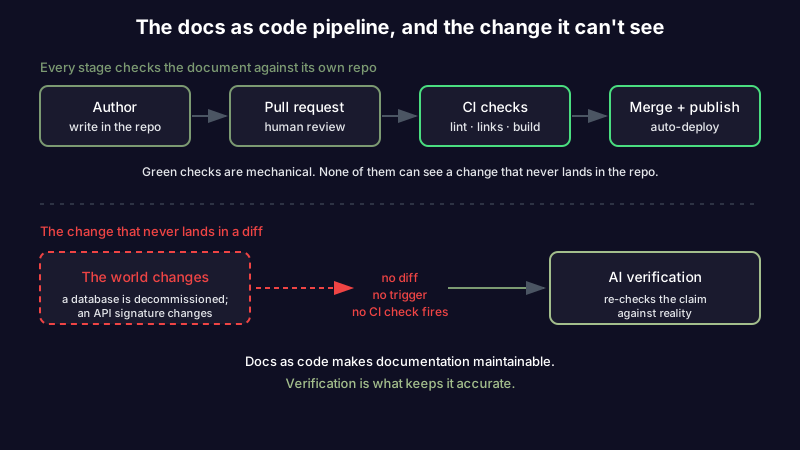
Read the table top to bottom and one thing stands out. Five of the seven stages are mechanical: a machine can decide pass or fail. Only two, authoring and review, need a human. That ratio is exactly why docs as code scales where a wiki does not. The mechanical checks never get tired, never skip a Friday, and never assume someone else already looked. If you want to see the review stage taken seriously as its own artifact, a good pull request template that people actually fill in does for the human half what CI does for the mechanical half.
If your team has a wiki that everyone agrees is out of date and nobody will fix, moving to this pipeline is a real upgrade, and it is the cheapest reliability win in the whole documentation stack. Start free if you want a place to keep the notes that do not belong in a repo but still need to stay honest.
The docs as code tools
There are three tool decisions, and most of the noise online is people arguing about the third one while the first two matter more.
The markup format is the foundation. Markdown is the default and the right choice for most teams: everyone already knows it, and it renders everywhere. Reach for AsciiDoc when you need real structure (admonitions, includes, conditional content) that Markdown fakes badly, and for reStructuredText mainly when you are already in the Python and Sphinx world. Pick one and standardize; a repo with three markup dialects is a repo with three linters. Diagrams get the same treatment: write them as Mermaid diagrams in a fenced text block and they version, diff, and review alongside the prose instead of arriving as an uneditable PNG.
The static site generator turns your source files into a published site. This is the decision people obsess over, and honestly the differences matter less than the fact that you chose one and wired it into CI.
| Generator | Best when | Notes |
|---|---|---|
| MkDocs (Material) | You want a docs site running this afternoon | Markdown-native, the Material theme is excellent out of the box |
| Docusaurus | You want versioned docs and are comfortable in the React ecosystem | Strong for product docs with multiple released versions |
| Sphinx | You are documenting Python, or need reStructuredText's power | The origin of much of "docs as code" culture; steeper learning curve |
| Antora | You have docs spread across many repositories | Built for multi-repo documentation at organizational scale |
Version control and CI are the parts you already own. The docs live in Git next to the code, and the checks run in whatever CI you already use for the code. That is the whole reason the practice is cheap to adopt: you are not buying a documentation platform, you are pointing your existing platform at a folder of text.
The tell that a team has actually adopted docs as code, rather than just filing markdown in a repo, is the CI config. If nothing runs on a documentation pull request, you have version-controlled documents, not docs as code. The government engineering teams that publish their standards in the open, like the UK Home Office engineering guidance, treat the pipeline, not the file location, as the practice.
A repo layout that survives contact with a real team
Where the docs live inside the repo is a smaller decision than the format wars suggest, but getting it wrong invites drift. Two patterns dominate.
Docs next to the code they describe keeps a service's documentation in that service's repository, so the doc and the code share a pull request and a review:
payment-service/
  src/
  tests/
  docs/
    index.md
    architecture.md      # the design decisions
    runbook.md           # what on-call does at 2 a.m.
    api.md
  mkdocs.yml
  .github/workflows/docs.yml
A central docs repository collects documentation that spans many services (a platform handbook, cross-cutting standards) in one place, usually built with a multi-repo tool like Antora. Most organizations end up with both: per-service docs in each service repo, and a central repo for the things that belong to no single service.
The rule that keeps either layout honest is proximity. The closer a claim sits to the code that makes it true, the more likely the person changing that code will change the claim in the same breath. A runbook in the service repo gets updated in the migration PR; the same runbook in a wiki three clicks away does not. This is the same failure that makes runbooks go stale the moment the command they call gets renamed, and the same instinct behind keeping architecture decision records in the repo as numbered files rather than in a decision-log wiki nobody opens.
The CI checks that keep docs honest
The mechanical half of the pipeline is where docs as code earns its keep, and it is worth being specific about what to run, because "add CI" is not advice. Here is a minimal but real GitHub Actions job that lints prose, checks links, and fails the build on a broken site:
name: docs
on:
  pull_request:
    paths: ['docs/**', 'mkdocs.yml']
jobs:
  docs:
    runs-on: ubuntu-latest
    steps:
      - uses: actions/checkout@v4
      - name: Lint prose
        uses: errata-ai/vale-action@reviewdog
      - name: Check links
        uses: lycheeverse/lychee-action@v2
        with:
          args: --no-progress './docs/**/*.md'
      - name: Build site (fail on warnings)
        run: |
          pip install mkdocs-material
          mkdocs build --strict
Three checks, three distinct failures. Vale lints prose against a style guide you define, so "we always say pull request, never PR" becomes a rule a machine enforces instead of a habit reviewers forget. lychee crawls every link in the changed files and fails on a dead one, which is the single highest-value check because a dead link is the most common and most quietly damaging doc defect. And mkdocs build --strict fails on any warning, so a broken include or a reference to a page you deleted stops the merge instead of shipping.
Add one more if your docs contain code samples that are supposed to work: run them. A tested code block is the only kind that cannot silently rot, because the test fails the day the API it calls changes. Untested samples are the parts of your documentation most likely to be wrong, precisely because they look the most authoritative.
What docs as code still can't do
Here is the honest edge. Every check in that pipeline verifies the documentation against itself and its repo: is the markup valid, do the internal links resolve, does the site build, does the prose match the style guide. Not one of them verifies the documentation against the world.
Go back to the onboarding guide pointing at the decommissioned database. The markup was valid. The internal links resolved. The site built cleanly. Vale had no complaints. Every check was green, and the doc was wrong, because the thing that changed was not in the diff. Someone decommissioned a database in an infrastructure repo the docs pipeline never watches, and nothing in a diff-based workflow fires when the world changes and the file does not. The tech writer Sarah Moir made this argument well in a post called docs as code is a broken promise: the workflow gives you the mechanism to keep docs current and then quietly leaves the deciding-to entirely up to humans, who forget.
This is the same rot that catches every kind of engineering documentation, which is why it deserves its own honest accounting rather than a footnote. Docs as code makes documentation maintainable. It does not make it accurate. It moves the problem from "where does this doc live and how does it change" (solved, genuinely) to "who is going to read this against current reality and notice it is now false" (unsolved, still a person's forgettable job). The pipeline turned five human failures into machine checks and left the two that actually decide truth exactly where they were.
If you want the maintenance layer your repo is missing, the pattern is to give each claim a last-verified date separate from its last-edited date, and something other than a human's memory to do the re-checking. That is the maintenance layer most wikis never build, and it is the piece docs as code leaves for you.
Docs as code with AI
The missing check is verification against reality, and that is the one an AI can now run. Instead of only asking "does this document build," you ask "is this document still true," and you point the question at a source of current truth: the code, the API, the live web.
This is the layer Scribelet adds on top of the docs-as-code instinct. Background agents periodically re-check the claims in your notes against the outside world and flag the ones that have gone stale, with a diff showing what changed and why, not a black-box verdict. Connect the GitHub connector and the check runs against your actual repository, so a doc that describes a function signature which changed gets flagged the way a broken link gets flagged in CI, except the source of truth is your code, not the doc's own markup. It is the same AI verification idea CI already trained your team to expect, extended to the one axis CI cannot see.
None of this replaces the pipeline. Keep the version control, keep the reviews, keep Vale and lychee and the strict build. Add the check that watches for the change that never lands in your diff. Docs as code was always a bet that documentation should live in the same system as the truth it describes. Verification is what makes the bet pay, because knowledge has a half-life whether or not your linter noticed.
Getting started
Adopting docs as code is not a migration project. Pick one service, move its docs into the repo as Markdown, add a three-line CI job that checks links and builds the site, and require doc changes to go through the same pull request as the code. That is a complete, working docs-as-code setup, and you can have it running before lunch.
Then be honest about the edge. The green checkmark means your documentation is well-formed and its links resolve. It does not mean the documentation is true. For that you need a last-verified date, a trigger for when to re-check, and something that does the checking on its own. Start free and point the first check at the doc you trust least: the runbook, the onboarding guide, the integration page you have not read since you wrote it.
Share this article