Context rot: why long AI sessions get worse over time
Table of contents
The session started sharp. You gave the agent a bug, it read the right files, made a clean fix, and moved on. Two hours and forty messages later it is a different collaborator: it re-suggests a change you already rejected, forgets a constraint you set at the start, and cites a file that got deleted an hour ago. You have not changed models or lowered your standards. The same assistant that felt reliable at message five feels unreliable at message forty, and the only thing that changed is how much it is now holding in its head.
That decline has a name, and it is not a bug in the model. It is context rot: the steady drop in an AI's accuracy and judgment as the text it is working from grows longer, even when that text still fits inside the window. The counterintuitive part is that a bigger context window does not fix it and often makes it worse, because the problem was never running out of room. The problem is that more text means less attention paid to any one part of it.
This piece is the practical version. What context rot is, why long context degrades even when it fits, how to tell rot apart from a plain bad prompt, when to compact a session versus reset it versus start over, what to keep and what to throw away, and the failure underneath all of it: the context you assemble is a document, and documents rot.
What is context rot?
Context rot is the measurable degradation in a large language model's performance as its input grows longer: as you fill the context window, the model becomes worse at recalling facts, following instructions, and reasoning over what it was given, even though every token still technically fits. The term was coined by a developer in mid-2025 and pinned down by Chroma's research, which tested state-of-the-art models and found that performance consistently degrades as input length increases, across every model they measured. Redis's write-up on context rot describes it the same way, as the performance drop that happens when a model has to process increasingly long input.
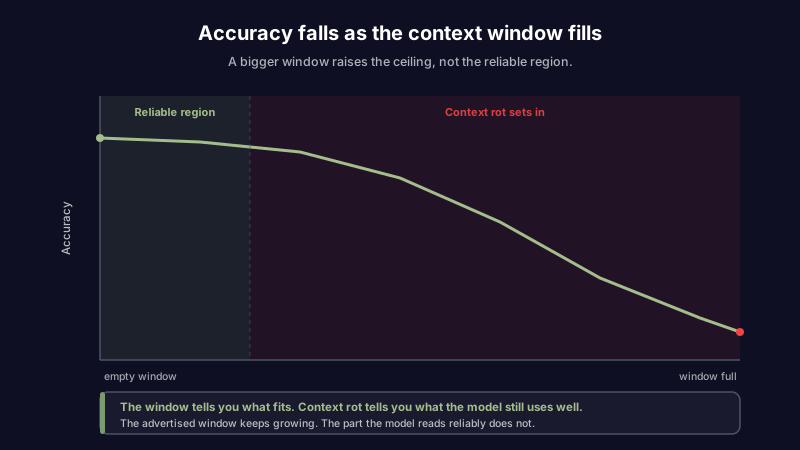
The distinction that trips people up is between the window and the rot. The context window is the capacity: the total amount of text a model can take in at once, measured in tokens, covering your prompt, the system rules, the chat history, and the answer. Vendors advertise ever larger windows, 200,000 tokens, a million, two million. Context rot is what happens inside that capacity. A model with a two-million-token window does not reason as well over 1.5 million tokens as it does over five thousand. The window tells you what the model can hold. Context rot tells you what it can actually use well, and the second number is much smaller than the first.
This is also why "just paste in everything" is bad advice dressed up as thoroughness. Filling the window feels safe, like giving the model more to go on. In practice it dilutes the model's attention across a pile of text that is mostly irrelevant to the current step, and buries the few lines that matter.
Why long context degrades
Three things happen as the input grows, and they stack.
Attention dilution. A transformer spreads its processing across every token it is given. Double the tokens and each one gets roughly half the focus. The model is not ignoring your instruction on purpose; it is spending a sliver of its attention on it because there are ten thousand other tokens competing for the same budget.
Lost in the middle. Models reliably use information at the very start and the very end of their input, and reliably miss things buried in the middle. A key instruction sitting halfway through a long thread is the single most likely thing to be dropped. This is not a quirk of one model; it shows up across the field.
Accumulated clutter. A long session collects debris: resolved tangents, abandoned approaches, full error logs from bugs that are already fixed, files you looked at once and no longer need. None of it is deleted, so all of it is still competing for attention and, worse, still available for the model to act on. It will happily revive a plan you killed twenty messages ago because that plan is still sitting in the context, reading as current.
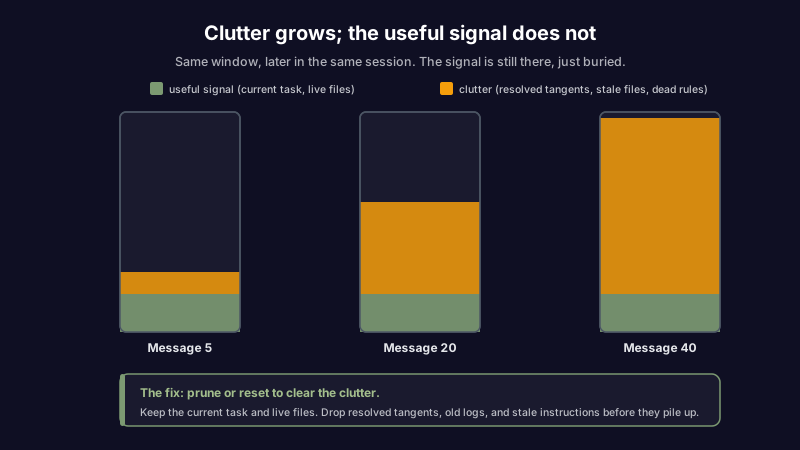
The clutter point is the one people underestimate, because it is the one you create yourself. Attention dilution and lost-in-the-middle are properties of the model. Clutter is a property of how you run the session, which means it is the part you can actually fix.
How to tell context rot from a bad prompt
Not every bad answer is context rot, and treating a prompt problem as a rot problem (or the reverse) wastes time. The tell is almost always when the answer went wrong and how full the window was when it did. Use the symptom to find the cause before you reach for a fix.
| Symptom | Likely cause | Quick test | Fix |
|---|---|---|---|
| Good early in the session, worse the longer it ran | Context rot | Start a fresh session with the same opening prompt; if the answer is good again, it was rot | Reset or compact the session |
| Wrong from the very first message | A bad prompt, not rot | The window was near-empty, so length cannot be the cause | Rewrite the prompt, or add a worked example |
| Fails the same way even in a short, clean session | Model limit or genuinely hard task | Retry on a stronger model with a near-empty window | Break the task into steps, or switch models |
| Confidently states something that used to be true | A stale source in the context | Find the line in the note, doc, or memory it is echoing | Fix the source, not the prompt |
| Ignores an instruction buried in a long middle | Lost in the middle | Move that instruction to the very end and retry | Restate the key instruction late, where attention is high |
The most valuable row is the fresh-session test. It costs thirty seconds and it cleanly separates the two most common cases: if the same first prompt produces a good answer in an empty window and a bad one deep in a long thread, the prompt is fine and the context is the problem. If it fails both ways, stop editing the session and fix the prompt or the task. A related technique when one prompt is trying to do too much is to break it into a chain of smaller steps, each of which runs on a short, clean input instead of the whole accumulated thread.
Compact, reset, or start fresh
Once you know it is rot, you have three moves, and picking the wrong one either loses state you needed or drags along the exact clutter that caused the problem. The choice comes down to how much of the current context is still worth keeping.
| Situation | Do this | Why |
|---|---|---|
| Long thread, most of it still relevant, you need continuity | Compact: summarize the thread, keep the summary, drop the raw history | Preserves the state, sheds the token weight that dilutes attention |
| The useful state is small enough to restate in a sentence or two | Start fresh | Cheaper and cleaner than carrying a long history for two facts |
| The task itself changed (new feature, new goal, different files) | Start fresh | The old context is now pure clutter that can only mislead |
| Degrading, but you cannot tell what is still needed | Reset and rebuild deliberately | Add back only what the current task needs, one piece at a time |
| One stale fact is poisoning the answers | Fix the source first, then reset | Compacting a wrong fact just carries it forward inside the summary |
Compaction is the default that tools reach for, and it is genuinely useful, but it has a catch worth naming: a summary is lossy, and it is generated by the same model that is already struggling with the long context. Compact too aggressively and you lose the detail the next step needed; compact a mistake and you launder it into an authoritative-looking summary that is harder to catch than the original. Reset is blunter and safer when you can afford to lose the history, which is more often than the sunk cost of a long thread makes it feel.
What to keep and what to drop
Managing context rot is mostly a triage habit: at any moment, know what in the window is earning its place and what is just taking up attention. The rule of thumb is that the context should hold what the current step needs and almost nothing else.
| In the context | Keep or drop | Note |
|---|---|---|
| The current task and its goal | Keep, and place it late | Put it where attention is highest, near the end, not buried at the top |
| Files or code you are actively editing | Keep | The live working set is the point |
| Resolved tangents and abandoned approaches | Drop | Dead paths the model will otherwise revive as if current |
| Full error logs after the bug is fixed | Drop, keep the one-line lesson | The log is noise once resolved; the lesson is signal |
| A long doc you have already pulled what you need from | Drop it, keep the extract | Keep the three lines you used, not the thirty pages |
| A stale instruction that is no longer true | Drop and fix at the source | A confident false instruction is worse than no instruction |
| Standing rules that apply to every turn | Move to the system prompt | Durable rules do not belong in the churn of a thread |
The last row is the quiet win. Anything you find yourself re-pasting into session after session is not session context at all; it is a standing rule, and it belongs above the task where it is stated once and applied every turn. The same goes for facts the model needs to carry across sessions: those belong in structured AI memory, not re-explained into every fresh thread, where they add to the very clutter you are trying to control.
The context you assemble is an artifact that rots
Step back and the pattern is familiar. You assemble a context to work from: a system prompt, a spec, a pile of notes, a memory store, a few pasted docs. It works. So you keep it, and reuse it, because rebuilding it every time is tedious. That is the right instinct and the start of the problem, because everything you kept was true on the day you wrote it and nothing in the context has an expiry field.
This is knowledge decay, the same rot that turns a good runbook into a liability and a good note into a quiet lie, showing up one layer up in the material you feed an AI. Context rot inside a single session is the fast version: attention thins over the course of a long thread, and you fix it by pruning. But the assembled context you carry between sessions rots on a slower clock and does far more damage, because an agent reads it, trusts it, and acts on it without the raised eyebrow a human teammate would give a stale instruction. The parts that go stale fastest are the ones tied to something with its own schedule: a named file that gets renamed, an external fact that changes, a rule that was true for exactly one release. It is the same failure that makes an old prompt or chain quietly misfire and makes the context an AI coding agent reads steer the next ten tasks wrong.
The fix is upstream. Pruning a session buys you a good afternoon; keeping the source material honest is what keeps every session built on it honest. That is the premise Scribelet is built on: the notes, facts, and instructions your AI works from are things you maintain, not just store. When the material an assistant draws from can be listed, checked, and corrected in one place, a fact that stopped being true gets caught and fixed at the source, instead of aging silently until it poisons a summary you will never think to re-read.
Keep the window small on purpose
Context rot is not a flaw to wait out. Models will keep getting better at long context, and long context will keep getting worse than short context, because attention is finite and dilution is arithmetic. The habit that survives every model release is the same one: put in what the current step needs, place the important part where the model actually looks, and clear out the rest before it accumulates.
Treat the context you keep the way you would treat any note you rely on, as something that was true when you wrote it and deserves a look before you trust it again. Set up your first desk and see what it looks like when the material your AI works from is something that tells you when it has gone stale, instead of quietly rotting while every answer stays confident.
Share this article