Best Note-Taking App for iPhone (2026): 10 Rated
Table of contents
The best note-taking app for iPhone starts from an unusual place: your phone already came with a strong one. Apple Notes is preinstalled, free, syncs through iCloud, and has quietly grown into a capable app. Most people never look past it, which is exactly why a roundup of twenty alternatives can feel like a solution hunting for a problem.
Two things make the iPhone list different from a Mac or Windows one. The first is gravity. Apple Notes sits one swipe from the lock screen and pulls everything into iCloud, so any app you pick has to be worth leaving that convenience behind. The second is the exit. Much of what people love on an iPhone is wired into the Apple account, and that feels seamless right up to the day you open a Windows laptop at work or hand your old phone to someone else.
This guide takes 10 apps that hold up on an iPhone and arranges them by the job you actually reach for on a phone. If you want the short version, Scribelet's Free plan runs as a native iPhone app and keeps the same notes open in a browser on every other machine you own.
What actually matters in an iPhone note app
Any of these can catch a thought on a phone. That is the floor. Four questions decide whether you are still using the app a year from now.
How fast is capture, really? On a phone the whole game is the gap between the idea and the saved note. Apple Notes wins this by sitting behind a lock-screen swipe and a Control Center button. Some apps on this list are built to be even faster for text; others ask you through a splash screen and a sync spinner first. Count the taps before you can type.
Do your notes leave the Apple world? iCloud is effortless until the moment it is not. Ask the blunt version: sit down at a Windows PC at work, or move to an Android phone in two years, and do your notes follow, or are they stranded on Apple hardware? Apple Notes and the Apple-only apps are gorgeous inside the walls and silent outside them.
Is it free, or free until a paywall appears? Several apps here are genuinely free. Others wear a free label over a meter: a note ceiling, a device limit, a sync subscription that only bites once your library grows. Check what the free tier actually covers before you lean on it.
Will the notes still be true later? Whatever you save stays accurate only as long as the world holds still, which is not long. A how-to you captured in spring points at a moved menu by autumn, a price you jotted down has already changed, a link quietly dies. One app in this lineup treats that decay as its own job rather than leaving it to you, and the Scribelet section explains how.
Quick picks for iPhone (2026)
Short on time? Match yourself to one of the lines below and skip straight to that app.
- Best built-in default: Apple Notes, free, instant, and already on your phone.
- Best for text-first power users: Drafts, where every note starts as text the second you open it.
- Best bare plain-text capture: Simplenote, free and weightless across every device.
- Best beautiful Markdown app: Bear, Apple-native writing that is a pleasure to look at.
- Best structured documents: Craft, for notes that want to read like polished docs.
- Best notes you own as files: Obsidian, plain Markdown kept on the device itself.
- Best free cross-platform notebook: Microsoft OneNote, strong and free on every machine.
- Best all-in-one workspace: Notion, for folding tasks and databases in beside notes.
- Best for handwriting with an Apple Pencil: Goodnotes, if you also carry an iPad.
- Best for notes that travel and stay trustworthy: Scribelet, native on iPhone, open in any browser elsewhere, catching notes that have drifted into being wrong.
Every pick below comes with its argument, judged on the two measures most iPhone lists drop once an app clears the does-it-run bar: whether your notes can leave Apple's world with you, and whether they stay correct as the months pass.
The 10 best note-taking apps for iPhone at a glance
| App | Platforms | Best capture | Offline | Price | Best for |
|---|---|---|---|---|---|
| Apple Notes | iPhone, iPad, Mac, Web | Typing, pencil, scan | Yes | Free | The built-in default |
| Drafts | iPhone, iPad, Mac, Watch | Typing | Yes | Free; Pro subscription | Text-first quick capture |
| Simplenote | iPhone, Android, Win, Mac, Linux, Web | Typing | Yes | Free | Plain-text everywhere |
| Bear | iPhone, iPad, Mac | Typing | Yes | Free; Pro subscription | Beautiful Markdown |
| Craft | iPhone, iPad, Mac, Win, Web | Typing | Partial | Free tier; paid | Structured documents |
| Obsidian | iPhone, Android, Win, Mac, Linux | Typing | Yes | Free; Sync paid add-on | Local Markdown you own |
| OneNote | iPhone, Android, Win, Mac, Web | Typing, pencil | Yes | Free | Free cross-platform notebook |
| Notion | iPhone, Android, Win, Mac, Web | Typing | Partial | Free personal; paid teams | All-in-one workspace |
| Goodnotes | iPhone, iPad, Mac, Win, Android | Handwriting | Yes | Free tier; paid | Apple Pencil and PDFs |
| Scribelet | iPhone (native), Web, Android (web) | Typing, voice | Yes | Free plan; paid upgrades | Cross-platform, accurate notes |
Prices move. Several of these apps changed theirs in 2026, so treat the figures as a starting point and confirm the current rate before you commit.
Fast, free capture
Apple Notes
If you own an iPhone, you already have the app most people should start with. Apple Notes is free, preinstalled, and opens from the lock screen or Control Center before any third-party app has finished launching. It syncs instantly through iCloud across iPhone, iPad, Mac, and the web, scans documents, takes pencil input on an iPad, offers folders and tags and shared notes, and now leans on Apple Intelligence for writing tools and summaries. For fast capture inside the Apple ecosystem, it is genuinely hard to beat.
Where it runs out of room is reach and structure. Your notes live in iCloud, so the day you want them on a Windows PC or an Android phone the story thins to a limited web view, and the organization, while better than it was, still trails a real knowledge base once your library runs to hundreds of notes. For a lot of people that ceiling never arrives. For the rest, it is the reason the apps below exist.
Drafts
Drafts rethinks the first second of a note. Open it and the cursor is already blinking in an empty text field, no file to name, no notebook to pick, so a passing thought lands before it escapes. From there you decide where the text goes: a note, a message, a task, a calendar event, all through actions you can wire up yourself. On an iPhone, where speed is everything, that capture-first design is the whole appeal.
The free version covers the core, with a Drafts Pro subscription unlocking the deeper workspace, themes, and automation, so check the current terms before you depend on it. Drafts is a text tool at heart, not a home for handwriting or heavy media, but if your notes are words and you want them captured the instant the idea arrives, little on the iPhone is quicker.
Simplenote
Simplenote does one thing and does it without friction: plain text that syncs everywhere, free, with no account games. It is lightweight, fast, supports Markdown preview, and runs on iPhone, Android, and every desktop, so a note you start waiting for coffee is on your laptop by the time you sit down. For capture and quick lists it is close to ideal, and because it is free and cross-platform it sidesteps the Apple-only trap entirely.
What you trade is everything past plain text. No attachments, no handwriting, no rich formatting, and only the barest organization. If your notes are words and you want them portable and uncluttered, that restraint is the appeal. If they are anything more, you will feel the walls.
Beautiful notes, built for Apple
Bear
Bear is what Apple Notes might look like if it were designed by people obsessed with typography. It writes in Markdown, organizes with nested tags instead of folders, and is a quiet pleasure to look at, which matters more than it sounds when an app is where you spend your writing time. It runs on iPhone, iPad, and Mac and syncs cleanly through iCloud, with a free tier and a Bear Pro subscription for sync across devices and the full theme set.
The catch is the same wall that makes Apple Notes sticky. Bear is Apple-only, so there is no Windows or Android version waiting when you change machines, and its export is plain Markdown, which softens the lock-in but does not remove it. If you live entirely on Apple hardware and care how your notes feel, Bear is one of the most pleasant places on this list to write.
Craft
Craft treats a note less like a scrap and more like a document. Its blocks, cards, and styling turn a plain capture into something that reads like a finished page, which makes it a favorite for people who share their notes or want them to look deliberate. It is Apple-first, strongest on iPhone, iPad, and Mac, with a web app and a free Starter tier, plus paid plans for collaboration and heavier use.
The trade is that polish takes a beat longer than raw capture, so Craft shines for notes you intend to keep and shape rather than the ten-second grocery list. Its Android support is the weakest leg, so if your life spans an iPhone and an Android tablet, weigh that before committing. For structured, good-looking documents on Apple hardware, few apps match it.
Cross-platform typing and workspaces
OneNote
Microsoft OneNote is the quiet workhorse of cross-platform iPhone notes. It costs nothing to download, puts no ceiling on how many notes you keep, takes pencil input, sorts everything into notebooks and sections, and syncs through a Microsoft account across iPhone, Android, Windows, Mac, and the web. For one free app that behaves the same on your phone and on every other machine you touch, it is the strongest choice on this list for leaving the Apple walls behind.
The price is paid in ownership. Those notebooks live in a proprietary format locked inside your Microsoft account and OneDrive, with no tidy way to carry your notes out as plain files. That lock-in is usually what prompts people to start weighing a OneNote alternative once they would rather own their notes than rent the account that holds them.
Notion
Notion is less a note app than a workspace that happens to take notes, folding documents, tasks, and databases into one structured place. On an iPhone it holds up for reading and light editing, and for people who want a single home for a project rather than a pile of loose notes, the structure earns its keep across every device they own.
Two things temper it on a phone. It leans on the cloud, so its offline mode, while improved, still trails local-first apps, and the depth that makes it powerful also makes it heavy for a two-line note on the move. Its AI features are bundled into the paid plans. When the structure starts to feel like overhead rather than help, that is the moment people start comparing a Notion alternative built for faster capture.
Notes you own as files
Obsidian
Obsidian keeps your notes as plain Markdown files in a vault on the device, which is the whole pitch: your writing is yours, in a format that will still open in a decade. The iPhone app is capable, the linking and plugin ecosystem is deep, and nothing lives in someone else's cloud unless you choose to put it there. It is also genuinely cross-platform, running on iPhone, Android, and every desktop.
The legwork is real, though. Syncing a vault between your phone and a laptop means either paying for the Obsidian Sync add-on or stitching together your own cloud folder, and the mobile app rewards a bit of patience before it clicks. The upside is permanence: a vault is nothing but Markdown, so your writing stays portable whatever happens to the app, which is the same reason Obsidian tops our roundup of Markdown note-taking apps. If you are weighing it specifically against the built-in option, our Obsidian versus Apple Notes breakdown sets the two side by side.
Handwriting, if you also carry an iPad
Goodnotes
Handwriting is really an iPad story, but it reaches the iPhone too, and Goodnotes is the app to beat. It pairs natural Apple Pencil input with strong PDF annotation and document organization, so marking up a lecture deck or a contract by hand feels first-class rather than bolted on. It runs across iPhone, iPad, Mac, Windows, and the web, and Notability is a close second if audio recording alongside your ink matters more.
The pricing is where to read the fine print. Goodnotes offers a free tier with limits and charges for the full experience, and the exact shape of that has shifted, so confirm what the free version covers before you depend on it. On an iPhone screen the handwriting surface is small, so this pick really makes sense when the phone is the pocket companion to an iPad and a pen.
The note app that keeps your notes honest
Scribelet
Scribelet takes the bet that no single device should own your notes. On iPhone it is a proper native app, and the identical notebook waits in a browser on Windows, Mac, and Android, with offline support, search, and a real sidebar. Switch to a work laptop, borrow a friend's machine, swap ecosystems entirely, and nothing moves except the screen. What you trade away is Apple Pencil handwriting; what you get back is a note that is never tied to the device it was born on, which is the gap every Apple-only app on this list leaves open.
The reason it belongs at the top of the checklist has nothing to do with looks. Scribelet runs AI agents in the background that compare what you wrote against the live web and raise a hand over any note that has quietly gone stale or wrong, handing you a corrected version to accept with one tap. It transcribes voice memos into structured notes, chats with your whole library, and keeps the entire vault behind AES-256-GCM encryption, with a genuine free plan. If the worry is not which app draws the prettiest handwriting but whether the note you trusted last January is still accurate, that is the exact hole it fills.
The question the AI overview skips
Type "best note-taking app for iPhone" into Google and a neat shortlist appears above the results, bucketed into quick capture, research, workspaces, and handwriting. All of those apps, and all ten above, answer one question: where does the text go? Not one of the Apple-native ones answers the harder follow-up: once it is saved, how do I know it is still correct?
A note is a photograph of what was true the moment you took it, and moments pass. The setup you captured in March runs into a redesigned screen by October. The pricing on this very page was the first thing we had to soften, because several of these apps have quietly changed theirs this year. Repeat that across a couple hundred notes and a tidy stack of Apple Notes cards slowly fills with claims that are stated with confidence and simply no longer true, and no app on this list so much as blinks.
That steady erosion is what we mean by knowledge decay, and it is the reason Scribelet treats accuracy as a first-class feature rather than your weekend chore. For anyone picking a note app to keep for years rather than weeks, "will it tell me when a note goes wrong" earns a spot on the checklist alongside price and capture speed.
How to choose your iPhone note app
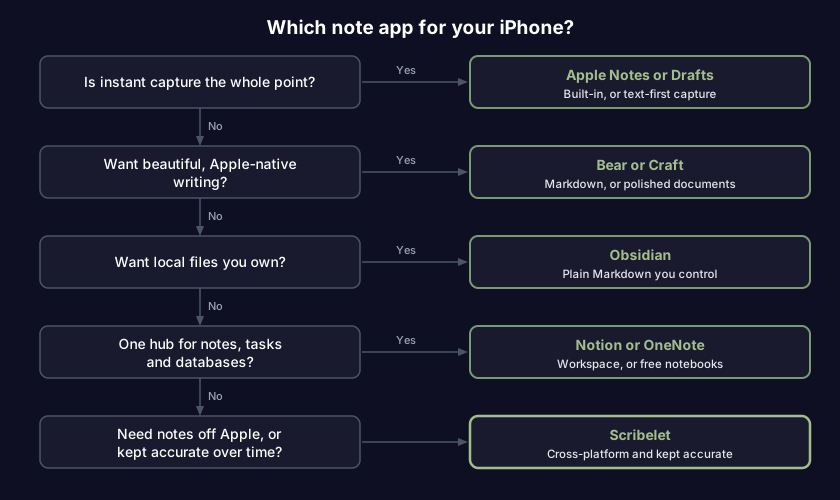
Work down the list and stop at the first yes:
- Is instant capture the whole point? Apple Notes is already on your phone and the fastest thing there is; Drafts is quicker still for pure text, and Simplenote keeps that speed on every other device too.
- Do you want beautiful, Apple-native writing? Bear for gorgeous Markdown, or Craft when a note should read like a finished document.
- Do you want your notes as plain files on your own device? Obsidian, accepting that sync and first setup take a bit of fiddling.
- Do notes, tasks, and a database need to sit under one roof? Notion for the all-in-one workspace, or OneNote for free notebooks that travel to any machine.
- Do your notes have to leave the Apple world, or stay reliably correct? Scribelet, native on your iPhone and open in any browser everywhere else, watching for notes that have gone out of date.
Jumping between more than one gadget? Our broader guide to cross-platform note-taking apps weighs the same field on sync and offline behavior for people who move between a phone, a tablet, and a laptop. If your other main machine is a Mac, the companion roundup is our best note-taking app for Mac guide.
Frequently asked questions
What is the best free note-taking app for iPhone? For most people it is Apple Notes, which is free, preinstalled, and fast. If you want a free app that also travels to a Windows PC, OneNote has no cap on how much you store, Simplenote is free for bare plain-text, and Obsidian is free if you want plain files you control. In practice the best free app is whichever one you actually leave running.
Is Apple Notes good enough, or should I switch? For quick capture inside the Apple ecosystem, Apple Notes is excellent and most people never need more. You switch when you hit one of two walls: you want your notes on a non-Apple machine, or you want structure and reliability that the built-in app does not reach. If neither wall is in sight, stay put.
Which iPhone note app works if I also use Windows or Android? Anything that is not chained to Apple: OneNote, Notion, Obsidian, and Simplenote all run on Windows and Android, and Scribelet is a native iPhone app that opens in a browser on every other platform. The ones that hurt to leave, Apple Notes, Bear, and Craft, are happiest staying inside the Apple world.
What is the best note-taking app for iPhone with handwriting? On the iPhone itself the screen is small for ink, so handwriting really belongs on an iPad. If you carry both, Goodnotes is the strongest Apple Pencil app, with Notability close behind when you also want audio recorded alongside your notes. For a typing-first iPhone app, the pen is not the deciding feature.
Almost every app here is good at the thing it set out to do. The real decision is which tradeoff you are willing to accept: Apple Notes and its instant free capture, the most beautiful place to write, files that stay on your own device, or notes that reach every screen and quietly correct themselves when the facts move. If that last one is the problem you keep hitting, try Scribelet free and keep your iPhone notes honest wherever you open them.
Share this article