Table of contents
Picking the best note-taking app for Mac should be easy, and it is not, for a surprising reason: the Mac has the richest field of beautiful note apps of any platform. On Windows you mostly pick between OneNote and whatever your company already pays for. On a Mac you are spoiled: Bear, Craft, Ulysses, Apple Notes, and a dozen more are all genuinely well made, all native, all a pleasure to type in. The hard part is not finding a good app. It is deciding which tradeoff you are willing to live with.
Because almost every one of those gorgeous Mac apps asks you to make the same quiet bargain: stay inside Apple's world. The best note-taking app for Mac is only the best app for you if it still works the way you work six months from now, when you open a shared Windows machine at the office, hand a colleague an Android phone, or just want your notes to outlive the one laptop they were born on.
This guide rates 10 note apps that run well on macOS, grouped by what they ask of you in return. If you would rather not read all of it, Scribelet's Free plan runs in any Mac browser and follows you onto every other device you own.
What actually matters in a Mac note app
Every app below is pleasant to use on a Mac. "It looks nice" stopped being a useful filter years ago. Four things actually decide whether you are still using the app next year.
Native feel. Does it behave like a Mac app, with real keyboard shortcuts, a sensible menu bar, and no lag, or is it a web page in a desktop window? Several popular apps ship their Mac build on Electron, which wraps a full browser in a desktop shell. That is a fine way to ship fast, but it is why some "Mac apps" feel heavier and less at home than the truly native ones.
Where your notes go when you leave the Mac. This is the one most Mac roundups skip, and it is the one that bites. An Apple-only app is wonderful until you buy a Windows laptop or your team standardizes on something you cannot install. Ask the uncomfortable question before you commit: if you stopped using a Mac tomorrow, would your notes come with you?
Price, honestly stated. Free, one-time, and subscription are three different commitments. Several of these apps changed their pricing in 2026, so treat any number here as a starting point and check the current rate before you pay.
Whether the notes stay accurate. A note you wrote in March can quietly go stale by November: the price changed, the link rotted, the plan you documented got replaced. No amount of native polish fixes that, and we will come back to it, because it is where most of this category stops short.
Quick picks for Mac (2026)
Pressed for time? Find the line that sounds like you and jump straight to that app below.
- Best free default: Apple Notes. Native, fast, already installed, synced through iCloud.
- Best for elegant Markdown writing: Bear or Ulysses, if you live entirely on Apple hardware.
- Best for polished documents: Craft, for notes that need to look like finished pages.
- Best for local files you own: Obsidian, plain Markdown on disk, with sync as a paid add-on.
- Best all-in-one workspace: Notion, when notes, tasks, and databases share one home.
- Best for leaving the Apple ecosystem without losing your notes: Scribelet, which runs on the Mac through the browser and natively everywhere else, and flags notes that have gone stale.
Below, each pick gets the reasoning behind it, scored on two things most Mac roundups never raise once an app clears the "feels good on macOS" bar: whether your notes leave the Mac with you, and whether they stay accurate over time.
The 10 best note-taking apps for Mac at a glance
Scan the table for your shortlist, then read the write-ups that follow. "Mac-native" means a real native build, not a browser in a window. Prices are late-2026 starting points and change often.
| App | Platforms | Mac-native | Price | Best for |
|---|---|---|---|---|
| Apple Notes | Apple devices + iCloud web | Yes | Free | The built-in default |
| Bear | Mac, iPhone, iPad | Yes | Free; Pro approx $30/yr | Elegant Markdown, Apple-only |
| Craft | Mac, Win, iOS, Android, Web | Yes | Free; paid Plus plan | Beautiful documents |
| Ulysses | Mac, iPhone, iPad | Yes | Subscription approx $6/mo | Long-form writing |
| Obsidian | Mac, Win, Linux, iOS, Android | Electron | Free; Sync paid add-on | Local Markdown you own |
| Notion | Mac, Win, iOS, Android, Web | Electron | Free personal; paid teams | All-in-one workspace |
| OneNote | Mac, Win, iOS, Android, Web | Mostly native | Free | Free cross-platform notebook |
| Evernote | Mac, Win, iOS, Android, Web | Electron, heavy | Free (50-note cap); paid | Legacy libraries |
| Simplenote | Mac, Win, Linux, iOS, Android, Web | Lightweight native | Free | Fast plain-text capture |
| Scribelet | Mac (web), iPhone, Web | Web on Mac | Free plan; paid upgrades | Cross-platform, accurate notes |
Apple Notes
Apple Notes is the app you already have, and for a lot of people it is the right answer. It is genuinely native, instant to open, syncs across your iPhone, iPad, and Mac through iCloud, and costs nothing. Recent versions handle tables, checklists, tags, and quick sketches well enough that the gap to paid apps is smaller than it used to be.
The catch is the one Apple will never fix: it lives inside Apple's ecosystem. There is a limited iCloud web view, but no real Windows or Android app. The day a non-Apple device enters your life, Apple Notes stops being cross-platform and starts being a reason to migrate. If your whole digital life is Apple and intends to stay that way, it is hard to beat for free.
Bear
Bear is the app people point to when they say Mac software can be beautiful. It is Markdown under the hood, with an elegant editor, tag-based organization, and a famously pleasant writing experience on Mac and iPhone. Bear Pro unlocks sync and export for a low yearly subscription (roughly $30 a year as of late 2026, though Bear is reworking its pricing, so check the current rate).
Its strength and its limit are the same fact: Bear is Apple-only. There is no Windows or Android version. For an all-Apple writer it is close to ideal. For anyone who might touch a non-Apple device, it is a lovely trap. Because Bear exports to Markdown, at least your writing is portable even if the app is not, which is the same reason it shows up in our roundup of Markdown note-taking apps.
Craft
Craft is for people whose notes want to look like finished documents. Its block-based editor produces pages that are genuinely attractive, with strong formatting, nested sub-pages, and easy sharing. It runs natively on Mac, iPhone, iPad, Windows, and Android, with a web version, and offers a free tier plus a paid subscription (branded Plus; the pricing shifted in 2026, so confirm before subscribing).
Craft's Apple apps are the most polished of its builds, and its document-first model is heavier than you want for a two-line grocery list. But if your notes double as things you send to other people, few apps make them look this good with this little effort.
Ulysses
Ulysses is a writing app first and a note app second, and that focus is the point. It gives long-form writers a clean, distraction-free Markdown environment, a library that scales to a book manuscript, and good export. It is subscription-only (around $6 a month, with a student discount) and is also bundled in Setapp, which can make it effectively free if you already pay for that.
Like Bear, Ulysses is Apple-only, so it is best thought of as a Mac-and-iPad writing studio rather than a universal notebook. If you draft essays, articles, or chapters on a Mac, it is one of the best tools made. If you want quick capture and cross-device reach, look elsewhere.
Obsidian
Obsidian is the choice for people who want to own their notes as plain files. Your vault is a folder of Markdown documents on your own disk, which means no lock-in and total control, plus a deep plugin ecosystem and a local graph of linked notes. The app is free, including for commercial use.
Two caveats matter on a Mac. The desktop app is Electron, so it is capable but not as featherlight as a native app. And reliable syncing between your Mac and phone runs through Obsidian Sync, a paid add-on, unless you wire up iCloud or another service yourself. The power is real and so is the setup cost, which is why many people eventually go looking for an Obsidian alternative that needs less assembly.
Notion
Notion turns notes into a workspace: pages, nested sub-pages, and databases that can act as tasks, trackers, or wikis. It runs on Mac, Windows, mobile, and the web, and the free plan is generous enough for one person, with paid plans (Plus starts around $10 per member per month) aimed at teams.
The tradeoffs are familiar. The Mac desktop app is Electron and web-based, so it can feel sluggish next to native apps, and everything lives in Notion's cloud, which makes export and portability weaker than a plain-text app. It is a brilliant home for structured, collaborative work and an awkward one for a fast personal scratchpad, which is the usual reason people start comparing it against a Notion alternative.
Microsoft OneNote
OneNote is the most capable free cross-platform notebook on this list. Its freeform canvas lets you place text, images, and ink anywhere on the page, it syncs through OneDrive at no cost, and it runs on Mac, Windows, mobile, and the web. For handwriting and for anyone who already lives in Microsoft 365, it is a strong, no-cost pick.
On a Mac specifically it is the slightly-less-native option: the app is good but clearly built to match its Windows sibling rather than to feel Mac-first, and the freeform canvas can turn into clutter without discipline. Still, free plus genuinely cross-platform is a combination most of this list cannot match.
Evernote
Evernote invented a lot of what we expect from a note app, and it still has a powerful Mac client with strong search, web clipping, and document handling. If you have years of notes already living there, the gravity is real.
The reason it sits this far down is its free plan, which is now capped at around 50 notes in a single notebook, a limit that makes it unusable as a free tool for most people. Paid plans exist but have grown expensive relative to the field. The price and the cap together are why "leaving Evernote" is practically its own genre, and why we wrote up where to go next in our Evernote alternative guide.
Simplenote
Simplenote does exactly what its name says: fast, free, plain-text notes that sync everywhere. It runs natively and lightly on Mac, Windows, Linux, mobile, and the web, costs nothing, and opens instantly, which makes it a great capture inbox.
What you give up is everything beyond plain text: no rich formatting, no attachments, no structure past tags and search. That minimalism is the appeal for some people and a dealbreaker for others. As a free, truly cross-platform quick-capture tool, it is hard to fault for the job it chooses to do.
Scribelet
Scribelet takes the opposite bet from the Apple-only apps above. Instead of a native Mac app, it runs in any Mac browser as a desktop-optimized web app, with a sidebar layout and keyboard shortcuts, and it runs natively on iPhone, with the same notes reachable in the browser on Windows and Android. One account, the same notes, on the Mac and on whatever else you carry. That is a deliberate tradeoff: you trade a dedicated Mac binary for notes that are never stranded on one platform.
The reason it earns a place on a Mac list is the column every other app ignores. Scribelet runs background AI agents that search the web and compare what they find against your notes, flagging the ones that have gone stale or inaccurate with suggested updates you can accept in one tap. Your notes are protected with AES-256 envelope encryption, and there is a free plan. If your worry is less "which Mac app is prettiest" and more "will my notes still be true and still be mine in a year," that is the gap it is built for.
The one thing most Mac roundups skip
Every app above answers the same question: where do I type? None of the native ones answer the harder one: how do I know what I typed is still correct?
A note is a snapshot of what was true when you wrote it. The onboarding steps you saved in spring get a new screen by autumn. The pricing you copied into a note is the first thing on this page we had to hedge, because several of these apps changed it in 2026. Multiply that across a few hundred notes and your tidy Mac notebook slowly fills with confident, wrong information, and nothing in a beautiful editor warns you.
This is the quiet failure mode of knowledge that decays, and it is why Scribelet weights accuracy as heavily as formatting. It is also why, if you are choosing for the long run, "does it keep notes accurate" belongs on the same checklist as "does it feel native."
How to choose your Mac note app
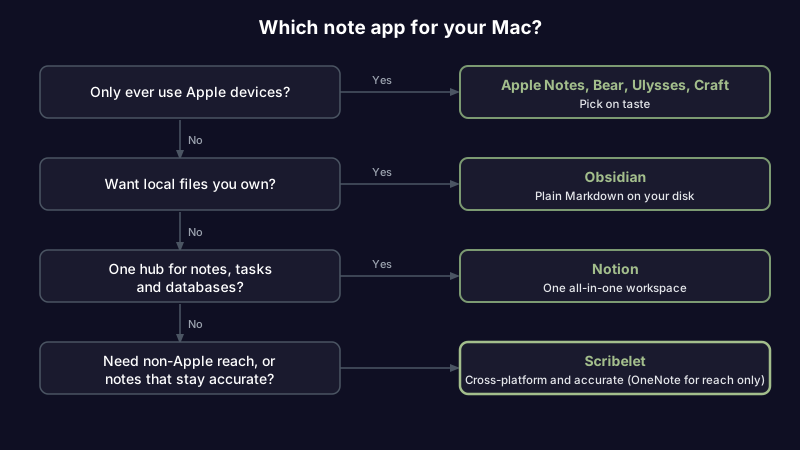
Walk it in this order:
- Will you only ever use Apple devices? If yes, Apple Notes (free), Bear (elegant Markdown), Ulysses (long-form), or Craft (polished docs) are all excellent, and you can pick on taste.
- Do you want to own your notes as plain files? Obsidian, with the understanding that sync and setup take work.
- Do you need one workspace for notes, tasks, and databases? Notion, accepting the Electron app and cloud lock-in.
- Do you need your notes on non-Apple devices, or do you care whether they stay accurate over time? Scribelet, or OneNote if you only need the cross-platform half and not the accuracy half.
If you take notes across more than a Mac, our broader guide to cross-platform note-taking apps rates the same field on sync and offline handling, and students juggling a campus machine and a personal laptop will find the picks in our note-taking app for students guide weighted for that exact handoff. When the Mac shares your desk with an iPhone, the pocket companion is our best note-taking app for iPhone roundup.
Frequently asked questions
What is the best way to take notes on a MacBook? Start with the app you will actually open. Apple Notes is the no-friction default; if you want Markdown pick Bear or Obsidian; if you want your notes on non-Apple devices too, choose a cross-platform app like Scribelet or OneNote. The best system is the one you keep using, not the one with the most features.
Do my notes sync between iPhone and Mac? Apple Notes and Ulysses sync through iCloud automatically, Bear syncs once you add Bear Pro, and Craft and the cross-platform apps sync through their own accounts. That account-based sync is also what lets the cross-platform apps reach Windows and Android, which iCloud cannot.
Which Mac note app is best if I might switch away from Apple someday? Any app that is not Apple-only: Obsidian (your files come with you), Notion, OneNote, Simplenote, Craft, or Scribelet. The Apple-exclusive apps (Apple Notes, Bear, Ulysses) are the ones that make leaving painful, so if portability matters, rule them out first.
Most of these apps will serve you well for the job they are built for. The decision is really about which tradeoff you can live with: the polish of an Apple-only app, the control of local files, or notes that go everywhere and stay accurate. If the last one is you, try Scribelet free and keep your notes honest on the Mac and everywhere else.
Share this article