The Best Note-Taking App for Students in 2026
Table of contents
Nobody has a note-taking problem in the first week of a semester. The notebook is clean, the app is new, and every lecture lands neatly in the right place. The problem shows up around week nine, the night before a midterm, when you go looking for one definition and find it in an app you abandoned in September, or buried in a 40-page document with no headings, or written down wrong because the lecturer corrected it the following week and you never went back.
So the honest answer to what is the best note taking app for students is not a single name. It depends on how you capture (handwriting or typing) and how you study (reviewing, connecting ideas, or drilling for recall). A pre-med student memorizing anatomy with flashcards needs a different tool than a philosophy student building one argument across a semester of reading. This guide covers eight apps, grouped by the job each is actually good at, so you can match the tool to how you work instead of to a feature list.
What is the best note-taking app for students?
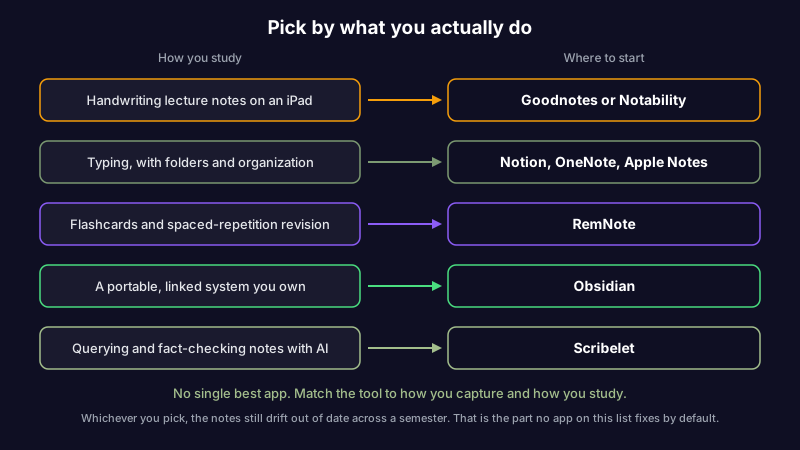
There is no universal best note-taking app for students, but there is a clear best one for each way of working. If you handwrite on an iPad, choose Goodnotes or Notability. If you type and want folders and structure, choose Notion, OneNote, or Apple Notes. If you study with flashcards and spaced repetition, choose RemNote. If you want a portable system you own outright, choose Obsidian. And if your notes are mostly typed and you want to ask questions across all of them and catch the ones that have gone out of date, choose Scribelet.
The quick version is the table below. The rest of this guide is the reasoning behind each pick, including what every app is bad at, because the thing an app does badly is usually the reason students quietly stop opening it by October.
| App | Platforms | Capture style | Free tier | Best for |
|---|---|---|---|---|
| Goodnotes | iPad-first (also Mac, Windows, Android) | Handwriting | Limited | Annotating slides and PDFs by hand |
| Notability | iPad, iPhone, Mac | Handwriting plus audio | Limited | Recorded lectures tied to your notes |
| Notion | Web, Mac, Windows, iOS, Android | Typing | Yes (personal) | An all-in-one semester workspace |
| OneNote | Windows, Mac, Web, iOS, Android | Typing plus handwriting | Yes | A free-form digital binder |
| Apple Notes | Apple devices only | Typing plus handwriting | Yes | Instant capture you already have |
| RemNote | Web, Mac, Windows, iOS, Android | Typing (flashcards) | Limited | Memorization and active recall |
| Obsidian | Mac, Windows, Linux, iOS, Android | Typing (Markdown) | Yes (personal) | A portable system you own |
| Scribelet | iOS, Web | Typing plus voice | Yes (AI capped) | Querying and fact-checking notes |
If you already know you type far more than you handwrite, you can try Scribelet free and jump to how an AI-first notes app handles study material. Otherwise, start with how you capture.
Best for handwriting: Goodnotes and Notability
If you take notes by hand, nothing beats an iPad, a stylus, and an app built around them. Typing is faster, but handwriting wins in any subject heavy on diagrams, equations, or marking up a lecturer's slides.
Goodnotes
Goodnotes turns an iPad and an Apple Pencil into a near-perfect replacement for paper. Writing feels natural, you can annotate imported PDFs and slide decks directly, and search can even read your handwriting. It is the default in subjects full of diagrams and worked problems, like biology, engineering, and mathematics (Goodnotes).
Watch out for: it is built for tablets, so without an iPad and a stylus you lose most of the point, and it keeps your pages in its own format rather than plain files. Best for: handwriting lecture notes and annotating slides and PDFs on a tablet.
Notability
Notability covers the same ground with one feature students prize above all others: it records audio while you write and links each pen stroke to the moment in the recording. Tap a word in your notes three weeks later and it jumps straight to what the lecturer was saying when you wrote it. For fast-talking lectures, that is close to a superpower.
Watch out for: the features students want most sit behind a subscription, and like Goodnotes it is happiest on Apple hardware. Best for: recorded lectures where you want to replay the exact moment behind a note.
Best for typing and organizing: Notion, OneNote, and Apple Notes
Most students type. If that is you, the question is how much structure you want and how much lock-in you can live with.
Notion
Notion is a flexible workspace: pages nested inside pages, databases, tables, and templates for everything from a reading list to a thesis tracker. Students use it to run an entire semester in one place. It is free for personal use, and students can unlock an upgraded plan at no cost with a school email (Notion).
Watch out for: the flexibility is also the trap. It is easy to lose an evening building a beautiful dashboard instead of studying, and large workspaces get slow and lean on a connection. If you want the trade-offs spelled out against the other heavyweight, our Notion vs Obsidian comparison covers the two apps most students weigh against each other.
OneNote
OneNote is the free-form binder: type anywhere on an infinite canvas, mix typing and handwriting, and organize into notebooks, sections, and pages. It is genuinely free from Microsoft, and many students already have it through a school Microsoft 365 account (Microsoft OneNote).
Watch out for: the free-form canvas that feels liberating in September gets hard to search by April, and your notes are tied to Microsoft and OneDrive. Best for: a flexible digital binder when you already live in the Microsoft ecosystem.
Apple Notes
Apple Notes is the one you already have. Instant capture from the lock screen, solid handwriting and document scanning, reliable iCloud sync, and no cost. For a lot of students it is simply enough, and the best app is the one you actually open.
Watch out for: it is Apple-only, and getting your notes out later, with formatting and attachments intact, is genuinely hard. That matters the day you switch phones or decide you want your notes in a portable format. We dig into that exact trade-off in Obsidian vs Apple Notes.
Best for revision: RemNote
RemNote is built for the one thing most apps treat as an afterthought: turning notes into flashcards for spaced-repetition review. Write a note, mark the parts you need to remember, and it schedules them to come back at the moment you are about to forget. Medical, law, and language students lean on it hard, because their courses are memorization at scale (RemNote).
Spaced repetition and active recall are not RemNote marketing; they are the two study methods with the strongest evidence behind them, which is why it is worth structuring your notes around them. If you want the habit without committing to one app's model, our guide on how to remember what you read covers the same principles.
Watch out for: the flashcard-first structure is more scaffolding than casual note-takers want, and the best features are paid. Best for: memorization-heavy courses where recall is the whole game.
Best for a system you own: Obsidian
Obsidian stores your notes as plain Markdown files on your own device, with backlinks and a graph that connect ideas across an entire degree. For a student building a long-term body of knowledge (a dissertation, a research area, a set of notes you want to keep after graduation), it is the one that still opens in five years, because the notes are just files on a disk.
It is free for personal use, and it runs on every major operating system, which matters if you move between a university lab machine and your own laptop. If plain-text portability is what you care about, it sits alongside the other markdown note-taking apps worth comparing, and the broader case for a tool that follows you everywhere is in our guide to cross-platform note apps.
Watch out for: it asks for more setup than the others, and it has no handwriting. Best for: students building a connected, portable knowledge base they intend to keep for years.
Best for querying and fact-checking your notes: Scribelet
Scribelet is an AI-first notes app, and it is honest about who it is not for: if you take notes by hand with a stylus, pick Goodnotes or Notability instead, because Scribelet has no handwriting. It is built for students who type their notes and want to do two things the apps above cannot.
The first is asking questions across every note at once. Scribelet's chat searches your own notes and answers with citations back to the exact note, so before an exam you can ask what the lecturer said about a topic and get an answer grounded in your own material rather than the open internet. The second is catching the notes that have gone out of date. Background checks compare your notes against current sources and show you a diff when a fact has changed, which is precisely the week-nine problem from the start of this guide: the corrected formula, the new textbook edition, the study that got retracted while your notes kept repeating the old claim with total confidence. Notes going quietly stale is a real and under-discussed problem, and we explain the mechanism in our guide to knowledge decay. Treating AI fact-checking for notes as its own discipline, separate from writing, is what keeps study material trustworthy.
It runs on iOS and in any browser, and the free tier includes AI, with verification capped on the free plan and the full set on Pro. You can bring your own API key if you want to choose the model and keep your data routed through a provider you trust rather than one picked for you. If your notes are sensitive, a secure note-taking app that encrypts your content at rest matters more than any single feature. Best for: students who type and want their notes searchable, answerable, and kept accurate. You can try it free.
How to choose: a pick-by-situation table
Skip the feature comparison and match your situation to a starting point.
| Your situation | Start with |
|---|---|
| I handwrite on an iPad and annotate slides | Goodnotes |
| I handwrite and want lectures recorded alongside | Notability |
| I type and want one organized workspace | Notion or OneNote |
| I want the simplest thing already on my phone | Apple Notes |
| I need to memorize a lot for exams | RemNote |
| I want notes I will still own after graduation | Obsidian |
| I type and want to query and fact-check my notes | Scribelet |
| I am on a tight budget | OneNote, Apple Notes, or Obsidian (all free) |
Most students end up using two apps, not one, and that is fine. A common pairing is one for fast capture (Apple Notes or Goodnotes) and one for the knowledge you keep and revise (Obsidian, RemNote, or Scribelet). The seam only hurts if you never move anything from the first into the second.
The part every note-taking app for students skips
Every app on this list helps you capture and organize. Not one of them, by default, tells you when a note has gone wrong. That is the gap that catches students out, because course material is not static: a lecturer corrects something the next week, a reading gets a new edition, a cited study is retracted, and your notes carry on stating the old version with complete confidence. You do not find out until the exam, or worse, until after it.
Capture and organization are solved problems; a dozen good apps do them well. What almost nothing does is maintenance, the quiet work of keeping notes accurate after you write them. When you compare note-taking apps for students, weight that row the way you weight handwriting or price, because it is the one that decides whether the notes you spend a semester building are an asset at finals or a liability you half-remember to distrust.
The bottom line
The best note-taking app for students is the one that fits how you actually capture and study, not the one with the longest feature list. Handwrite on an iPad and it is Goodnotes or Notability. Type and organize and it is Notion, OneNote, or Apple Notes. Drill for recall and it is RemNote. Build something you keep and it is Obsidian. Type and want your notes searchable, answerable, and kept accurate and it is Scribelet.
Whichever you pick, remember the row the comparison charts leave off: the notes still drift out of date across a semester, and the tool that flags what changed is doing the one job that protects the hours you put into them. If that is the problem you keep running into, you can try Scribelet free and see what it looks like when your notes check themselves.
Share this article