Secure note-taking apps: what you're actually protecting
Table of contents
You searched for a secure note-taking app, and the answers came back fast and confident. Standard Notes. Notesnook. A Reddit thread swearing by both. Every one of them leads with the same two words: end-to-end encryption. Case closed, apparently.
Except "secure" is carrying a lot of weight in that sentence, and nobody stops to unpack it. Secure against whom? A thief who grabs your unlocked phone on a train? A company that quietly reads your notes to train a model? An engineer at the provider with database access? A breach that dumps the whole table onto a forum? Those are four different problems, and a single green padlock in the marketing does not tell you which ones an app actually solves.
This is a buying decision disguised as a feature checkbox. Before you pick, it's worth knowing what the word is hiding, where the real trade-offs live, and why the most private note apps are often the least useful for anything beyond storage.
What does a secure note-taking app actually protect?
A secure note-taking app is one that encrypts your notes so that people who should not read them cannot, even if they reach the storage. The important question is not whether an app is encrypted. Almost all of them are, in some form. The question is who holds the key, because that decides who can read your notes when it matters.
There are three layers, and they are not interchangeable.
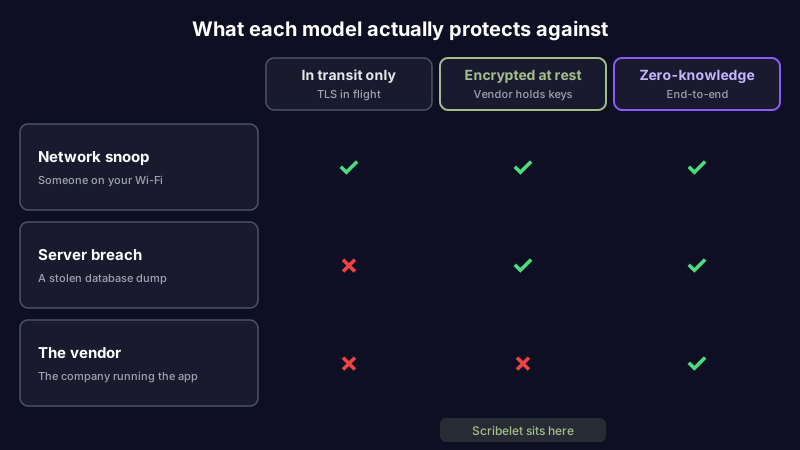
In transit. Your notes are encrypted while they travel between your device and the server, using TLS. Every credible app does this. It stops someone on the same coffee-shop Wi-Fi, and nothing else. On its own it is table stakes, not a security feature worth naming.
At rest. The server encrypts your notes before writing them to disk, so a stolen backup or a raw database dump is unreadable ciphertext. But the vendor holds the keys, because the server has to decrypt your notes to show them to you, index them, or run features over them. At rest protects you from a breach and from an outside attacker. It does not protect you from the vendor.
Zero-knowledge, also called end-to-end. Your notes are encrypted on your device before they ever leave it, with a key derived from your password that the server never sees. The provider stores ciphertext it genuinely cannot read. This is what Standard Notes and Notesnook mean by end-to-end encryption, and it is the strongest model: it protects you from a breach, an attacker, and the vendor.
So "are note-taking apps safe?" has no single answer. A note app can be safe from a network snoop and wide open to its own operator, or locked so tight that not even the company can help you if you forget your password. The word "secure" spans that entire range. Knowing which layer you actually need is the whole game.
Which note-taking app is most secure?
If your requirement is strictly "no one but me can ever read this, including the company," the most secure note-taking apps are the zero-knowledge ones. Here is the honest landscape, without pretending they are all the same.
| App | Encryption model | Who can read your notes | AI over your notes | Open source |
|---|---|---|---|---|
| Standard Notes | Zero-knowledge E2EE | Only you | No | Yes |
| Notesnook | Zero-knowledge E2EE | Only you | No | Yes |
| Joplin | Optional E2EE | Only you (if enabled) | No native | Yes |
| Obsidian | Local files, you control the disk | Only you | Plugins only | No (core) |
| Apple Notes | Locked notes are E2EE on iCloud | You, and Apple for unlocked notes | Apple Intelligence | No |
| OneNote | Password-protected sections | You and Microsoft | Copilot | No |
A few honest notes on that table. Standard Notes and Notesnook are the purest picks: open-source, audited, encrypted before anything leaves your device. Joplin gives you the same guarantee but end-to-end encryption is opt-in, so it protects nothing until you turn it on. Obsidian keeps plain Markdown files on your own disk, which is a different kind of security: there is no cloud to breach because there is no cloud, though sync and backups become your responsibility. Local-first apps like Obsidian are covered in more depth in our Obsidian alternative guide.
Apple Notes and OneNote are the ecosystem defaults, and if you're leaving OneNote specifically, we sorted an honest OneNote alternative guide by reason. You can put a password on a note in both, which answers the common "can I put a password on my notes app?" question, but the lock covers individual notes or sections, not everything, and the vendor still processes the rest. The Freedom of the Press Foundation's guide to secure note-taking for journalists is a good threat-model reference if your notes could put a source at risk. Google Keep sits in the same bucket, an ecosystem default with no end-user encryption controls, so if getting your notes off a Google account is the point, we sorted the Google Keep alternatives by reason too.
Pick from that list and you get real privacy. You also, in almost every case, get a note that just sits there.
The trade-off nobody mentions: encryption versus AI
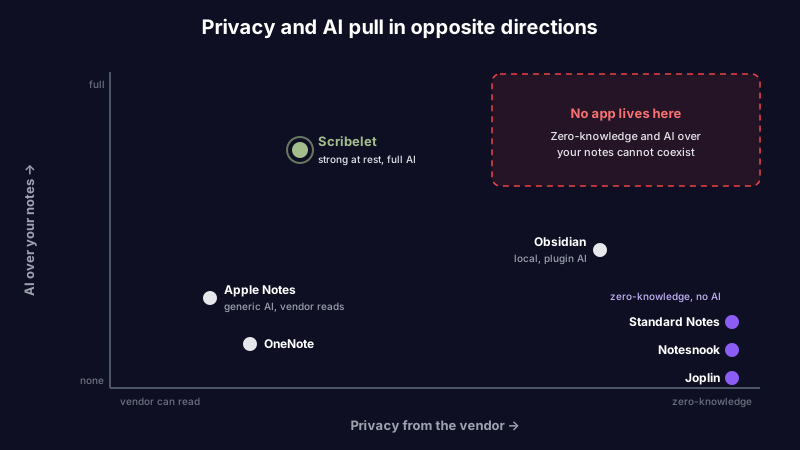
Here is the part the roundups skip. Zero-knowledge encryption means the server only ever sees ciphertext. That is the entire security model, and it is also a hard ceiling on what the app can do with your notes.
You can't run semantic search over data you can't decrypt. You can't summarize it, cross-reference it, fact-check it, or chat with it. An AI feature that reads your notes needs to, well, read your notes, and a zero-knowledge server structurally can't. This isn't a gap Standard Notes or Notesnook will close with a future release. It's the direct cost of the promise that makes them secure.
So the most private note apps are also the least helpful with what is inside your notes. They are excellent vaults and deliberately nothing more. For a password, a recovery phrase, or a private journal, that is exactly right. For a working knowledge base you actually use, storage was never the hard part.
And there is a second cost that encryption does not touch at all. A note can be perfectly encrypted and quietly, confidently wrong. The API you documented shipped a breaking change. The pricing you noted went up. The recommendation reversed. Zero-knowledge encryption guards that stale note as faithfully as a true one, because encryption protects the bytes, not the accuracy. We wrote the long version of this as knowledge decay: the slow rot that no lock prevents. A secure note you can't trust is still a liability, just a private one.
Which reframes the question. It was never "which app is most encrypted." It is "what am I willing to trade, and for what."
A middle path: strong encryption plus AI you control
This is where Scribelet fits, and the honest thing is to draw the line clearly rather than blur it.
Scribelet isn't zero-knowledge. The server can decrypt your notes, because that's what makes verification, chat, and search over your content possible. If your single hard requirement is that not even the vendor can ever read a note, the pure end-to-end apps above are the correct choice, and you should stop reading here.
What Scribelet does instead is encrypt at rest, seriously. Note bodies, chat messages, memories, and verification results are field-level encrypted with AES-256-GCM. Each desk gets its own Data Encryption Key, and those keys are themselves wrapped by a Key Encryption Key held in AWS Key Management Service (envelope encryption), so a database dump is useless on its own. That's real protection against a breach and against an outside attacker. It's a deliberate step down from zero-knowledge, taken so the app can actually help maintain what you write.
The trade is narrowed by three controls, not hand-waved away.
You choose where the AI runs. With bring your own key, you connect your own OpenAI, Anthropic, or Gemini account, and your notes go to the provider you already trust rather than one we picked. We encrypt that key at rest and never see your prompts. It is optional, since AI works out of the box, but connecting your own API key takes about a minute and puts the data path in your hands. Without it, processing stays on our infrastructure and is not sold or handed to third-party model vendors.
Your account is hard to reach in the first place. Passkeys and two-factor authentication mean there is no password to phish, and stored secrets use Argon2id hashing. Encryption at rest is on the free plan, not gated behind a paywall.
The notes get to stay correct. Because the server can read your notes, background agents can fact-check them against the web on a schedule you set, and hand you a diff: green for what is current, red for what drifted, with a source for each change. That is the payoff you are accepting a decryptable model to get. A vault can't do it.
Be clear-eyed about the exchange. You give up "even the company cannot read this" and you get a note app that keeps your knowledge accurate instead of just stored. For some threat models that is the wrong trade. For a lot of working professionals, it is the one they actually wanted.
How to choose a secure note-taking app
Skip the badge comparison and start with the question the badges avoid. Work through these in order.
- Name your threat model. Write down who you are actually protecting against: a device thief, the vendor, a breach, a network snoop, a subpoena. "Everyone" is not a threat model; it is anxiety.
- If the answer is "the vendor, always," go zero-knowledge. Standard Notes or Notesnook. Accept that the app will not read, search, or maintain your notes, and that this is the point.
- If device theft is the real fear, you need a lock, not zero-knowledge. Any app with a passcode or biometric app-lock plus encryption at rest covers it, even Apple Notes locking individual notes.
- If you want AI to work over your notes, accept a decryptable model, then raise your standards. Demand encryption at rest, ask who holds the keys, insist on a no-training guarantee, and prefer bring-your-own-key so you control the data path.
- Read the encryption page, not the homepage. "Bank-grade" and a padlock icon mean nothing. The security or docs page will tell you at rest versus end-to-end, and who can decrypt.
- For any zero-knowledge claim, check for open source or an audit. A promise you cannot inspect is a promise you are taking on faith.
- Then confirm the note is still right. The most secure note in the world is worthless if it is quietly out of date. Accuracy is part of security for anyone who acts on what they wrote.
The word is a question, not a checkbox
A secure note-taking app is not a product category with one winner. It is a match between what an app protects and what you are trying to protect. Zero-knowledge apps win the "no one but me, ever" bracket cleanly and pay for it in capability. At-rest apps trade a slice of that guarantee for the ability to do something useful with your notes. Neither is wrong. They answer different questions.
Decide which question is yours before you install anything. And whichever side of the trade you land on, remember the part encryption was never going to handle: a locked note that's wrong is still wrong.
If you want strong encryption and an app that keeps your notes accurate instead of just sealed, see how Scribelet's plans compare. Encryption at rest is free.
Share this article