9 Obsidian alternatives in 2026, sorted by why you're leaving
Table of contents
You didn't start looking for an Obsidian alternative because you hate Obsidian. You probably love the core idea: your notes are plain text on your own disk, and no company can take them away. Something specific pushed you to the search bar. The mobile app, the paid sync, the blank vault you never finished setting up, or the slow realization that nothing in there tells you when a note has gone out of date.
That's the problem with most "best Obsidian alternative" lists. They hand you ten apps ranked by popularity and let you sort out which one fixes your actual complaint. A tool that's perfect for someone who wants free self-hosting is useless to someone who just wants the mobile app to stop fighting them.
So here are nine alternatives worth knowing, compared first on the things that decide a switch, then sorted by the reason you're leaving rather than by a ranking. We name the honest best pick for each reason, including several that aren't ours. And we're upfront that one of them is ours, for one specific reason no other tool on this list covers.
The 9 Obsidian alternatives at a glance
| Tool | Price | Sync | Open source | Built-in AI | Best for |
|---|---|---|---|---|---|
| Logseq | Free | Built-in paid tier, or Git | Yes | No | Daily notes and bullet thinkers |
| Joplin | Free | Your own cloud, or paid Joplin Cloud | Yes | No | Encryption and self-hosting |
| Standard Notes | Freemium | Built-in, end-to-end encrypted | Yes | No | Privacy above everything |
| Anytype | Free | Peer-to-peer, no central server | Code public | No | Local-first without a server bill |
| SiYuan | Freemium | Paid cloud, or self-hosted | Yes | Optional | Notion-style blocks, kept local |
| Notion | Freemium | Built-in, cloud-native | No | Paid add-on | Structure you adopt instead of invent |
| Capacities | Freemium | Built-in, cloud-native | No | Yes | Object-based notes with a modern editor |
| Craft | Freemium | Built-in, cloud-native | No | Yes | A polished editor that opens fast |
| Scribelet | Free tier, Pro $8/mo | Built-in, cross-platform | No | Yes, plus background verification | Notes that stay accurate over time |
Read that table as a starting filter, not a verdict. The column that matters is the one attached to your reason for leaving, which is what the rest of this guide sorts by.
What's actually pushing people away from Obsidian
Spend ten minutes in any Obsidian alternatives thread and the same complaints repeat. They sort into a handful of reasons, and the right alternative is completely different for each one.
Some people find Obsidian too much: too many plugins, too much setup, a blank vault that demands decisions before it gives value. Others love the local-first model but want it free and open source all the way down, or self-hosted on their own server. A large group has no problem with the app and one problem with the price: Obsidian Sync is a paid add-on, and the mobile experience pushes them to look elsewhere. And a growing group wants AI built in, not bolted on through a community plugin.
There's a fifth reason that rarely makes the lists, and it's the one we built around. Obsidian shows you the graph, the backlinks, and the word count. It never tells you whether the notes inside are still true. If that last one resonates, our guide to knowledge decay explains why it happens to every note, in every app, not just yours.
If Obsidian feels like too much setup
If the blank vault defeated you, the fix is an opinionated tool that makes the decisions for you. Picture installing Obsidian, opening it to an empty pane, and realizing you now have to choose a folder structure, a linking convention, and a dozen plugins before you can write a single useful note. For a lot of people that's where the trial ended.
Notion
Notion is the obvious move here. It comes with templates, databases, and a structure you can adopt instead of invent, and a non-technical teammate can be productive the same afternoon. The tradeoff is that your notes now live in Notion's cloud database rather than as files you own, which is the exact thing Obsidian fans usually care about. Worth knowing before you commit: people leave Notion too, and a Notion alternative that fits your reason is a different pick depending on whether it got slow, got loud with AI, or locked you in.
Pick it if you want structure handed to you and you can live in the cloud. Skip it if file ownership was the whole reason you liked Obsidian.
Capacities and Craft
If you want less structure rather than more, the honest answer might be a simpler note app entirely. Capacities organizes around objects (people, books, meetings) instead of folders, so the shape emerges as you write rather than before. Craft gives you a polished, doc-style editor with light organization and exports that don't embarrass you. Both are cloud-native and both ship AI features, so neither is a local-files replacement.
Apple Notes or Google Keep are fine if all you need is fast capture. If Keep is the app you outgrew rather than Obsidian, we sorted the Google Keep alternatives by what you outgrew the same way. Not every Obsidian refugee needs another power tool. Some just need a clean editor that opens fast and stays out of the way.
Pick them if the editor was the thing you wanted and the vault was the thing you dreaded.
If you want it free, open source, or self-hosted
This is where Obsidian's commercial model loses people, and where the open-source community is genuinely strong. Obsidian is free to use but it is not open source, and for some people that distinction is the entire reason they're reading this.
Logseq
Logseq is the closest spiritual sibling: free, open source, local-first, and built around an outliner instead of a document editor. If you think in bullets and daily notes, it can feel more natural than Obsidian. It is also the option here whose storage model is actively changing as the project moves to a database backend, which we weigh in Obsidian vs Logseq.
Pick it if you write in bullets and want the closest free equivalent. Skip it if you need a settled file format today.
Joplin
Joplin is the pick when end-to-end encryption and sync-to-your-own-cloud matter most. It's open source, stores Markdown, and syncs through Dropbox, Nextcloud, WebDAV, your own server, or its paid cloud. The editor is plainer than Obsidian's and that's rather the point.
Pick it if encryption and self-hosting are non-negotiable. Skip it if you want a polished writing surface.
Standard Notes
Encryption-first, end-to-end encrypted by default, open source, with a free tier and paid plans for richer editors. Zero-knowledge apps like Standard Notes win on privacy precisely because they can't read your notes, which is also why they can't run AI over them. If encryption is the actual reason you're leaving, sort out which secure note-taking app fits your threat model before you switch.
Pick it if privacy outranks every other feature.
Anytype
Local-first and object-based, with peer-to-peer sync and no central server, so there's no subscription and no company holding your data. The code is public, though under its own license rather than a standard open-source one, which matters if strict licensing is your reason for leaving.
Pick it if you want local-first without a server bill.
SiYuan
The one that rarely makes these lists and keeps coming up on Hacker News as "a mix of Notion and Obsidian". Block-based like Notion, local-first like Obsidian, open source, and self-hostable with Docker if you want your own instance. Sync is a paid cloud add-on or your own server.
Pick it if you want Notion's block editor without Notion's cloud.
If plain Markdown is the real requirement rather than Obsidian specifically, our roundup of the best markdown note-taking apps weighs each of these on portability and, just as importantly, on whether anything keeps the notes inside accurate.
All of these share Obsidian's core virtue: the data is yours. They also share its core cost: you are the one maintaining everything inside it. None of them checks whether what you wrote is still accurate, because that was never what they set out to do.
If sync and mobile are the dealbreaker
Plenty of people would stay on Obsidian if syncing across devices were free and the mobile app felt native.
Obsidian Sync works well but is a paid subscription on top of a free app, and the do-it-yourself alternatives (Git, iCloud, third-party plugins) range from fiddly to fragile. The friction usually shows up at the worst moment. You capture an idea on your phone on the train, open your laptop at your desk, and the note isn't there yet, or it synced twice and now there are two copies to reconcile. For someone living across a phone, a tablet, and a laptop, that gap is the entire reason they start searching.
On Android specifically, the gap widens. Git-based sync plugins that work fine on desktop are awkward to run on a phone, and iCloud is not an option at all, which leaves Android users choosing between the paid subscription and a workaround they have to babysit. Logseq and Joplin both ship real Android apps with their own sync paths, and Anytype syncs peer-to-peer without a central server. If your only complaint with Obsidian is the sync bill and the mobile friction, one of these usually solves it without asking you to relearn how you take notes. Before you commit, it's worth knowing what true cross-platform note-taking takes, because a cheaper sync bill doesn't help if the app still treats mobile as a second-class citizen.
Worth saying plainly: if sync is the single issue, switching tools to fix a subscription is a lot of churn. Sometimes the better move is to keep your vault and change how it syncs.
If it's the graph view you'd miss most
The graph is the feature people picture when they picture Obsidian, and it's the one they're most afraid to lose. The good news is that it's also the easiest to replace. Logseq, SiYuan, and Anytype all ship a graph or a linked-references view, and Capacities builds its whole model around typed objects and their connections. Notion is the notable exception: it has backlinks but no graph, so if the visual map is load-bearing for you, Notion will feel like a downgrade no matter how good its databases are.
Be honest with yourself about how often you used it. For most people the graph is a thing they show other people rather than a thing they work in, and the feature they actually relied on was backlinks, which every tool here supports.
If you want built-in AI, not another plugin
This is where the alternatives start to look the same, and where most of them stop short.
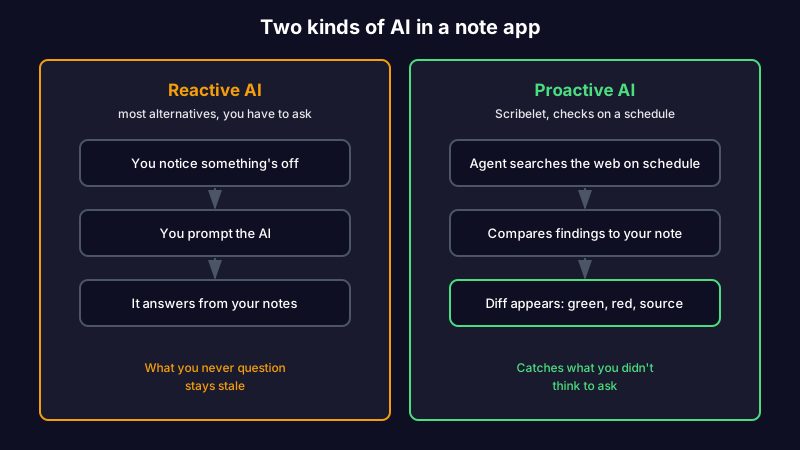
Obsidian has no native AI, so the community fills the gap with plugins that bolt a chat box onto your vault; we mapped every way to add AI to Obsidian, from plugins to Claude Code, in a separate guide. Notion ships Notion AI as a paid add-on. Newer tools like Mem, Reflect, and Capacities lead with AI as the headline. Google's NotebookLM belongs to a different family again, because it chats over sources you upload rather than notes you keep writing and revising, which is why we sorted the NotebookLM alternatives for personal notes by job instead of by feature count. Almost all of it is the same shape: reactive AI you have to prompt. You ask a question, it answers from your notes. That's useful for drafting and search, and it's genuinely good at both.
None of it watches your notes for accuracy. Reactive AI only helps when you already suspect something is wrong and think to ask. The far more common case is the note you trust without checking, the one that quietly went stale months ago.
Picture a developer's integration guide that documents an API's auth flow. The provider deprecates that flow in a point release. A chat plugin sitting on the vault has no idea, because nobody asked it. The next person to follow the guide loses a morning to errors that the note caused. That's knowledge decay, and a chat sidebar does nothing about it.
If you love the ownership but you're tired of maintaining everything
Here's the reason that doesn't make the listicles, and the one Scribelet is built for.
If what you love about Obsidian is ownership, and what wore you down is being the sole maintenance engine for your own knowledge base, the missing piece isn't a prettier editor or another plugin. It's a tool that keeps your notes accurate without you auditing them by hand.
Scribelet keeps the parts Obsidian users care about. You can bring your own key and route AI through OpenAI, Anthropic, or Gemini, with the key encrypted at rest, so your notes go to the provider you trust. Notes connect with the same wikilinks you already use. Then it adds the layer none of the others have: background agents search the web on a schedule you set, compare what they find against what you wrote, and surface the difference as a diff, green for new information, red for what's outdated, with a source link on every change. That's how background verification works.
A research note you cited six months ago points to a study that's since been retracted. According to Retraction Watch, paper retractions have grown roughly tenfold since 2000, so this is not a rare edge case. In Obsidian, the link still resolves and the note still looks authoritative. With scheduled verification, the retraction shows up as a diff before you build on it again.
Tired of being your own maintenance department? Start free, run your first verification, and see what a diff actually catches. The Pro plan is $8/mo or $79/yr when you want the full set.
The honest tradeoff: Scribelet isn't a folder of local plain-text files you mold with plugins, and it isn't a free self-hosted project. If pure local ownership is the whole point for you, Logseq or Joplin will fit better. Scribelet is for people who want their notes to stay accurate, not just stay theirs.
Is there a free version of Obsidian, and should you even switch?
Yes. Obsidian is free for personal use, and most of what makes it good costs nothing. The paid pieces are Sync, Publish, and a commercial license. So before you migrate a vault you've spent years building, it's worth asking whether you have an Obsidian problem or a habit problem.
If the issue is a specific feature, the cheapest fix is often a single add-on or a free sync path, not a new app and a weekend of migration. Switch when the reason you're leaving is structural, when the tool itself can't do the thing you need, like keeping your notes current or working natively across every device. A new editor won't fix a maintenance gap, and a maintenance layer won't make you love an interface you've outgrown.
There's an upside to that weekend of migration, though, whichever tool you're leaving. It's the one moment you have the whole archive in front of you and are already deciding what deserves to come along, which makes it the best chance you'll get to audit your archive while you migrate instead of quietly rebuilding the same graveyard somewhere nicer.
So which Obsidian alternative should you pick?
The right alternative is the one that fixes the specific reason you went looking.
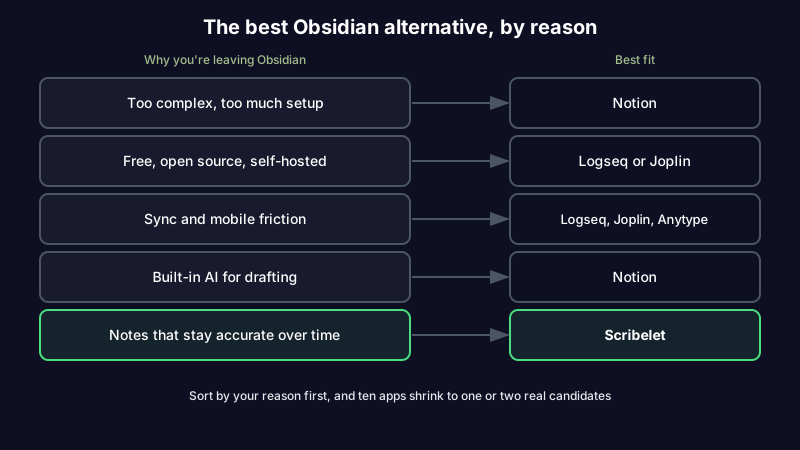
If Obsidian was too much, a structured tool like Notion does the deciding for you. If you want free and open source, Logseq and Joplin are the strongest picks, though Logseq's own users are now running the same exercise in reverse, which we mapped in a Logseq alternative sorted by why you're leaving. If sync and mobile drove you out, one of those or Anytype solves it without relearning everything. And if you loved the ownership but not the upkeep, that's the gap Scribelet fills.
| Why you're leaving Obsidian | Best fit |
|---|---|
| Too complex, too much setup | Notion |
| Free, open source, self-hosted | Logseq, Joplin, or SiYuan |
| Sync and mobile friction | Logseq, Joplin, or Anytype |
| Privacy above everything | Standard Notes |
| Built-in AI for drafting | Notion or Capacities |
| The graph view specifically | Logseq, SiYuan, or Anytype |
| Notes that stay accurate over time | Scribelet |
For the two tools people weigh most often before leaving either, our Notion vs Obsidian comparison goes deeper, and our weekly maintenance system works no matter which app you land on.
Pick the fix, not the most popular app
The best Obsidian alternative isn't the one with the longest feature list or the most upvotes. It's the one that solves the exact thing that made you start searching. Sort by your reason first, and the field of nine apps shrinks to one or two real candidates.
If the thing that wore you out was maintaining your own knowledge by hand, that's the reason worth fixing for good. Start writing with background verification and see your first diff.
Share this article