The best Logseq alternative depends on why you're leaving
Table of contents
The top result for "logseq alternative" is a thread on Logseq's own forum called Leaving Logseq. That says most of it. People don't drift away from an outliner they spent two years learning. Something specific pushed them, and they go looking for a Logseq alternative with that one thing in mind.
Every ranked list you'll find answers a question you didn't ask. Here are eight apps for linked notes, sorted by the author's preference, with the author's own product at number one. But the right replacement for someone stuck waiting on the database rewrite is not the right replacement for someone who just wants a mobile app that opens reliably, and neither of them wants what the person escaping bullet points wants.
So this guide is sorted by reason, not by rank. Each reason gets an honest best pick, and most of them aren't ours. One of them is, for a problem no other app on this list touches.
What is a Logseq alternative?
A Logseq alternative is any note-taking app that covers what you actually used Logseq for: block-level outlining, bidirectional links between notes, a daily journal as the default capture surface, and local-first storage you control. Logseq's specific combination is unusual, so most alternatives trade one of those pillars away. Obsidian keeps local files and links but works in documents rather than blocks. Tana and Roam keep the outliner but move your data to their cloud. Knowing which pillar you can live without is the whole decision.
Why people are leaving Logseq in 2026
Five reasons come up repeatedly, in the forum thread above, in r/NoteTaking, and in the Hacker News threads that surface whenever the project's roadmap comes up:
- The database rewrite moved the source of truth out of plain Markdown files.
- The mobile app stayed slow and awkward while the desktop app got good.
- Sync arrived late, stayed in beta, and pushed people onto Git or Syncthing.
- Release pace got slow enough that people started asking whether the project had stalled.
- The bullet is the only container, which is wrong for long-form writing.
Each one points at a different replacement.
The database version split the project in two
On 13 July 2026, Logseq shipped its 2.0 beta and moved the canonical copy of your notes out of a folder of Markdown files and into a local SQLite database, splitting the project into two versions in the process. For a tool whose pitch was "your notes are just files in a folder," moving the source of truth into a database is not a minor release note. It changes the guarantee people chose the app for. We wrote about that specific tradeoff in Obsidian vs Logseq, because the file question is the real fault line between the two.
The mobile app never caught up
This is the most common practical complaint. Logseq's desktop experience is strong and its mobile app has consistently lagged: slower to open, awkward to edit in, and historically dependent on sync working perfectly to be useful at all. If you capture on your phone, you feel this every day.
Sync was the weak link
Official sync arrived late and stayed in beta for a long time, which pushed most users onto Git, Syncthing, or iCloud. Those work until they don't, and when they don't you get conflicted copies of a graph where every block is supposed to have one canonical home.
Development pace made people nervous
Search volume for "is logseq dead" doubled year over year. The project isn't dead, and the Logseq GitHub repository shows real ongoing activity, but long gaps between user-facing releases do something specific to trust: people stop building their working life on a tool they suspect might stall. Worth being fair here, because the lists that profit from your departure won't be. Logseq is a small open-source team attempting a full architectural rewrite in public, which is harder and more honest than shipping a rebrand. Slow is not the same as abandoned.
Everything is a bullet
Logseq's outliner model is a genuine idea, not a limitation, and for thinking in fragments it's excellent. It's also a poor fit for long-form prose. If you're writing documents rather than accumulating thoughts, you eventually notice you're fighting the editor.
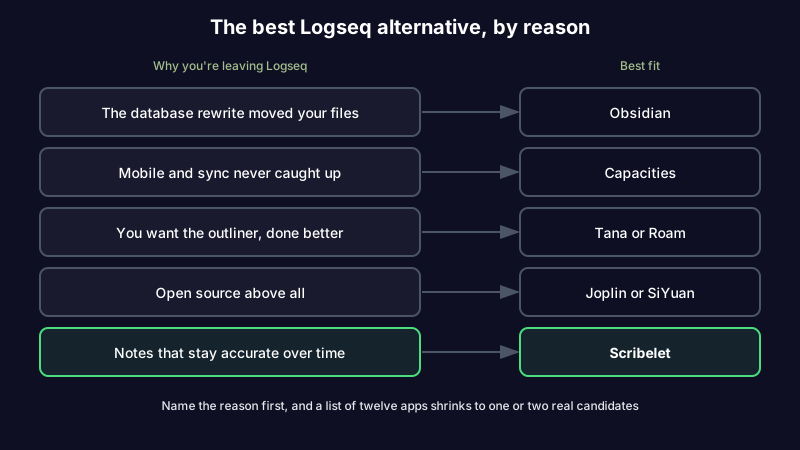
Logseq alternatives, sorted by why you're leaving
| Your reason for leaving | Best pick | The tradeoff |
|---|---|---|
| You want plain Markdown files, permanently | Obsidian | Documents, not blocks. You rebuild outliner habits with plugins. |
| You want the outliner, better executed | Tana | Powerful structure, but your data lives in their cloud. |
| You want blocks plus a real mobile app | Capacities | Object-based rather than pure outlining. Paid for the good parts. |
| You want open source above all | Joplin, SiYuan, or Anytype | Rougher edges and smaller plugin ecosystems. |
| You want notes plus spaced repetition | RemNote | Study-shaped. Heavier than you need for work notes. |
| You want notes that stay accurate over time | Scribelet | Not an outliner. Blocks are not the unit. |
If you want your files to stay files
Obsidian is the safe default and the most common destination in every thread. Your notes stay as Markdown in a folder you own, links and backlinks work, and the plugin ecosystem is large enough that outliner-style workflows are reachable if you want them. You give up native block references as a first-class primitive, and you'll spend a weekend configuring. If Obsidian is where you're heading, our guide to markdown note-taking apps covers the rest of the field in the same format.
If you want the outliner, done better
Tana is the most credible upgrade for people who genuinely think in blocks. Supertags and structured nodes give you the database-like power Logseq was reaching for, with AI built in rather than bolted on. Roam Research remains the original and still has the smoothest daily-journal loop. Both ask you to accept cloud hosting, which is precisely the thing many Logseq users chose Logseq to avoid.
If open source is the point
If you left Logseq for reasons of principle rather than friction, staying in the free software world matters more than polish. Joplin is the mature option with strong encryption. SiYuan sits closest to a Notion and Logseq hybrid and is genuinely local-first. Anytype is the most ambitious and the least finished. All three trade smoothness for control, and if encryption is what's driving you, our breakdown of what "secure" actually protects is worth reading before you pick, because at-rest and zero-knowledge encryption mean very different things for what your notes can do afterward.
If AI is what's missing
Logseq has no native AI, and the community plugins that add it vary in quality and maintenance. Most people leaving for this reason are choosing between bolting AI onto a local vault or moving to a tool where it's native. That decision maps almost exactly onto the one we mapped for Obsidian in Obsidian AI, and the conclusion is the same: a plugin can answer questions about your notes, but it won't maintain them.
What you give up by leaving
Most alternative guides are written as though the tool you're leaving had no virtues. Logseq has several, and you should know which ones you're about to lose so the regret doesn't arrive three weeks later.
You lose block-level addressability. In Logseq, any bullet anywhere is a first-class thing you can reference, embed, and query from somewhere else. Obsidian's block references exist but are clumsier, and most other apps don't have the concept at all. If you built query-driven dashboards out of block references, budget real time to rebuild them or accept that they're gone.
You lose journal-first capture. Logseq opens on today's date with the cursor blinking. That single design choice removes the "where does this go?" decision that stops people from writing things down at all. Plenty of apps have daily notes; few make them the default surface. If your capture habit depends on it, check that your replacement can be configured the same way before you commit.
You lose an outliner that never fought you about structure. Folding, zooming into a bullet, and restructuring a page by dragging one line are all instant in Logseq and merely available elsewhere. This is the piece people miss most, and it's why the honest answer for a lot of readers is Tana rather than Obsidian, even at the cost of cloud storage.
What you don't lose is your writing, provided you're on the file-based version and you take the directory with you. That was always the point of local-first, and it still holds.
Logseq vs Obsidian, the short version
This is the comparison most people are actually running, so here it is compressed. Choose Logseq if the block is your unit of thought, journals are your capture habit, and you like outlining everything. Choose Obsidian if the file is your unit, you write in documents, you want the larger plugin and theme ecosystem, and you want a mobile app that works today. The deeper version, including what the database rewrite changes about the file guarantee, is in our full Obsidian vs Logseq breakdown.
What none of these alternatives fixes
Here's the part the ranked lists leave out. Every app above changes how you capture, structure, and store notes. Not one of them does anything about what happens to those notes after you write them.
Your Logseq graph has blocks in it from two years ago. Some describe an API that has since changed its auth flow. Some cite a paper that was corrected, or a pricing page that has moved twice. Retraction Watch documents a research retraction problem that keeps growing, and that's just the citations. Nothing in Logseq flagged any of it, and nothing in Obsidian, Tana, or Joplin will either. They show you what you captured. They stay silent on whether it's still true.
This is the reason we built Scribelet, and it's the only reason we'd put ourselves on this list. Background agents re-check your notes against current sources on a schedule you set, and when something has changed you get a diff showing what's different and why, with the source. You accept or dismiss it. Your keys, your provider, your call. This is the step every PKM system skips, and migrating between apps doesn't close it. It just moves the same decaying archive somewhere nicer.
If that's the complaint underneath your search, see what a verification diff actually looks like.
How to migrate off Logseq without losing the graph
A migration is the one moment your entire archive is in front of you. Use it.
- Export to Markdown first. Logseq's files are already Markdown on disk if you're on the file-based version. Copy the whole graph directory before you touch anything, and keep that copy untouched as your rollback.
- Expect the bullets to survive as bullets. Every block in Logseq is a list item. In a document-first app like Obsidian, your notes will land as nested lists. Budget time to flatten the pages you actually reread, and leave the rest.
- Accept that block references will break. Block-level
((refs))are Logseq-specific. Page links survive; block links usually don't. Grep your export for((before you migrate so you know the scale. - Move journals separately. Daily notes are usually the largest and least valuable half of a graph. Migrating them into a dated folder rather than mixing them with your reference notes keeps the new vault legible.
- Audit while you move. Every note you touch, ask one question: is this still true? You will delete more than you expect. This is the only pass most archives ever get, which is exactly the problem worth fixing permanently.
Pick the fix, not the highest-rated app
The best Logseq alternative isn't the one at the top of somebody's list. It's the one that solves the specific thing that made you open a new tab and start searching. Name the reason first and the shortlist gets short fast.
And if the reason underneath the reason is that you've now spent two years building a knowledge base you're no longer sure you can trust, moving it to a different app won't change that. Start writing with background verification and let the notes check themselves. Free to start, and you bring your own API key if you want full control over the provider. Compare what's included on our pricing page.
Share this article