Notion alternatives, sorted by what actually broke
Table of contents
Nobody wakes up wanting a Notion alternative. Something specific sent you to the search bar. Maybe a page has been loading for thirty seconds and you're staring at a skeleton loader for the fourth time today. Maybe you opened the app and found AI offering to write things you didn't ask it to write. Maybe you built a gorgeous interlocking system of databases two years ago and haven't opened most of it since.
Here's what every "best Notion alternative" list gets wrong. They rank nine apps by popularity and leave you to work out which one fixes your actual complaint. The right pick for someone fleeing an AI-everywhere workspace is useless to someone who needs their team wiki self-hosted, or to someone whose real problem is that the workspace still works fine and the information inside it stopped being true.
So this guide is sorted by the reason you're leaving. We name the honest best pick for each one, including several that aren't ours. And we're upfront that one of them is ours, for a reason no other app on this list covers.
What is a Notion alternative?
A Notion alternative is any tool that replaces some part of what Notion bundles together: a block-based document editor, relational databases, a team wiki, a project tracker, and lately an AI assistant. Because Notion is five products in a trench coat, there is no single replacement. The useful question is not "what is the best Notion alternative" but "which of those five things was I actually using, and what broke?"
That reframing is the whole guide. Answer it and the field narrows from thirty apps to about two.
What actually pushes people off Notion
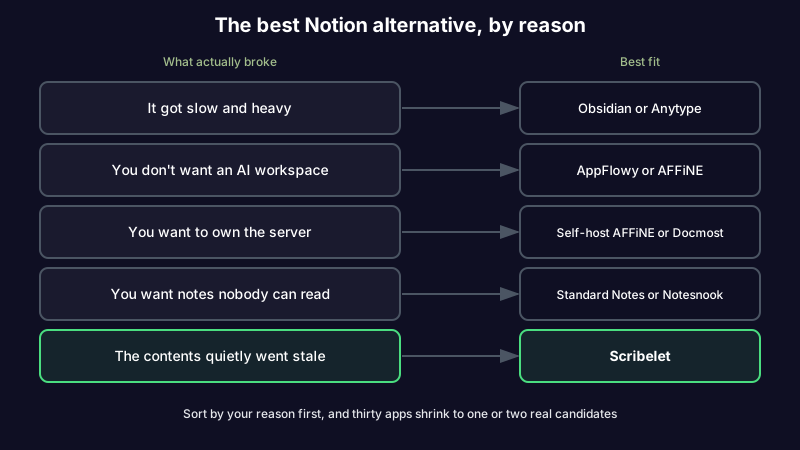
Spend ten minutes in any Notion alternatives thread and the same complaints repeat. They sort into four reasons, and the right alternative is completely different for each.
It got slow. Notion is a web app rendering blocks over the network, and the weight shows once your workspace is real. Pages that used to open instantly now hesitate. Search stalls. On a plane or a bad connection, a tool you rely on for everything becomes a spinner. This is the single most common complaint, and it is not something a workaround fixes.
It became an AI workspace. Notion repositioned hard around AI, and a real share of users did not ask for that. The queries tell the story: people search for notion alternative without ai and notion alternative no ai by name. If you want a quiet document tool and your document tool now suggests, drafts, and summarizes by default, that is a legitimate reason to leave.
You don't own any of it. Everything lives in Notion's cloud, in Notion's format. Export exists, but what comes out is a lossy approximation of the databases and relations you built. For anyone who wants self-hosting, offline access, or notes a vendor cannot read, that is disqualifying.
You built a system instead of a knowledge base. This is the reason that never makes the listicles. Notion is exceptionally good at helping you design structure, which is why so many people spend a weekend building an immaculate second brain and then quietly stop using it. The databases still look beautiful. Nothing in them has been checked in two years.
Notes that check themselves. If your Notion workspace looks fine but you no longer trust what's in it, Scribelet runs background verification against live sources and shows you the diff. Start free and point it at your worst page.
If Notion got slow and heavy
This is the quiet majority, and the fix is a fundamentally lighter architecture rather than a better-optimized clone.
Obsidian is the usual landing spot. It reads and writes plain Markdown files on your own disk, so opening a note is a file read rather than a network round trip, and it stays fast at ten thousand notes. You trade Notion's databases for links, backlinks, and a graph. The cost is that you become the administrator of your own setup, and paid sync surprises some people. Our Notion vs Obsidian comparison goes deeper on which one suits which brain.
Anytype is the closest thing to a like-for-like swap. It keeps Notion's block-and-object model, including relations, but stores everything locally and syncs peer to peer with end-to-end encryption. If you liked how Notion worked and hated where it ran, this is the shortest migration.
Capacities sits between the two, organizing by object type rather than folders, with a noticeably snappier editor than Notion's.
If you lean Obsidian-shaped but aren't sure it's the one, Obsidian alternatives sorted by reason covers the same exercise for that app.
If you don't want an AI workspace
The honest answer here is that most of the mainstream options are moving the same direction, so pick for the default rather than the feature list. What matters is whether AI is opt-in and out of the way, or on by default and in the editor.
AppFlowy is the strongest pick. It is open source, local-first, deliberately Notion-shaped, and its AI is something you switch on rather than something that greets you. AFFiNE is the other serious candidate, combining docs with an infinite canvas, also open source.
Below those, a plain Markdown editor removes the question entirely. There is no assistant because there is no platform. Our roundup of the best markdown note-taking apps weighs each on portability and lock-in.
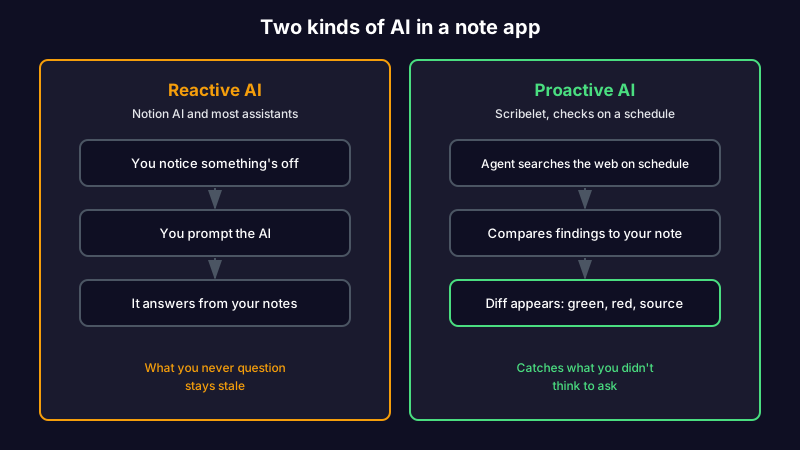
One distinction worth making before you flee the category: "AI in a note app" describes two very different things. Reactive AI drafts and summarizes when you prompt it, which is the kind most people are tired of. Proactive AI checks whether what you already wrote is still true, which nobody is tired of because almost nothing does it. Rejecting the first is reasonable. Rejecting the second means keeping the maintenance work yourself.
If you want it open source or self-hosted
open source notion alternative and self-hosted notion alternative are among the highest-intent searches in this whole cluster, and the ecosystem here is genuinely good.
AppFlowy and AFFiNE both self-host. For a team wiki specifically, Docmost and Outline are purpose-built and considerably lighter than running a Notion clone. It's FOSS keeps a maintained list of the privacy-focused options if you want to compare them side by side. If your requirement is really "my notes, my server, forever", Joplin with a self-hosted sync target is the least exciting and most durable answer.
Self-hosting solves ownership completely. It is worth being clear that it solves nothing else. A note you host yourself goes out of date on exactly the same schedule as a note in someone else's cloud.
If you want notes a vendor cannot read
If the driver is confidentiality rather than ownership, you want zero-knowledge encryption, not self-hosting. Standard Notes and Notesnook both encrypt end to end, so the company hosting your notes cannot open them.
Before you commit, know the tradeoff you are buying. We laid out which secure note app fits your threat model in detail. The short version: zero-knowledge apps win on privacy precisely because they cannot read your notes, which is also why they cannot run any AI over them. You are choosing between an app that cannot see your notes and an app that can help you with them. That is a real fork, and worth taking on purpose rather than by accident.
If you built a beautiful system and the contents went stale
Here is the reason that doesn't make the listicles, and the one Scribelet is built for.
Notion is a superb tool for designing structure. It is not a tool for maintaining truth. Every database, every linked relation, every carefully templated page shows you what you captured and tells you nothing about whether any of it is still accurate. The API you documented shipped a breaking change. The pricing you noted went up. The article you summarized was updated, or retracted. Notion renders all of it exactly as confidently as the day you wrote it.
That is not a Notion flaw specifically. It is knowledge decay, and it happens in every app, which is why switching apps never fixes it. It is also the step every framework leaves out, as we argue in personal knowledge management is missing a step.
Scribelet adds the layer none of the others have. Background agents search the web on a schedule you set, compare what they find against what you wrote, and surface the difference as a diff: green for new information, red for what is outdated, with a source link on every change. You accept or reject each one. That is how background verification works.
Picture a research note you dropped into Notion two years ago citing a study that has since been retracted. According to Retraction Watch, paper retractions have grown roughly tenfold since 2000, so this is not a rare edge case. In Notion the page still looks immaculate. With scheduled verification, the retraction arrives as a diff before you build on it again.
You keep control of the AI itself. Bring your own key and route through OpenAI, Anthropic, or Gemini, with the key encrypted at rest. It is optional; the AI works out of the box, and the free plan includes ten verifications a month, which is enough to point at your ugliest Notion export before paying anything.
The honest tradeoff: Scribelet is not a project tracker, it has no relational databases, and it will not run your company's roadmap. If what you use Notion for is genuinely project management, ClickUp or Linear will serve you far better. Scribelet is for the notes half, and specifically for keeping that half true.
Stop being your own fact-checking department. Start free, run one verification on your stalest page, and see what a diff actually catches. The Pro plan is $8/mo or $79/yr when you want the full set.
Comparison at a glance
| Alternative | Best for | Self-host | AI default | Keeps notes accurate |
|---|---|---|---|---|
| Obsidian | Speed, local Markdown, linking | Files are yours | None built in | No |
| Anytype | Closest Notion-shaped swap | Local-first, P2P sync | None built in | No |
| AppFlowy | Open source, AI kept opt-in | Yes | Opt-in | No |
| AFFiNE | Docs plus infinite canvas | Yes | Opt-in | No |
| Docmost / Outline | Team wiki, lighter than Notion | Yes | Minimal | No |
| Standard Notes / Notesnook | Zero-knowledge privacy | Notesnook: yes | None possible | No |
| Scribelet | Notes that stay true | No | Proactive verification | Yes |
What Notion is still genuinely good at
It would be dishonest to write two thousand words on leaving without saying this. Notion remains the best tool in the category at one specific thing: letting a non-technical person build a relational system without writing code. Databases, linked relations, rollups, and filtered views are still unmatched by any app above. Team adoption is trivial because everyone already knows it.
If that is what you use it for, the correct move is probably not to leave. It is to stop asking Notion to be your knowledge base as well as your workspace, and to let something else own the notes that need to stay accurate.
Is there a good free Notion alternative?
Yes, and this is one of the few categories where free is not a compromise. AppFlowy, AFFiNE, Obsidian for personal use, and Joplin are all free and, for most individuals, permanently sufficient. The paid tier usually buys hosted sync rather than features. If free alternative to notion is what brought you here, start with AppFlowy if you want Notion's shape and Obsidian if you want speed.
Pick for the reason, not the ranking
Every list will tell you Coda, Obsidian, and Anytype. They are not wrong. They are just answering a question you did not ask.
If Notion got slow, go local: Obsidian or Anytype. If you want the AI out of your editor, go AppFlowy. If you want to own the server, self-host AFFiNE or Docmost. If you want notes nobody can read, take zero-knowledge and accept the tradeoff.
And if the workspace was never the problem, because it still works and you simply stopped trusting what's inside it, no amount of migration will help. That one needs a tool that checks. Try Scribelet free and start with the page you'd be most embarrassed to have someone fact-check.
Share this article