Internal documentation: nobody owns the second draft
Table of contents
Your company has more internal documentation than anyone will admit. There is a wiki three migrations deep, a Notion workspace nobody has pruned since the last reorg, and onboarding guides written with real care by people who have since left. The problem was never the writing. It is that the writing describes a company that no longer exists, and noticing was nobody's job.
You have probably concluded the fix is writing more of it. It isn't. Almost every team that complains about internal documentation has plenty. What they lack is the second draft: the update that has to arrive after the system changes, and that nobody owns.
This guide covers what internal documentation is, the types worth separating, what to document and what to skip, a page template you can paste in today, why it decays on a schedule set by your deploy pipeline rather than your writing habits, and what a maintenance layer looks like in practice.
What is internal documentation?
Internal documentation is the written record an organization keeps for its own people rather than its customers: runbooks, onboarding guides, architecture notes, standard operating procedures, decision records, the definition-of-done checklist a team holds itself to, and the service docs that explain one team's system to everybody else, which exist at all because your architecture ends up shaped like your team structure. It is the knowledge a company would have to rediscover if everyone quit on the same day. The narrower version of that risk, when one critical system depends on one person, is your team's bus factor, and internal documentation is one of the few levers that reliably raises it.
External documentation is the opposite audience. API references, help centers, and release notes are written for customers. The difference that matters is not tone. It's feedback. External docs have users who file a ticket when something is wrong. Internal docs have colleagues who quietly work around the error and tell nobody.
That silence is the whole problem. A wrong page in your help center generates a support queue. A wrong page in your wiki generates a Slack thread at 2 a.m. and no edit.
The types of internal documentation
Search engines surface a lot of "three types" and "four types" lists for this term, and they mostly describe the same buckets under different counts. The distinction worth keeping is not how many buckets there are. It is which documents are meant to last and which are written to be thrown away.
| Type | What it covers | Lifespan | Who reads it |
|---|---|---|---|
| Process docs / SOPs | How recurring work gets done: release checklists, on-call rotation, expense approvals | Durable, edited often | Whoever runs the process next |
| Onboarding docs | How a new hire gets productive without asking six people | Durable, decays silently | Each new hire, once |
| Runbooks and playbooks | Step-by-step operational procedures for a specific failure | Durable, read under pressure | On-call, at the worst moment |
| Architecture and decision records | Why the system is shaped the way it is | Durable, append-only | Anyone proposing a change |
| Specs and design docs | What a change is supposed to do before it ships | Disposable, expires at merge | The three people building it |
| Team docs | Goals, roles, ways of working | Durable, changes on reorg | The team and its neighbors |
The buckets are fine. They describe what to write, which is the part teams are already reasonably good at. Search for how to write technical documentation and you'll find a thousand competent answers. Search for how to keep it true and the advice thins out fast.
They also flatten a distinction that costs teams real time. Some of these documents are meant to last and some are not. A design doc is written to be discarded once the code ships, and treating it as a permanent wiki page is how durable content ends up in a disposable container. Specs sit in the same category: the three readers a spec has want incompatible things from it, and only one of them is still around a year later, which is why a shipped spec left in the wiki gets read as documentation long after it stopped describing anything.
If you want the shortest version of the quality checklist people quote as the "5 C's," it is this: documentation should be clear, concise, correct, complete, and current. Four of those five are properties you can get right on the day you publish, though "clear" is sneakier than it looks: a draft always reads as clear to the person who wrote it, which is why experts write documentation nobody can follow. The fifth, current, is the one this entire piece is about, because it is the only one that decays on its own after you close the tab.
What to document, and what to skip
The instinct after reading a best-practices post is to document everything. That produces a wiki so large nobody trusts any single page, which is the same failure as documenting nothing. The useful filter is whether a piece of knowledge is stable, load-bearing, and expensive to rediscover.
| Document it | Skip it (or put it elsewhere) |
|---|---|
| Steps only one person currently knows | Anything already enforced by code or CI |
| Procedures run under pressure (incidents, releases) | One-off decisions with no future reader |
| The reason behind a non-obvious choice | Meeting notes that will never be reopened |
| Interfaces other teams depend on | A screenshot-heavy walkthrough of a UI that ships weekly |
| Setup a new hire needs in week one | Personal scratch notes and drafts |
| Anything whose absence caused an incident | Content the vendor's own docs already own and maintain |
The right-hand column matters more than the left. Every entry there is a page that will go stale faster than anyone updates it, generate false confidence while it does, and dilute the pages that were worth keeping. A smaller set of documents that stay true beats an exhaustive set where half the pages are quietly wrong.
A copy-pasteable internal documentation page template
Most templates you'll find online are about consistency of formatting. This one is about survival. The two fields at the top, Last verified and Drift triggers, are the ones almost no wiki has, and they are the ones that decide whether the page is still true in six months. Paste this into whatever tool you already use.
Title: [what this document is, in plain words]

Owner: [team, not a person -- people leave]
Last verified: [YYYY-MM-DD -- the last time someone confirmed the claims below, not the last edit]
Drift triggers: [the specific changes that would make this wrong -- e.g. "Postgres upgrade", "vendor plan change", "the deploy repo is renamed"]

Purpose
[Why this exists and who should read it. One or two sentences.]

Steps / Content
1. [Each claim or step. Keep one assertion per line so a single change touches one line.]
2. [...]

Sources of truth
- [Claim] -> [where the real answer lives: repo path, dashboard, vendor doc, org chart]

Escalation / owner of last resort
[Who to ask when the steps do not work, by role.]
The template is doing one quiet thing the formatting-consistency versions do not. It separates a claim from its source of truth, and it names the trigger that would invalidate the claim while you still remember what that trigger is. A page built this way can be checked. A page that is just prose cannot.
The first draft is the only draft anyone budgets for
Teams are not lazy about documentation. They are structurally biased toward version one.
Writing gets a slot. There is a docs week, a Notion migration, an onboarding revamp, a "let's finally write the runbooks" push after a bad incident. Every one of those produces a burst of pages with a real owner, a real deadline, and a real sense of accomplishment. What none of them produces is a mechanism for the next twelve months.
David Nunez, an early hire at Stripe and Uber, put the ownership question plainly in his guide to internal documentation for startups: everybody uses internal docs and almost nobody owns them. Documentation lands in the category of work that belongs to everyone, which reliably means it belongs to no one after the launch push ends.
The payoff for getting this right is large and well measured. Google's DORA program has found that documentation quality amplifies every technical practice it studies rather than sitting beside them: teams with above-average documentation saw a 656% greater lift in organizational performance from continuous delivery, and 1,525% from trunk-based development.
Notice what that finding rests on, though. Quality is a present-tense property. A document that was excellent in March and wrong in July doesn't score as quality documentation. It scores as a trap with good formatting.
Why internal documentation goes stale faster than you expect
Your documentation describes a system that changes on a deploy schedule. Your documentation changes on a human schedule. That gap is the entire mechanism of knowledge decay, and it compounds quietly.
The useful move is to stop thinking about stale pages and start thinking about stale claims. A runbook isn't one fact that goes bad all at once. It's a stack of individual assertions, each with its own half-life and its own trigger. Documentation drift doesn't happen to a document. It happens one sentence at a time.
| Claim in a doc | What invalidates it | Rough half-life | How you find out today |
|---|---|---|---|
"Run deploy.sh --prod from the release branch" | A rename or refactor in the deploy repo | Weeks | Someone runs it and it fails |
| "Postgres 14, single primary in us-east-1" | An upgrade or region migration | Months | Mid-incident, at the worst moment |
| "Ask the payments team in #payments-eng" | A reorg or a channel rename | Months | A new hire pings a dead channel |
| "Rate limit is 1,000 requests per minute" | The vendor changes plans or pricing | Unpredictable | A 429 in production |
| "We chose Kafka because of ordering guarantees" | A later decision supersedes it | Years | An argument in a design review |
Read the right-hand column again. Every discovery method on that list is an incident, a stumble, or a new hire's wasted afternoon. Your documentation has no expiry date and no test suite, so production is the test suite.
Code has a defense against this. Tests fail when an assumption stops holding. Prose doesn't fail. It just sits there, formatted and confident, being wrong.
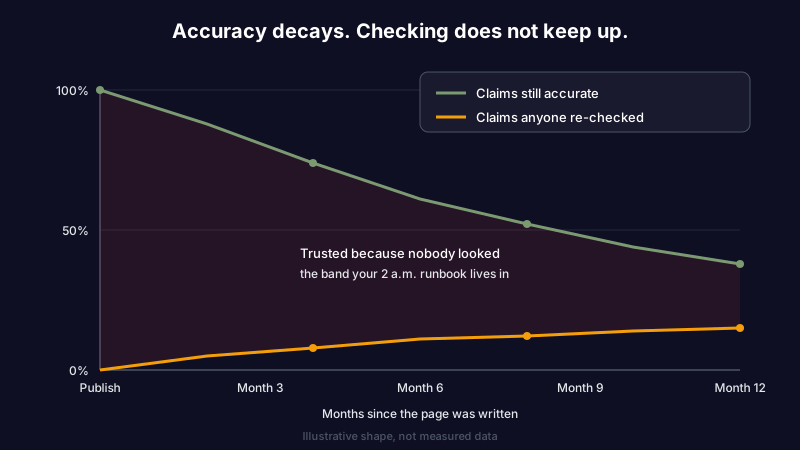
This is the same failure we wrote about in the doc rot problem, viewed from the team side rather than the individual one. Personal notes rot privately. Internal documentation rots in a place where four people will act on it.
Ownership decays before the documentation does
Here's where the standard advice runs out. Every guide on internal documentation best practices converges on the same instruction: give every document an owner, and have that owner review it on a cadence.
Try holding that model against the actual lifespan of a role. People change teams, take the promotion, go on leave, or leave outright. Add reorgs and team splits to ordinary attrition and the practical half-life of "Owner: Dana" is a year or two at best, which is shorter than the useful life of most of the pages Dana owned. That is exactly why the template above puts a team in the owner field, not a name.
So the owner field is a claim like any other, sitting in the same page, decaying on the same curve as everything around it. When it goes stale it takes the review cadence down with it, silently, because a calendar invite for a quarterly doc review does not bounce when the assignee leaves. It just stops being accepted.
Consider a two-year-old onboarding doc with a former staff engineer's name at the top. A new hire follows it on day two, sets up a local environment against a database that was decommissioned last spring, loses most of a day, and asks in Slack. Someone answers in the thread. Nobody edits the page. Next month the next hire loses the same day. That doc has now cost more engineering time than writing it saved, and its owner hasn't worked here since 2024.
Pointing a check at something that cannot leave the company is what fixes this. Your repo, your changelog, your vendor's docs, and your dashboards are all still here. For code-adjacent claims, the GitHub connector verifies what a doc says against what your repository actually contains.
What a maintenance layer looks like
A maintenance layer is not a bigger wiki or a stricter template. The docs as code approach already gave engineering teams the best version of the tooling answer: docs in the repo, reviewed in pull requests, versioned with the thing they describe. The same repo-native instinct produces a pull request template people actually fill in, reviewed like code because it is code. It's a genuine improvement, and it still can't tell you that a claim expired, because nothing in a diff-based workflow fires when the world changes and the file doesn't.
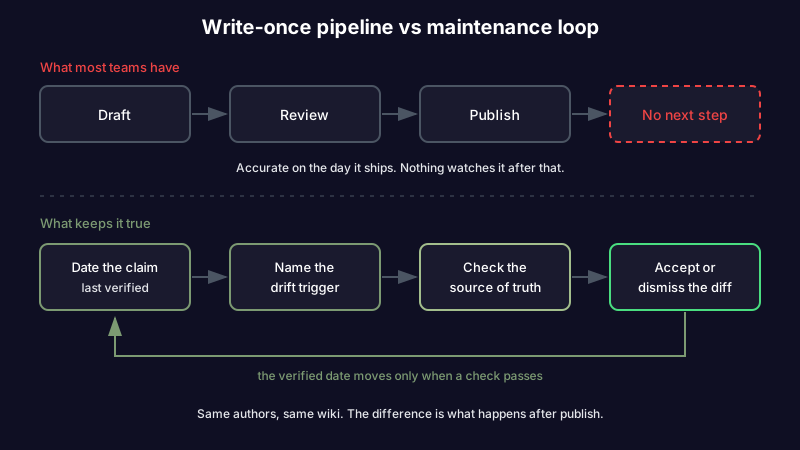
What closes that gap is four habits, only one of which is about writing.
Date the claim, not the page. Almost every tool shows "last edited." That timestamp tells you when someone touched the formatting. What you need is "last verified": the last time somebody, or something, confirmed the assertion is still true. A page edited yesterday can be wronger than one verified last week.
Name the drift trigger while you still remember it. When you write "we run Postgres 14," you know exactly what would change that: an upgrade. Write the trigger down next to the claim. This is the discipline that makes named drift triggers work in architecture decision records, and it transfers cleanly to runbooks and service docs.
Point each claim at a source of truth. Version numbers live in the repo. Endpoints live in the API spec. Ownership lives in the org chart. Rate limits live in a vendor's docs. A claim that cannot be traced to a source is a claim nobody can check, which is a good reason to either delete it or promote it into a decision record where its rationale can live.
Review as a diff, not a rewrite. A rewrite is an afternoon and gets deferred forever; a diff is thirty seconds of judgment about one changed line. That is the difference between a doc audit nobody schedules and a 30-minute weekly review somebody actually finishes.
A 30-minute internal documentation review
The four habits above are only worth anything if they turn into a routine short enough that someone finishes it. Here is that routine as a checklist. Run it on your five most load-bearing documents, not the whole wiki, and run it on a fixed cadence rather than after the next incident.
[ ] Sort by blast radius, not by age. Start with the docs an error would hurt
    most: runbooks, on-call, release steps, the day-one setup guide.

[ ] For each page, read only the claims, not the prose. One line at a time:
    is this still true today? Yes / No / I am not sure.

[ ] Every "No" gets a one-line diff, not a rewrite. Fix the sentence, move on.

[ ] Every "I am not sure" gets a source of truth attached, or the claim is
    deleted. An unverifiable claim is worse than a missing one.

[ ] Update "Last verified" to today on every page you touched, even the ones
    that needed no change -- "still true" is the most valuable signal here.

[ ] Anything that was wrong because a decision changed goes into a decision
    record, so the reason survives the next time someone asks.
The point of the checklist is not thoroughness. It is that a diff-sized review can be scheduled and finished, and a full audit cannot, so the review that actually protects your docs is the small one you repeat.
How this works in Scribelet
The four habits above are doable by hand. They rarely survive a quarter, because the work arrives at the worst possible time and belongs to nobody in particular.
Scribelet runs them as background jobs. Your team's docs live in shared team desks, and background agents re-check the factual claims in those notes against the web, your connectors, and your own repository on a schedule you choose. Want to see what an automated check on a page like that looks like? Background checks run on a schedule you set and show you what stopped being true.
When something no longer matches, you get a diff: the sentence you wrote, what the source says now, and a citation, waiting for you to accept or dismiss it. The verified date moves when a check passes, not when someone fixes a typo.
Model choice is yours. Scribelet's AI works out of the box, and if you would rather route it through your own OpenAI, Anthropic, or Gemini key, bring your own and the key is encrypted at rest.
Be clear about the limits. Verification catches claims that can be checked against something external: a version, an endpoint, a limit, a deprecation. It cannot tell you that your team decided in a hallway to stop using the staging cluster. That kind of knowledge needs a decision record, written by a person, at the moment the decision happens. Nothing automates that, and any vendor telling you otherwise is selling.
Where this bites first
Runbooks feel it hardest, because they are read under pressure and their claims are the most operational. On-call is the one context where a wrong internal document has a direct cost you can measure in minutes of downtime. It is also the only document type whose entire readership is concentrated in its worst possible moment, which is why the runbook nobody re-checks fails in a category of its own.
Onboarding docs come second, and their damage is invisible in the aggregate: every new hire pays the tax privately, in a lost afternoon they assume was their own fault.
After that it is infrastructure inventories, the perennial subject of r/sysadmin threads about what to use for internal documentation, where the tool is never the actual problem. Then internal service docs, the pages one team maintains so five others do not have to read the source, which decay fastest of all because the people harmed by the errors are not the people who can fix them.
The second draft has to arrive on its own
Internal documentation is not a writing problem. It is an expiry problem wearing a writing problem's clothes, which is why every attempt to fix it with better templates, a nicer wiki, or one more documentation sprint produces another burst of pages that are accurate on the day they ship and quietly wrong by autumn.
Give your claims a verified date, a drift trigger, and a source they can be checked against, then let something other than a departed owner's calendar invite do the checking. Your docs stop being a museum of what used to be true. Start free and point the first check at the runbook you trust least.
Share this article