Notion vs OneNote: an honest 2026 comparison
Table of contents
Ask whether Notion or OneNote is better and you will get two confident answers that both sound right, because the people giving them are using the tools for different jobs. One person swears by OneNote for the freeform page where they sketch, clip, and scrawl. Another swears by Notion for the database that runs their whole team. Neither is wrong. They are just not comparing the same thing.
That is the trap in most Notion vs OneNote comparisons. They line up features side by side as if the two apps are competing to win the same race, when OneNote is trying to be an infinite sheet of paper and Notion is trying to be a lightweight database with a word processor bolted on. Pick by feature count and you will end up with the tool that does more on paper and less for how you actually work.
So this is a round-by-round comparison of Notion and OneNote: who wins each dimension, what each one costs, how hard it is to move your notes between them, and the single thing neither of them does. By the end you will know which one fits the way you think, not just which one has a longer feature list.
Notion vs OneNote at a glance
OneNote is a freeform digital notebook from Microsoft, best for handwriting, infinite-canvas layouts, quick capture, and anyone already living in Microsoft 365. Notion is a block-based workspace built around relational databases, wikis, and project management, best for structured knowledge and teams. The honest split: OneNote for capture and ink, Notion for structure and systems.
| Dimension | OneNote | Notion | Winner |
|---|---|---|---|
| Core model | Freeform canvas, type or draw anywhere | Block-based pages and databases | Depends |
| Structure and databases | Basic tables and tags | Relational databases with Kanban, calendar, gallery views | Notion |
| Handwriting and stylus | Native ink, palm rejection, ink-to-text | No native handwriting | OneNote |
| Quick capture | Click and type anywhere instantly | Slower; pick a page or database first | OneNote |
| Offline access | Full offline on desktop and mobile | Limited; heavy editing wants a connection | OneNote |
| Collaboration and wikis | Shared notebooks, real-time co-editing | Team wikis, permissions, comments, databases | Notion |
| Templates and extensibility | Small add-in gallery | Huge template ecosystem and an API | Notion |
| Built-in AI | Microsoft Copilot in paid plans | Notion AI with workspace Q&A | Depends |
| Where notes live | Proprietary files synced in OneDrive | Notion's servers, blocks in a database | Tie (both closed) |
| File format and export | Microsoft's own format; export resists | Markdown and HTML export, but structure breaks | Tie (both lossy) |
| Pricing | Free; storage via Microsoft 365 | Free personal tier; paid team plans | Depends |
| Keeping notes accurate over time | None (manual) | None (manual) | Neither |
Look at the last row before anything else. Every comparison covers the ones above it. Almost none covers that one, and it is the row that decides whether your notes stay an asset or quietly turn into a liability. If you have watched your own notes drift out of date without noticing, our guide to knowledge decay explains why it happens to everyone, not just disorganized people.
Now the rounds.
Round 1: Core model, canvas vs database
This is the whole decision in one dimension, so it goes first.
OneNote gives you a page that behaves like paper. Click anywhere and start typing. Drag a text box, drop in a screenshot, draw a diagram with your finger, record audio in the margin. Nothing has to line up. The structure is loose on purpose: notebooks hold sections, sections hold pages, and inside a page you do whatever you want.
Notion gives you a page made of blocks, and the real power is that any page can become a database. A table of projects where each row opens into its own full page. A board that shows the same data as Kanban. A calendar view of the same rows again. Notion rewards people who think in systems and want their notes to behave like structured, queryable data.
The mistake is treating this as better versus worse. It is capture versus organization. If your notes are messy by nature, meeting scrawls, half-ideas, clipped research, OneNote's canvas fits. If your notes are records you will filter, sort, and relate, Notion's databases fit. Most people lean clearly one way once they stop comparing feature lists and ask what their notes actually are.
Winner: depends. Freeform thinking goes to OneNote. Structured systems go to Notion.
Round 2: Handwriting and quick capture
OneNote wins this one cleanly, and it is not close.
OneNote was built for ink. On a Surface, an iPad, or any touchscreen, you write by hand with palm rejection, convert handwriting to text, and draw diagrams inline. Capture is instant: open any page, click, type. There is no decision to make before you can write, which matters more than it sounds when you are trying to catch a thought before it evaporates.
Notion has no native handwriting at all. To capture a quick note you first choose where it goes, which page or which database, and that small friction is the opposite of how capture should feel. Notion is a place you organize things you already captured, not the place you capture them.
If you take handwritten notes, or you want the lowest-friction "just write it down" surface, OneNote wins before the other rounds even start. Notion is simply not where fast capture happens.
Winner: OneNote.
Round 3: Offline and speed
OneNote works offline by design. Your notebooks live on your device and sync to OneDrive when you reconnect, so a flaky connection does not stop you from writing. Microsoft documents full offline access as a core feature of the app (Microsoft 365 OneNote).
Notion is cloud-first. It has an offline mode, but a limited one: pages you have not opened recently may not be available, and heavy editing expects a connection. For a tool people use as their operating system for work, that is a real constraint, not a footnote.
Winner: OneNote.
Round 4: Structure, databases, and collaboration
Here Notion takes back the lead, and it is just as lopsided as Round 2.
Notion's relational databases are genuinely powerful. One source of truth, many views, rows that relate to other rows, filters and rollups that turn notes into something closer to a lightweight app. For a team wiki, a content calendar, a CRM, or a project tracker, nothing in OneNote comes close. Notion also handles permissions, comments, and real-time collaboration in a way that suits teams building shared knowledge.
OneNote collaborates too, through shared notebooks and Microsoft 365 co-editing, and for a family or a small group passing notes around it is fine. But it has no concept of a relational database. Tables are tables. If your notes want to behave like data, OneNote cannot get you there.
Winner: Notion.
Round 5: AI features
Both ship AI now, and the split follows the ecosystems.
OneNote's AI is Microsoft Copilot, which summarizes, drafts, and answers questions across your notes, but it requires a Copilot or Microsoft 365 license on top of the free app. Notion AI is built into the workspace and does the headline trick well: ask a question and it answers across your pages, which is useful precisely because Notion holds structured data it can reason over.
The honest caveat for both: AI that writes into your notes raises a question neither tool answers, which is whether what it wrote is still true next month. An assistant that confidently restates an outdated fact is worse than no assistant. That is why we treat AI fact-checking for notes as a separate discipline from generation, and why the control you have over the model matters as much as the model itself.
Winner: depends. Copilot if you are in Microsoft 365, Notion AI if your notes are already structured.
Round 6: Pricing
OneNote is free. The app costs nothing, and you only pay if you want more OneDrive storage or the Microsoft 365 bundle, which many people already have for Office. Copilot is the one real add-on cost.
Notion has a free personal tier that is generous for a single user, with paid plans for teams that add members, advanced permissions, and more automation (Notion pricing). Notion AI is typically an add-on on top of that.
For a solo user, both can be free. For a team, OneNote leans on a Microsoft 365 subscription you may already pay for, while Notion is priced per member as a standalone product. Which is cheaper depends entirely on what you already own.
Winner: depends on your existing stack.
Round 7: Migration, and the lock-in nobody mentions
This is the round that should change how you read all the others.
Moving between these two tools is painful in both directions. OneNote stores notes in Microsoft's proprietary format, and getting them out cleanly, with your ink, layout, and attachments intact, resists you. Notion exports to Markdown and HTML, which sounds better, but its structure does not survive the trip: databases flatten, relations break, and nested pages scatter into folders. One blogger's widely-cited account of switching described Notion's import of a decade of OneNote notes as poor enough to send them back (The Productive Indie Fiction Writer).
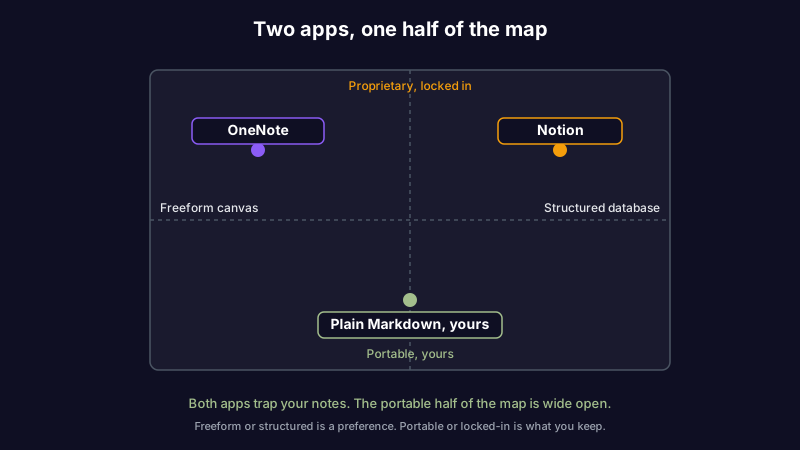
Step back and the real pattern is clear. Both tools are closed ecosystems. OneNote locks your notes in a proprietary file in Microsoft's cloud. Notion locks them in blocks on Notion's servers. In both cases the app is the door, and the door only opens so far. You can switch tools, but you cannot easily take your notes with you in a form the next tool fully understands.
This is where a third model exists that neither comparison usually mentions: plain Markdown note-taking apps keep your notes as portable text files you own outright, readable by any editor, today and in ten years. If what you actually want is to not be locked in, the Notion vs OneNote question has a third answer. The same logic drives people toward a Notion alternative or a OneNote alternative once lock-in becomes the deciding factor.
Winner: neither. Both trap your notes; the escape is a format you own.
The dimension neither tool measures
Every round above is about where your notes live and how you edit them. None of it touches whether your notes are still true.
A note is a snapshot of what you understood on the day you wrote it. The API you documented changes. The pricing you noted goes up. The link you saved rots. Neither Notion nor OneNote has any idea this is happening. They store what you wrote and show it back to you with the same confidence a year later, long after half of it stopped being accurate. This is the brand we build on: knowledge has a half-life, and most tools pretend it does not.
That is the row we care about most, and it is the one both tools score zero on. Scribelet runs background checks that compare your notes against current sources and show you a diff when something has changed, so the notes you trust stay trustworthy instead of quietly going stale. You bring your own API key, we encrypt it at rest, and you see exactly what changed and why. If you keep sensitive notes, a secure note-taking app that never reads your content matters more than a feature checklist. Try it free.
So which should you choose?
Strip away the feature lists and it comes down to how you think.
- Choose OneNote if you handwrite, sketch, or capture fast and loose; if you need full offline access; or if you already live in Microsoft 365 and want notes that fit beside Word and Outlook.
- Choose Notion if your notes want to behave like data: databases, wikis, project trackers, team knowledge bases with real structure and permissions.
- Choose neither, and reach for a Markdown-first tool, if the thing you care about most is owning your notes in a portable format and keeping them accurate over time. That is the gap both of these leave open.
If you are still weighing the wider field, our Notion vs Obsidian and Obsidian vs OneNote comparisons cover the two apps most people consider next. The best note-taking tool is not the one with the most features. It is the one whose notes you will still trust after everything in them has had a chance to change.
Share this article