11 OneNote alternatives in 2026, sorted by why you're leaving
Table of contents
You didn't wake up wanting a OneNote alternative. Something specific sent you to the search bar. Maybe Microsoft retired the OneNote app you'd used for years and turned your notebooks read-only. Maybe the free-form canvas that felt liberating in 2015 turned into a swamp you can't search. Maybe you're just done keeping a decade of notes inside a proprietary format tied to a Microsoft account you'd rather not depend on.
Here's what every "best OneNote alternative" list gets wrong. They hand you ten apps ranked by popularity and leave you to work out which one fixes your actual complaint. A tool that's perfect for someone who wants a free open-source notebook is useless to someone who just needs their notes to work on Linux, or to stop quietly going out of date.
So here are eleven alternatives worth knowing, compared first on the things that decide a switch, then sorted by the reason you're leaving rather than by a ranking. We name the honest best pick for each reason, including several that aren't ours. And we're upfront that one of them is ours, for one reason no other tool on this list covers.
The 11 OneNote alternatives at a glance
| App | Price | Platforms | Where your notes live | Checks accuracy | Best for |
|---|---|---|---|---|---|
| New OneNote app | Free with Microsoft 365 | Windows, Mac, web, mobile | Microsoft cloud (OneDrive) | No | Staying in the Microsoft world |
| Notion | Freemium | All, plus web | Notion's cloud | No | Structure and databases |
| Joplin | Free | All, including Linux | Your own storage, encrypted | No | OneNote's hierarchy, kept open |
| Obsidian | Freemium | Desktop and mobile | Local Markdown files you own | No | Plain files and linking |
| Zoho Notebook | Freemium | All, plus web | Zoho cloud | No | A free, OneNote-like feel |
| Standard Notes | Freemium | All, plus web | End-to-end encrypted cloud | No | Privacy above everything |
| Capacities | Freemium | Desktop, mobile, web | Capacities cloud | No | Object-based notes |
| Evernote | Freemium | All, plus web | Evernote cloud | No | Web clipping and deep search |
| Apple Notes | Free | Apple devices, web | iCloud | No | Fast capture on Apple |
| GoodNotes | Freemium | iPad, iPhone, Mac, Windows | GoodNotes cloud | No | Handwriting and stylus |
| Scribelet | Free tier, Pro $8/mo | iOS, Android, web | Encrypted, BYOK optional | Yes | Notes that stay accurate |
Read that table as a starting filter, not a verdict. The column that matters is the one attached to your reason for leaving, which is what the rest of this guide sorts by.
What's actually pushing people off OneNote
Spend ten minutes in any OneNote alternatives thread and the same complaints repeat. They sort into a handful of reasons, and the right alternative is completely different for each one.
The loudest one right now is Microsoft's own doing. OneNote for Windows 10, the version millions of people actually opened every day, reached end of support on October 14, 2025. It's now read-only: you can look at your notes, but you can't edit or sync them in that app, and there are no more updates or security patches. Microsoft consolidated everything into a single OneNote app on Windows. OneNote itself isn't dead, but for a lot of people a forced migration is a forced migration, and if you have to move anyway, you might as well shop around.
Others have a quieter, older complaint. OneNote stores your notes in a proprietary format synced through OneDrive, there's no clean way to export the whole thing to plain files, and there's still no native Linux app. The free-form canvas that lets you drop anything anywhere is glorious for a stylus and miserable for finding a note two years later.
There's a fifth reason that rarely makes the lists, and it's the one we built around. OneNote shows you notebooks, sections, and pages. It never tells you whether anything inside them is still true. If that resonates, our guide to knowledge decay explains why it happens to every note, in every app, not just yours.
If the Windows 10 app just went read-only
If your OneNote for Windows 10 notebooks went read-only overnight, you need somewhere to land that imports what you already have without a fight. Three picks cover the range from "least disruption" to "clean break."
New OneNote app
The lowest-friction move is the one Microsoft wants: the current OneNote app on Windows, free with Microsoft 365, which imports your existing notebooks and keeps them syncing through OneDrive. Nothing to migrate, nothing to relearn.
Pick it if the retirement is your only complaint and you're otherwise happy in OneNote. Skip it if getting away from OneNote was the whole point, because this keeps you exactly where you were.
Notion
Notion is the usual next stop for people who want structure. Its pages and subpages map loosely onto OneNote's notebooks and sections, and it adds databases OneNote never had. The tradeoff is that your notes now live in Notion's cloud rather than as anything you own, which is the exact thing a lot of OneNote refugees are trying to leave. Worth knowing before you commit: people leave Notion too, and a Notion alternative that fits your reason is a different pick depending on whether it got slow, got loud with AI, or locked you in.
Pick it if you want more structure than OneNote gave you and you can live in the cloud. Skip it if file ownership or a proprietary format was the reason you started looking.
Joplin
If you want to keep OneNote's notebook-section-page hierarchy without Microsoft, Joplin is the closest match on this list. It's free, open source, keeps that tree structure, stores Markdown, syncs through your own cloud, and has end-to-end encryption built in. It looks and feels like the community project it is, but it does the job, and it has a genuine OneNote importer.
Pick it if you want OneNote's shape, your own storage, and no subscription. Skip it if a polished, consumer-grade interface matters more to you than openness.
If you're done with Microsoft and the proprietary format
This is the reason that predates the Windows 10 retirement. You want your notes out of a proprietary format and off a Microsoft account, in something you can read without one specific app.
Obsidian
Obsidian is the enthusiast's answer. Plain Markdown files on your own disk, no lock-in, and a plugin for almost anything. The cost is that you become the administrator of your own note-taking, and paid sync plus a slower mobile app catch some people out. If that's where you're heading, we sorted the Obsidian alternatives by reason for leaving too, and our roundup of the best markdown note-taking apps weighs each option on portability. Plain text is the closest thing to an escape hatch this category offers. It keeps your notes portable. It does not keep them true.
Pick it if owning plain files is the point and you don't mind assembling the setup. Skip it if you want it to work well on mobile the day you install it.
Standard Notes and Notesnook
If encryption is the actual reason you're leaving, sort out which secure note app fits your threat model before you switch. Zero-knowledge apps like Standard Notes and Notesnook win on privacy precisely because they can't read your notes, which is also why they can't run AI over them or search inside an attachment. That's a deliberate tradeoff, not an oversight.
Pick it if default end-to-end encryption is non-negotiable. Skip it if you want search, AI, or anything that requires the app to read your content.
Zoho Notebook
Zoho Notebook is the underrated one on this list. It's free, cross-platform, and it feels closer to OneNote's card-and-notebook metaphor than most of the Markdown tools do, which makes the mental jump smaller. Notes live in Zoho's cloud, and the free tier is generous.
Pick it if you want a OneNote-like experience without Microsoft and without paying. Skip it if local files or an export you fully control are the requirement.
If the free-form canvas became impossible to search
OneNote's free-form page is a feature until you have a thousand pages. Then it's a liability. You remember writing something down, you just can't find where you dropped it on which page in which section. The fix is a tool with more structure and real search.
Capacities
Capacities organizes around objects (people, books, meetings) instead of a blank canvas, so structure emerges as you write and retrieval becomes a first-class feature rather than a scavenger hunt. It's cloud-native and modern, and it reads as the spiritual opposite of a swampy OneNote section.
Pick it if you want your notes to self-organize by what they're about. Skip it if you'd rather own local files than trust another cloud.
Evernote
Evernote is the old rival, and its web clipper and search are still genuinely strong, which is exactly what a lost-in-the-canvas OneNote user is missing. The catch is price: the useful tiers are a subscription, and the free plan is tight now. A migration is also the rare moment your whole archive is in front of you, which makes it the best chance you'll get to audit your archive while you move it instead of quietly rebuilding the same graveyard somewhere nicer.
Pick it if web clipping and deep search are what you actually need. Skip it if the subscription and the years of feature churn put you off.
Apple Notes
If you live on Apple devices and the real problem was that OneNote was overkill, Apple Notes is fast, clean, and free. It syncs through iCloud, handles checklists and light sketching, and never asks you to configure anything. It is Apple-only in any way that matters, so it's a non-starter if you touch Windows, Android, or Linux.
Pick it if you're all-in on Apple and want frictionless capture. Skip it if you need it to work anywhere outside the Apple ecosystem.
Whichever of these you pick, check the platform story before you commit, because OneNote's cross-device sync is one of the things people miss most. A painful share of migration regret is someone landing in a desktop-first or Apple-only app and discovering the mobile experience was an afterthought. It's worth knowing what true cross-platform note-taking takes before you move a decade of notes into something that only really works on one device. For the two tools people weigh most often, our Notion vs Obsidian comparison goes deeper.
If you take handwritten notes with a stylus
Let's be honest about a big slice of OneNote's audience. If you use it with a pen on a tablet, to sketch, annotate PDFs, or take handwritten lecture notes, most of the apps above will disappoint you. That's not their job, and it isn't ours either.
GoodNotes and Notability
GoodNotes and Notability are the polished picks on iPad, with the smooth inking, PDF markup, and handwriting search that made OneNote's pen tools worth using in the first place. Both are freemium, and both are best on Apple hardware.
Pick it if handwriting and stylus input are the reason you loved OneNote. Skip it if you type your notes and don't own an iPad.
Xournal++
Xournal++ is the free, open-source stylus option across Windows, Mac, and Linux, and it's the rare handwriting app that runs on Linux at all. It's utilitarian rather than pretty, but it annotates PDFs and takes ink notes without a subscription.
Pick it if you want free handwriting on a non-Apple machine, Linux included. Skip it if you want a consumer-grade, synced experience out of the box.
How do I move my OneNote notebooks to another app?
This is the question the ranking lists and the AI overviews skip, and it's the one that actually decides whether a switch sticks. OneNote stores notes in a proprietary .one format, so "just export it" is rarely clean. Here's the honest migration path into each destination, and what tends to survive the move.
| Destination | How your OneNote notes get in | Handwriting and ink | The gotcha |
|---|---|---|---|
| New OneNote app | Automatic import of existing notebooks | Preserved | Keeps you in the Microsoft cloud |
| Notion | Export OneNote pages to Word or PDF, then import to Notion | Flattened to images | Free-form layout gets linearized |
| Joplin | Built-in OneNote importer, or export to .md first | Mostly lost | Community importer, expect some cleanup |
| Obsidian | Export to Word or PDF, convert to Markdown | Lost | You assemble the pipeline yourself |
| Evernote | Web clipper plus manual copy, or third-party tools | Flattened to images | No first-party OneNote importer |
| Zoho Notebook | Copy and paste, or import from Evernote as a bridge | Lost | No direct OneNote importer |
Two rules survive every row of that table. Typed text and images move; free-form canvas positioning and pen strokes usually don't. And whatever you carry over, a migration copies your notes without checking a single one of them, so a decade of clippings arrives in the new app exactly as stale as it left the old one.
If you loved free capture but your notebooks became a graveyard
Here's the reason that doesn't make the listicles, and the one Scribelet is built for.
Scribelet
If what you loved about OneNote was capturing everything in one place, and what wore you down is that "everything" became years of clippings, meeting notes, and half-finished project pages that nobody weeds and nothing checks, the missing piece isn't a prettier canvas. It's a tool that keeps your notes accurate without you auditing them by hand.
Scribelet keeps the parts OneNote users care about. Notes connect with wikilinks. It runs natively on iOS, Android, and web, so there's no second-class platform. Then it adds the layer none of the others have: background agents search the web on a schedule you set, compare what they find against what you wrote, and surface the difference as a diff, green for new information, red for what's outdated, with a source link on every change. That's how background verification works.
Most AI in note apps is reactive. You ask a question, it answers from your notes. That's useful for drafting and search, and OneNote's own Copilot does it if you pay for it. But reactive AI only helps when you already suspect something is wrong and think to ask. The far more common case is the note you trust without checking, the one that quietly went stale months ago.
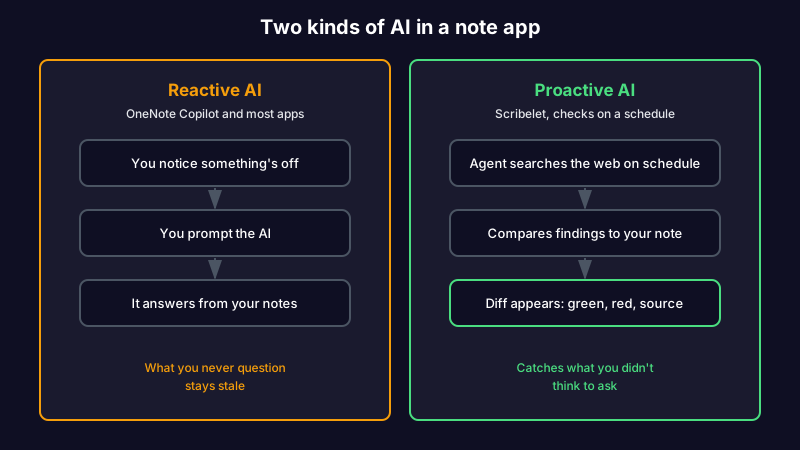
Picture a research note you clipped into OneNote two years ago, citing a study that has since been retracted. According to Retraction Watch, paper retractions have grown roughly tenfold since 2000, so this is not a rare edge case. In OneNote the page still looks authoritative. With scheduled verification, the retraction shows up as a diff before you build on it again.
You can also keep control of the AI itself. Bring your own key and route through OpenAI, Anthropic, or Gemini, with the key encrypted at rest, so your notes go to the provider you trust rather than one Microsoft chose for you. It's optional; the AI works out of the box, and the free plan includes ten verifications a month, enough to point at your ugliest imported notes before paying anything.
Tired of being your own maintenance department? Start free, run your first verification, and see what a diff actually catches. The Pro plan is $8/mo or $79/yr when you want the full set.
Pick it if the thing that wore you out was carrying notes nobody ever checked. Skip it if you want a folder of local files, a free self-hosted project, or a web clipper and handwriting to match OneNote's, because Joplin, Obsidian, or GoodNotes will fit those better.
Is Microsoft phasing out OneNote?
Not entirely. OneNote for Windows 10, the older app that shipped with Windows 10, reached end of support on October 14, 2025 and is now read-only. OneNote itself continues as a single consolidated app on Windows, free and included with Microsoft 365. So OneNote lives on, but the specific version many people used does not.
That distinction is exactly why so many people are shopping. A forced move to a different OneNote app is the moment you ask whether you want to stay in OneNote at all.
So which OneNote alternative should you pick?
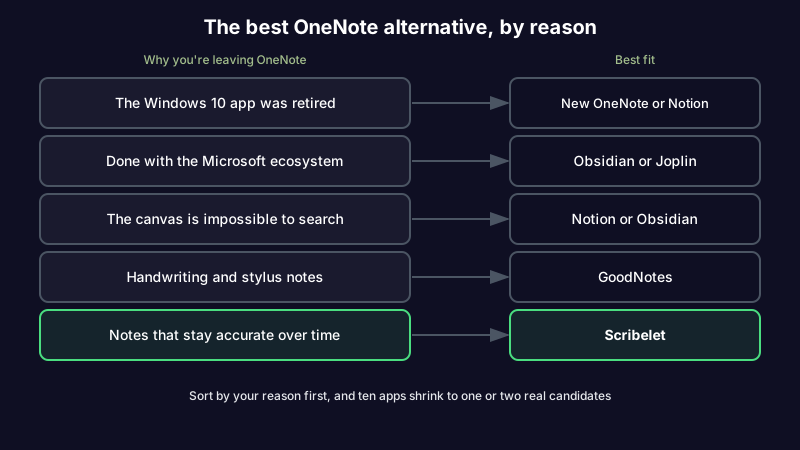
The right alternative is the one that fixes the specific reason you went looking. Sort by your reason, and the field of eleven apps shrinks to one or two real candidates.
| Why you're leaving OneNote | Best fit |
|---|---|
| The Windows 10 app was retired | New OneNote app, Notion, or Joplin |
| Done with Microsoft and the proprietary format | Obsidian, Joplin, or Standard Notes |
| The canvas is impossible to search | Notion, Capacities, or Evernote |
| You want a free, OneNote-like feel | Zoho Notebook or Joplin |
| Handwriting and stylus notes | GoodNotes, Notability, or Xournal++ |
| Notes that stay accurate over time | Scribelet |
That last row is the one every listicle leaves out, and the reason this article exists. If you started on Google Keep rather than OneNote, we sorted the Google Keep alternatives by what you outgrew the same way.
Pick the fix, not the most popular app
The best OneNote alternative isn't the one with the longest feature list or the most upvotes. It's the one that solves the exact thing that made you start searching. Sort by your reason first, and the choice gets a lot simpler.
If the thing that wore you out was carrying a growing pile of notes that nobody ever checked, that's the reason worth fixing for good. Start writing with background verification and see your first diff.
Share this article