11 Evernote alternatives, ranked by what you're actually moving
Table of contents
The export finishes and you're staring at a single .enex file. Fourteen years of clipped articles, meeting notes, recipes, and API scratch pads. Four thousand notes, give or take. You haven't opened most of them since the year you wrote them.
Now comes the part every Evernote alternative guide gets wrong. They hand you a feature matrix and a price column, as if the only decision left is which app receives the file. That question is the easy one. The hard one is sitting inside the export: how much of this is still true?
This roundup does both halves. First the honest comparison you came for: eleven apps, an at-a-glance table, and a pick-it or skip-it verdict for each. Then a real migration table for the .enex file, and the question the feature matrices never ask.
The 11 Evernote alternatives at a glance
| App | Best for | Evernote import | Free tier | What it costs you |
|---|---|---|---|---|
| UpNote | The closest 1:1 feel | .enex | Limited notes | Low feature ceiling |
| Notesnook | Privacy, encryption | .enex importer | Generous | Smaller ecosystem |
| Zoho Notebook | Visual notebooks, easy switch | Built-in migrator | Full | Web-first, needs an account |
| Notion | Databases, wikis, teams | Native importer | Full personal | Complexity; it's a workspace |
| Obsidian | Local files, linking, control | Importer plugin | Full (personal) | Setup time; paid sync |
| Joplin | Open source, self-hosted | .enex (built-in) | Full | Rough edges; you run the sync |
| Microsoft OneNote | Free, stylus, Office shops | Microsoft importer | No note cap | Free-form chaos; weak linking |
| Amplenote | Notes tied to tasks | .enex | Limited | Task model you may not want |
| Bear | Markdown on Apple | .enex | Basic only | Apple-only; sync is paid |
| Apple Notes | Apple-only, zero setup | Manual | Full | No Android, thin linking |
| Scribelet | Notes that get checked | Markdown import | 10 checks/mo | Newer; not a clipper |
Below is the pick-it or skip-it read on each, then the part no other list on this page covers: what actually survives the migration, and what happens to the notes after they land.
The 11 apps, with a verdict each
UpNote
Pick it if you want Evernote before it got expensive. UpNote mirrors the notebook-and-tag model closely, imports .enex directly, and is pleasant to use. A cheap lifetime licence is on offer.
Skip it if you wanted the switch to be an upgrade. UpNote won't do anything your notes didn't already do. It is a faithful copy of the thing you're leaving, minus the price.
Notesnook
Pick it if privacy is the reason you're moving. Notesnook is end-to-end encrypted by default, open source, and its Evernote importer handles notebooks and attachments well. It is the answer the AI overview keeps naming for a reason.
Skip it if you lean on a huge third-party plugin ecosystem or deep integrations. The app is focused and clean, which is the point, but the surrounding tooling is thinner than Notion's or Obsidian's.
Zoho Notebook
Pick it if you want the least painful switch on this list. Zoho Notebook ships a built-in Evernote migration tool, uses a familiar notebook-and-card model, and syncs across platforms for free.
Skip it if you want to work offline or stay out of another vendor's suite. It is web-first and pulls you toward a Zoho account you may not otherwise want.
Notion
Pick it if your notes are really a wiki or a set of databases in disguise. Notion is superb at structure, has a native Evernote importer, and bundles Notion AI.
Skip it if you mostly clipped and searched. Notion is genuinely bad at being a shoebox. If capture-and-find is your whole workflow, it feels like being handed a CAD program to draw a shopping list. Our Notion vs Obsidian breakdown walks that tradeoff properly, and if databases are the draw, the wider Notion alternatives are worth a look first.
Obsidian
Pick it if you want your notes as plain markdown on your own disk, with no lock-in and a plugin for everything. It is the enthusiast's pick and it earns the reputation.
Skip it if you don't want to be the system administrator of your own note-taking. Paid sync and a slower mobile app catch people out. If that is where you're heading, we sorted the Obsidian alternatives by reason for leaving too.
Joplin
Pick it if open source and self-hosted are hard requirements. Joplin really is free, really does end-to-end encryption, imports .enex cleanly, and syncs through storage you control.
Skip it if polish matters to you day to day. It looks and feels like the community project it is, and web-clip formatting can come across rough.
Microsoft OneNote
Pick it if "free" is the whole brief. OneNote has no note cap, imports Evernote directly, and costs nothing extra if you already pay for Microsoft 365.
Skip it if you have thousands of notes to retrieve. OneNote's free-form canvas lets you put anything anywhere, which is liberating for a stylus and miserable for search at 4,000 notes. Plenty of people searching for a OneNote alternative are refugees from exactly that, so landing there from Evernote can be a lateral move.
Amplenote
Pick it if your notes and your to-do list want to be the same thing. Amplenote connects daily notes to a task system and imports .enex.
Skip it if you just want a notebook. The task-centric model is opinionated, and if you don't work that way it adds friction rather than removing it.
Bear
Pick it if you live on Apple hardware and want a beautiful markdown editor. Bear imports .enex, uses tags instead of notebooks, and is a genuine pleasure to write in.
Skip it if you need Android or Windows. Bear is Apple-only, and sync sits behind the paid tier. Cross-platform is not a footnote here, it is the deciding factor for a lot of people, which is why a cross-platform note-taking app is worth checking before you commit.
Apple Notes
Pick it if you're all-in on Apple and want zero setup and zero cost. It is fast, it is already installed, and it syncs through iCloud without a thought.
Skip it if you touch a non-Apple device or want real linking between notes. There is no Android app and the organisation model is thin. Importing .enex is a manual chore rather than a one-click job.
Scribelet
Pick it if the reason you're moving is that you no longer trust what's in the archive. Scribelet imports your markdown and then does the thing none of the others do: it checks whether your notes are still true, on a schedule, against the live web.
Skip it if the web clipper is the reason you stayed on Evernote for fourteen years. Scribelet has no clipper that competes with Evernote's, and its OCR story is younger. That gap is real and you should weigh it. More on how the checking works below.
What has happened to Evernote?
The exodus isn't nostalgia. It traces to a handful of specific decisions.
Evernote was acquired by the Milan-based app studio Bending Spoons, which then cut most of the original staff and moved operations to Europe. In December 2023 the free plan was capped at 50 notes and one notebook. That limit turned a decade-old free account into a read-only museum overnight. Evernote's own plan comparison still lists the free tier at 50 notes, 1 notebook, 1 GB, and a single synced device.
Then the paid tiers were reshuffled. Personal and Professional were retired in favour of Starter and Advanced, with existing subscribers rolling into Advanced at renewal unless they actively downgraded. Advanced lands around $250 a year. For a tool many people used as a glorified shoebox, that's a real number.
So the searches make sense. "Evernote alternative free." "Evernote alternative open source." "Evernote alternative self hosted." Every one of them is someone doing the same arithmetic.
Fair credit where it's due. Evernote's web clipper is still one of the best ever shipped, its OCR reads text inside images, and its search is genuinely fast across huge archives. Those are the things you'll miss, and any honest list should say so.
Is there an app like Evernote but free?
Yes, and the honest ranking is short. OneNote is the strongest genuinely free option: no note cap, direct Evernote import, and free with a Microsoft account. Zoho Notebook is free and has the smoothest migration tool. Notesnook is free, private, and open source. Joplin is free and self-hostable. Apple Notes and Google Keep are free if you live in their ecosystems, though Keep is really a sticky-note app rather than a notebook, which is why people outgrow it and start hunting for a Google Keep alternative of their own.
The catch is the same one the feature tables hide: a free destination still receives the same slowly rotting archive. Free fixes the price. It does nothing for the contents.
Moving the .enex file: what survives, what breaks
Here is the part no other guide on this page carries. Exporting from Evernote gives you a single .enex file (File > Export Notes). Where it lands changes what makes it across intact. Read this before you pick, not after.
| Destination | Import path | What comes across | What breaks or needs cleanup |
|---|---|---|---|
| UpNote | Built-in .enex import | Notes, notebooks, tags, attachments | Some rich formatting simplifies |
| Notesnook | .enex importer | Notes, notebooks, attachments | Complex tables, nested formatting |
| Zoho Notebook | Built-in Evernote migrator | Notes, notebooks, images | Inter-note links do not transfer |
| Notion | Native Evernote importer | Notes as pages, notebooks as sections | Deep nesting flattens; large imports are slow |
| Obsidian | Importer community plugin | Notes as markdown, attachments | Tags and notebooks need reorganising |
| Joplin | Built-in .enex import | Notes, notebooks, tags, attachments, dates | Web-clip HTML can look messy |
| OneNote | Microsoft Evernote importer | Notes into sections, images | Evernote tags are dropped |
| Amplenote | .enex import | Notes | Formatting and links vary |
| Bear | .enex import | Notes, some attachments | Notebooks become tags |
| Apple Notes | No .enex; manual or third-party tool | Text, images | Tags and structure; tedious at scale |
| Simplenote | Plain text only | Note text | Attachments and all formatting |
Two rules that hold across every row. Keep the original .enex forever, wherever you land: it is your rollback. And do not import all of it, which is the step people skip and regret. More on that below, because it is where the real decision lives.
The question every Evernote alternative list skips
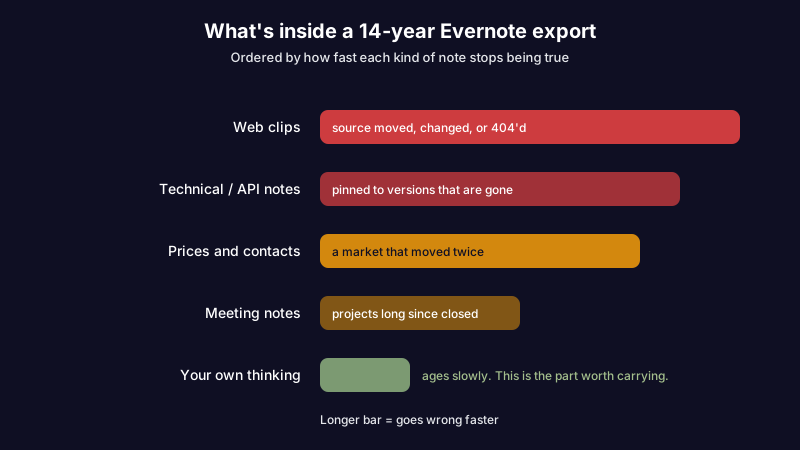
Here's what fourteen years of notes actually contains.
Roughly a third of it is web clips whose source pages have changed, moved, or died. Another slice is technical notes pinned to versions that no longer exist. There are meeting notes about projects that shipped or got cancelled, phone numbers for people who changed jobs, and prices from a market that has moved twice since. The stuff that stays true is a minority: your own thinking, written in your own words.
Every guide in this SERP treats that archive as inert cargo. Import it, re-tag it, done. But the notes aren't inert. They're wrong, quietly, and they've been wrong for years. The reason you never noticed is that nothing ever told you.
This is knowledge decay, and a migration is the one moment you're forced to look straight at it. You have the whole archive in one file. You're already deciding what deserves to come with you. It's the best audit opportunity you'll get for another decade, and every listicle tells you to skip it and compare pricing tables instead.
Consider what happens if you do skip it. A developer moves an engineering wiki out of Evernote into a cleaner, faster, markdown-based app. The notes look better immediately: nice typography, instant search, proper code blocks. Six months later someone follows the OAuth setup note and it fails, because the scope it documents was deprecated before the migration ever happened. The editor improved. The wrongness came along for the ride, reformatted.
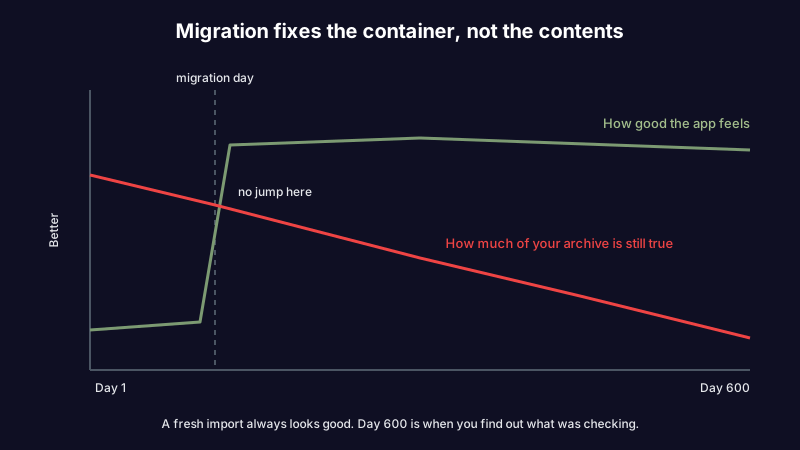
Switching apps upgrades the container. It does nothing to the contents.
Curious what it looks like when software checks whether a note is still true? See how AI verification works before you pick a destination.
How to migrate without carrying the rot with you
The mechanical part is easy. The judgment part is what makes the difference. Do it in this order:
- Export everything first.
File > Export Notesgives you the.enex. Keep that file forever, regardless of where you land. It's your rollback. - Don't import all of it. This is the step people skip and regret. A full import recreates the graveyard in a nicer building.
- Sort by last-opened, not by notebook. Notebooks tell you how you organised in 2014. Last-opened tells you what you actually use. The long tail you haven't touched in five years is the part most likely to be both stale and unnecessary.
- Bring the notes you wrote, leave most of the clips. Your own synthesis ages slowly. Somebody else's article aged the day it was published, and the original is still on the web anyway.
- Flag anything with a version number, a price, or a URL. These are the notes that decay fastest. They're also the ones that hurt when they're wrong, because you'll act on them.
- Then import, and set something to watch the survivors.
That last step has no equivalent in any other guide, because most tools have nothing to offer for it. On format, whatever you pick, markdown-based note apps give you the best odds that the next migration is easier than this one. Plain text is the closest thing to an escape hatch the category offers. It keeps your notes portable. It doesn't keep them accurate, which is the whole point of this article.
What happens after the notes land
Scribelet's premise is that step six shouldn't be your job.
Background agents run on a schedule you set. They search the web, compare what they find against what your note claims, and show you a diff: green for what's new, red for what no longer holds, with a source link for each change. You accept or dismiss. The note updates or it doesn't. Nothing gets rewritten behind your back.
Point that at a freshly imported Evernote archive and the first pass is genuinely uncomfortable. The pricing note that's off by two increases. The setup guide whose middle three steps no longer exist in the current UI. The clipped article that has since been corrected by its own author. None of that surfaced in Evernote, and none of it would have surfaced in UpNote or Notion or Obsidian either, because checking isn't a thing any of them do.
The AI works out of the box, and the free plan includes ten verifications a month. That's enough to point at your worst imported notes and see whether the diffs tell you anything. If you'd rather route it through your own provider, bring your own key is there: OpenAI, Anthropic, or Gemini, your key, encrypted at rest, your data going to the provider you picked instead of the one we picked.
Ready to compare on something other than a feature matrix? The free plan includes AI verification, so you can point it at your ugliest imported notes before paying anything. Compare plans.
What are the best Evernote alternatives in 2026?
There is no single winner, and any list that names one is selling something. Pick from the reason you're leaving:
- Closest feel: UpNote or Zoho Notebook.
- Free with no cap: OneNote.
- Privacy and open source: Notesnook or Joplin.
- Structure and databases: Notion.
- Local control and linking: Obsidian.
- Apple-only and simple: Apple Notes or Bear.
- Notes you no longer trust: Scribelet.
The reason the Evernote alternative question feels exhausting is that everyone answers it with the wrong variable. Feature matrices assume your notes are fine and only the software is wrong. But you've been carrying a slowly spoiling archive from tool to tool, and each migration polished the container while leaving the contents exactly as wrong as they were.
Pick your next app on what it does on day six hundred, not day one. On day one every option in that table looks good, because a fresh import always looks good. Day six hundred is when you find out whether anything in the system was ever going to tell you your notes stopped being true.
You already have the export file. That's the audit, sitting right there, waiting. Set up your first desk and point it at the notes you were least sure about.
Share this article