11 Cross-Platform Note-Taking Apps That Work on Every Device (2026)
Table of contents
You jot a half-formed idea into your phone while waiting for coffee. Two hours later you want to expand it at your desk, and that evening you reach for it again on a tablet on the couch. Three devices, one thought, and somewhere in that handoff the friction shows up: the note synced late, the mobile app choked on the formatting, or the thing you wrote on the laptop simply is not there yet on the phone.
That handoff is the whole promise of a cross-platform note-taking app, and it is exactly where most of them quietly break. "Runs on iOS, Android, and web" sits on every feature page. Whether it runs well on all three, syncs without drama, and keeps the note usable once it is there is a much shorter list.
This piece is for anyone who works across more than one device and is tired of a note app that treats one platform as the real product and the rest as afterthoughts. Below are 11 well-known options rated on what actually decides a handoff, plus the one thing every "works everywhere" checklist leaves out. If you want to skip the reading and just try one, Scribelet's Free plan runs natively on all three from a single codebase.
What makes a note app truly cross-platform?
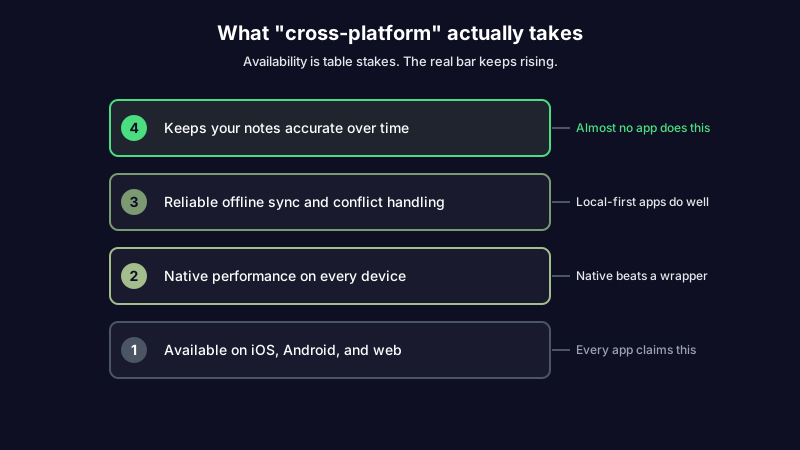
A truly cross-platform note-taking app runs natively on each operating system, syncs reliably with offline support and conflict handling, and gives every platform the same features. Not a web page in a desktop shell, not a crippled mobile port. The same app, working the same way, wherever you open it.
That definition matters because the marketing version stops at "available on." Availability is cheap. A company can wrap its website in a desktop window and ship a thin mobile app in a weekend, and technically it now runs everywhere. What you feel a month later is the gap between running and running well: the mobile version that lags, the desktop app that eats a gigabyte of memory, the feature that exists on web but not on your phone.
Three things separate the real thing from the checkbox. Native performance, so each platform feels like it belongs there. Sync you can trust, so switching devices mid-thought is invisible. And feature parity, so you never learn the phrase "you can only do that on desktop."
Picture the test that actually exposes an app: you draft a meeting agenda on the web, add three action items on your phone during the walk to the room, then reorder everything on a tablet once the meeting starts. If the app is truly cross-platform, none of those switches register as events. If it is not, one of them costs you a reload, a lost edit, or a formatting mess you fix by hand. The difference never shows up on a feature comparison page, because every app claims all three platforms. It shows up in the seconds you lose during a handoff, every day, for as long as you use the thing.
Why most cross-platform note apps fail when you switch devices
The failures cluster into a few recognizable shapes. Knowing them makes the shopping much faster, because you can spot each one from the pricing page.
The first is the wrapper problem. Notion and Obsidian both ship their desktop apps on Electron, which bundles a full Chromium browser with every install. That is why the desktop apps can feel heavy and why the mobile experience is a separate build with its own quirks. Electron is a reasonable engineering choice for shipping fast, but it means "cross-platform" is really "one web app in several costumes," and the seams show most on the device with the least memory to spare: your phone.
The alternative is a genuinely native stack. Scribelet is built on React Native, which compiles to real iOS and Android UI components instead of rendering a bundled browser, and runs the same core on the web. The practical result is that the phone app is a first-class citizen rather than a port, so a long note scrolls smoothly on a three-year-old Android the same way it does on a new laptop.
The second is the second-class mobile port. An app can be genuinely good on the desktop and merely tolerable on mobile, which is a problem if mobile is where you capture. Obsidian is the classic case: the desktop app is beloved, the mobile app works, and reliable syncing between them runs through Obsidian Sync, a paid add-on on top of the free app. Plenty of people go looking for an Obsidian alternative for exactly this reason.
Then there is platform lock-in dressed up as simplicity. Apple Notes is fast, native, and free, and it does not exist on Android. The moment one device falls outside the walled garden, "cross-platform" is off the table. Google Keep goes the other way: it runs on Android, iOS, and the web, but a flat wall of colored cards is all you get, which is why so many people go looking for a Google Keep alternative once the wall fills up.
The last failure is the sync itself, the least visible one and the one that costs you actual work. An app that is cloud-first with weak offline support will happily let you edit the same note on two devices and then pick a winner for you, silently discarding the other version. A notes app with offline support worth trusting does the opposite: it queues your edits locally, syncs when you reconnect, and detects conflicts instead of guessing.
The 11 best cross-platform note-taking apps at a glance
Every app below runs on more than one platform. What separates them is how well: whether the mobile build is native or a port, whether sync is free or a paid add-on, and whether offline editing is safe. Start with the table, then drop to the app that fits how you work.
| App | Platforms | Native or wrapper | Free sync | Best for |
|---|---|---|---|---|
| OneNote | Win, Mac, iOS, Android, Web | Mostly native | Yes (OneDrive) | Free all-rounder, handwriting |
| Obsidian | Win, Mac, Linux, iOS, Android | Electron desktop | No (Sync is paid) | Power users, local Markdown |
| Notion | Win, Mac, iOS, Android, Web | Electron, web-based | Yes | Workspace, databases |
| Joplin | Win, Mac, Linux, iOS, Android | Native-ish, open source | Yes (bring your own) | Open source, encryption |
| Standard Notes | Win, Mac, Linux, iOS, Android, Web | Cross-platform | Yes | End-to-end encryption |
| Simplenote | Win, Mac, Linux, iOS, Android, Web | Lightweight native | Yes | Fast, free, plain text |
| Evernote | Win, Mac, iOS, Android, Web | Native, heavy | Limited on free | Legacy libraries |
| Apple Notes | Apple devices + iCloud web | Native (Apple only) | Yes (iCloud) | All-Apple households |
| Google Keep | Android, iOS, Web | Web-based | Yes | Quick capture |
| Bear | Apple devices only | Native (Apple only) | Yes (paid) | Markdown on Apple |
| Scribelet | iOS, Android, Web | Native (React Native) | Yes | Native mobile, kept-accurate notes |
OneNote
Pick it if you want the strongest free cross-platform option and you write by hand. OneNote runs on Windows, Mac, iOS, Android, and the web, syncs through OneDrive at no cost, and its infinite canvas plus stylus support make it the default recommendation on almost every forum thread and in Google's own AI overview for this query. Offline works, and 5 GB of free OneDrive storage covers most personal use.
Skip it if you want plain Markdown files you own, or a fast, minimal editor. OneNote's notebook-section-page hierarchy is heavier than a plain list, its notes live in Microsoft's format rather than portable text, and the Mac and mobile builds trail the Windows one. If OneNote is the app you are leaving, we sorted the OneNote alternatives by why you are leaving.
Obsidian
Pick it if you want a local-first Markdown vault, wikilinks, and a graph view, and you mostly work on desktop. Obsidian stores notes as plain .md files on your machine, so you own them outright, and it is free for personal use across every major OS.
Skip it if mobile is where you capture and you would rather not pay to sync. Reliable syncing between the loved desktop app and the workable mobile app runs through Obsidian Sync, a paid add-on, and the mobile build is a step behind the desktop one. That specific gap, the phone half plus paying to close it, is why so many people shop for an alternative.
Notion
Pick it if your notes are really a workspace: databases, project boards, wikis, and shared pages. Notion runs everywhere, syncs for free, and its flexible page model is unmatched for structured team content. It also writes with AI on request.
Skip it if you need dependable offline access or a fast mobile capture. Notion is cloud-first: offline support is limited and historically flaky, and the Electron desktop app plus web-based mobile can feel heavy. For a full head-to-head on the two biggest names here, we wrote an honest Notion vs Obsidian comparison that goes past the feature grid.
Joplin
Pick it if you want an open-source, Markdown-based app you can sync through your own cloud (Dropbox, OneDrive, or a self-hosted server) with end-to-end encryption. Joplin runs on every desktop and mobile platform and costs nothing.
Skip it if you want polish out of the box. Sync setup is more hands-on than a hosted service, and the interface is functional rather than refined. It is the tinkerer's pick, and a good one.
Standard Notes
Pick it if encryption is the point. Standard Notes is end-to-end encrypted by default, runs on every desktop, mobile, and web platform, and syncs across all of them on the free tier. For anyone who wants notes that are private first and cross-platform second, it is the cleanest option on this list.
Skip it if you want rich formatting, inline images, and a fast writing surface without paying. The free editor is deliberately plain, and the features that make it feel like a modern notes app sit behind a subscription.
Simplenote
Pick it if you want the fastest, lightest, genuinely-free way to sync plain-text notes everywhere. Simplenote runs on all desktop and mobile platforms plus web, syncs instantly, and never asks for money. For quick text that has to be on every device in a second, nothing here beats it.
Skip it if you need formatting, attachments, or any structure beyond tags. Simplenote is plain text and proud of it, which is the feature and the limit at once.
Evernote
Pick it if you already have years of clippings and notebooks in it and you are not ready to move. Evernote still runs on Windows, Mac, iOS, Android, and the web, and its web clipper and search remain strong.
Skip it if you are starting fresh. The free tier now limits devices and syncing, the app is heavy, and pricing has climbed. Most people evaluating it today are actually looking for the exit, which is why we mapped the Evernote alternatives worth switching to.
Apple Notes
Pick it if every device you own is Apple. On a Mac-plus-iPhone-plus-iPad setup, Apple Notes is fast, native, free, and syncs invisibly through iCloud, and it is hard to beat inside that garden.
Skip it if a single Windows laptop or Android phone is anywhere in your life. Apple Notes does not exist on Android, and the iCloud web version is a fallback, not a real app. The moment one device sits outside the walled garden, it fails the cross-platform test by definition.
Google Keep
Pick it if you want frictionless quick capture, checklists, and voice notes synced across Android, iOS, and the web for free. As a capture inbox it is excellent.
Skip it if you are building anything you will keep. There are no real documents, no linking, and no structure beyond colored cards, so it fills up and stops scaling, at which point people go looking for something with more depth.
Bear
Pick it if you live on Apple hardware and want a beautiful Markdown editor with tags and a calm writing surface. Bear is a genuine pleasure to write in.
Skip it if you need Windows or Android. Like Apple Notes, Bear is Apple-only, so it is a cross-platform app only within Apple's platforms, and its sync sits behind a subscription.
Scribelet
Pick it if you want a note app that is native on iOS and Android, shares one codebase with the web, and does something none of the others do: keeps your notes accurate over time. Sync is free, offline editing queues locally and reconciles on reconnect, and wikilinks plus a backlinks panel work the same on every platform.
Skip it if you need handwriting or a mature template gallery today. Scribelet is typed-note-first and younger than OneNote or Evernote, so a stylus-heavy workflow is better served elsewhere for now.
Ready to feel the difference? Start a note on your phone and finish it on the web. Scribelet shares one codebase across iOS, Android, and web, so the handoff has no seam to catch on. Get set up in five minutes.
What note-taking app syncs across devices without losing edits?
Almost all of them sync. The question that actually matters is what happens when two devices edit the same note, or when you write offline and reconnect. That is where cross-platform apps quietly differ, and it is the column no roundup fills in. Here is how the genuinely cross-platform picks handle the hard part.
| App | How sync works | Offline editing | Conflict handling |
|---|---|---|---|
| OneNote | OneDrive cloud sync | Solid offline, syncs on reconnect | Merges, can create duplicate pages |
| Obsidian | Local files + paid Obsidian Sync | Offline-first (files are local) | Sync add-on flags conflicts |
| Notion | Cloud-first | Limited; recent edits can lag | Last write can win silently |
| Joplin | Your own cloud, encrypted | Offline-first | Creates conflict copies |
| Standard Notes | Encrypted cloud sync | Offline, syncs on reconnect | Conflict versions preserved |
| Simplenote | Instant cloud sync | Basic offline | Keeps version history |
| Scribelet | Cloud sync, native clients | Offline queue, auto-save | Detects conflicts, no silent overwrite |
The pattern is worth internalizing before you commit to anything. The local-first tools (Obsidian, Joplin) are safe offline because the file already lives on your device. The cloud-first tools (Notion, Google Keep) are the ones to test carefully: turn on airplane mode, edit a note, reconnect, and confirm nothing was lost or silently overwritten. An app that picks a winner for you without saying so is the one that will eventually cost you a paragraph you never knew you wrote.
The part every cross-platform list skips: does your note stay accurate everywhere?
Sync solves one problem and hides another. Once a note is on all your devices, we treat it as done. But a note that is wrong on your laptop is now wrong on your phone and your tablet too. You did not fix the information. You replicated it, faithfully, to every screen you own.
This is the layer the roundups never reach, because it has nothing to do with which operating systems an app supports. It is about what happens to the content over time. The React setup you documented last spring, the pricing you noted from a competitor, the API endpoint you saved for a side project: all of it looked right when you wrote it, and some of it has quietly gone stale since. Perfect sync makes the stale version more available, not less.
The tools built to fight this treat maintenance as a feature, not an afterthought. Scribelet runs background verification on a schedule you set: it searches the web, compares what it finds to what you wrote, and shows you a diff, green for new information and red for what no longer holds. You review, accept or dismiss, and the corrected note syncs everywhere, the same way the wrong one used to.
A concrete version: you keep a note documenting a payment provider's webhook fields, written cleanly six months ago and synced to every device. The provider deprecates one field and renames another. Your note keeps looking authoritative on all five screens until the day you build against it and hit an error. A verification pass catches the change while the note is idle, hands you a diff, and the fix propagates before it costs you an afternoon.
The point is not that sync is unimportant. It is that a cross-platform note app that only moves your notes around, without any sense of whether they are still true, has solved the easy half of the problem and left you the hard half.
How to choose a cross-platform note app
Once you stop grading on availability alone, the decision gets simpler. Run any candidate through these six questions and the field narrows fast.
- Is it native, or a wrapper? Check whether the desktop app is Electron and whether mobile is a real build. Open the mobile app and scroll a long note. Sluggishness now is sluggishness forever.
- Can it sync notes across devices without you thinking about it? Free and built in beats a paid add-on. Test the handoff before you commit, on your actual devices.
- Does offline actually work? Turn on airplane mode, edit a note, reconnect, and confirm nothing was lost or silently overwritten.
- Is there feature parity? If a capability lives on desktop only, assume you will need it on your phone at the worst possible moment.
- Does it connect your notes? Wikilinks and backlinks turn a pile of notes into something you can navigate. Scribelet builds these with wikilinks and a backlinks panel on every platform.
- Does it keep your notes accurate? This is the tiebreaker almost nobody offers. If two apps sync equally well, the one that also flags stale information is the one worth keeping.
Weight the questions by how you work. If you capture on mobile and refine on desktop, questions one through three decide it. If you are building a knowledge base you will lean on for years, questions five and six matter more than any sync benchmark. If you care most about owning portable files, we also compared the markdown-first note-taking apps that keep your notes in plain text.
The bar is higher than "runs everywhere"
Every note app in this comparison can technically follow you from phone to laptop to tablet. That was the hard problem a decade ago and it is table stakes now. The apps still competing on it are competing on the wrong thing.
The bar that matters is whether the handoff is invisible, whether offline is safe, and whether the note you carry across five devices is still worth carrying. Get those right and cross-platform stops being a feature you shop for and becomes something you never think about again, which is the entire point. Start writing on every device you own, and let AI keep the notes accurate. Try Scribelet free.
Share this article