AI memory: what to store, what to expire, what to check
Table of contents
Your assistant knows you moved teams in March. It knows because you mentioned it once, in a conversation you have long forgotten. It does not know that the team was folded into another one in June, because nothing in the system is designed to be told that a fact stopped being true.
So it keeps helping. It drafts your update with the old team name in it. It suggests people who are no longer on the project. Every answer is fluent, confident, and quietly wrong in the same small way, and none of it looks like an error because errors announce themselves and stale facts do not.
That is the actual state of AI memory in 2026. Writing to it is nearly free. Correcting it is a manual job nobody has been assigned. This piece covers the four types of memory, what belongs in each one, how long each kind of fact stays true, and how to audit what a system already believes about you.
What is AI memory?
AI memory is a system's ability to carry information across sessions, so a model can use what it learned about you last week without you pasting it in again. It is what separates an assistant that knows your stack from one that meets you fresh every morning.
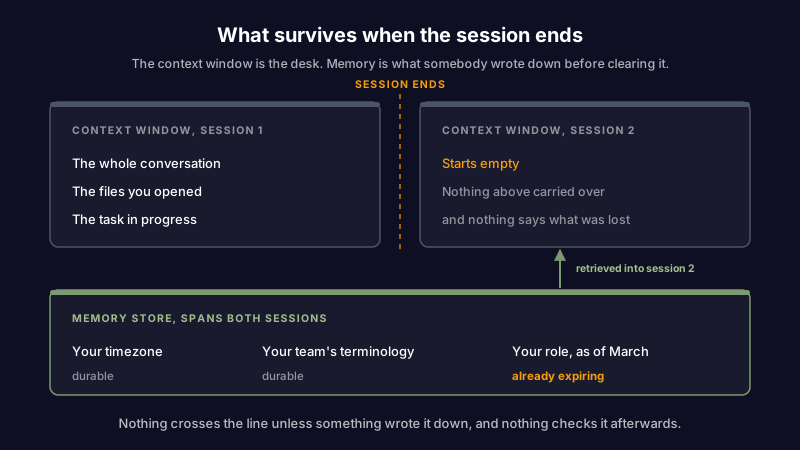
The context window is not memory. The context window is the desk: everything currently spread out in front of the model, available all at once and gone when the session ends. And the more that piles onto the desk, the less reliably the model reads any one thing on it, a slide known as context rot. Memory is what somebody wrote down before clearing the desk. IBM's overview of AI agent memory frames it the same way, as the ability to store and recall past experience rather than to hold a large amount of text at once.
One disambiguation, because the phrase now points at two different industries. If you came here about the other AI memory, the DRAM and high-bandwidth memory shortage pushing up hardware prices, J. P. Morgan's research on the AI-driven memory shortage is the better read. This piece is about the software kind: what an AI remembers about you.
If you want to see the mechanics in a working system rather than in the abstract, Scribelet's AI memory documentation walks through how facts get extracted, stored, and retrieved per workspace.
The four types of AI memory
Almost every explanation of AI memory lists the types. Very few say what each type gets wrong, which is the part you need before you decide what to trust it with.
| Type | What it holds | Where it lives | What it gets wrong |
|---|---|---|---|
| Working memory | The current conversation, the files you just opened, the task in progress | The context window | Falls off the end. Nothing survives the session unless something else writes it down, and the model cannot tell you what it forgot |
| Semantic memory | Standalone facts: your role, your stack, your terminology, your preferences | Database rows or a vector store | Records facts without any notion of expiry, so a fact from March outranks nothing and is retrieved with full confidence in December |
| Episodic memory | What happened and when: a conversation, a decision, a session summary | Timestamped summaries | Accumulates faster than it is pruned. Ten summaries of the same recurring meeting are noise, not history |
| Procedural memory | Rules and standing instructions: how you want things formatted, what to never do | System prompts, rule files, instruction documents | The hardest to inspect and the most likely to silently override a request you made just now |
The two failure modes worth internalising are in the middle rows. Semantic memory has no clock, and episodic memory has no editor. Both problems compound in the same direction: the store grows, the average fact gets older, and nothing in the retrieval path knows the difference between a fact that is true and a fact that was true.
This is the same shape as knowledge decay in a notes system, which is not a coincidence. A memory store is a notes system with no reader. At least when your own notes go stale, you eventually open one and wince. Nobody reads their AI's memory store for pleasure. The same blind spot covers few-shot examples that live in the prompt rather than in memory: they steer every answer from the context window and go stale with nobody reading them back.
Memory is write-heavy and has no retraction step
Look at how the writing and the un-writing compare in any current memory system.
Writing is automatic. You say something in passing, an extraction step decides it is a durable fact, and it is stored. Mem0's guide to memory in agents describes this loop well: the value of the pattern is precisely that the user does not have to curate anything.
Retraction is manual, and usually undiscoverable. There's rarely a screen that lists what the system believes. When there is one, it lists facts without sources, so you can't tell whether "prefers Postgres" came from a considered decision or from you losing an argument on a Tuesday.
The asymmetry produces a specific outcome: memory quality degrades even when every individual write was correct at the time. Nothing was wrong when it was written. It just kept being retrieved afterwards.
There is a useful piece of evidence for how much this matters. In a benchmark posted to r/AI_Agents, one developer ran eight agent memory systems through 2,176 tasks and reported that a plain markdown wiki beat every product in the comparison. Treat any single benchmark carefully, but the direction is worth sitting with: the setup that won was the one a human could open, read, and correct. Legibility beat sophistication.
That result rhymes with what happens to a compiled LLM wiki when its sources move on. Everyone builds the compile step. Almost nobody builds the recompile.
What to store, and what to never store
Most memory systems will store anything you say. That is a capability, not a policy. Here is the policy, organised by how long the fact stays true.
| What it is | Example | Shelf life | Store it? |
|---|---|---|---|
| Stable identity | Timezone, name, working language | Years | Yes. This is what memory is for |
| Terminology | What your team means by "desk", "run", "cell" | Years, until a rename | Yes, and it pays for itself on every retrieval |
| Role and team | "Works on the payments team" | 6 to 18 months | Yes, with the date attached |
| Standing preferences | "Prefers short answers, no preamble" | Months, until you change your mind | Yes, and make it easy to override in the moment |
| Project state | "Migration is blocked on the vendor" | Days to weeks | Only with a review trigger. This is the category that ages worst |
| Numbers from a source | "The API rate limit is 100 requests a minute" | Until the source changes, which nobody tells you | Store the source, not the number |
| Other people's details | A colleague's personal circumstances | Not yours to decide | Almost never. Store what the work needs, not what you happened to hear |
| Secrets | API keys, passwords, tokens | Never | Never. A memory store is a retrieval surface, and anything in it can come back out in an answer |
The row that catches the most people is the numbers row. A remembered figure is a snapshot with the timestamp filed off. Six months later the model quotes it back with the same confidence it had on day one, and the only signal that something changed is the thing you were trying to avoid: finding out the hard way. Storing the source instead means the fact can be re-checked. That is what AI fact-checking against live sources is for.
How to audit what an AI remembers about you
Run this quarterly, and after any change big enough to invalidate a category above. It takes about twenty minutes.
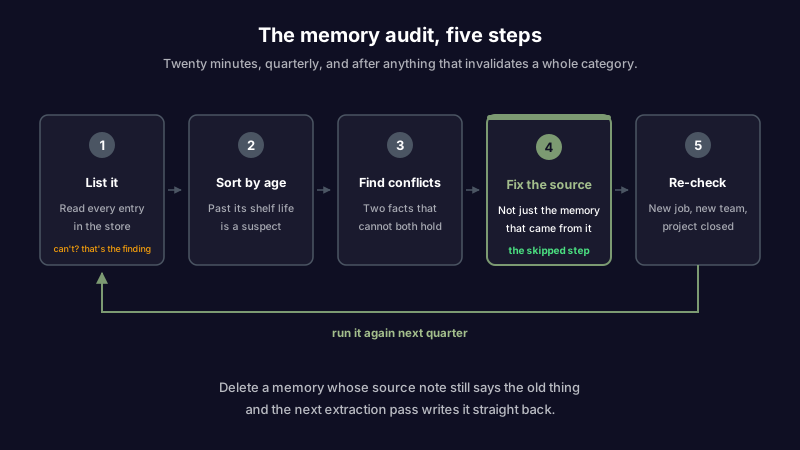
- List it. Open the memory store and read every entry. If your tool can't produce that list, you have already found the most important thing about it. A store you cannot enumerate is a store you cannot correct.
- Sort by age. Anything older than its shelf life from the table above is a suspect, not yet a defect. You are looking for facts that outlived the situation that produced them.
- Look for contradictions, not just errors. Two entries that cannot both be true are far easier to spot than one entry that is quietly wrong, and they are the strongest signal available that something changed and the store missed it. Scribelet surfaces these through knowledge health, which flags memories that conflict with each other instead of waiting for you to notice.
- Correct the source, not just the memory. This is the step everyone skips. If a stale memory came from a note that still says the old thing, deleting the memory accomplishes nothing: the next extraction pass reads the same note and writes the same fact back. Fix the note, then fix the memory. Deleting alone is a loop.
- Re-check after a change. New job, new team, finished project, deprecated tool. These are the moments when a memory store goes from mostly right to confidently misleading, and they're predictable enough to put on a calendar.
Nothing in this list requires a specific product. It requires that the store be readable and editable, which is the whole of the argument.
Agent memory vs personal AI memory
The phrase covers two jobs that pull in different directions, and the distinction decides which failure you should care about.
Agent memory exists so a task can finish. An agent working through a long job needs to recall what it already tried, what failed, and what it decided three steps ago. Success is measured over the life of the task, and after that the memory is mostly disposable. Getting it wrong wastes tokens and repeats work.
Personal AI memory exists so knowledge stays true across months. Success is measured in whether the thing it tells you in December is still accurate. Getting it wrong means acting on something that stopped being the case, and never finding out which fact did it.
They need opposite defaults. Agent memory should forget aggressively once the task closes. Personal memory should keep facts but attach a review trigger to the ones that rot. Most tools ship one implementation and use it for both, which is why personal memory stores get cluttered with task residue and agents keep re-learning your preferences.
How Scribelet handles AI memory
Scribelet builds memory per desk, so the terminology and people from your work desk never leak into your personal one. Facts are extracted from notes and conversations, categorised (person, project, term, preference), and linked into a knowledge graph, so asking about a project can surface the people and dependencies attached to it rather than only the words you searched for.
The parts that matter for everything above: memories are listable and editable rather than a hidden store, conflicting facts are surfaced by knowledge health instead of waiting to be discovered, and consolidation merges redundant entries so an episodic log does not become the noise described earlier. Memories are encrypted at rest with per-desk keys, and if you would rather the extraction run through a provider you chose, bring your own key for OpenAI, Anthropic, or Google.
The honest limitation: none of this decides for you which project facts have expired. It tells you where two beliefs disagree and makes the store easy to read. You still make the call, which is the same trade-off as any AI second brain worth trusting.
Worth saying plainly: a memory store that can't be read is a memory store you're trusting on faith.
The part nobody builds
Every memory system on the market has a good answer for how it remembers. Ask what happens when a stored fact stops being true and the answers get vague, because the industry has been optimising the write path for two years and the correction path for almost none of it.
Until that changes, the practical position is the boring one. Store the durable things. Store sources rather than figures. Keep the store small enough that a human can read it, and read it on a schedule. An assistant that knows four true things about you is worth more than one that knows forty things, six of which expired in the spring.
Want a memory you can actually inspect? Set up your first desk and see what your notes look like when the AI has to show its working.
Share this article