System prompt: what to keep, what to cut, when to revisit
Table of contents
Open the system prompt of any assistant that has been in production for a year and read it from the bottom up. The last lines are the newest, and they are the strangest.
Do not begin a reply with "Certainly". Never use the word "delve". If asked about pricing, say you do not know. Each of those was added on a particular afternoon, after a particular complaint, by someone who may no longer be on the team.
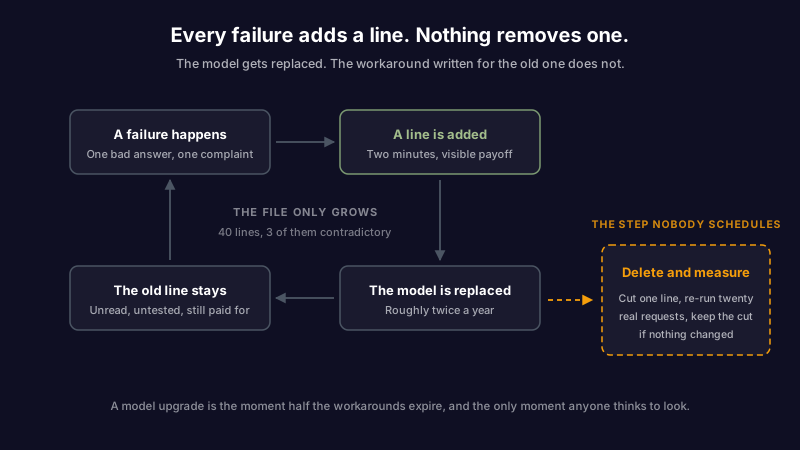
Nobody wrote that file. It accumulated. And it only ever grows, because adding a line is a two minute fix with a visible payoff, while removing one is a risk nobody has a ticket for.
Meanwhile the model underneath gets replaced twice a year. The instructions stay frozen at the failure modes of a model that no longer exists. This piece covers what a system prompt is, which four places an instruction can live and how to pick the right one, what belongs in the file and what does not, and how to find the lines that stopped paying rent.
What is a system prompt?
A system prompt is the set of instructions a language model reads before the conversation starts. It defines the model's role, the rules it works under, and the shape of its output. NIST's glossary describes it as application-specific instructions provided in-context by the model developer or the application designer, which is the useful part of the definition: a system prompt comes from whoever built the thing, not from whoever is typing into it.
The user prompt is the question. The system prompt is the standing brief that the question arrives into.
You have probably written one without calling it that. ChatGPT's custom instructions are a system prompt with a friendlier label. So are Claude Projects instructions, the system parameter in an API call, the "how should this assistant behave" box in whatever internal tool your team shipped last quarter, and the .md file your coding agent reads on startup. Same artifact, four names. However you write one, by hand or by asking a model to draft it for you, the same rules decide what belongs in it.
The difference between a system prompt that works and one that fights you is rarely eloquence. It is placement: whether each instruction is in the layer that can hold it.
System prompt vs user prompt, and the two layers people forget
Most comparisons stop at two. There are four places an instruction can live before the model answers, and putting something in the wrong one produces a specific, recognizable failure.
| Layer | What it holds | How long it lasts | Failure when misused |
|---|---|---|---|
| System prompt | Role, output format, tone, refusal rules, how to use tools | Every request, until someone edits the file | Facts pinned here go stale silently, with no expiry and no owner |
| User prompt | The actual request and its specifics | One turn | Standing rules repeated here get dropped the moment someone forgets to paste them |
| Memory | Stable facts about the person and their work | Across sessions, until corrected | Volatile detail stored here is confidently repeated long after it stopped being true |
| Retrieved context | Documents and notes pulled in for this question | One turn | Source material pasted into the system prompt instead bloats every request and ages in place |
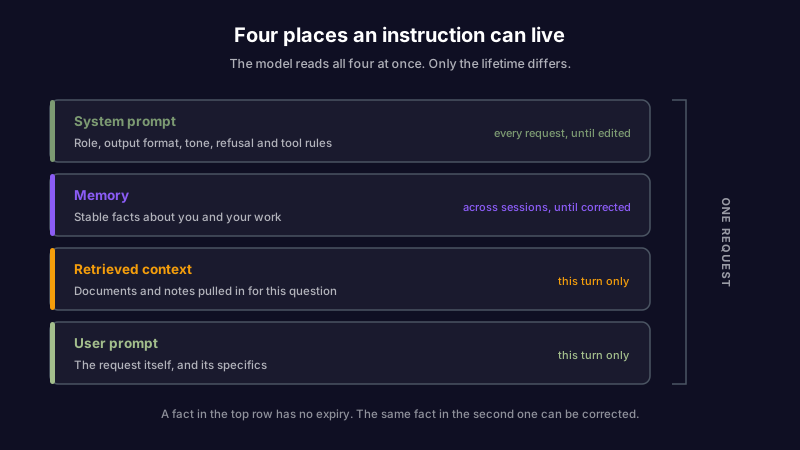
The most common mistake is the first row. A line like "the user works at Acme on the Titan migration" reads as helpful context when you write it. It's a fact, and facts change.
Eight months later the migration is done, the model still opens with it, and the person who typed it has moved to another team. A fact in a system prompt has no expiry date and no review, which is the argument for keeping changing detail in what the AI remembers about you rather than in the standing brief, where it can at least be listed, edited, and contradicted.
If you want to see that split in a working system rather than in the abstract, Scribelet's AI memory documentation shows what gets extracted, where it is stored, and how to correct it.
What belongs in a system prompt
A good default is shorter than you expect. Six sections, most of them two or three lines, in an order that puts the output contract last so it sits closest to the model's answer.
## Role
You are a technical writing assistant for an internal engineering wiki.
Readers are engineers who already know the codebase.

## Scope
Answer from the provided documents. If they do not cover it, say so
and name what is missing. Do not fill gaps from general knowledge.

## Tone
Direct. No preamble, no summary of the question, no closing offer to help.

## Tools
Use `search_notes` before answering anything about internal systems.
Use it once. If it returns nothing, say the wiki has no entry.

## Refusals
Decline requests to modify production configuration. Point at the runbook.

## Output
Markdown. Lead with the answer in one sentence, then the detail.
Code blocks carry a language tag. Never exceed 300 words unless asked.
Read that against a typical production prompt and the difference isn't quality of prose, it's what has been left out. No persona backstory. No list of values. No instruction telling the model to be helpful and accurate, because a model that needs to be told to be accurate won't be fixed by being told.
The section that earns its length is Output. Format rules are the first thing models drop when a prompt gets long, so they belong at the end, written as a contract rather than a preference. "Never exceed 300 words" is checkable. "Be concise" is a mood.
What does not belong
Four things, and they leave for different reasons.
| Keep it out | Why | Where it goes instead |
|---|---|---|
| Facts with a shelf life | No expiry, no owner, no review | Memory, or retrieved context |
| Secrets and permission rules | The prompt isn't a secret and isn't a control | Outside anything the model reads |
| Long worked examples | Paid for on every request, relevant to few | Retrieval, one example per question |
| Workarounds for a retired model | Fixing behavior the current model doesn't have | Deleted, once a test says so |
The first row covers team names, project status, current pricing, who owns what. Memory and retrieved context can both be corrected in one place. A system prompt can't, because nobody opens it again.
On the second, OWASP's LLM07:2025 System Prompt Leakage entry is blunt: the system prompt should not be treated as a secret, and it should not be used as a security control. Credentials, connection strings, internal architecture and permission structures don't belong in it. Anyone who can talk to the application will eventually infer most of what the prompt says, so anything that has to stay private has to live somewhere the model can't read.
The third row is where good intentions collect. A couple of examples pasted in to fix one bad answer turn permanent the day they are added, but few-shot examples belong with the request that needs them, not in a brief that pays for them on every call.
The fourth row is the quiet one, and it's the reason the file keeps growing. A line added in 2024 to stop a model padding its answers is still there in 2026, still costing tokens, still shaping behavior in ways nobody predicted. The model it was written for is gone. Nobody ran the test.
Model choice makes that worse or better depending on how much control you have over it. When the provider swaps the model underneath you on their schedule, your prompt was tuned against a moving target you cannot see; choosing your own provider and model at least makes the change an event you decide on.
Why system prompts rot
Three forces, running at the same time.
The first is scar tissue. Every incident produces a line, and lines are never audited as a set. Twenty of them accumulate, some contradicting each other, and the model resolves the contradiction however it resolves it.
The second is the upgrade. Each new model handles instruction following differently, so a prompt tuned for one is a pile of workarounds for a system that no longer behaves that way.
The vendors know this about their own products. Anthropic publishes the system prompts for Claude as dated release notes, versioned per model and revised when the model changes. Most teams can't say when their own prompt last changed, or who changed it.
The third is ownership. A system prompt is usually in a config file, a database row, or a settings box in an admin panel. It has no code review, no tests, and no author after the first week. It is the same failure that turns a good runbook into a liability: writing it was somebody's job, and keeping it true never became anybody's.
Read the symptom, then find the line
Bad output from a long system prompt usually traces back to a specific instruction. The mapping is more predictable than it looks.
| What you see | The line that usually causes it | Fix |
|---|---|---|
| Your JSON format is ignored on long answers | The format rule sits in paragraph four, behind 300 words of persona | Move the output contract to the end of the prompt and state it as a hard constraint |
| Replies run three times longer than you want | "Be thorough and comprehensive", written once to fix a thin answer | Replace with a number. Word or sentence limits are followed; adjectives are not |
| Harmless requests get refused | A refusal rule written broadly for an older model that needed the guardrail | Narrow it to the actual case, or delete it and re-test |
| It repeats a fact that stopped being true | A fact pinned in the system prompt with no expiry | Move it to memory, where it can be listed and corrected |
| The newest instruction has no effect | An older line contradicts it, and the model picked the other one | Search the prompt for the opposite instruction before adding another |
The last row is worth its own habit. Before adding a line, search the prompt for the thing you are about to forbid. In a file that has grown for a year, roughly one in five new instructions is arguing with an old one.
Delete and measure
There is one reliable way to find out whether a line still earns its place, and it takes an afternoon to set up.
Collect twenty real requests, the ordinary ones plus the two or three that caused the incidents that produced the lines in the first place. Save the current answers. Then remove exactly one line from the prompt, run the twenty again, and compare.
If nothing changed, the line was scar tissue, and you've just made every future request cheaper and the file easier to read. If something broke, you've learned what that line does, which nobody currently knows.
A team doing this for the first time on a two year old assistant will usually cut a third of the prompt in a morning. Not because the writing was bad, but because a third of it was written for a model that has since been retired twice.
Two rules make this safe. Keep the prompt in version control, so a bad delete is a revert rather than an archaeology project. And change one line at a time, because a batch of five deletions with one regression tells you nothing about which of the five caused it. The same discipline that makes checking a claim against its source useful applies here: an unverified change and an unverified fact fail the same way, quietly and later.
When to revisit
Four triggers, and one floor.
Revisit on a model upgrade, because that is when half the workarounds expire. Revisit when you add a tool, because tool instructions are where contradictions breed. Revisit after any incident that produced a new line, one week later, to check whether the line was the fix or just the thing you did while panicking. And revisit when the prompt crosses whatever length makes you stop reading it top to bottom, which for most people is somewhere around forty lines.
The floor is quarterly, even when none of the four fire. A prompt nobody has read in six months is a prompt nobody knows the contents of, and that is true whether or not it is working.
This is the same maintenance gap that swallows an AI-compiled wiki: the compile step is exciting and gets automated, the recompile step is boring and does not.
The file is an artifact, not a setting
The reason system prompts rot is that everyone treats them as configuration. Configuration gets set once and revisited when something breaks. A system prompt is closer to a piece of documentation that the machine reads on every request, which means it decays the way documentation decays, except that nothing ever renders it visibly wrong. It just gets slowly less true, one obsolete workaround at a time, while the outputs stay fluent enough that nobody goes looking.
Treat it accordingly. Put it in version control, keep it short enough to read in one sitting, move every changing fact into a layer built for change, and delete a line whenever you can prove it does nothing.
If the facts your assistant works from live in your notes, they should be as inspectable as the prompt. Set up your first desk and see what an AI looks like when it has to show what it knows and where it learned it.
Share this article