Meta prompting: use AI to write your prompts
Table of contents
You spend fifteen minutes wrestling with a prompt for a report you need, and the output is still generic mush. So you give up and try something else. You type: "I need a prompt that turns my raw meeting notes into a weekly status update for my manager. Ask me three questions first, then write it." The model asks about audience, length, and tone, you answer in a sentence each, and it hands back a prompt three times better than the one you were fighting with.
That is meta prompting, and the first time it works it feels like a cheat code. You stopped trying to be a prompt engineer and asked the thing that is good at language to do the part you are bad at.
Then you save the prompt it wrote, because it was good, and you reuse it every Monday. And somewhere around week seven it starts producing updates that are subtly wrong: the wrong length, a section your manager stopped caring about, a tone that fit the old team. Nothing errored. The prompt just kept doing exactly what it was told, long after what it was told stopped being right.
This piece covers what meta prompting is, a meta-prompt you can copy, when to reach for it instead of writing the prompt yourself, the ways it quietly goes wrong, and why the prompt it writes for you has an expiry date you will not see.
What is meta prompting?
Meta prompting is the technique of using an AI model to write, improve, or structure the prompts you feed to an AI model. Instead of guessing at the wording yourself, you hand the model your goal and let it act as the prompt engineer: it asks what it needs to know, then produces a detailed, structured prompt you can run.
The name is literal. A normal prompt is an instruction about a task. A meta-prompt is an instruction about a prompt. You are one level up, working on the instruction itself rather than the work. OpenAI's cookbook example on meta prompting describes it plainly: use a capable model to generate or refine a prompt, often a stronger model improving the instructions that a cheaper one will run at volume. IBM's write-up on meta prompting frames it as giving the model a reusable, step-by-step template in plain language rather than a one-off request. The Prompt Engineering Guide draws the same line: meta prompting focuses on the structure and syntax of a task rather than its specific content.
The appeal is real. Writing a good prompt is a skill, and most people do not have it, and the model has read more good prompts than any of us ever will. Asking it to write the instruction is often faster and better than writing the instruction by hand, especially for a task you will repeat.
The catch is the one nobody puts on the tin. A meta-prompt does not just save you the writing. It hands you a finished artifact, confident and complete, that you are now going to trust and reuse without ever having built the understanding that would tell you when it has gone wrong.
The meta-prompt that does the work
The whole technique fits in a few lines. Here is a meta-prompt you can copy and adapt. The shape matters more than the exact words.
I want a reusable prompt for the following task:

[describe the task in one or two plain sentences]

Before you write it, ask me up to 4 questions about anything that
would change the output: the audience, the format, the length, the
tone, and any edge cases the prompt must handle.

After I answer, write the prompt. Requirements:
- Start with the role and the single goal, stated once.
- List the inputs the prompt expects and the exact output format.
- Name what to do when an input is missing or ambiguous.
- Keep it as short as it can be while still unambiguous.

Then tell me, in one line, which of my answers you were least sure
about, so I know what to double-check.
Three things make this better than "write me a prompt for X", and each is a lever you can pull:
- It interviews you first. The single biggest reason a generated prompt is generic is that your request was generic. Forcing the model to ask before it writes pulls the context out of your head and into the prompt, where it belongs.
- It names the failure cases. "What to do when an input is missing" is the instruction people forget to write and the model forgets to follow. Asking for it up front is how you avoid a prompt that invents a value rather than flagging a gap.
- It reports its own uncertainty. The last line turns a black box into something you can check. The answer it was least sure about is the line most likely to be wrong, and now you know where to look.
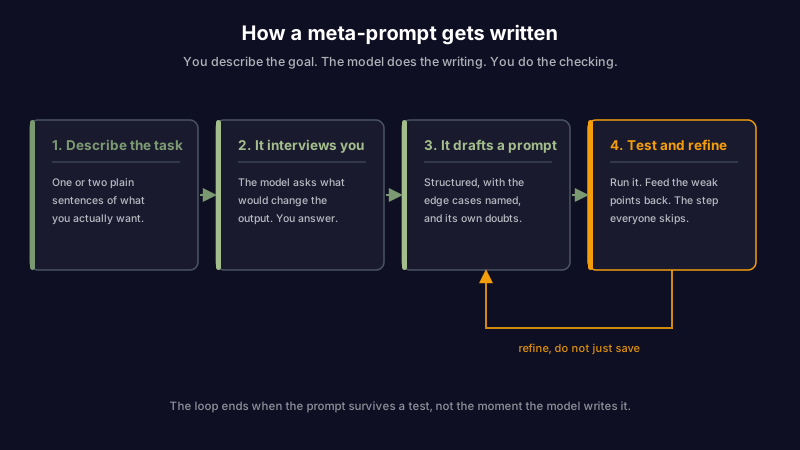
Notice what the loop does not end with. It does not end at "save the prompt." It ends at "test it, then feed the weak points back," and the difference between those two is most of whether meta prompting helps you or quietly hurts you later.
When to meta-prompt, and when to just write it
Meta prompting is a tool, not a default. For a one-line ask you will use once, opening a dialogue with the model to write the prompt is slower than writing the request. The technique earns its cost when the prompt is going to be reused, or when the task is fiddly enough that you cannot see the right structure yourself.
It also sits next to other techniques that solve nearby problems, and reaching for the wrong one is the common mistake.
| Reach for | When | Instead of |
|---|---|---|
| Just writing the prompt | The task is simple, one-off, and you can see the right shape. | Spending three turns interviewing a model to save yourself one sentence. |
| Meta prompting | The prompt is complex or reusable, and you cannot see the structure. Let the model draft it, then you edit. | Rewriting a bad prompt by hand five times and hoping the sixth sticks. |
| Few-shot prompting | The problem is a format or an edge case that one example would pin. | A longer instruction, when a worked example would say it in less space. |
| Editing the system prompt | The instruction should apply to every request, not just this one. | Pasting the same standing rule into every prompt by hand. |
The honest read is that meta prompting and the others are layers, not rivals. You might meta-prompt to draft a good instruction, keep the durable part of it in a system prompt, add a few-shot example to the request when a specific case needs pinning, and break a big task into a chain of prompts when one instruction is trying to do too much. What you should not do is treat the generated prompt as finished the moment it appears, which is exactly what its polish invites you to do.
How meta prompting quietly goes wrong
The tutorials stop at "and now you have a great prompt". The failures that actually cost you come after that, and most of them are hidden because the generated prompt reads so well that you never inspect it.
| Failure mode | What you see | What caused it |
|---|---|---|
| Over-engineering | A short task comes back as a 300-word prompt with sections you did not need | The model optimizes for thoroughness. Given room, it adds structure whether the task wants it or not. |
| Invented constraints | The output obeys rules you never asked for: a word count, a format, a banned word | The model guessed at your intent and wrote its guess into the prompt as a hard rule. |
| Bloat you pay for | The prompt works but is long, and every run costs more tokens and more latency | A generated prompt is verbose by default. On a prompt you run often, the padding is a recurring bill. |
| Lost voice | The output is competent and sounds like nobody. Yours went missing | The model wrote a prompt for a generic professional, because you did not tell it whose voice to keep. |
| Skill atrophy | You can no longer fix the prompt when it drifts, because you did not write it | Outsourcing the writing outsources the understanding. When the prompt breaks, you are debugging a stranger's work. |
| Stale by design | It was perfect in March and subtly wrong by September, with no change on your end | The prompt froze the context of the day it was written. The world it captured moved. See below. |
The first two are worth catching on day one: read the prompt the model wrote before you trust it, and delete the constraints you did not ask for. The last one is the one nobody plans for, and it is the one worth dwelling on.
The prompt it wrote has a shelf life
A generated prompt is a snapshot. When the model interviews you and writes an instruction, it bakes in everything true at that moment: the audience you named, the format you wanted, the tone that fit, the task as it stood. Then you save it, and it keeps steering toward that moment long after the moment has passed.
The Monday status update from the opening did not break because the model got worse. It broke because the prompt still encoded the manager, the length, and the sections that were right in the spring, while the actual job drifted underneath it. The output stayed confident and well-formatted the entire time, which is exactly why it took seven weeks to notice.
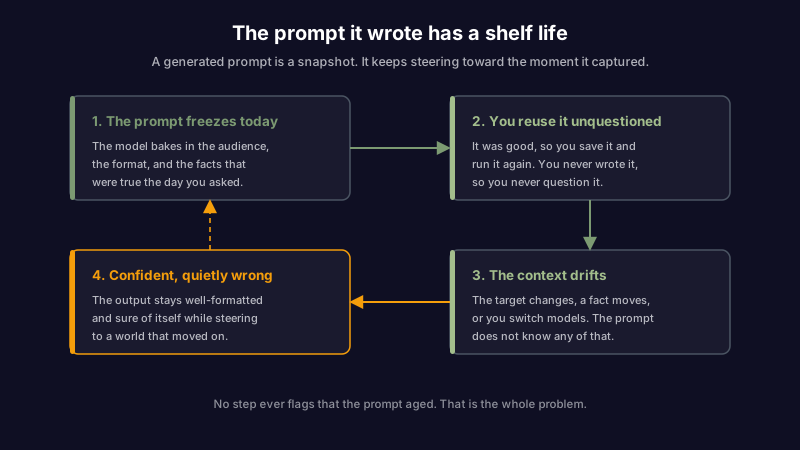
This is the same rot that turns a good system prompt into scar tissue and a good runbook into a liability. It is knowledge decay, one level up: the prompt is a note, the model reads it on every run, and nothing ever renders it visibly wrong. A meta-prompt makes the problem worse in one specific way, which is that a prompt you wrote yourself carries a memory of why each line is there, and a prompt the model wrote for you does not. You are more likely to keep it unquestioned, because you never questioned it in the first place.
The parts that rot fastest are the ones tied to something that changes on its own schedule:
- A fact. A generated prompt that says "our current pricing is X" or "the API returns Y" bakes a fact with an expiry into a place that has no expiry field.
- A named target. "Write for my manager Dana" is wrong the week Dana changes. The prompt does not know that.
- A model assumption. A prompt tuned for one model's quirks can misfire on the next one you switch to, and switching models is the whole point of being able to choose your own provider.
If the context a meta-prompt captures comes from your own notes, the fix is upstream: the notes have to stay true. That is the premise of an assistant that treats your knowledge as something to maintain rather than only store. Scribelet's AI memory and background fact-checking exist so the material your AI works from can be listed, checked, and corrected in one place, instead of frozen into a prompt where it silently ages.
A meta-prompt is an artifact, not a magic trick
Meta prompting is genuinely useful, and the case for it is simple: the model is better at writing prompts than most of us, and letting it do the part we are bad at is a good trade. Use it for anything reusable or fiddly. Let it interview you, because the interview is where the quality comes from.
But treat what it hands you as a draft, not a verdict. Read the prompt it wrote. Delete the constraints you did not ask for. Cut the length it padded. Keep the part that is durable, and keep it somewhere you can see and edit it, not buried in a chat you will never scroll back to. And re-read it on a schedule, because the prompt that was perfect in March is quietly steering your Monday mornings wrong by September, and the output will never tell you.
The trick is not getting a good prompt out of the machine. The trick is remembering that a good prompt, like a good note, is only good on the day you check it. Set up your first desk and see what it looks like when an AI has to show what it knows and where it learned it.
Share this article