Few-shot prompting: when examples help and when they hurt
Table of contents
A team ships a few-shot prompt to sort support tickets: three examples labeled urgent, normal, and low. It works. Six weeks later the same prompt is calling half of everything urgent, and nobody changed a line.
What changed was the tickets. The three examples were written back when "urgent" meant a payment outage. The new tickets are feature requests and billing questions, and the model, still matching against three months-old examples, keeps forcing them into a shape that no longer fits.
That is few-shot prompting working exactly as designed and failing anyway. The examples did their job. They just encoded a world that moved.
This piece covers what few-shot prompting is, when to use no examples versus one versus a handful, a prompt you can copy, the failure modes the tutorials skip, and why the examples you paste today have an expiry date you will not see.
What is few-shot prompting?
Few-shot prompting is a technique where you put a small number of examples, usually two to five, of the input you will give and the output you want directly inside the prompt, before the real request. The model reads the pattern in those examples and applies it to the new input, with no retraining.
The name comes from the paper that made the technique famous. When OpenAI introduced GPT-3 in 2020, the title was Language Models are Few-Shot Learners: the finding was that a large enough model could learn a task from a few examples in the prompt, with no gradient updates and no fine-tuning. The mechanism has a name, in-context learning. The model's weights never change; it conditions its next answer on the examples sitting in front of it. IBM's write-up on zero-shot versus few-shot prompting frames it the same way: the examples are guidance, not training.
That is the whole idea, and it is genuinely useful. An example is worth a paragraph of instructions. "Return the answer as JSON with keys name and role" is a rule the model might follow. One filled-in example of that JSON is a rule it can see.
The catch is that an example carries more than you meant to put in it. Its format, its wording, its order, and the mix of cases you happened to include are all instructions, whether you intended them or not.
Zero-shot, one-shot, few-shot: which to reach for
The "shot" is just the count of examples. Zero-shot is no examples, only an instruction. One-shot is a single example. Few-shot is two or more. Each is the right tool in a different place, and reaching for the wrong one is the first mistake.
| Approach | Examples | Reach for it when | The risk |
|---|---|---|---|
| Zero-shot | None | The task is common and the format is simple. Modern models already know "summarize this" or "translate to French". | The model guesses the format, and the guess drifts between calls. |
| One-shot | One | You need a specific output shape and one example pins it: a layout, a tone, a particular JSON. | A single example reads as the answer, not a pattern. The model over-copies it. |
| Few-shot | Two to five | The task has edge cases, categories, or a judgment call one example cannot show. Classification, extraction with exceptions. | More examples, more tokens on every call, plus the ordering bias below. |
| Fine-tuning | Dozens to thousands | You run the same task at volume and the examples no longer fit in the prompt. | A trained model is a frozen artifact too, and a costlier one to change. |
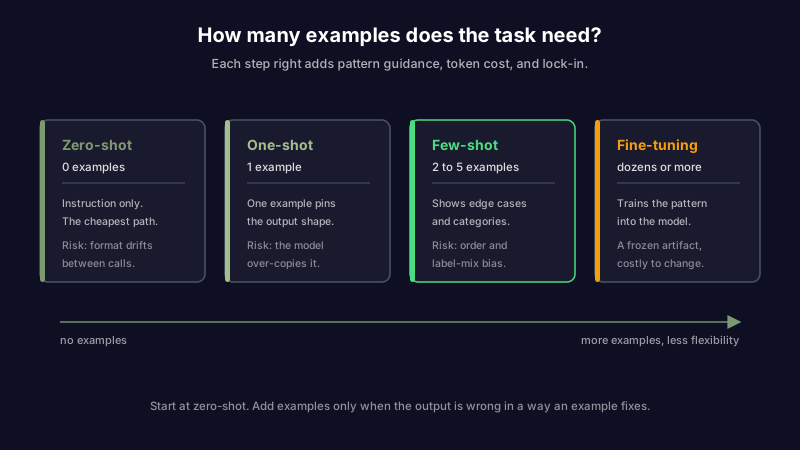
The honest default for most one-off work is zero-shot first. Try the instruction alone. Add examples only when the output is wrong in a way an example would fix, which is almost always a format or edge-case problem, not a knowledge problem. If the model does not know something, examples will not teach it. They will only make it guess more confidently, which is the opposite of what you want when the thing you are prompting has to be checked against a source afterward. And when the failure is not a missing example but a single prompt trying to do too much at once, the fix is not more examples; it is breaking the task into a chain of smaller prompts, each doing one job.
A few-shot prompt that works
Here is a few-shot prompt for a real task: turning a messy meeting note into structured action items. The shape matters more than the words.
Extract action items from meeting notes. For each, return the owner,
the task, and a due date if one is stated. If no owner is named, use "unassigned".

Input: Sarah will send the vendor contract by Friday. We still need
someone to review the Q3 numbers.
Output:
- owner: Sarah | task: send the vendor contract | due: Friday
- owner: unassigned | task: review the Q3 numbers | due: none

Input: Mike is going to update the runbook after the migration.
Let's revisit pricing next week.
Output:
- owner: Mike | task: update the runbook | due: after the migration
- owner: unassigned | task: revisit pricing | due: next week

Input: {your meeting note here}
Output:
Three things make this work, and each is a lever:
- Consistent structure. Every example uses the same labels (owner, task, due) in the same order. Models copy structure faster than content, so a wobble in your examples becomes a wobble in the output.
- An edge case on purpose. The "unassigned" and "none" cases appear in the examples, so the model has seen what to do when a field is missing. An example set that only shows the happy path teaches the model to invent a value rather than leave it blank.
- The pattern is the point. Two examples, not eight. Once the shape is unambiguous, more examples add token cost and the ordering bias below, not accuracy.
If you use an assistant that keeps a system prompt or custom instructions, this is exactly the kind of thing that should not live there permanently. A worked example is paid for on every request and relevant to few of them, which is why long examples belong in the request that needs them, not in the standing brief.
How few-shot prompting quietly breaks
The tutorials stop at "use consistent formatting". The failures that actually cost you are more specific, and most stay hidden because the output reads fluently while it goes wrong.
| Failure mode | What you see | What caused it |
|---|---|---|
| Recency bias | The model favors the label or format of your last example | Models weight the most recent example most heavily. Put the most typical case last, not an edge case. |
| Majority-label bias | With three "urgent" examples and one "normal", everything trends urgent | The label mix in your examples leaks into the output. Balance the classes, or the model learns your ratio instead of the task. |
| Format lock-in | A new input that does not fit the example shape gets forced into it anyway | The examples taught a rigid template, and the model bends the input rather than break the pattern. |
| Example leakage | Names or values from your examples show up in answers about unrelated inputs | The model treats example content as context, not just as a pattern. Use obviously generic, fake values. |
| Domain overfitting | Great on inputs like your examples, poor on everything else | Your examples all came from one domain, so the model narrowed to it. Cover the range you actually expect. |
| Stale examples | Output was right for months, then slowly went wrong with no code change | The examples encode a format, taxonomy, or tone that has since moved. See below. |
The first two have a name in the research. The paper Calibrate Before Use showed that few-shot accuracy swings widely based on the order of the examples, the specific examples chosen, and the label distribution, and that the model leans toward answers it saw recently and often. The practical version is short: your examples are not neutral. Their order and their balance are instructions you did not know you were writing.
Your examples have a shelf life
The last row of that table is the one nobody plans for, and it is the one worth dwelling on.
An example is a snapshot. When you paste two support tickets labeled by your 2025 taxonomy, or a meeting note formatted the way your team wrote them last quarter, you are freezing a moment. The prompt keeps steering toward that moment long after the world it captured has changed.
The classifier from the opening did not break because the model got worse. It broke because "urgent" drifted while the three examples still defined it the old way. The output stayed confident the whole time, which is exactly why it took six weeks to notice.
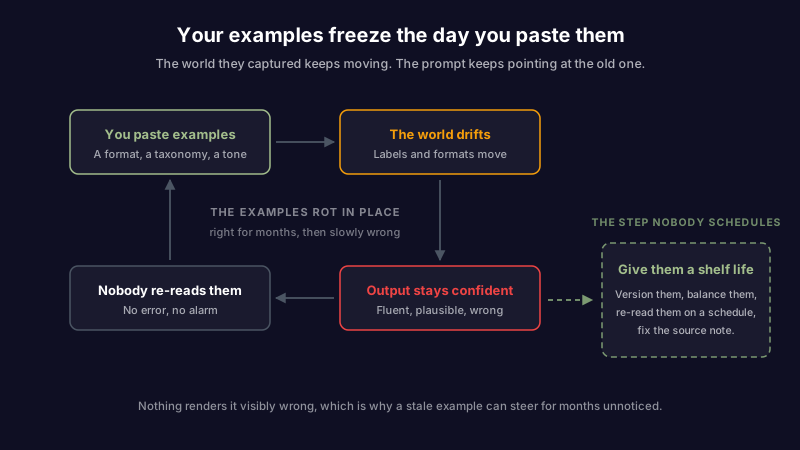
This is the same failure that turns a good system prompt into scar tissue and a good runbook into a liability. It is knowledge decay, one layer down: the examples are notes, the model reads them on every call, and nothing ever renders them visibly wrong.
The examples that rot fastest are the ones tied to something that changes on its own schedule:
- A taxonomy. Category labels, priority levels, tag names. When the set changes, every example using the old set is teaching the wrong map.
- A format. A JSON schema, a date convention, a field that got renamed. The examples keep producing the old shape.
- A fact. An example modeling "our current plan is X" bakes a fact with an expiry into a place that has no expiry field.
If the examples you feed a model come from your own notes, the fix is upstream: the notes have to stay true. That is the premise of an assistant that treats your knowledge as something to maintain rather than just store. Scribelet's AI memory and background verification exist so the material your AI works from can be listed, checked, and corrected in one place, instead of copied into a prompt where it silently ages.
When to stop adding examples
There is a point where the answer is not another example. Few-shot has a ceiling, and pushing past it spends tokens for worse results.
Stop adding examples when:
- You are past five or six and still not happy. The gain from each example flattens fast. If six have not fixed it, the problem is the instruction or the task, not the count. When it is the instruction, having the model draft the prompt for you beats reaching for a seventh example.
- The examples no longer fit the context window. Long few-shot prompts get expensive on every call, and the earliest examples start getting ignored anyway. If you need dozens, you have outgrown the technique.
- The task needs knowledge, not a pattern. Examples show the model how to answer, not what is true. For facts, reach for retrieval, not more examples.
At volume, the honest next step is fine-tuning: train the pattern into the model so it does not cost prompt space on every call. But note the trade. A fine-tuned model is a frozen artifact, and a costlier one to change than a prompt. The examples that rot in a few-shot prompt at least sit in a text file you can read; the same drift baked into fine-tuning weights is invisible and costs a training run to fix. When you choose your own provider and model, that trade is at least yours to make on purpose.
Examples are an artifact, not a setting
Few-shot prompting gets treated as a trick: paste a couple of examples, get better output, move on. It works well enough often enough that the examples turn permanent the day they are added, and then they sit there, defining a task by a handful of cases from one particular week.
They deserve the same care as anything else the machine reads on every request. Keep them few. Keep them balanced. Keep them in version control, so a change is a diff and not a mystery. And re-read them on a schedule, because the examples that were perfect in March are quietly teaching your model the wrong lesson by September, and the output will never tell you.
If the examples your AI learns from come from your own notes, they should be as inspectable and as maintainable as anything else you write down. Set up your first desk and see what it looks like when an AI has to show what it knows and where it learned it.
Share this article