AI second brain: how to build one that stays accurate
Table of contents
Search interest in the phrase "AI second brain" has more than tripled in the past year, and the guides have multiplied to match. Build one with Claude Code. Build one with a no-code workflow builder. Build one in a weekend with a vector database and an afternoon of patience. Nearly all of them assume you are building it for work, and quietly skip a second brain for your personal life, where the same method applies to your home, health, and kitchen.
Almost all of them stop in the same place. They cover how information gets in and how you ask questions of it. Very few say anything about month seven, when the API you documented has shipped a new auth flow, the pricing you saved is out of date, and the model answering your questions is confidently citing a note that stopped being true in March.
This guide covers both halves. What an AI second brain actually is, the four ways people build one and what each costs you, and then the maintenance layer that decides whether you still trust the thing a year from now.
What is an AI second brain?
An AI second brain is a personal knowledge system where AI does three jobs the system used to require you to do by hand: retrieve the right note by meaning rather than by keyword, connect notes you would never have linked yourself, and keep what you filed accurate as the world it describes changes.
The "second brain" half of the term comes from Tiago Forte's 2022 book, which popularised the idea of an external store for everything you learn. The "AI" half is what changed in the last 18 months, and it changed the bottleneck. Capture was never the hard part. Trusting what you captured, and reaching it at the moment it matters, always was.
A working definition that respects a skeptical reader: an AI second brain is a notes system where every note can be checked, retrieved, and referenced by an AI without you doing the integration work by hand. It does not write your notes for you. It keeps what you wrote useful.
That last distinction matters because two different artifacts get called the same thing right now. The LLM wiki pattern has a model compile your curated sources into a wiki it authors and you read. A second brain is the notes you wrote yourself, in your own words. Both are worth building, and both need someone checking whether what is on the page is still true. We pulled that fork apart in more detail when Andrej Karpathy floated the idea, and there are genuinely two directions for a self-maintaining knowledge base depending on which artifact you care about.
The four ways to build an AI second brain
Every setup guide you will find is arguing for one of four architectures. They differ less in what they can do on day one than in who is responsible for keeping them working on day two hundred.
| Build path | What it is | Who keeps it accurate | Where it breaks |
|---|---|---|---|
| Markdown plus a coding agent | Local files in Obsidian or a plain folder, indexed and edited by Claude Code or Cursor | You, by remembering to run the prompts | The month you get busy and stop running them |
| No-code workflow builder | n8n, Zapier or MindStudio wiring capture into a vector store, with a chat layer on top | You, by repairing the workflow | Any API in the chain changes shape, silently |
| Managed second-brain app | A hosted product that ingests your sources and answers questions about them | The vendor, and only for retrieval | You need the same knowledge anywhere else |
| Notes app with background agents | Notes with scheduled verification, semantic linking, and an endpoint other AI tools can call | The system, on a schedule you set | The agents check the wrong things, or you never read what they surface |
The first three are the ones the tutorials cover, and they all work. The honest caveat is that the first two hand you a maintenance job and the third hands you a boundary you cannot cross. Whichever you choose, the question to ask before you invest a weekend is not "can it answer questions about my notes" but "what happens to this in six months if I stop paying attention to it".
If you are starting from an existing vault rather than a blank slate, the practical constraints are different again, and we went through them separately in the guide to running AI over an Obsidian vault.
Three ways a second brain stops working
Most guides treat second brain failure as a discipline problem. You did not review weekly. You did not tag consistently. You did not follow the method rigorously enough.
That diagnosis is wrong, and it is why the standard fix (try harder) does not hold. There are three structural failure modes. They feel different from the inside and they lead to the same place: a folder of notes you have quietly stopped opening.
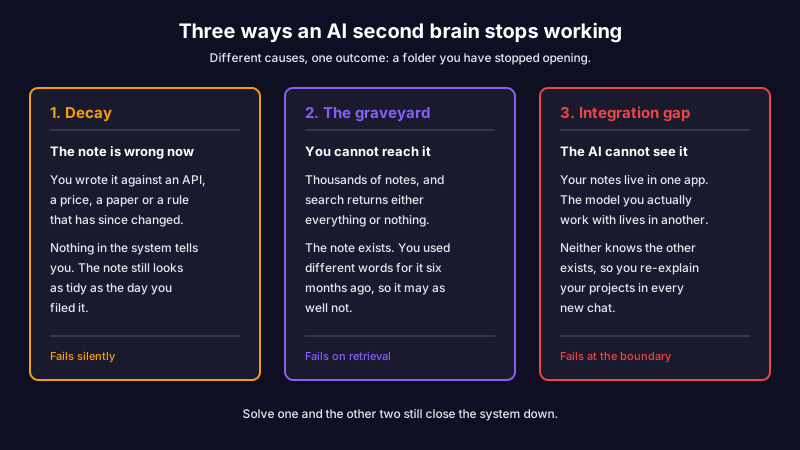
Decay
You wrote a Stripe integration guide last quarter. Stripe shipped a new auth flow. Your guide now teaches a pattern that returns 401s, and you will not find out until a teammate follows it.
This is knowledge decay, and it reaches every note that references something external: an API, a paper, a competitor's pricing, a regulation. Information has a half-life. Notes accumulate inaccuracy by sitting still while the world moves.
The standard advice is a quarterly review. At 50 notes that works. At 500 it fails arithmetically. Verifying a single note properly, which means checking sources, reading changelogs, and comparing what you wrote against what is current, takes 15 to 30 minutes. Multiply that by your top notes and you will quietly stop doing it.
The graveyard
A user on r/PKMS named this one precisely: "The actual problem isn't capturing. Capturing is easy. The problem is retrieval."
You captured for years. You have thousands of notes. You can never find the one you need at the moment you need it, because search returns either every note that mentioned the keyword or nothing at all, since you used different words six months ago.
A 237-upvote post in r/ObsidianMD titled "I Deleted My Second Brain" is the emotional version of this failure. Two years of building. Unusable. Deleted.
A digital garden is the same project with an audience attached, and it stalls on the same schedule for the same reason. Publishing does not create the upkeep; it only makes the gap visible to other people.
The integration gap
This one is newer, and it is growing. You have a second brain in Obsidian. You also pay for Claude, use NotebookLM occasionally, and run Cursor for coding. Each tool has its own idea of "your context." None of them know about the others.
A user described it on r/ObsidianMD: "I want a second brain that actually knows my history, past decisions, failed experiments, half-baked ideas, the WHY behind how I think. My setup: Obsidian + Claude Pro + NotebookLM. Solid individually but completely siloed."
The AI you are paying for has amnesia. The notes you wrote cannot reach it. You re-explain your projects every time you open a chat.
A system that solves one of these three still fails in the other two. A system that solves all three is a different kind of object, and that is the thing worth building.
The step CODE stops before
Most second brain guides start with Tiago Forte's CODE framework, and it is worth using. It is clean, and the vocabulary already exists in everything else you will read.
CODE stands for Capture, Organize, Distill, Express. Capture what resonates as you read or work. Organize by actionability rather than topic. Distill down to what is worth keeping. Express it as writing, decisions, or product.
CODE is good. It is also open at one end. It describes everything up to the moment you make something with a note, and says nothing about what happens to that note in the six months afterwards.
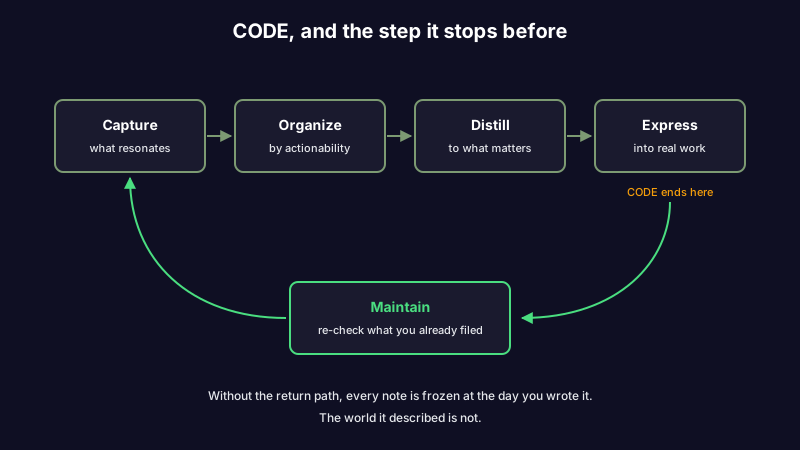
The missing fifth step is Maintain: keeping notes accurate as the world changes, resurfacing dormant notes when they become relevant again, and archiving what is no longer true. Skip it and decay catches up with you on a schedule you do not control. Close the loop and the knowledge base appreciates instead of depreciating.
This is the gap we wrote about at length in the living notes method. The short version: every PKM methodology designed before AI agents existed treats notes as finished artifacts. They are not. They behave much more like dependencies in a software project, and dependencies need updating. It is also the step missing from the field as a whole, which is the argument we made about what personal knowledge management leaves out.
A maintenance layer you can actually run
"Maintain your notes" is useless as advice. Here is the specific version, split by what a machine should do and what only you can.
| Task | Cadence | Who runs it | What it catches |
|---|---|---|---|
| Verify notes that cite external sources | Weekly | Automated | The API, price, statistic or rule that changed since you wrote it |
| Triage what verification flagged | Weekly, 10 minutes | You | Real changes, separated from noise |
| Link new notes to older related ones | Continuous | Automated | Connections you would never have made by hand |
| Archive projects that have shipped | Monthly | You | Finished work still sitting in the active pile |
| Prune what you no longer believe | Quarterly | You | Notes you would be embarrassed to cite today |
The split is the whole point. The two automated rows are the ones that fail when they are left to a human, because they are unbounded and boring. The three manual rows are the ones that fail when they are left to a machine, because they need judgement about your own work.
Getting that division right is what makes the difference between a system you maintain and a system that maintains itself.
PARA in 2026, with AI doing the sorting
PARA is the filing system that pairs with CODE. Four buckets: Projects, Areas, Resources, Archive. Projects are short-term efforts with an outcome. Areas are ongoing responsibilities. Resources are topics you might use later. Archive is everything inactive.
PARA still works. What changes is who does the sorting. In the original, you decide where each note goes as you process your inbox. With AI in the loop, the system can propose the bucket, suggest tags, surface related notes you forgot you wrote, and flag a "Project" note that belongs in "Archive" because the project shipped two months ago. You stay the decider. The AI does the legwork. We walked through that mapping in detail in the PARA method with AI.
In Scribelet, each major bucket lives in a desk. Personal projects in one, client work in another, ongoing areas in a third. Tags inside each desk handle finer filing. AI memory is scoped per desk, so your team's terminology in the work desk does not leak into your personal desk.
That separation matters more than it sounds like it should. It is the difference between a second brain that is one giant context window and one that is a structured memory you can reason about. If you want the mechanics underneath that distinction, the four types of AI memory covers what each one holds and what each one gets wrong.
Setting up your AI second brain
Five steps. Each takes between two and ten minutes.
1. Create one desk, not a system. Pick the single use case where you most often need notes you can trust: technical documentation, client research, course notes. Start there. Modelling your whole life on day one is the most common way this stalls.
2. Set up capture from wherever you already think. Web, mobile, and voice. Voice is the highest-leverage capture method most people never turn on. You record a thought, it gets transcribed, and AI structures the result into a note with a title, headings, and suggested tags. Accuracy improves as the desk's memory learns your vocabulary.
3. Turn on the background agents. This is the Maintain step, and it is the one to do early rather than "once the system settles." Verification runs on your schedule and surfaces a diff when a note drifts from current sources. The auto-linker finds semantic connections you did not make. The stale checker flags untouched notes on topics you are actively working in. The daily digest gives you a morning brief across recent notes.
4. Connect it to the AI tools you already use. This closes the integration gap. The MCP server exposes your notes as tools any Model Context Protocol client can call, including Claude Code and Cursor. You ask a question, the model searches your notes by meaning, and answers with citations. Your second brain becomes the context layer for the AI you were already paying for.
5. Optionally, bring your own key. Scribelet's AI works out of the box; chat, tag suggestions, and on-demand verification are on the free plan with daily limits. If you would rather route AI through your own provider, bring your own key for OpenAI, Anthropic, or Google. Your key is encrypted at rest with AES-256-GCM, your prompts go to the provider you picked, and you control the spend. Skip this if you do not need it.
One Reddit user got tired of waiting for a product like this and built a DIY version from Obsidian, Supabase, vector embeddings, and a homebrewed MCP server. The post is still circulating on r/PKMS. When the audience is building it themselves, that tells you what the gap looks like from the user side.
The cadence that survives a skipped week
Standard PKM advice tells you to run a 30-minute weekly review. It is solid advice, and most weekly reviews collapse around week three anyway. Life gets busy, you skip a Sunday, the inbox piles up, and restarting feels worse than starting over.
The fix is not more discipline. It is a system that holds its shape during the weeks you skip.
When the background agents are running, most of the maintenance happens whether you are at your desk or not. Verification catches the API change the day it ships. The auto-linker connects the new note to the old one without waiting for your review. Stale flags accumulate quietly until you have a few minutes to triage them.
What is left for you weekly is small: scan the digest, accept or dismiss the diffs, capture anything you missed. Twenty minutes if you do it on time. You come back from a skipped week to a slightly larger inbox rather than to a graveyard.
When this is not the right fit
An AI second brain is not the right answer for every kind of note-taking, and pretending otherwise is the marketing posture that earned this category its skepticism.
If your notes are pure journaling, daily reflection without external references, there is nothing to verify. No facts point outward, so the maintenance layer has no work to do.
If you are using notes for therapy, processing, or genuinely private writing, you may not want AI in the loop at all. That is a legitimate choice, and notes can be excluded from AI processing entirely.
If you have fewer than 50 notes, you do not have a maintenance problem yet. You have a capture problem. The setup above is fine to start, but most of the value compounds after a few hundred notes, so do not optimise for a scale you have not reached.
And if you enjoy configuring systems more than writing in them, no tool fixes that. The system is a means, not an end.
Your next 30 minutes
- Pick the use case where staleness has actually cost you something: drifting technical docs, client research, notes from a course you took last year.
- Create one desk and bring in five existing notes that fit it.
- Run a verification pass on those five and read the diffs. Most people find at least one inaccuracy in their top five notes. That is the maintenance gap, made concrete on your own material.
- Turn on the daily digest. The first one arrives the next morning.
- Connect the MCP server to whichever AI tool you already have open all day.
Half an hour of work, and you have a system you can grow into rather than one you will rebuild next year.
A second brain is not a filing system. It is something that thinks with you, and that only works if what is inside it stays true and the AI you use can actually reach it.
Set up your first desk and see what an AI second brain looks like when the maintenance is built in.
Share this article