A Second Brain for the Parts of Life That Aren't Work
Table of contents
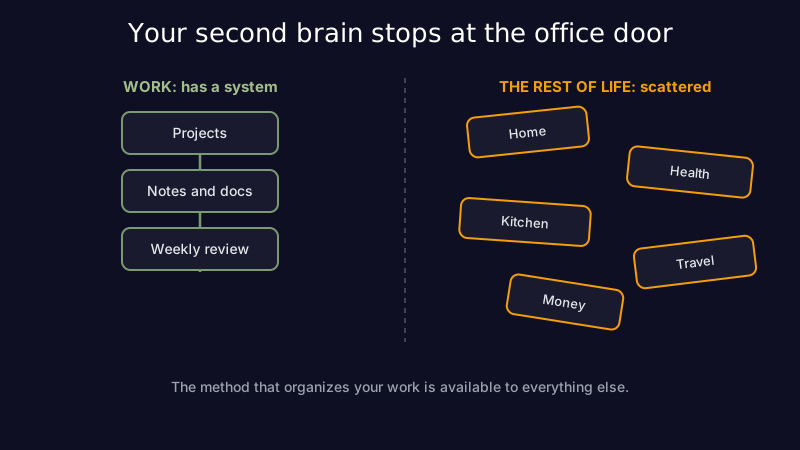
Look at how carefully you organize work. There is a project structure, a naming convention, a weekly review, maybe a whole tagging system you have opinions about. Now look at the rest of your life. The recipe you loved is a screenshot buried three months deep in your camera roll. The washing machine manual is a PDF in an email you will never find again. Trip ideas are split across four apps, the plumber's number is in a text from 2023, and you have re-bought the same lightbulb twice because you could not remember the fitting.
Most people build a second brain for the eight hours that pay them and leave the other sixteen in chaos. This is about the other sixteen: how to organize your life outside of work, and where a notes app helps versus where it quietly gets in the way.
What a second brain is, and why it stops at the office door
A second brain is an external system that holds what your head cannot: a trusted place to capture, organize, and find information so you are not relying on memory. Tiago Forte popularized the term, but the idea is older than the name, and by now most knowledge workers have some version of it for their job.
The strange part is where it stops. The same person who keeps an immaculate work wiki will manage their entire home, health, and family life out of memory, a messy notes app, and their inbox. Not because the personal stuff matters less. Usually because it never got a system at all. Work forced one on you. Nobody ever sat you down and said "here is the structure for your warranties." So the personal knowledge management habits you take for granted at work simply never crossed the threshold into the rest of your life.
That threshold is worth crossing, because the friction on the personal side is real even if it is quieter. It rarely shows up as a crisis. It shows up as ten minutes lost hunting for a document, a warranty that lapsed the month before the thing broke, a recommendation you know someone gave you and cannot retrieve. A second brain built with something like Scribelet is usually pointed at work first, but nothing about the idea is work-specific. The method is the same; only the shelves are empty.
The parts of life that never get a system
Once you look for them, the ungoverned collections are everywhere. Each one is a pile of information you accumulate for years and organize never:
- Home: appliance manuals, warranty dates, paint colors, the WiFi password, which filter the fridge takes, who fixed the boiler last time.
- Health: past prescriptions, test results, the specialist's name, what dose worked, questions you meant to ask at the next appointment.
- The kitchen: recipes you actually liked, what you cooked last week, what is in the freezer, the grocery list that lives half in your head and half on a receipt.
- Travel: places people recommended, the hotel that worked last time, passport expiry dates, the packing list you rebuild from scratch every trip.
- Family and money: birthdays and gift ideas, subscriptions you meant to cancel, the accountant's email, where the important documents actually are.
None of these is complicated on its own. The problem is that they are scattered across screenshots, tabs, texts, and three different apps, and they go stale while you are not looking. This is the same collect-and-forget trap that swallows work notes, just aimed at your kitchen instead of your codebase. When one of those piles is a real collection you keep adding to (books, records, the recipes you actually use), the fix is to catalogue it with notes so you can search what you own instead of guessing at it.
Why the work playbook does not transfer cleanly
Here is the trap people fall into: they discover the second-brain idea, get excited, and try to shove all of it into one notes app. It half works, then falls apart, and they conclude they are just disorganized. They are not. Personal information behaves differently from work notes in two ways that matter.
First, a lot of it needs doing, not just storing. A work note is usually reference: you write it, you read it later, done. But a recipe is not reference. To be useful it has to scale to six people, merge its ingredients with six other recipes, and turn into a grocery list sorted by aisle. A warranty is not reference either. It needs to turn into a reminder before it expires. A generic notes app is a shoebox: brilliant at holding things, useless at acting on them.
Second, personal life is shared and bursty. Your partner needs the grocery list too. The whole family needs the trip plan. And it arrives in floods (a house move, a new baby, a holiday) rather than a steady trickle. A system built for solo, steady work capture strains under both.
The honest conclusion is not "try harder to make one app do everything." It is that some parts of your life have outgrown a note and deserve a tool built for them.
Match the tool to the collection
The useful principle is boring and it works: keep the reference stuff in a notes app, and give the domains that need doing a purpose-built tool. You already accept this at work. You do not track sprint work in a plain text file when a proper board exists, and you do not keep the company finances in the same app as your meeting notes.
Apply the same judgment at home. Reference material that just needs to be captured and found later (manuals, medical history, that running list of gift ideas) is exactly what a notes app is for, and a maintenance-aware one keeps it from rotting. But the domains with real workflows deserve dedicated software. The kitchen is the clearest case. Recipes plus meal planning plus a shared, self-merging grocery list is a genuine little application, not a note, which is why a tool like Origano treats meal planning and a recipe collection as its entire job rather than a folder inside a general app. The test is simple: if a collection mostly needs to be found, a note is fine; if it needs to be acted on, reach for the tool built for that action.
| Personal domain | Mostly needs to be | Right home |
|---|---|---|
| Manuals, warranties, passwords | found later | a notes app, with a reminder on the ones that expire |
| Medical history, doses, questions | found later | a notes app |
| Recipes, meal plans, grocery lists | acted on (scaled, merged, shared) | a dedicated meal-planning app |
| Calendar, bills, subscriptions | acted on (scheduled, cancelled) | a calendar and a money app |
| Gift ideas, recommendations, trip notes | found later | a notes app |
Take the kitchen concretely. In a notes app, a recipe is just text: you can read it, but to cook from seven of them next week you still copy every ingredient out by hand, merge the duplicates, and sort the result by aisle. A tool built for the job does that in one step and syncs the list to whoever is actually at the store. That gap, between holding a recipe and doing something with it, is the whole reason a purpose-built app beats a folder of notes for that one domain. The rest of your reference material has no such gap, so it stays where reference belongs.
The maintenance problem follows you home
There is one more reason your personal second brain decays, and it is the same reason your work notes do. Capturing is the easy half. Keeping what you captured true is the half everyone skips.
A saved recipe links to a page that gets taken down. A warranty quietly expires. An address, a dose, a price, a phone number: all of them were correct the day you wrote them and drift out of date while the note sits there looking confident. This is knowledge decay, and it is not a work-only phenomenon. A personal archive nobody tends is not an asset, it is a pile of things that used to be true. Whatever system you build for the rest of your life needs an answer to "how does this stay current," not just "where do I put it," which is the whole point of a weekly maintenance pass small enough to actually do.
This is the part Scribelet is built to carry. Its background agents re-check what you have written against reality on a schedule and hand you a diff when something no longer holds, so the reference half of your personal second brain does not silently rot between the Sundays you remember to review it. Maintenance is the difference between a system you trust and one you eventually abandon, and it is the step almost every personal setup skips.
A lightweight second brain for the rest of your life
You do not need to become a productivity hobbyist to fix this. A workable personal system has four moving parts:
- One capture inbox. A single place everything lands first, so nothing starts its life as a screenshot you will never find. Sort it later; just stop scattering it.
- A handful of domains, not forty. Home, health, kitchen, travel, money, people. Five or six buckets cover almost everything, and a light structure like PARA keeps them from turning back into one big pile.
- Purpose-built tools where doing matters. The kitchen, calendars, and money each earn their own app. Everything that is pure reference stays in your notes.
- A recurring review. Fifteen minutes on a Sunday to clear the inbox and catch the things that have gone stale. This is the step that separates a second brain from a graveyard, and the one an AI-assisted setup can increasingly carry for you.
The point is not maximal organization. It is that the effort you already spend organizing work is quietly available to the rest of your life, and the parts of it that never got a system are usually the parts causing the most low-grade friction.
What this looks like a month in is not a beautiful dashboard you show people. It is the absence of small failures. You stop re-buying the lightbulb. The recipe you liked is one search away instead of lost in the camera roll. The warranty reminder arrives before the appliance dies, not after. Nobody re-plans the same trip from scratch, and nobody buys the milk twice because the grocery list lives in one place both of you can see. None of these are dramatic wins. Added up across a year, they are most of the mental overhead you currently carry for the parts of life that aren't work, and the reason it feels like there is never quite enough room in your head. A second brain does not make you a different person. It just stops your own life from being the thing you keep forgetting.
Start small and let it earn its place. Systematizing one annoying domain well beats a grand reorganization you abandon in three weeks, and each domain you fix makes the next one obvious.
Getting started
Pick the single domain that annoys you most this week (for a lot of people it is the kitchen or the pile of household admin) and give it a real home instead of a screenshot. Use a dedicated tool where the collection needs doing, and keep the reference material somewhere that will not let it quietly rot. Try Scribelet free for the notes-and-reference half of your second brain, and let the parts of life that aren't work finally get the same system the office already has.
Share this article