Digital gardens: everyone plants, nobody weeds
Table of contents
Somewhere in your notes there's a page with a seedling emoji at the top. You planted it in 2023. It was going to grow into something. It is still a seedling.
That page is the honest state of most digital gardens. The idea is lovely and the writing about it is some of the best on the indie web: notes that grow in public, connected sideways instead of stacked by date, revised as your understanding deepens. What almost nobody writes about is the eighteenth month, when the garden has forty seedlings, no evergreen notes, six dead links, and a note near the front confidently describing an API that shipped a breaking change last spring.
The metaphor is not the problem. The metaphor is the most honest thing in the room. Real gardens are perhaps a tenth planting and the rest weeding, and the people who borrowed the word took the aesthetic and quietly dropped the labor. This post is about that missing labor: where gardens actually die, why no publishing tool saves them, and what tending would have to look like to survive contact with a real week.
What is a digital garden?
A digital garden is a public collection of notes that grow and get revised over time, linked to each other by idea rather than ordered by date. It sits between a private notebook and a blog. A blog post is finished when you hit publish. A garden note is never finished; it is just at some stage of growth.
Most gardens borrow a maturity convention from Maggie Appleton's history and ethos of the digital garden: a note starts as a seedling (a rough thought, barely defensible), becomes budding (developed, still soft), and eventually goes evergreen (something you'd stand behind), a stage that is its own note-taking method with the same maintenance blind spot. The stage is usually stamped right on the page.
The rest of the ethos follows from that. Gardens are non-linear, so a reader wanders instead of scrolling. They are anti-perfectionist by design, because publishing a seedling is allowed and lowers the cost of writing anything at all.
Joel Hooks put the distinction plainly in his essay on why his blog is a digital garden: the focus is the process and the care, not the finished showpiece. The practice got its mainstream introduction around 2020, when MIT Technology Review covered digital gardens as a reaction against the performance of social feeds.
Here's the difference that matters, and it's the one that creates the whole problem:
| Blog | Digital garden | |
|---|---|---|
| Order | Reverse chronological | Linked by idea |
| Lifecycle | Published once, then frozen | Revised indefinitely |
| Unit | The post | The note |
| Done means | Shipped | Nothing. There is no done |
| Implied upkeep | None. Old posts are archive | Continuous, forever |
| What decay looks like | An old post, obviously dated | A current-looking note that's wrong |
Read that last row again. A blog's decay is visible and forgiven, because a post from 2021 is understood to be from 2021. A garden's decay is invisible and unforgiven, because the whole promise is that the note is tended, and the note looks tended whether or not anyone tended it.
If that gap sounds familiar, we've made the same argument about note-taking systems generally in the missing phase in note-taking. Gardens are the version of that gap with the best vocabulary and the worst outcome, because they promised maintenance out loud.
The metaphor already contains the answer
Ask anyone who actually gardens what the work is. It is not planting. Planting is the fun afternoon. The work is the weekly, unglamorous, slightly boring return: pulling what doesn't belong, cutting back what has overgrown, noticing the thing that's dying before it's dead, and deciding what earns its space this year.
Digital gardening kept the seedlings and the growth stages and the soft green language. It dropped the weeding, the pruning, and the compost pile. There's no shame in that; nobody set out to be dishonest. It's that the tools made planting take twenty seconds and left weeding as an unpriced manual chore that competes with your actual job.
So the metaphor is doing something unusual. It is not overselling. It is describing a discipline the software underneath it never supported.
Where gardens actually die
Four failure modes, and they compound. They don't announce themselves, which is the point.
Seedlings never get promoted
Growth stages are a status field that a human has to update by hand. Nothing in your setup knows that a note got better.
So the label freezes at whatever you typed the day you created the file. After a year, the stage tells you when you wrote it, not what it's worth. The taxonomy becomes archaeology.
Links rot underneath you
A garden's value is its edges, and a meaningful share of them point outward. Pew Research Center found that 38% of webpages that existed in 2013 were no longer accessible a decade later.
Your garden inherits that rate. The prose around the dead link stays confident and well-formed, which is exactly what makes it dangerous.
Facts drift while the sentences hold still
This is the quiet one. The note doesn't break; the world moves. The library got a new major version, the pricing page changed, the recommendation reversed, the paper was retracted.
Your sentence is still grammatical and still wrong. We've written the long version of this as knowledge decay, and gardens are its ideal habitat: lots of external claims, long shelf life, an explicit promise of freshness.
The graph stops growing before the note count does
Early on you link everything, because there are nine notes and you remember all of them. At two hundred notes you no longer remember what's in there, so new notes arrive unconnected.
The graph view still looks impressive in a screenshot while the recent additions sit in a lonely ring around the edge. That's the same wall people hit with a slip-box, which is why we argued for a zettelkasten that links itself rather than one that depends on you recalling everything you've ever written.
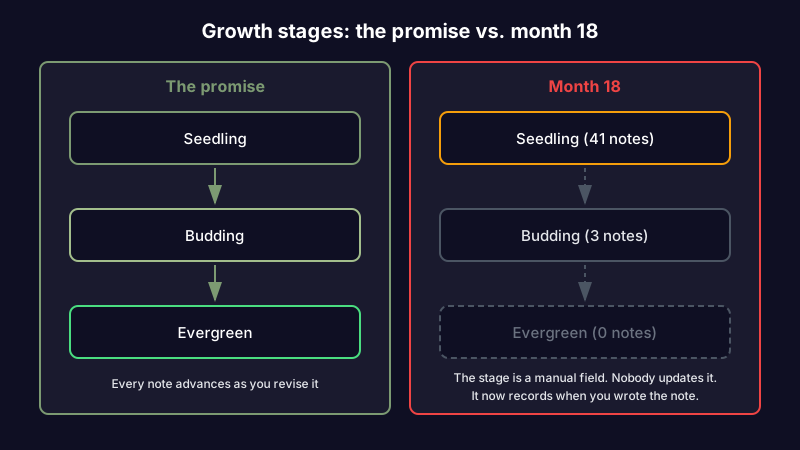
None of these need neglect to happen. They happen to gardens that are actively being added to. Adding is not tending. That's just as true of a commonplace book that only ever grows, the oldest collect-and-forget method, as it is of a garden.
The tools publish gardens. They don't tend them.
Look at what the ecosystem actually gives you. Quartz and Obsidian Publish turn a folder of markdown into a browsable site. Capacities and Notion give you objects, backlinks, and databases. Eleventy and Jekyll will happily build whatever you hand them.
Every one of these is good at what it does, and what they all do is publishing. They take the notes you have and put them on the internet, quickly and attractively. Not one of them has an opinion about whether the note you published fourteen months ago is still true. There is no tool in that list whose job is to come back later.
That's not a flaw in the tools. It's a category that doesn't exist yet in most people's stack. Static site generators were never going to check your facts.
The plugin ecosystem gets closest and still stops short. If you keep your digital garden in Obsidian, you can bolt on AI through Copilot, Smart Connections, Text Generator, or a Model Context Protocol connection to Claude Code.
We catalogued every way to add AI to Obsidian and the pattern held across all of them: they help you write the note and search the vault. They are reactive. You ask, they answer. None of them wake up on their own and tell you that the thing you wrote in March stopped being true in June.
Reactive AI cannot fix a problem whose defining feature is that you don't know to ask.
What tending actually takes
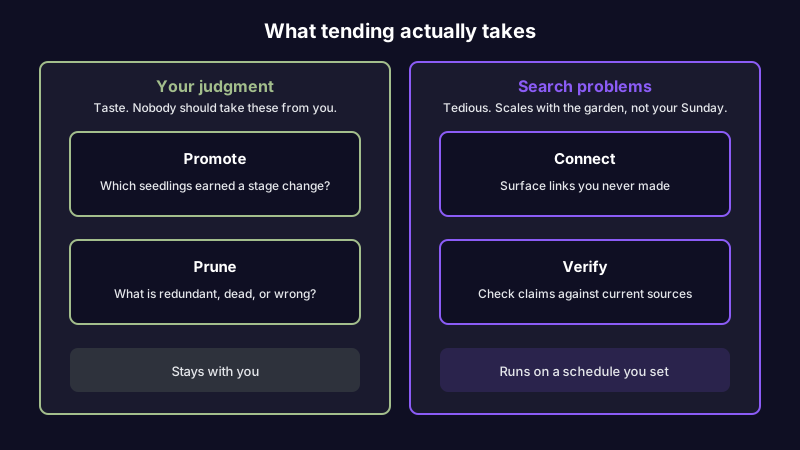
Strip the gardening language away and the maintenance job has four parts. This is what you'd be doing on that Sunday you keep not spending.
- Promote. Decide which seedlings earned a stage change, and which have been seedlings so long they should be compost.
- Connect. Find the notes that should link to each other and don't, especially the older ones you've forgotten.
- Verify. Check the external claims. Which facts moved? Which links are 404s? Which recommendation reversed?
- Prune. Remove or merge the notes that are redundant, abandoned, or wrong beyond repair.
Two of these are judgment and two are labor. Promoting and pruning are yours; they're about taste and what you think is worth standing behind, and no software should take them from you. Connecting and verifying are search problems. They're mechanical, they're tedious, and they're precisely the two that don't get done, because they scale with the size of the garden while your Sunday does not.
You can do this by hand. We've published a 30-minute weekly review system for exactly that, and it works, as long as you run it. The honest read on manual weeding is the same as the honest read on flossing: the people who need the routine most are the people who won't keep it.
A garden that tends itself
This is where Scribelet fits, and it's a narrow claim, so let me make it precisely: we automate the two mechanical jobs and leave the two judgment jobs to you.
Background agents check your notes against the web on a schedule you set. When a claim in a note no longer matches what the sources say, you get a diff: green for what's current, red for what's outdated, with a source link for each change.
You accept it or dismiss it. Nothing is rewritten behind your back, because a garden where the plants move on their own isn't a garden you own. That's AI verification, and it's the weeding, running whether or not you showed up on Sunday.
The auto-linker handles the other half. It reads your notes semantically and surfaces connections you didn't make, including to notes you wrote two hundred entries ago and no longer remember. That's the edge growth that normally stalls at the exact moment the garden gets big enough to be interesting.
Because this involves sending your notes to an AI provider, you should get to choose which one. Bring your own key (BYOK) means you connect your own OpenAI, Anthropic, or Gemini account; we encrypt the key at rest and your notes go to the provider you picked, not the one we picked for you. The BYOK setup takes about a minute. It's optional, since AI features work out of the box on the free plan, but for a public garden built on the premise that it's your plot, choosing the provider is part of the point.
Here's the honest limit. Verification works on notes that make external, checkable claims: the API reference, the pricing comparison, the summary of a paper, the recommendation with a link under it.
A garden of personal reflection and half-formed essays has less for it to check, and it will tell you less. If your garden is mostly you thinking out loud, the auto-linker will earn its keep and verification mostly won't. That's a real tradeoff and it's better said out loud than discovered in month three.
The reframe
The digital garden was never a publishing format. It was a promise about upkeep, made in a vocabulary borrowed from the one hobby where everyone already knows that upkeep is the entire activity. Then it got implemented as a publishing format, because publishing is the part software knew how to do.
A garden with no gardener isn't a garden. It's a lot. The plants are still there and the sign out front still says what it said, and that's precisely why it takes a while for anyone to notice, including you.
You already know which of your notes you'd flinch at if someone read it aloud today. That's the weeding list, and it's been sitting there getting longer. Set up your first desk and point it at those notes first.
Share this article