Zettelkasten with AI: the slip-box without the busywork
Table of contents
You set one up once. A clean Obsidian vault, a folder for atomic notes, a plugin to mint unique IDs, maybe a template with the three note types laid out. For a week or two it felt like your thinking finally had a home. Then the linking got tedious, the daily upkeep slipped, and the vault turned into a drawer of orphan notes you never open.
That arc is the most common thing that happens to a zettelkasten. The method promises a connected web of ideas that generates insight. What it hands most people is a second job, and the part that quietly kills it is not the writing. It is the manual maintenance the method was built to require.
This piece is for anyone who admires the idea of a zettelkasten but has watched their own system stall. We'll cover what the method actually asks of you, why so many slip-boxes die in the first month, which parts of it were only ever a workaround for paper, and what changes when AI does the linking and the upkeep instead of you.
What is a zettelkasten?
A zettelkasten is a note-taking system where every idea lives on its own small note, and those notes link to each other to form a network. The German word means "slip-box." The sociologist Niklas Luhmann built the most famous one, filling roughly 90,000 paper slips over several decades and crediting the system for dozens of books.
The mechanics of zettelkasten note-taking are simple to describe. You write in atomic notes, one idea per note, in your own words. You give each note a way to be referenced. Then you link it to the notes it relates to, so structure emerges from the connections rather than from a folder hierarchy you decided in advance.
Most modern practitioners also sort notes into three rough types, a framing popularized by Sönke Ahrens in How to Take Smart Notes: fleeting notes you jot in the moment, literature notes you take while reading a source, and permanent notes that capture a developed thought you want to keep. The permanent notes are the ones that compound. We walk that workflow step by step, and the point where it quietly stops paying out, in how to take smart notes. Their more fluid cousin, the evergreen note, makes the same promise and breaks it the same way. They're also the ones that quietly go wrong, which is where most of this article is headed.
What makes the method different from a folder of documents is emergence. You never design the outline. You write small, connect honestly, and after a few hundred notes a shape appears that you couldn't have planned, because it reflects how your ideas actually relate rather than how you guessed they would. That payoff is real. It just sits on the far side of a lot of manual effort that most people never get through.
It's also what separates a slip-box from the commonplace book, its older cousin: a commonplace book collects other people's words worth keeping, while a zettelkasten asks you to develop them into ideas of your own.
Why most zettelkasten systems die in three weeks
Search the note-taking forums and you'll find the same confession on repeat: the system looked beautiful and then became a chore. One of the pages that ranks for the method is literally an Obsidian forum thread arguing that zettelkasten is too complex for most people. That's the honest signal underneath the tutorials.
The failure isn't laziness. It's that the method front-loads work that never ends. Every new note needs an ID, and every note needs you to remember what it relates to and go create the links by hand. Every so often you're supposed to review the whole thing to keep it coherent. Do that across 40 notes and it's a pleasant hobby. Do it across 400 and it's unpaid labor.
Then there's the slower failure, the one nobody warns you about. A permanent note you wrote 18 months ago can still be linked, still be tagged, still look authoritative, and be flatly wrong. The link works. The idea inside no longer holds. This is knowledge decay, and a slip-box has no defense against it. Luhmann's notes referenced sociological theory that shifted over decades. Yours probably reference an API, a paper, or a market that shifts over months.
Curious what a maintenance-first approach looks like in practice? Our writeup on the living notes method covers the phase every note-taking system skips.
So a zettelkasten dies two ways. It dies fast when the manual linking exhausts you, and it dies slow when the notes that survived stop being true. That slow death is the step PARA leaves out too: every organizing method files a note without ever checking whether it still holds. Both problems come from the same root: the method assumes a human will do all the connecting and all the checking, forever.
The part of the method that was always a workaround
Here's the reframe. Luhmann's most-copied techniques were not the point of a zettelkasten. They were compensations for the limits of paper.
Unique numeric IDs existed because a paper slip can't be searched. If you wanted to find a note again, or point one note at another, you needed an addressing scheme, so Luhmann invented an intricate one.
Manual links existed because index cards can't discover their own relationships. A card sits in a box, inert, until a person physically threads a connection between it and another card. The daily discipline of reviewing and re-filing existed because paper has no way to resurface a relevant old note at the right moment.
Strip those away and what remains is the actual insight, the thing worth keeping: atomic notes in your own words, connected by meaning, so that structure emerges instead of being imposed. That principle is excellent. The Wikipedia entry on the method and the community reference at zettelkasten.de both center it, and it holds up.
The mechanics around it were a tax Luhmann had to pay because he worked with cardboard. You don't. A digital system can search itself, connect itself, and resurface its own notes. The question is whether your tool actually does that work, or just hands you a nicer-looking box and the same manual job.
The zettelkasten method with AI doing the linking
This is where an AI-native notebook changes the math. The single most tedious part of the practice, finding and creating the links between notes, is exactly the part a machine is good at.
| The zettelkasten job | On paper or manual Obsidian | With AI doing the work |
|---|---|---|
| Addressing a note | Unique IDs you assign by hand | Full-text and semantic search, no IDs |
| Linking | You find and create every link | Auto-linker suggests connections by meaning |
| Resurfacing old notes | Scheduled manual review | Daily digest and backlinks bring them back |
| Keeping notes true | Nothing catches decay | Background verification flags stale claims |
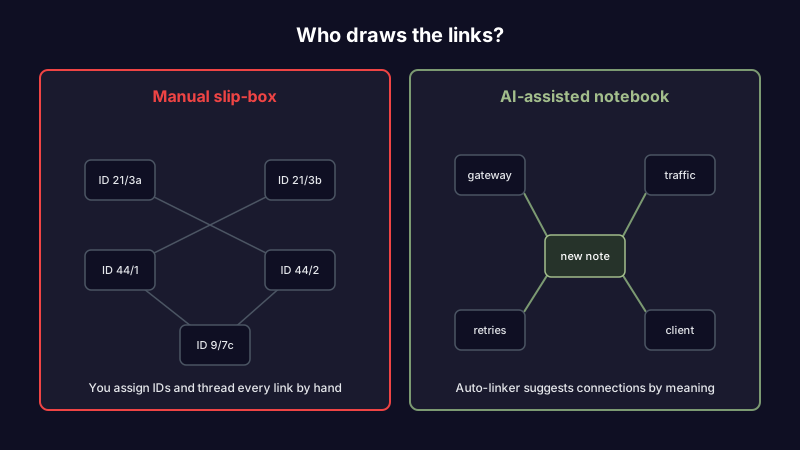
Write an atomic note in Scribelet and the auto-linker reads it for meaning, then surfaces the existing notes it relates to and suggests wikilinks you can accept or ignore. You still decide what connects to what. You just stop doing the manual search that made people quit. A backlinks panel shows every note that points at the one you're reading, so the web is visible instead of imagined.
The connections don't stop at links you approve. Scribelet builds a per-desk knowledge graph from the facts and relationships in your notes, mapping how people, projects, and terms relate. That graph is the modern version of Luhmann's numbered index, except you never number anything. Ask a question and the AI chat searches across your slip-box and answers from your own notes with citations, rather than making you re-read 30 cards to reconstruct a thread.
Consider the common case of the abandoned import. Someone moves 300 old notes into a fresh vault, fully intending to link them, and never does, because linking 300 notes by hand is a weekend nobody has. An auto-linker builds the web they were never going to build. The zettelkasten they wanted becomes the zettelkasten they have.
Want to see the auto-linker and knowledge graph on your own notes? Start free and connect your first few notes in a couple of minutes.
Keeping a zettelkasten accurate, not just connected
Linking solves half the problem. It does nothing for truth.
Picture a literature note in a research slip-box. It summarizes a study cleanly and links to three permanent notes that build on the finding. A year later the study is corrected, or retracted outright. Paper retractions have grown roughly tenfold since 2000, according to Retraction Watch, and the note has no idea. The link still resolves. The permanent notes downstream still cite it. You find out during peer review, after you've built on a foundation that cracked.
The developer version is faster and just as quiet. A permanent note captures a framework pattern that was correct when you wrote it. Two releases later the pattern is deprecated and throws errors. The note still links neatly into your engineering wiki. The next person who follows it loses a morning to it.
Scribelet's background verification is built for exactly this gap. Background agents search the web on a schedule you set, compare what they find against what your notes claim, and surface any discrepancy as a diff: green for new information, red for what's outdated, with a source link on every change.
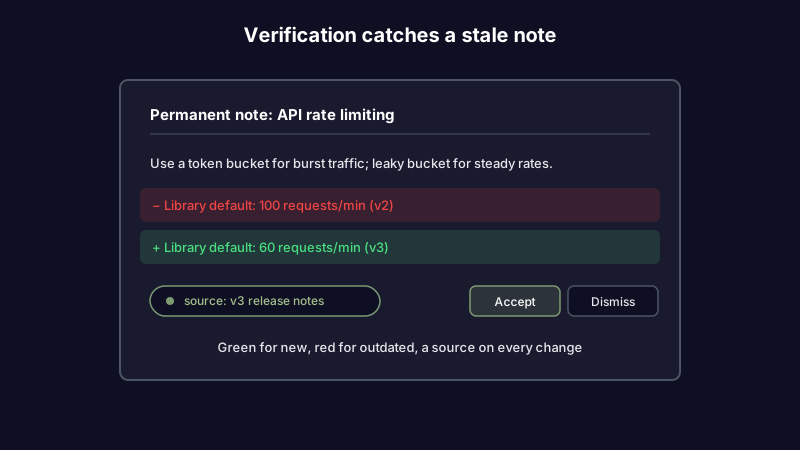
You review it in seconds, accept or dismiss, and the note stays trustworthy. The connecting is automated. The checking is automated. Your judgment stays in the loop where it belongs.
There's a third case that matters most to anyone billing for their thinking. A consultant pulls up a permanent note on a market they analyzed last quarter and reuses it in a new engagement. Two competitors have repriced since, and one shipped a feature that didn't exist when the note was written. Presenting it as current is a professional risk that compounds every time the note gets reused. Verification catches the drift before it reaches a client deck.
Because verification means your notes pass through an AI model, you get a choice about which one. Scribelet's AI works out of the box, and if you want provider control you can bring your own key from OpenAI, Anthropic, or Google. Your key is encrypted at rest, and your notes go to the provider you picked rather than one a vendor chose for you. That's the optional sovereignty path, not a setup step.
A zettelkasten example, start to finish
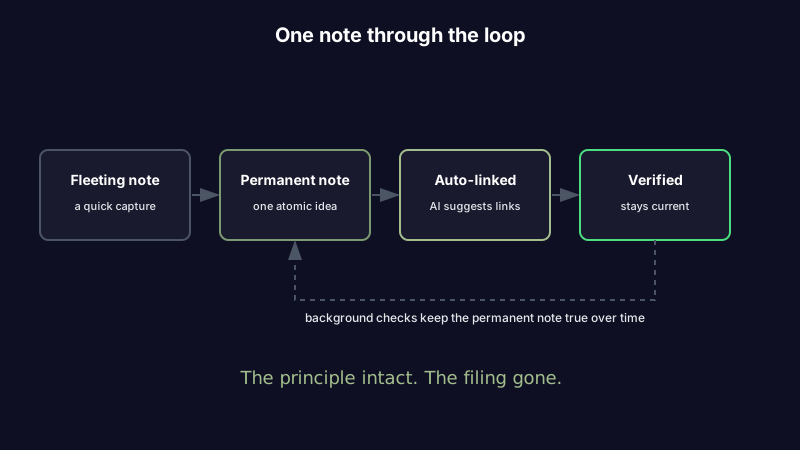
It helps to watch one note move through the whole loop, because the abstract version hides where the effort used to go.
You read a post about rate limiting and jot a fleeting note: "token bucket vs. leaky bucket, revisit for our API." Later you turn it into a permanent note in your own words, one idea, a few sentences on when each algorithm fits.
On a classic slip-box, this is where the labor starts. You'd assign the note an ID, then scan your other notes to remember that you already wrote something about API gateway design and something else about a client's traffic spikes, then create both links by hand.
In an AI-native version, you write the permanent note and stop. The auto-linker surfaces the gateway note and the traffic-spike note as suggested wikilinks; you accept both in two taps. The knowledge graph now knows this note relates to that client and that project, so a later question about their infrastructure pulls it in without you searching. Weeks on, a background check notices the rate-limiting library you referenced changed its default in a new release and shows you a diff. Same method Luhmann used. None of the filing he had to do.
That's the whole pitch in one note: the principle intact, the busywork gone.
How to start a zettelkasten in 2026
You don't need Luhmann's numbering scheme or a stack of plugins. The method reduces to a short loop, and the tool can carry most of it.
- Write atomic notes. One idea per note, in your own words. Keep them short enough to reuse.
- Link as you go, or let the auto-linker suggest connections after you write. Accept the ones that fit.
- Let the web resurface itself. A daily digest and backlinks panel bring related notes back to you instead of you hunting for them.
- Verify what matters. Put your source-heavy permanent notes on a background check schedule so decay gets caught before you act on it.
One honest tradeoff worth naming: AI linking suggests, it doesn't decide. It will occasionally propose a connection that doesn't belong, and you'll wave it off. That's the right division of labor. The machine handles the search across your whole slip-box; you keep the judgment about what actually relates. The thinking stays yours, which was always the point of a zettelkasten in the first place.
If you're running an Obsidian zettelkasten today, none of this asks you to abandon the concept. It asks you to stop paying the paper tax that Obsidian, faithful to the original method, still leaves on your desk. Our take on the best Obsidian alternative goes deeper on that switch if you're weighing it.
The slip-box, finally worth the effort
Luhmann built a machine out of paper because paper was what he had. The genius was the principle: small notes, connected by meaning, structure emerging from the network. The busywork of IDs, manual links, and endless review was never the insight. It was the cost of running that principle on cardboard, and it's the reason your version stalled in week three.
A zettelkasten worth keeping is one where the connecting and the checking happen without you becoming their full-time operator. Start a slip-box that links and verifies itself. Try Scribelet free.
Share this article