How to Take Meeting Notes That Turn Into Action
Table of contents
Here is the test every system for how to take meeting notes has to pass. It is Friday. Someone asks what the team decided in Monday's planning call and who owns the follow-up. You open your notes and find three screens of near-verbatim dialogue, no clear decisions, and an action item with no name attached to it. The meeting happened. The record did not.
That failure is almost never about writing faster. It is about writing down the wrong things. Good meeting notes are not a transcript; they are a short, scannable record of what was decided, who agreed to do what by when, and what is still open. This guide covers how to take meeting notes that pass the Friday test: the prep that takes a minute, the three things worth capturing while the meeting runs, a template you can paste in, how the method bends for a one-on-one versus a project kickoff, and the step most people skip, which is turning the notes into tracked work before they go stale. If your real worry is that half of what you write down quietly rots, Scribelet is free to try and is built for exactly that.
What are meeting notes, and how do they differ from minutes?
Meeting notes are a working record of a meeting: the decisions reached, the action items assigned, and the open questions left for next time, written to be acted on rather than filed. They are for the people who were in the room, or who need to catch up fast.
Meeting minutes are a different document. Minutes are the formal, often-approved record of a meeting (attendance, motions, votes, exact resolutions) kept for governance and compliance, the kind a board or a nonprofit is required to retain. If you are searching how to take good meeting notes for a weekly standup, you almost certainly want notes, not minutes. Reaching for the heavier format is the first way people make the job harder than it is.
| Meeting notes | Meeting minutes | |
|---|---|---|
| Purpose | Act on what happened | Formal legal/governance record |
| Audience | Attendees and catch-up readers | The organization, auditors, the record |
| Tone | Shorthand, scannable | Complete, precise, often approved |
| Captures | Decisions, actions, open questions | Attendance, motions, votes, resolutions |
| Typical use | Standups, 1-on-1s, planning, client calls | Board meetings, AGMs, official committees |
For the rest of this guide, we mean notes: the fast, useful kind.
Before the meeting: set up to capture, not transcribe
Thirty seconds of prep decides whether your notes are usable. Before the meeting starts, create the note and seed it with four lines: the date, the attendees, the one-sentence purpose, and the agenda items as empty headings. Now you are not writing on a blank page while people talk; you are filling in a structure.
The structure matters more than the tool, but the tool should at least sync, so the note you start on a laptop is the same note you finish on a phone. That is the baseline any note app that works on every device should clear. Title the note so you can find it in six months: "2026-11-19 Planning, Q1 roadmap" beats "Meeting notes" for the fortieth time.
One decision to make before you start typing: pen or keyboard. If the meeting is one where you need to understand and remember rather than produce a shared document, handwriting has an edge. There is research behind this. A widely cited study summarized by the Association for Psychological Science, Take Notes by Hand for Better Long-Term Comprehension, found that people who typed notes captured more words but tended to understand less, because transcribing verbatim skips the summarizing that builds memory. Treat it as a useful prompt rather than a hard law, but the practical lesson is not anti-laptop anyway; it is anti-transcription. Capture meaning in your own words, which is the same discipline behind taking smart notes in any setting.
During the meeting: the three things actually worth writing down
Here is the whole method. While the meeting runs, sort everything you hear into three buckets and ignore the rest.
- Decisions. What was actually decided, stated as a decision, not a discussion. "We are shipping the beta on Dec 1" is a decision. "We talked about the launch date" is not. If it was decided, write it on its own line and mark it clearly.
- Action items. Every task someone agreed to do, each with an owner and a due date. An action item without a name is a wish. "Priya: send the revised pricing deck by Thursday" is an action item; "we should update the deck" is not.
- Open questions. Anything raised and not resolved: a blocker, a dependency, a decision deferred to next time. These are the seeds of the next agenda, and they are the notes people most often lose.
Everything else, the context, the debate, the tangents, is background. You can capture a line of rationale when a decision is non-obvious, because the "why" is what you forget first, but you do not need the play-by-play. When someone goes off-topic with a real idea, drop it in a fourth spot, a "parking lot," so it is saved without derailing the meeting.
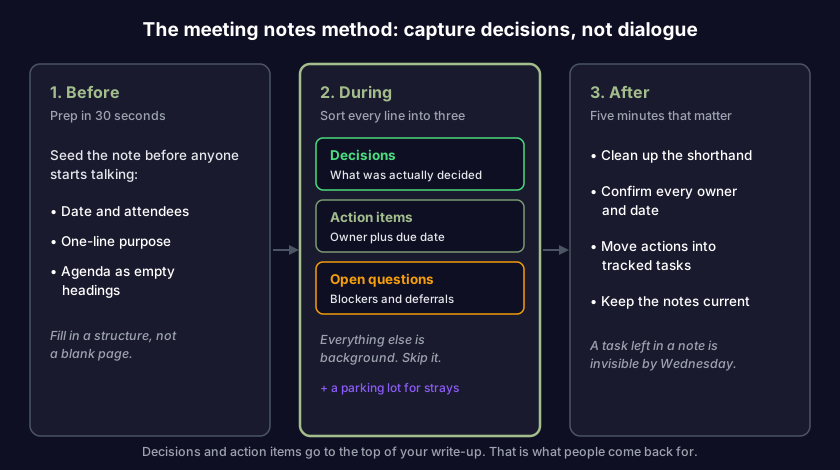
This decisions-actions-questions spine is what makes notes survive the week, because it is organized around what people come back for. Nobody reopens a meeting note to reread the discussion. They reopen it to find a decision or check who owns a task, which is why those two get the clearest formatting you can give them.
A meeting notes template you can paste in
Start every meeting from the same skeleton and you stop reinventing structure under time pressure. Paste this in, fill the top four lines before the meeting, and sort as you go:
# [Date]: [Meeting name]
Attendees:
Purpose:

## Agenda
- [topic 1]
- [topic 2]

## Decisions
- [decision] (why, if non-obvious)

## Action items
- [ ] [Owner]: [task] (due [date])

## Open questions
- [question / blocker / deferred decision]

## Parking lot
- [off-topic idea worth keeping]
The checkboxes on action items are deliberate: they turn the note into something you can actually work from afterward, not just read. Keep the Decisions and Action items sections at the top of your eventual write-up so the two things people need are the two things they see first.
How to take meeting notes for different meeting types
The spine stays the same; the emphasis shifts with the meeting. A one-on-one is mostly open questions and follow-ups; a board meeting is mostly decisions. Match the weight to the room.
| Meeting type | What to weight | Watch for |
|---|---|---|
| One-on-one | Follow-ups, commitments both ways, recurring themes | Carrying threads forward week to week |
| Daily standup | Blockers and today's commitments, kept to one line each | Writing a paragraph where a bullet will do |
| Project kickoff | Scope, owners, the first few decisions and risks | Vague ownership ("the team will") |
| Client or sales call | Requirements, objections, promised next steps and dates | Promising a date you did not record |
| Decision meeting | The decision, the rationale, who was in the room | Leaving with no written decision |
For anything where the output is a decision you will need to defend or revisit later, the meeting note is not the final home. A recurring decision belongs in a decision log: one durable line per decision, with the date and the reason, so six months from now you know not just what you chose but why. Meeting notes feed the log; they are not a substitute for it.
After the meeting: turn notes into action (and keep them current)
The five minutes after a meeting are worth more than the hour you spent in it. Before you close the laptop, do three things: clean up the shorthand while you still remember what it meant, confirm every action item has an owner and a date, and share the note where the team will actually see it.
Then do the step that separates notes that work from notes that die: move the action items out of the note and into wherever your team actually tracks work. A task sitting in a meeting note is invisible by Wednesday. Asana's guide, Meeting notes tips: how to take notes and track actions, frames the whole point of meeting notes as producing tracked actions, not just a record. This is where the method usually breaks, because the hand-off is manual and nobody has time, and it is exactly the kind of thing worth automating. Drop your rough notes into Scribelet and its AI pulls the decisions and action items into a clean structure, so the hand-off does not depend on you retyping anything; on the Pro plan you can dictate that recap by voice instead of typing it. You can run it on the model it ships with or plug in your own key; your notes stay yours. Scribelet is free to try.
There is a second, slower failure worth naming, because it is the one nobody designs for. The decision you captured was correct on Monday. By the time someone acts on it three weeks later, the price quoted has moved, the person assigned has left, or the plan was revised in a meeting they missed. Your note still shows the Monday version, word for word, because judging whether a line is still true was never a notes app's job. It is why even a tidy archive rots: the whole category is built to capture and organize, and then stop. Meeting notes get hit hardest, because they are mostly dated specifics: prices, deadlines, tool versions, links. That decay is the specific problem Scribelet exists to work on. It periodically re-checks the externally verifiable details in your notes against current sources and flags the ones that no longer match, pointing at what moved. It cannot know that a plan changed in a meeting you missed, but the dated facts a decision rested on are exactly the part it can catch. That is the difference between an archive and notes that stay current, and it is why a growing library of meeting notes does not have to quietly turn into a pile of things that used to be true.
What not to write down
Half of taking good notes is restraint. Skip the verbatim dialogue; nobody rereads it, and the research above says transcribing it hurts your own recall. Skip side conversations that reached no decision and assigned no task. Skip the attendee who repeated a point three times; record the point once. Leave out anything you would not want forwarded, because meeting notes travel.
This restraint has a cost argument behind it. Harvard Business Review reported in Stop the Meeting Madness that senior managers spend close to 23 hours a week in meetings, which makes the record of those meetings expensive by the hour. Notes that bury one decision under three screens of chatter waste that investment. A tight record of decisions, owners, and open questions is what makes the time spent in the room actually pay out later, the same way deliberate capture is what lets you remember what you read instead of just highlighting it.
The short version
How to take meeting notes, compressed: prep the note before the meeting with date, attendees, purpose, and agenda headings. During the meeting, write down only three things, decisions, action items with an owner and a date, and open questions, plus a parking lot for stray ideas; capture meaning in your own words instead of transcribing. Match the emphasis to the meeting type. Afterward, clean up, confirm every task has a name, share it, and move the action items into wherever you track work.
And the part no template covers: a meeting note is mostly dated specifics, and those start going wrong the moment the meeting ends. Writing them down is step one. Keeping them honest is the job most tools hand back to you. Start with Scribelet free, let its AI turn your rough notes into tracked actions, and let the dated facts in your notes flag themselves when they stop matching the world.
Share this article