Obsidian vs Notion: an honest 2026 comparison
Table of contents
You keep your project tracker in Notion, your actual thinking in Obsidian, and a third pile of half-formed ideas in whatever was open on your phone. Every few months you try to consolidate, lose a weekend to it, and go back to running both.
That split is the honest state of the Notion vs Obsidian debate. Most comparisons hand you a clean rule: Obsidian for private local notes, Notion for databases and teams. The rule is mostly right, and this guide gets to why, dimension by dimension, with a clear winner called on each.
But the rule answers the wrong question. It tells you which tool fits your workflow today. It says nothing about which notes you will still trust a year from now, after the APIs you documented have changed and the sources you cited have moved.
So this is a round-by-round comparison of Obsidian and Notion: who wins each dimension, what each one actually costs, how to move your notes from one to the other, and the single dimension neither of them measures.
Obsidian vs Notion at a glance
Notion is a cloud database that doubles as a note app, best for teams, structured data, and all-in-one workspaces. Obsidian is a local-first Markdown editor, best for private, fast, deeply linked personal notes. The honest split: Notion for collaboration and databases, Obsidian for ownership and thinking.
| Dimension | Notion | Obsidian | Winner |
|---|---|---|---|
| Where notes live | Cloud database on Notion's servers | Local Markdown files on your device | Obsidian |
| File format | Blocks, exportable to Markdown | Plain Markdown, yours by default | Obsidian |
| Speed and offline | Needs a connection; slows on big databases | Instant, offline-first | Obsidian |
| Databases and structured data | Relations, boards, calendars, filtered views | Plugins and discipline only | Notion |
| Linking and graph | Backlinks and database relations | Wikilinks plus an interactive graph | Tie |
| Collaboration | Real-time, built in | Paid sync or third-party services | Notion |
| Built-in AI | Notion AI, a paid add-on | None native; community plugins | Depends |
| Mobile and cross-platform | iOS, Android, web, desktop | Desktop and mobile as separate apps | Notion |
| Plugins and extensibility | ~200 integrations | 2,700+ community plugins | Obsidian |
| Pricing | Free plan; paid tiers per seat | Free for personal use; paid add-ons | Depends |
| Keeping notes accurate over time | None (manual) | None (manual) | Neither |
Notice the last row. Every comparison covers the others. Almost none covers that one, and it is the row that decides whether your notes are an asset or a liability. If you have watched your own notes drift out of date without noticing, our guide to knowledge decay explains why it happens to everyone, not just disorganized people.
The real difference: a database vs a folder of files
Most feature-by-feature debates miss the design choice underneath everything else, and it is the choice that decides every round below.
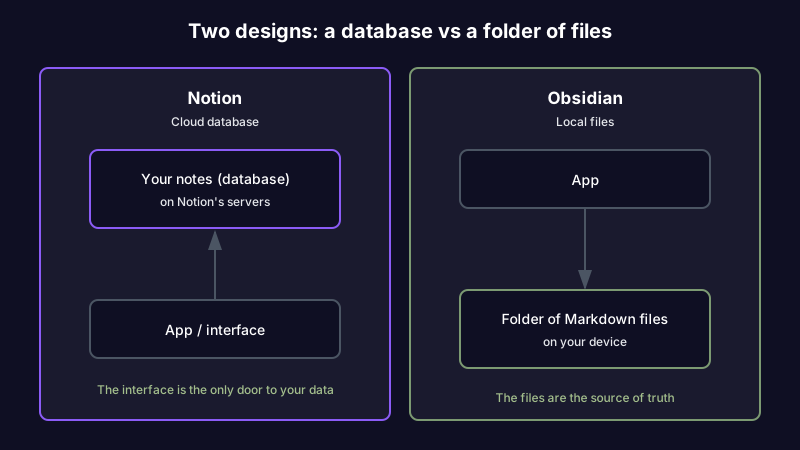
Notion's source of truth is a database living on Notion's servers. The interface is the door to your data, and for most practical purposes it is the only door. That is what makes Notion's databases, relations, and shared views possible, and it is also why exporting a large Notion workspace can feel like moving house.
Obsidian's source of truth is a folder of plain Markdown files on your own machine. The app sits on top of that folder and gives you ways to link, search, and visualize the files. A note can be read outside the app, backed up like any other folder, and opened in twenty years by anything that reads text.
Everything downstream follows from this. Notion trades ownership for collaboration and structure. Obsidian trades convenience for control. Neither choice is wrong; they are built for different fears.
Round by round: who wins each dimension
The at-a-glance table calls the winners. Here is the reasoning behind each one, so you can weight the rounds that matter to you and ignore the ones that do not.
Storage and ownership: Obsidian
Obsidian notes are plain text on your disk. They open without the app, survive the company folding, and back up like any other folder. Notion holds everything in a proprietary cloud database you reach through the interface. For anyone whose fear is lock-in or longevity, this round is not close.
Speed and offline: Obsidian
Obsidian opens instantly, searches without lag, and works on a plane. Notion needs a connection for most things and gets visibly slower as a workspace grows into thousands of blocks. If you capture fast and often, the difference is felt daily.
Databases and structured data: Notion
This is Notion's home turf. Turn a page into a table, a board, a calendar, or a gallery, and filter the same data a dozen ways without touching a plugin. Relational databases connect projects to clients to deliverables. Obsidian can approximate this with the Dataview and Bases plugins, but it is bolted on, not native.
Linking and organization: tie
Both do bidirectional links well. Notion links pages and database rows; Obsidian links files and renders an interactive graph. Obsidian's graph is prettier and its wikilinks are faster to write; Notion's relations carry structured meaning a backlink cannot. Which one wins depends on whether you think in connected notes or in structured records.
Collaboration: Notion
Real-time multi-user editing is built into Notion, not bolted on. A five-person team can run its roadmap, meeting notes, and customer feedback in one workspace, each view filtered to what that person needs, and a non-technical teammate is productive in an afternoon. Obsidian is a solo tool unless you pay for sync and add third-party services, and even then it is not built for concurrent editing.
Built-in AI: depends
Notion AI is a capable writing and summarizing assistant folded into the paid plans. It is reactive by design: you prompt it, it answers. Obsidian ships no native AI, but its community plugins and external agents let you wire up almost anything, including local models. If you want AI that works out of the box, Notion wins; if you want to choose your own model and route, Obsidian's openness wins. The wider set of AI options for Obsidian is worth a look before you decide this round.
Mobile and cross-platform: Notion
Notion runs the same workspace across iOS, Android, web, and desktop, syncing for free. Obsidian has good mobile apps, but syncing them means the paid Obsidian Sync add-on or a DIY setup. If running your notes across a phone, tablet, and laptop is the real requirement, it is worth weighing both against a note app that works well on every device without a sync surcharge.
Plugins and extensibility: Obsidian
Obsidian's community catalog runs past 2,700 plugins, from kanban boards to spaced repetition, which means the app can become almost anything, including a rough approximation of Notion. Notion has roughly 200 integrations and a more closed model. Obsidian is one of several apps built on that plain-text, extensible idea; we weigh the wider field in our guide to markdown note apps compared.
Learning curve: split
Notion is easier to start. You type a slash, pick from a menu, and have a usable page in minutes. Obsidian is easier to master, because a folder of Markdown files never hides how it works. The common failure mode runs the other way, though: Notion tempts you into engineering an elaborate system, while Obsidian's blank vault gives you no opinion about what to build.
What each one actually costs
Pricing is where the AI overview and most comparisons go vague. Here are the real shapes, current as of 2026. Both companies adjust plans, so confirm the exact figure before you commit a team.
| Plan | Notion | Obsidian |
|---|---|---|
| Free tier | Full personal use, generous limits | Full personal use, no time limit |
| Individual paid | Plus, roughly $10 per user per month billed annually | None needed; personal use is free |
| Team or business | Business, roughly $15 to $20 per user per month, with more AI | Commercial license, roughly $50 per user per year for work use |
| AI | Bundled into paid plans (was a per-seat add-on) | None native; you supply your own via plugins |
| Sync across devices | Included in every plan | Obsidian Sync add-on, roughly $4 to $8 per month |
| Publishing to the web | Public pages included | Obsidian Publish, roughly $8 per month per site |
The honest read: for a solo user, Obsidian is free forever and Notion is free until you want AI or history. For a team, Notion's per-seat cost buys collaboration Obsidian cannot match at any price. Neither bill includes the cost that actually bites, which is the time you spend later finding out a note went stale.
Switching between them: the migration paths
Nobody mentions the exit until you need it, so here is the reality in both directions. Packing is the easy part in any direction, and it is worth being honest about what you are actually moving: a years-old archive is rarely as intact as you remember it.
| Moving | How it goes | What breaks |
|---|---|---|
| Notion to Obsidian | Export the workspace as Markdown and CSV, then open the folder as a vault | Databases flatten into files plus CSVs; relations, rollups, and filtered views do not survive; internal links need cleanup |
| Obsidian to Notion | Import the Markdown files into Notion pages | Wikilinks and the graph do not carry; nested folders become nested pages; plugin-rendered content is lost |
| Either to a fresh start | Both export to plain Markdown, the portable format | Formatting quirks and embeds; the notes themselves travel fine |
The asymmetry is the point. Obsidian exports cleanly because the files were always plain text. Notion exports lose the database structure that made Notion worth using, because that structure lived in the cloud, not in the files. Plan your entry with your exit in mind.
The questions everyone asks
Can Notion replace Obsidian?
For structured, collaborative work, yes. For a private, offline, plain-text thinking space, no. Notion can hold your notes, but it holds them in a cloud database you do not own, and it is slower for fast capture. People who leave Obsidian for Notion usually miss the speed and the ownership; people who leave Notion for Obsidian usually miss the databases.
What are the downsides of Obsidian?
You own the maintenance. There is no native AI, sync across devices is a paid add-on or a DIY project, and the blank-vault problem is real: a tool that can be anything gives you no opinion about what it should be. The graph looks beautiful and tells you nothing about whether the notes inside it are still true. One more, quietly: fewer plain-text tools hold that line than used to, and the outliner closest to Obsidian moved its notes into a database in 2026, which we cover in the file question behind Obsidian vs Logseq.
Is Notion overkill for personal use?
For most individuals, yes. A solo user rarely needs relational databases to keep a few hundred notes, and the common failure mode is spending more time engineering the system than using it. You can watch this play out in any Notion vs Obsidian thread: someone builds an elaborate second brain with linked databases, and three weeks later admits they are maintaining the scaffolding more than thinking with it. A methodology is not a maintenance plan. The setup is the easy part. Keeping it trustworthy is the part nobody budgets for.
Does anyone still use Notion?
Yes, in large numbers, especially teams and startups running everything from one workspace. The "everyone is switching to Obsidian" narrative is loud on Reddit and quiet in company wikis. Both tools are growing; they are just growing with different users. The switch stories you see are mostly solo thinkers, not the five-person teams Notion was built for.
The question neither answers: will you trust these notes next year?
Here is the dimension every Obsidian vs Notion comparison skips. Both tools are exceptional at getting information in and organizing it once it is there. Neither does anything about what happens to that information afterward.
A developer writes a careful guide to a payment API integration. Eight months later the provider deprecates the OAuth scope the guide depends on. The note still looks authoritative in both Notion and Obsidian. The next teammate to follow it spends a morning chasing 401 errors before realizing the doc went stale. The editor was never the problem. The accuracy was.
This is knowledge decay, and it is a property of information, not a failure of discipline. Technical docs decay in weeks, research citations get retracted, competitor data shifts, and links rot. Your vault does not know. Your workspace does not care. As we have argued before, every note-taking method skips a maintenance phase between organizing a note and trusting it.
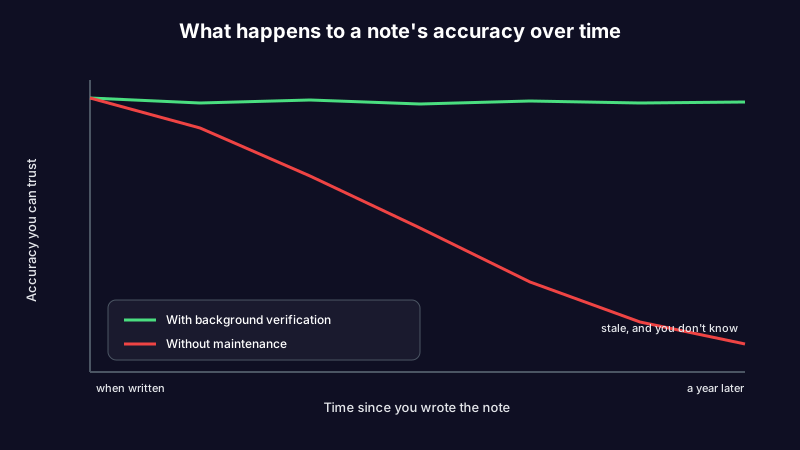
Notion's AI does not close this gap, because reactive AI only works when you already suspect something is wrong and think to ask. Obsidian's plugins do not close it either, because they automate capture and formatting, not verification. The honest answer to "Obsidian or Notion" is that for keeping notes accurate over time, the score is zero to zero.
A third option: ownership plus maintenance
This is where a different kind of tool enters the comparison, and where we are upfront that we built one.
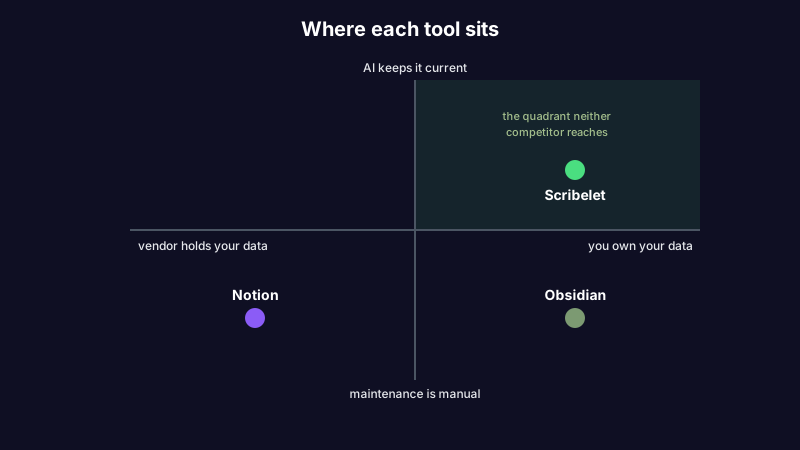
Scribelet starts from Obsidian's ownership instinct and adds the proactive AI Notion only gestures at. Background agents search the web on a schedule you set, compare what they find against what you wrote, and surface the difference as a diff: green for new information, red for what is outdated, with a source link on every change. You review, accept or dismiss, and the note stays current without a manual audit. That is how background verification works, and it is the maintenance layer neither Notion nor Obsidian offers.
A consultant reopens last quarter's competitor analysis for a new pitch. Two rivals changed pricing; one shipped a feature that did not exist when the note was written. In Notion or Obsidian, nothing flags the drift. With scheduled verification, the changes are waiting as a diff before the meeting, not discovered during it.
The ownership story holds too. You can bring your own key and route AI through OpenAI, Anthropic, or Gemini, with the key encrypted at rest, so your notes go to the provider you trust rather than one a vendor chose for you. BYOK is optional; the AI works out of the box. Notes connect with the same wikilinks Obsidian users already know.
The honest tradeoff: Scribelet is not a Notion-style all-in-one with relational databases and kanban boards, and it is not a bare local vault you mold with plugins. It is for people whose notes need to stay accurate, not just organized.
Obsidian vs Notion vs Scribelet: which should you choose?
The decision comes down to what you are most afraid of losing. Match your situation to the row.
| Your situation | Best fit | Why |
|---|---|---|
| Small team running projects and docs together | Notion | Real-time collaboration and databases are the whole point |
| Solo thinker who wants speed and offline plain text | Obsidian | Ownership and instant local files, no sync surcharge |
| Developer keeping technical notes that go stale fast | Scribelet | Background verification catches the decayed API doc for you |
| Student or researcher juggling sources | Obsidian | Plain-text vault plus the graph, portable across years |
| Anyone whose real pain is not trusting old notes | Scribelet | The maintenance layer neither incumbent has |
| You want AI you prompt for drafts | Notion | Notion AI is reactive and built in |
| You want AI that checks your notes for you | Scribelet | Scheduled diffs, not prompts |
If you have already decided one of the incumbents is not it, we sorted the Notion alternatives by what actually broke and did the same for the best Obsidian alternative, because the right replacement is different for speed, for AI fatigue, and for lock-in. And if you landed here on your way out of a heavier all-in-one, we ranked eleven OneNote alternatives by the reason you are leaving the same way.
Want to see the difference for yourself? Start free, run your first verification, and watch what a diff actually catches. The Pro plan is $8/mo or $79/yr when you want the full set.
The comparison that measures the wrong year
Run the standard Obsidian vs Notion comparison and you get a fair answer to a narrow question: which tool fits the way you work right now. Notion wins on collaboration and databases. Obsidian wins on ownership and speed. Both answers are correct, and both miss the part that actually decides whether a knowledge base survives.
A note is only as valuable as it is true. The editor you pick determines how pleasant it is to write; it does nothing about whether what you wrote is still accurate six months later. That is the real failure mode behind every abandoned second brain, and it is the one dimension this debate keeps leaving out.
If staying accurate is what you care about, start writing with background verification and see your first diff.
Share this article