Obsidian vs Apple Notes: an honest 2026 comparison
Table of contents
The fastest way to start an argument among people who take notes is to ask whether Obsidian or Apple Notes is better. Both camps are right, because they are answering different questions. One person reaches for Apple Notes to jot a grocery list from the lock screen before the thought is gone. Another has spent two years building a linked vault in Obsidian that maps how every idea connects to every other. Neither is using the tool wrong. They are just not using it for the same thing.
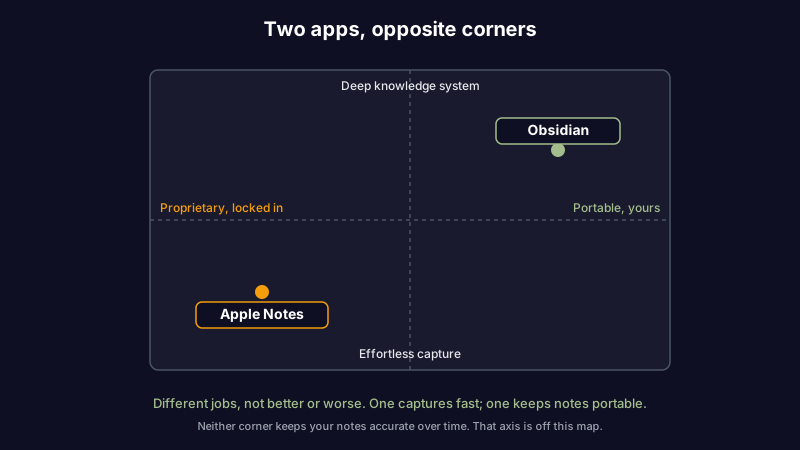
That is the flaw in most Obsidian vs Apple Notes comparisons. They stack features in two columns as if the apps are racing to win the same event, when Apple Notes is trying to be the frictionless pocket notebook that is already on your phone and Obsidian is trying to be a knowledge system you own outright. Score them on feature count and you will pick the one that looks busier, not the one that fits how you actually work.
So here is a round-by-round comparison: who wins each dimension, where your notes actually live, how hard it is to move them, and the single thing neither app does. By the end you will know which one suits the way you think. And if the honest answer turns out to be "both," you will know how to run them together without the seam showing.
Obsidian vs Apple Notes at a glance
Apple Notes is Apple's built-in notes app: instant capture, handwriting, scanning, and tight iCloud sync, best for anyone who lives inside the Apple ecosystem and wants zero setup. Obsidian is a local-first knowledge base built on plain Markdown files, with backlinks, a graph view, and community plugins, best for people building a long-term, portable thinking system. The honest split: Apple Notes for capture, Obsidian for connection and ownership.
| Dimension | Apple Notes | Obsidian | Winner |
|---|---|---|---|
| Core model | Frictionless native capture | Local Markdown knowledge system | Depends |
| Quick capture and handwriting | Instant, lock-screen, Apple Pencil, scanning | No native handwriting; capture needs the app open | Apple Notes |
| Cross-platform reach | Apple devices only (plus iCloud.com web) | macOS, Windows, Linux, iOS, Android | Obsidian |
| Linking and knowledge graph | Folders, tags, Smart Folders, no graph | Bi-directional links, backlinks, graph view | Obsidian |
| Customization and plugins | None (fixed, out of the box) | Large community plugin and theme ecosystem | Obsidian |
| Offline access | Full offline on every Apple device | Full offline; files live on disk | Tie (both strong) |
| Built-in AI | Apple Intelligence on recent hardware | None built in; plugins or bring your own | Depends |
| Where notes live | Proprietary store synced through iCloud | Plain .md files in a folder you control | Obsidian |
| File format and export | Apple's own format; export resists you | Markdown you already own; nothing to export | Obsidian |
| Pricing | Free with your Apple device | Free for personal use; optional paid add-ons | Depends |
| Keeping notes accurate over time | None (manual) | None (manual) | Neither |
Read the last row before any of the others. Every comparison online covers the rows above it. Almost none covers that one, and it is the row that decides whether your notes stay an asset or quietly become a liability. If you have ever opened a note you trusted and found it half wrong, our guide to knowledge decay explains why it happens to everyone, not just the disorganized.
Now the rounds.
Round 1: Core model, capture vs knowledge system
This is the whole decision in one dimension, so it goes first.
Apple Notes behaves like the notebook that is always within reach. It is already on your iPhone, iPad, and Mac, signed in, synced, one tap from the lock screen. You open it and you are writing. The structure is deliberately light: folders, subfolders, tags, and Smart Folders that gather notes by rule. It is built so that capturing a thought costs you nothing.
Obsidian behaves like a workshop you build over time. Every note is a plain text file on your disk, and the power comes from connecting them: type [[ and link one note to another, then watch the backlinks and the graph reveal structure you never planned. Obsidian rewards people who want their notes to compound, where today's note is wired into everything related you have ever written.
The mistake is reading this as better versus worse. It is capture versus connection. If your notes are fleeting, lists, reminders, a photo of a whiteboard, Apple Notes fits the moment. If your notes are a body of knowledge you return to and build on, Obsidian's links fit the long game. Most people lean one way the instant they stop counting features and ask what their notes are actually for.
Winner: depends. Fast capture goes to Apple Notes. A connected, lasting system goes to Obsidian.
Round 2: Quick capture and handwriting
Apple Notes wins this one cleanly, and it is not close.
Capture is where Apple Notes was born. Open it from the lock screen, the Control Center, or a tap on the back of the phone, and you are typing in under a second. On an iPad you write by hand with the Apple Pencil, convert that handwriting to text, scan a document straight into a note, and sketch a diagram inline. There is no decision to make before you can write, which matters far more than it sounds when you are trying to catch a thought before it evaporates.
Obsidian has no native handwriting, and capture always runs through the app. You open Obsidian, choose or create a note, and then write. On desktop that is quick. On mobile it is a few taps more than Apple Notes, and the gap is exactly the friction that decides whether a passing idea gets recorded at all. Obsidian is where you organize and connect what you captured, not usually where you capture it in the first place.
If you handwrite, sketch, or want the lowest-friction "just get it down" surface, Apple Notes wins before the other rounds begin.
Winner: Apple Notes.
Round 3: Cross-platform reach
Here Obsidian takes the lead, and for a lot of people this single round ends the debate.
Apple Notes runs on Apple hardware and nowhere else. Mac, iPhone, iPad, and a stripped-down web view at iCloud.com. If every device you touch has an Apple logo, that is invisible. The moment a Windows laptop, an Android phone, or a Linux box enters your week, Apple Notes stops being an option on that device, and your notes are effectively trapped behind the ecosystem boundary.
Obsidian runs on macOS, Windows, Linux, iOS, and Android, reading the same Markdown files everywhere. Your vault is the same vault on every platform. For anyone who works across operating systems, or who refuses to let a notes app dictate which phone they buy next, that reach is decisive. We make the same case in our guide to picking a cross-platform note-taking app: the tool that follows you everywhere beats the one that is slightly nicer on a single device.
Winner: Obsidian.
Round 4: Linking, backlinks, and the knowledge graph
This is Obsidian's home turf, and it is just as lopsided as Round 2 was the other way.
Obsidian is built around bi-directional links. Reference another note and both notes now know about each other, so you can follow a thread of thinking in either direction. The graph view turns your vault into a map of how ideas connect, and plugins extend that into dashboards, spaced repetition, canvas boards, and more. For a research library, a zettelkasten, or any body of knowledge where the connections are the point, nothing in Apple Notes comes close.
Apple Notes organizes with folders, tags, and Smart Folders, and links one note to another manually, but it has no backlinks and no graph. You can find a note. You cannot see the web it sits in. For simple structure that is fine. For thinking that grows by connection, it is a ceiling you hit early.
Winner: Obsidian.
Round 5: AI features
Both have an AI story now, and the split follows the same ecosystem lines as everything else.
Apple Notes leans on Apple Intelligence, which can summarize a note, rewrite a passage, and clean up handwriting, with much of it running on device for privacy (Apple Intelligence). The catch is hardware: the features only appear on recent iPhones, iPads, and Macs, so an older device gets none of it. Obsidian ships no built-in AI at all. Instead you add it through community plugins, which means you choose the model and, often, bring your own API key.
The honest caveat for both is the same, and it is the one the marketing skips. AI that writes into your notes raises a question neither app answers: is what it wrote still true next month? An assistant that confidently restates an outdated fact is worse than no assistant. That is why we treat AI fact-checking for notes as a discipline separate from generation, and why the control you have over the model matters as much as the model itself.
Winner: depends. Apple Intelligence if you own recent Apple hardware and want zero setup. Obsidian plus a plugin if you want to pick the model and keep control.
Round 6: Pricing
Apple Notes is free. It comes with the device, and the only cost is iCloud storage if your notes and attachments outgrow the free tier, which text notes rarely do on their own.
Obsidian is free for personal use, and stays free for the core app no matter how large your vault grows. The optional costs are add-ons: Sync for official end-to-end encrypted sync across devices, and Publish for putting notes on the web. Neither is required. You can sync a vault yourself through any file-sync service and never pay Obsidian a cent (Obsidian pricing).
For a solo user, both can cost nothing. The real price difference is not dollars. It is what you are tied to: Apple Notes is free as long as you stay on Apple hardware, while Obsidian is free and goes wherever you do.
Winner: depends on what you already own.
Round 7: Migration, and the lock-in nobody mentions
This is the round that should change how you read all the others.
Getting out of Apple Notes is genuinely hard. Notes live in Apple's proprietary store, and exporting them cleanly, with attachments, formatting, and handwriting intact, resists you at every step. There is no "export my vault as files" button, because in Apple's model there is no vault, only the app. Obsidian, by contrast, is already just a folder of Markdown files. There is nothing to export, because nothing was ever locked in. Obsidian even ships an official importer to pull your Apple Notes across into durable Markdown (Obsidian Apple Notes Importer), which tells you which direction the escape hatch points.
Step back and the pattern is clear. Apple Notes locks your notes inside an app tied to one company's hardware. Obsidian hands you plain text files you own forever, readable by any editor, today and in ten years. This is the core of Obsidian's "file over app" philosophy, and it is the strongest reason people switch. If owning your notes in a portable format is what you care about most, the comparison is already over, and the same logic drives people toward plain Markdown note-taking apps or a dedicated Obsidian alternative when Obsidian itself asks for more tinkering than they want.
But owning the files only solves half the problem. Plain Markdown in a folder is portable and yours, and it is also completely on its own: nothing syncs it securely across devices unless you wire that up, and nothing checks whether what you wrote is still accurate. That open gap is where the real question lives.
Winner: Obsidian. It traps nothing. The catch is that ownership is the floor, not the finish line.
The dimension neither tool measures
Every round above is about where your notes live and how you edit them. None of it touches whether your notes are still true.
A note is a snapshot of what you understood on the day you wrote it. The API you documented ships a breaking change. The price you noted goes up. The link you saved rots. Neither Apple Notes nor Obsidian has any idea this is happening. They store what you wrote and hand it back a year later with the same confidence, long after half of it stopped being accurate. This is the uncomfortable truth we build Scribelet on: knowledge has a half-life, and most tools pretend it does not.
That is the row both apps score zero on, and it is the one we care about most. Scribelet runs background checks that compare your notes against current sources and show you a diff when something has changed, so the notes you rely on stay trustworthy instead of quietly going stale. You bring your own API key, we encrypt it at rest, and you see exactly what changed and why, your keys and your models, not ours. If you keep sensitive notes, a secure note-taking app that encrypts your content and never trains on it matters more than any feature checklist. Try it free.
So which should you choose?
Strip away the feature lists and it comes down to how you think and where you work.
- Choose Apple Notes if you live entirely on Apple devices, you capture fast and loose, you handwrite or scan, and you want a notes app that needs zero setup and is already in your pocket.
- Choose Obsidian if you want a connected, lasting knowledge system you own outright: backlinks, a graph, plugins, plain-text files, and the freedom to work on any operating system.
- Run both if your honest answer is that you capture everywhere and think deeply in one place. Many people use Apple Notes as the inbox and move the keepers into Obsidian, which the top of this field quietly agrees is the sanest setup.
- Reach past both if what you care about most is keeping your notes accurate over time. That is the gap each of them leaves wide open.
If you are still weighing the wider field, our Notion vs Obsidian and Obsidian vs OneNote comparisons cover the two apps most people consider next. The best note-taking tool is not the one with the most features, or even the one you own most completely. It is the one whose notes you will still trust after everything in them has had a year to change.
Share this article