The Best Markdown Note-Taking App in 2026: 11 Compared
Table of contents
You picked markdown for a good reason. You were tired of notes trapped inside a proprietary format, tired of an app that could disappear and take your writing with it, tired of copy-pasting out of a rich-text box that mangled the formatting. Plain text with a little structure felt like the honest choice, and it was.
So you go looking for a markdown note-taking app and find a crowded field, each tool promising the cleanest editor and the truest plain-text soul. Most roundups rank them on the same three traits: does it store real .md files, does it sync, does the editor feel nice.
Those traits matter, and this guide covers them app by app. But it also gives you something the comparison tables leave out: a five-minute test you can run on any candidate to find out whether "supports markdown" actually means your notes are portable. Several popular apps fail it. And at the end there is the question none of the eleven answers, which is the reason we built Scribelet's Free plan the way we did.
What is a markdown note-taking app?
A markdown note-taking app is a note tool that stores your writing as plain text using markdown syntax: # for headings, * for emphasis, - for lists, [ ]() for links. Because the underlying file is plain text, you can read it in any editor, move it between tools without conversion, and keep it long after the app that made it is gone.
That last part is the real appeal. Markdown is a format you own. It was published by John Gruber in 2004 as a way to write structured text that stays readable as plain text, and it has since been standardized as CommonMark, which means a heading you write today parses the same way in ten years. No vendor controls it. No subscription unlocks it. Your notes are a folder of text files, and text files outlive every app.
The catch, which the next section will make concrete, is that "markdown app" describes two quite different things. Some tools keep a folder of .md files you can open in any editor. Others store notes in a database and let you type markdown syntax. Both are marketed identically. Only one of them gives you the portability you came for.
The best markdown note-taking apps at a glance
| App | Platforms | Real .md files on disk | Sync | Price | Best for |
|---|---|---|---|---|---|
| Obsidian | Mac, Win, Linux, iOS, Android | Yes | Paid add-on | Free personal use | Power users who want plugins and a graph |
| Logseq | Mac, Win, Linux, iOS, Android | Yes | Paid or self-host | Free, open source | Outliners and block references |
| Joplin | Mac, Win, Linux, iOS, Android | Export only | Your own backend | Free, open source | End-to-end encryption you can audit |
| Bear | Apple only | No, database | iCloud | Subscription | The prettiest editor on Apple devices |
| Typora | Mac, Win, Linux | Yes | None built in | One-time purchase | Pure inline editing, one file at a time |
| iA Writer | Mac, Win, iOS, Android | Yes | iCloud or Dropbox | One-time purchase | Long-form drafting |
| Inkdrop | Mac, Win, Linux, iOS, Android | No, database | Built in | Subscription | Developers who want code-first notes |
| Notable | Mac, Win, Linux | Yes | None built in | Free | A free desktop app over a folder you own |
| Zettlr | Mac, Win, Linux | Yes | None built in | Free, open source | Academic writing with citations |
| Simplenote | Mac, Win, Linux, iOS, Android, web | Export only | Built in, free | Free | The lightest cross-platform option |
| Scribelet | iOS, Android, web | Markdown source of truth | Built in, offline queue | Free tier | Notes that have to stay accurate |
Read down the third column and the field splits in a way no marketing page admits. Three of these eleven do not put a .md file anywhere you can reach it.
The 11 best markdown note-taking apps, compared
Each of these is genuinely good at something. The verdicts below say who should pick it and, more usefully, who should not.
Obsidian: best for power users who want plugins and a graph
Obsidian is the default recommendation for a reason. It points at a local folder of .md files, has the largest plugin ecosystem in the category (which is also where the AI plugins for Obsidian live, since it ships none natively), and its graph view made networked note-taking mainstream.
The tradeoffs are real. The desktop app runs on Electron so it is heavier than it looks, the mobile app is a separate and less-loved build, and reliable syncing between devices runs through a paid add-on.
Pick it if you want the deepest customization available and you enjoy assembling your own setup. Skip it if you want something that works well on day one without plugins, or if paying for sync on top of a free app annoys you. We wrote a guide to picking an Obsidian alternative sorted by exactly why people leave.
Logseq: best for outliners and block references
Logseq takes the outliner path. Everything is a bullet, notes are block-referenced rather than page-linked, and it stores local markdown. If you think in outlines, it fits your head better than anything else here.
Its 2.0 direction moves the canonical copy of your notes into a database rather than files, which matters a great deal if plain text is the reason it is on your list.
Pick it if you think in nested bullets and want block-level linking. Skip it if you think in documents, or if the database shift worries you. Read what Logseq's database switch changes before committing, and see what to use instead of Logseq if it is a dealbreaker.
Joplin: best open-source app with end-to-end encryption
Joplin is the option you can audit. It is open source, supports end-to-end encryption, and syncs through a backend you choose: Dropbox, OneDrive, S3, WebDAV, or its own paid cloud. The web clipper is the best in this list.
The honest caveat is storage. Joplin keeps notes in a local database and writes markdown on export, so the folder-of-files experience is not what you get day to day.
Pick it if encryption and self-hosting outrank editor polish for you. Skip it if you want to open your notes folder in another editor without exporting first, or if a utilitarian interface will bother you.
Bear: best-looking markdown app on Apple devices
Bear is the most beautiful note app on Apple platforms. The typography is careful, the nested-tag organization is elegant, and it feels native because it is.
Two walls. It is Apple-only, so the moment an Android phone or a Windows laptop enters your life it is off the table. And it stores notes in a database using its own markdown-flavored markup, so what you have is markdown-style writing with an export button, not a folder of files.
Pick it if you are entirely inside Apple's ecosystem and want the nicest writing experience money buys. Skip it if you have any non-Apple device, or if you want to reach your notes without opening Bear.
Typora: best pure markdown editor
Typora renders markdown inline as you type, with no split preview pane, and the result is close to writing in a clean document while producing real .md files. It is a one-time purchase after a trial, which is increasingly rare.
It is not an organization system. There is no sync, no linking layer, no library. It edits files, beautifully.
Pick it if you already have a folder structure and a sync method and just want the best editor to sit on top of them. Skip it if you want the app to organize anything, or if you need your notes on a phone.
iA Writer: best for long-form drafting
iA Writer is the writer's markdown app: focused, distraction-free, opinionated about typography and about keeping you in the text. Focus mode and syntax highlighting for parts of speech are genuinely useful when you are drafting something long. It writes real .md files and syncs through iCloud or Dropbox.
Pick it if most of what you write is prose that will eventually be published somewhere. Skip it if you want a sprawling knowledge base with hundreds of interlinked notes. It is a writing tool, not a library.
Inkdrop: best markdown note-taking app for developers
Inkdrop is built for people who paste code into notes. Multi-language syntax highlighting, a vim mode, a plugin API, and cross-platform apps that all sync through its own service without configuration. If your notes are half snippets, it is the most comfortable option in this list.
It is subscription-only with no free tier, and notes live in its database rather than a folder you browse.
Pick it if you take code-heavy notes on several machines and want sync that just works. Skip it if you want a free option or file-level access to your own notes.
Notable: best free desktop app over a folder you own
Notable works directly on top of a local folder of .md files, with no proprietary database in between, which means you can edit the same notes in any other editor at any time. It is free, and it is the plainest expression of the "your notes are just files" idea in this list.
It is desktop-only, and development has been quiet for a while. That is survivable precisely because the notes are plain files: if it stops, nothing is trapped.
Pick it if you want a free, honest desktop editor over a folder you already control. Skip it if you need mobile access or you want a tool under active development.
Zettlr: best for academic writing and citations
Zettlr is the one built for researchers. It connects to Zotero and other citation managers, handles citeproc references properly, exports through Pandoc to PDF, Word and LaTeX, and stores everything as local markdown. If you are writing a thesis rather than keeping a work log, it is the only tool here designed for the job.
Pick it if you write anything that needs a bibliography. Skip it if you do not, because the citation machinery is most of the point.
Simplenote: best free cross-platform option
Simplenote is the lightest thing here. It is free with no paid tier, runs everywhere including the web, syncs instantly, and has excellent version history. Markdown rendering is a per-note toggle rather than the foundation, and there are no folders, no attachments, and no images.
Pick it if you want fast, free, everywhere plain-text capture and nothing more. Skip it if you need images, attachments, or any structure beyond tags.
Scribelet: best for notes that have to stay accurate
Scribelet keeps markdown as the source of truth, the same portable text you would get from Obsidian or Typora, and runs natively on iOS, Android and web with sync included rather than sold as an add-on. What it adds is the layer described further down: background verification that checks whether your notes are still true.
Pick it if your notes contain facts that go stale, which is most technical and professional notes. Skip it if you want a desktop-first app with a plugin ecosystem. That is Obsidian's job and it does it well.
The five-minute portability test
Every app above claims markdown support. That claim is doing a lot of work, and it hides the difference between a tool that keeps your notes in files and a tool that keeps them in a database that speaks markdown. Run these five checks on any candidate before you move a year of notes into it. It takes about five minutes and it is the only test in this guide that costs nothing to be wrong about.
- Find a note on disk. Write one note, then go looking for it in Finder or Explorer without the app's help. If you land on a
.mdfile you can read, the app passes. If you find a.db, a.sqlite, or a folder of numbered blobs, it does not. - Edit it from outside. Change that file in a plain text editor, save, and switch back. A file-based app shows the change, usually within a second. A database app either ignores it or overwrites you.
- Move one note to another app. Copy the file into a second markdown editor and look at what breaks. Wikilinks, callouts, embedded queries and tag syntax are where the damage shows up. This is the dialect problem, and the table below covers it.
- Check an attachment. Add an image, then find it. Is it a real file next to the note with a relative link, or did the app absorb it into storage you cannot browse? Attachments are where "just markdown" quietly stops being true.
- Do the uninstall test. Imagine the company shuts down tomorrow and the app will not launch. Can you still read, search and use your notes with nothing but a text editor? If the honest answer is no, you have a nice editor, not a portable archive.
Three of the eleven apps above fail step one. That is not a reason to avoid them, and Bear in particular is a joy to use. It is a reason to know which promise you are actually buying.
Not all markdown is the same: the dialect problem
The second thing comparison tables miss is that markdown is a base standard with a pile of app-specific extensions layered on top. The base is portable. The extensions, which are the features you will use most, frequently are not.
| Syntax | Example | Portable? |
|---|---|---|
| Headings, emphasis, lists, links | # Heading, **bold** | Yes, everywhere. CommonMark. |
| Tables, fenced code blocks, task lists | - [ ] todo | Mostly. GitHub-flavored markdown, widely supported. |
| YAML frontmatter | A tags: block fenced by --- at the top of the file | Usually preserved, but read differently by each app. |
| Wikilinks | [[Another note]] | No. Obsidian, Logseq and Scribelet understand these. Typora and iA Writer render them as literal text. |
| Inline tags | #project | No. Some apps index them, some treat them as a heading, some as plain text. |
| Callouts and admonitions | > [!note] | No. Obsidian syntax. Elsewhere it is a blockquote with odd brackets in it. |
| Block references | ((block-id)) | No. Logseq-specific and meaningless outside it. |
| Embedded queries | Dataview, and similar | No. These are plugin output, not content. They export as the query, not the answer. |
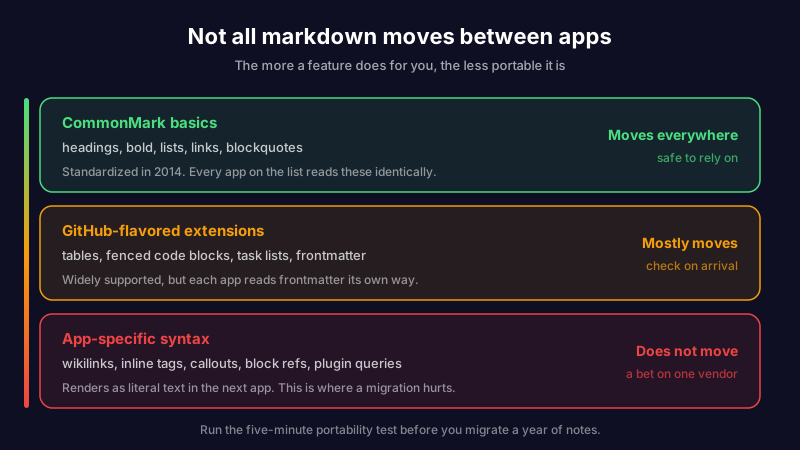
The practical rule: the more a feature does for you, the less portable it is. That is not an argument against using wikilinks or callouts, both of which are worth it. It is an argument for knowing which parts of your notes are text and which parts are a bet on one vendor's parser, so a future move is a decision rather than a discovery.
The best markdown note-taking app for Android, Mac and Windows
Platform is the filter that quietly eliminates most of this list, and it is the one people apply last instead of first.
On Android, the field shrinks hard. Obsidian, Logseq, Joplin, iA Writer, Inkdrop and Scribelet ship real Android builds. Bear does not and will not. Typora, Notable and Zettlr are desktop-only. If you carry an Android phone, filter for a real Android app before you compare anything else, because a beautiful desktop editor you cannot reach on the train is not a note system.
On Mac, everything here works and the choice comes down to taste, so let the portability test decide rather than the screenshots. Bear and iA Writer are the most pleasant; Obsidian and Logseq are the most capable; Typora and Notable are the most honest about being editors.
On Windows, drop Bear and everything on that list still stands. Obsidian, Logseq, Joplin, Typora, Notable, Zettlr and Simplenote all have native Windows builds, and iA Writer has one too.
Cross-platform is a sync question, not an app question. Most of the pain people report is not about editors, it is about two devices disagreeing. Scribelet runs natively on iOS, Android and web from a single codebase with offline-first sync and conflict detection, which is the specific problem being solved.
Do you need to pay for a markdown note-taking app?
No, not to start. Several of the best markdown note-taking apps are free at the level most people use them. Logseq, Joplin, Notable, Zettlr and Simplenote are free, Obsidian is free for personal use, and Typora and iA Writer are one-time purchases rather than subscriptions. The costs hide in two places: sync and platform.
Sync is where the free label frays. Obsidian is free, but reliable syncing across your devices is a paid add-on, and that is the single most common reason people go shopping for something else. If an app is free on the desktop but charges to make your phone and laptop agree, price the sync, not the app.
Platform is the other catch, and it bites hardest on Android, for the reasons above.
Scribelet's Free plan covers unlimited notes, the full markdown editor, wikilinks, tags, and sync across iOS, Android and web, with no add-on to make your devices talk. The paid tier adds the maintenance layer below. You pay for the part that does work no other markdown app does, not for the basics.
The question no markdown note-taking app answers
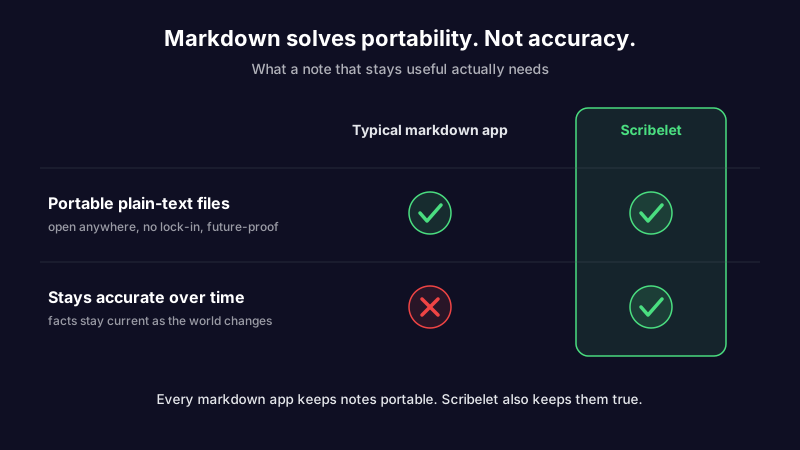
Here is the thing every roundup skips, including the version of this one we published first. Markdown guarantees your note is portable. It says nothing about whether your note is right.
Open a markdown file you wrote eighteen months ago about a library's API, a pricing tier, a deployment runbook, a config flag. The text is pristine. The syntax parses. iCloud synced it flawlessly to every device. And the content is wrong, because the API shipped a breaking change, the price went up, the flag was renamed, and the note never heard about any of it.
This is knowledge decay, and it is the quiet failure mode of every plain-text system. Markdown solved the problem of the format rotting. It did nothing about the facts inside the format rotting, which is the problem that actually costs you: acting on a note you trusted and finding out too late it went stale. Plain text is a fantastic container. A container does not check its own contents.
Notice that none of the eleven apps claim to. Obsidian will store the stale note forever. Bear will render it beautifully. Typora will let you edit it cleanly. They are editors and libraries, and they have decided, reasonably, that keeping your facts current is your job. The trouble is that nobody does that job, because auditing a folder of hundreds of notes by hand is exactly the chore no human keeps up with.
Markdown plus a maintenance layer
So keep the part that works. You should not give up plain text to fix this, and you do not have to.
Scribelet keeps markdown as the source of truth, the same portable, standards-based text you would get from Obsidian or Typora, and it passes its own portability test. On top of that it adds the layer the others leave blank: it watches your notes for decay. Background verification periodically searches the web, compares what it finds against what your note claims, and shows you a diff, green for what is new, red for what is outdated, with a source link. You review, accept or dismiss, and the note stays correct without you auditing anything by hand.
The AI works out of the box. If you would rather route it through your own provider, bring your own key for OpenAI, Anthropic, or Gemini, so your prompts go to the model you chose and your keys are encrypted at rest. That is a choice, not a setup requirement.
If you are weighing the two biggest incumbents while you shop, our breakdown of plain files versus a database covers that fork in more detail than a table can.
How to choose a markdown note-taking app
Skip the agonizing. Match the tool to the need:
- You want the biggest ecosystem and do not mind tinkering. Obsidian, and budget for Sync.
- You think in outlines and block references. Logseq.
- You want open source and encryption above all. Joplin.
- You live entirely on Apple and want the prettiest editor. Bear, knowing it is a database.
- You just want to write, one clean file at a time. Typora or iA Writer.
- Your notes are mostly code. Inkdrop.
- You want free and file-based on the desktop. Notable or Zettlr.
- You want the lightest possible capture everywhere. Simplenote.
- You want portable markdown that also stays accurate, on every device. Scribelet.
Run the five-minute portability test on your top two before you migrate anything. It is the cheapest hour of research in this whole category, and it is the difference between choosing an app and choosing a format.
Markdown made your notes portable. It is a good foundation, and most of these tools will not trap your writing. But a note that is portable everywhere and wrong everywhere is still wrong. If you want the plain-text foundation with a maintenance layer on top, set up your first desk in five minutes and see what your notes look like when something keeps them current.
Share this article