Obsidian AI in 2026: The 4 Routes, Compared
Table of contents
Search "Obsidian AI" and you will find hundreds of tutorials, plugin roundups, and YouTube walkthroughs. What you will not find, on the app's own site, is an AI feature. Obsidian ships with no built-in assistant, no chat, no semantic search, no generation. That is not an oversight. It is the whole design: a fast, local-first Markdown editor that leaves everything else to a community plugin ecosystem.
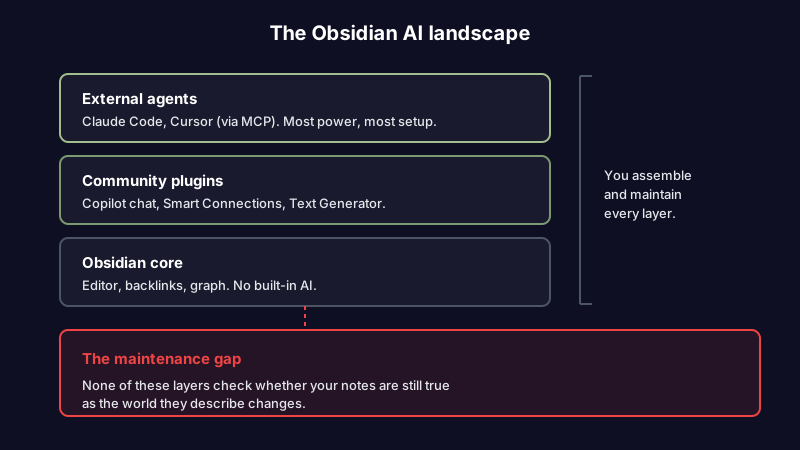
So when people ask how to get AI into Obsidian, the honest answer is that you assemble it yourself. There are exactly four ways to do it, and they are not variations on one theme. They differ in what you install, how much of your vault leaves your machine, how long the setup takes, and what breaks when something upstream changes.
This guide compares all four, gives a verdict on each of the main plugins, and shows where every one of them stops. If your goal is a note system that stays accurate on its own rather than one that answers questions on demand, there is a structural gap worth naming before you invest a weekend in it.
What is Obsidian AI?
Obsidian AI is not a product. It is the umbrella term for adding artificial intelligence to Obsidian through community plugins (like Copilot, Smart Connections, and Text Generator) or external tools connected to your Markdown vault. The core Obsidian app has no native AI; every capability comes from something you install and configure yourself.
That distinction matters because it shapes everything downstream. In an app with native AI, the intelligence knows about your notes by default. In Obsidian, each piece is a separate bolt-on that you point at your vault, feed an API key, and update on its own schedule. You are the integration layer.
Obsidian itself is free for personal use, with paid Sync and Publish add-ons. The AI runs on your own accounts and keys. If you would rather skip the assembly entirely, Scribelet's free plan ships AI in the box; the rest of this piece explains the tradeoff between the two paths.
The four routes at a glance
Every Obsidian AI setup is one of these four, or a combination of them.
| Route | What you install | Setup time | API key | What breaks |
|---|---|---|---|---|
| 1. Community plugins | A plugin from the directory | 10-20 min | Usually yes | Plugin abandonment, API changes |
| 2. Coding agents | Claude Code, Cursor, or similar | 30-60 min | Yes (agent subscription) | Agent edits files you did not expect |
| 3. MCP server | A server process in front of the vault | 1-2 hours | Yes | Server config drifts from the spec |
| 4. Copy and paste | Nothing | 0 min | No | Nothing, but nothing scales either |
Read the setup-time column against what each route buys you. Routes 1 and 4 are the ones most people should start with. Route 3 is the one most people write about, which is not the same thing.
Route 1: Obsidian AI plugins
The Obsidian community plugin directory lists thousands of extensions, and a growing slice of them add AI. Three do most of the heavy lifting, and they map to three different jobs. Install the one that matches the job you actually have, not all three.
Copilot for Obsidian: pick it for chatting with your whole vault
Copilot for Obsidian is the closest thing to a native assistant. It gives you a chat panel that answers questions using your vault as context, summarizes notes, and runs multi-step agents. You bring an API key from OpenAI, Anthropic, or another provider, and the plugin does the orchestration.
Pick it if you want one panel that does most things and you are comfortable pasting in an API key. Skip it if you mainly want better search, because you will be paying per token for something embeddings do more cheaply.
Smart Connections: pick it for semantic search and related notes
Smart Connections takes a different angle. Instead of chat, it computes embeddings for your notes and surfaces related ones as you write. That is search by meaning rather than by keyword, and it can run locally against your files.
Pick it if your vault is large enough that you have stopped finding your own notes, or if you want the least cloud exposure of any plugin here. Skip it if your vault is small, where the folder tree and search still work fine.
Text Generator: pick it for inline drafting from prompts
Text Generator covers the pure writing side: prompt templates that draft, expand, or rewrite text inline, without a chat panel in the way.
Pick it if you write in Obsidian and want the model in the document. Skip it if you mostly read and retrieve, where a chat panel fits better. Whichever you install, the persona and rules it sends ahead of your text do more work than the sentence you type, and the four layers an instruction can live in decide which of them survives past the current session.
Here is how the plugin options compare, including the row people forget.
| Plugin | What it does | Needs an API key | Where it runs |
|---|---|---|---|
| Copilot for Obsidian | Chat with your vault, summaries, agents | Yes (your provider) | Local plugin, cloud model |
| Smart Connections | Semantic "related notes" and search | Optional (local embeddings possible) | Mostly local |
| Text Generator | Inline drafting and rewriting from prompts | Yes (your provider) | Local plugin, cloud model |
| Obsidian core | Editing, backlinks, graph view | No AI at all | Fully local |
Read the bottom row again. The base app you fell in love with contributes nothing to the AI column. Everything above it is scaffolding you own and operate, on three separate update cycles, with keys stored in three separate settings panes.
Route 2: Claude Code and the coding agents
This is the route that has changed most since the plugin ecosystem settled, and it skips plugins entirely. Because an Obsidian vault is just a folder of Markdown files, any coding agent that can read a directory can read your notes. People point Claude Code or Cursor at their vault and get an agent that can search, rewrite, cross-reference, and reorganize hundreds of notes in one pass.
What makes this different from a chat plugin is scope. A plugin answers a question about a note. An agent runs a task across the vault: retag everything from a project, find every note that contradicts a decision you just made, split a 4,000-word dumping ground into atomic notes with links between them. It is the only route on this list that changes many files at once.
That is also the risk. An agent with write access to your vault will do exactly what you asked across files you forgot were in scope.
Pick it if you already live in a terminal and a coding agent is your daily driver. Skip it if you are not going to back the vault up first, because an agent's mistake arrives at the scale of the whole folder rather than one paragraph. Commit the vault to git before the first run and the whole route becomes reversible.
One thing worth knowing before you start: the agent begins every session knowing nothing about your vault. What it retains between runs is whatever you write down for it, which is a different problem from the one AI memory solves in an app that persists context on your behalf.
Route 3: MCP servers
The connective tissue for the agent route is the Model Context Protocol, an open standard for giving AI models structured access to tools and data. With an MCP server in front of your vault, the agent does not just read raw files; it queries and updates them through a defined interface.
The practical difference is precision. Raw file access means the agent globs the folder and reads whatever it finds, spending its context on files that turned out to be irrelevant. An MCP server exposes operations instead: search notes, read one, append to another. The agent asks for what it needs.
Pick it if you are already on Route 2 and the agent keeps reading the wrong files, or you want to expose your vault to more than one tool through the same interface. Skip it if you have not run Route 2 yet, because this is optimization for a problem you have not hit. It is the most technical option here and the one whose setup instructions go stale fastest.
Route 4: copy and paste
Nobody writes tutorials about this one, and a large share of people do it anyway: select the relevant note, paste it into ChatGPT or Claude, ask the question there.
It deserves its place on the list because it is the only route with no install, no key, no config, and no standing access to your files. You decide what leaves your machine every single time, one paste at a time.
Pick it if you ask your notes a question occasionally rather than continuously, or your vault holds anything you would not hand to a third party wholesale. Skip it if you are doing it twenty times a day, at which point you have manually rebuilt Route 1 at a much worse exchange rate.
Where your notes actually go
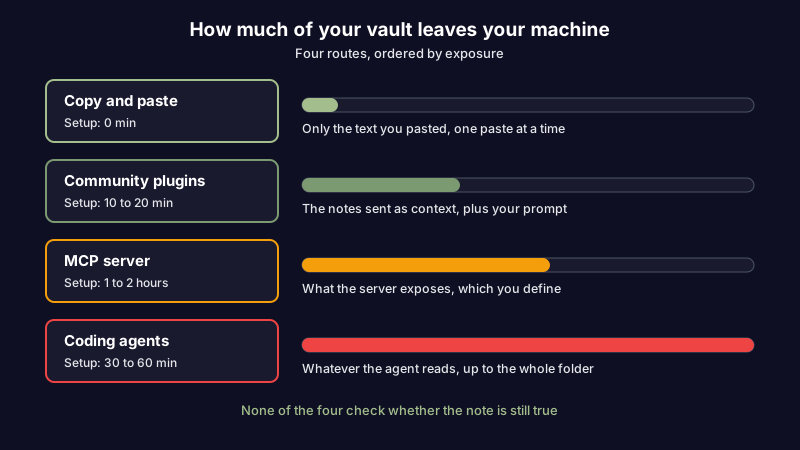
The privacy question is the one every route answers differently and few tutorials state plainly. What follows is what leaves your machine on each route, assuming a default setup.
| Route | What leaves your machine | Local-only option |
|---|---|---|
| Copy and paste | Only the text you pasted | Yes, use a local model |
| Community plugins | The notes sent as context, plus your prompt | Partly (local embeddings for search) |
| Coding agents | Whatever the agent reads, which can be the whole folder | Only with a locally hosted model |
| MCP server | What the server exposes, which you define | Yes, if the model behind it is local |
Two things fall out of that table. First, the routes are ordered by exposure in the reverse of how they are usually recommended: the most-written-about route sends the most. Second, "local" is a property of the model, not the route. A plugin running on your laptop that calls a cloud API is not a local setup, whatever the install location suggests. If keeping the key relationship in your own hands matters, that is a bring your own key question rather than a plugin question.
What every Obsidian AI setup still cannot do
Here is the pattern across all four routes. Plugins chat with your notes. Agents rewrite your notes. Embeddings connect your notes. Every one of these acts on the note as it exists right now, treating whatever you wrote as ground truth.
None of them check whether what you wrote is still true.
That is the gap. Your notes reference a moving world: an API that ships a breaking change, a pricing page that goes up, a framework that deprecates the pattern you documented, a citation that gets retracted. The note sits in your vault looking exactly as authoritative as the day you wrote it while the thing it describes drifts out from under it. This is knowledge decay, and a bolt-on AI layer is structurally blind to it, because chat and generation are reactive acts and decay is a continuous one.
You can see the shape of the problem in what each route optimizes. Copilot makes it faster to ask a question. Smart Connections makes it easier to find a related note. Claude Code makes it faster to restructure a hundred of them. Not one runs on a schedule, searches the live web, and tells you that the answer you saved six months ago no longer holds. The most sophisticated agent setup in the world will happily summarize an outdated note into a confident, outdated brief. Garbage in, eloquent garbage out.
This is not a knock on the plugins or the agents. It is a limit of the architecture. A folder of static Markdown files plus an on-demand model is a great writing environment and a poor maintenance system, because nobody in that loop is responsible for the notes staying correct while you are not looking.
What native AI note-taking looks like
Start with the principle, not the product. A note system that fights decay has to do something no route above does: revisit its own contents on a schedule and tell you when reality has moved. When AI is native rather than bolted on, that becomes a default behavior instead of a plugin you hope keeps working.
In Scribelet, the AI is not a panel you install. Chat, semantic search, and memory are built in, and the piece the plugin stack is missing runs automatically: background verification. On a schedule you set, it searches the web, compares what it finds to what a note claims, and hands you a diff: green for new information, red for what no longer holds. You review it, accept or dismiss, and the note updates. The intelligence is not just answering questions about your notes; it is keeping them worth answering from.
Two honest tradeoffs, because the sovereignty crowd deserves them straight. First, Scribelet is not local-first plain files the way Obsidian is. Your notes live in an encrypted, synced store you can export, not a folder on your disk, and for some people that alone settles it in Obsidian's favor. Second, verification helps most for notes that reference an external, checkable world; a private journal entry does not need fact-checking, and the system leaves it alone.
What Scribelet keeps from the Obsidian ethos is control over the model. You can bring your own key for OpenAI, Anthropic, or Gemini, so your prompts go to the provider you chose rather than one we picked for you. And if you like the agent workflow, Scribelet exposes its own MCP server too, so Claude Code and Cursor can drive your notes the same way they drive a vault, with a maintenance layer underneath.
See what AI-native notes feel like without assembling a stack. Set up your first desk in a few minutes.
Which route fits you?
There is no universal answer, so match the route to what you actually want.
- Copy and paste if you ask your notes a question now and then. Zero setup, zero standing access, and it is not the embarrassing answer people assume.
- Stay and plug in if the tinkering is the reward. Keep your Markdown vault and add Copilot for chat or Smart Connections for search. You will spend setup time, juggle keys, and get exactly the system you configured.
- Go agent-first if you live in a terminal. Pointing Claude Code at your vault gives you the most raw power and the widest blast radius. Put the vault in git first.
- Switch to native if you want AI that maintains, not just generates. If the goal is notes that stay accurate on their own and you would rather not run a stack, a tool with verification, chat, and memory in the box gets you there without the assembly. We put the four ways to build an AI second brain side by side, including what each one costs you in upkeep once the novelty wears off.
Three of these keep you in Obsidian, and that can absolutely be the right call. If you are weighing a move, we wrote separately about how the best Obsidian alternative depends on why you are leaving, and about the deeper Notion versus Obsidian split between a cloud database and a folder of files. The AI question sits on top of that older one; the base tool still shapes what the AI can do.
The AI Obsidian left to you
Obsidian's decision to ship no AI is defensible and, in its way, admirable. A lean local-first editor plus an open plugin market is a legitimate answer, and for people who enjoy building their own system it is the best answer there is. The plugins are good. The agent route is genuinely powerful. The portability of plain Markdown is real.
Just be clear-eyed about what you are signing up for. You become the integration layer, you decide on every route how much of your vault leaves your machine, and the whole stack still leaves the hardest job undone, which is keeping the notes true after you file them. If assembling that appeals to you, assemble it well. If it does not, the alternative is an app where the intelligence and the maintenance come standard, so the question stops being how to add AI to your notes and becomes what you want to do with the ones that stay accurate. Start writing with a note app that keeps its own notes current. Try Scribelet free.
Share this article