11 Google Keep alternatives in 2026, sorted by what you outgrew
Table of contents
The Google Keep wall used to be two taps and done. Now it's four hundred colored cards deep, "I know I wrote that down" no longer means you can find it, and you're in the search bar looking for a way out. Something specific pushed you here. Maybe it's that scroll you can't navigate anymore. Maybe you're tired of Google reading everything you write and you want off the account entirely. Maybe you saw "is Google Keep being discontinued" trending and got nervous about trusting years of notes to a company famous for shutting things down.
Here's what most "best Google Keep alternative" lists get wrong. They hand you eight apps ranked by popularity and leave you to work out which one fixes your actual complaint. So this roundup is sorted by the reason you're leaving, not by a ranking. Every app gets a plain pick-it or skip-it verdict, there's an at-a-glance table so you can scan it in ten seconds, and there's a migration table showing what actually survives when you export from Keep. Several of the picks aren't ours. One of them is, for a reason no other app on this list covers.
The 11 best Google Keep alternatives at a glance
| App | Best for | Where your notes live | Free tier | Checks accuracy |
|---|---|---|---|---|
| Simplenote | Pure fast text and lists | Simplenote's cloud | Yes | No |
| Apple Notes | The direct swap on Apple devices | Apple's cloud | Yes | No |
| Zoho Notebook | The closest visual match to the card wall | Zoho's cloud | Yes | No |
| Notesnook | De-Googled, encrypted, Keep-like | Encrypted, unreadable to host | Yes | No |
| Standard Notes | Long-term zero-knowledge privacy | Encrypted, unreadable to host | Yes | No |
| Joplin | Open source and self-hosting | Your own storage, encrypted | Yes | No |
| Obsidian | Local Markdown and linking | Local files you own | Yes | No |
| Microsoft OneNote | Free structured notebooks | Microsoft's cloud | Yes | No |
| Notion | Databases and structure | Notion's cloud | Yes | No |
| Bear | Markdown that looks good on Apple | iCloud | Limited | No |
| Todoist | If Keep was really your to-do list | Todoist's cloud | Yes | No |
| Scribelet | Notes that stay accurate over time | Encrypted, BYOK optional | Yes (10 checks/mo) | Yes |
That last column is the one every roundup leaves out, and it is the reason this article exists. More on it below.
What's actually pushing people off Google Keep
Spend ten minutes in any Google Keep alternatives thread and the same complaints repeat. They sort into a handful of reasons, and the right alternative is completely different for each one.
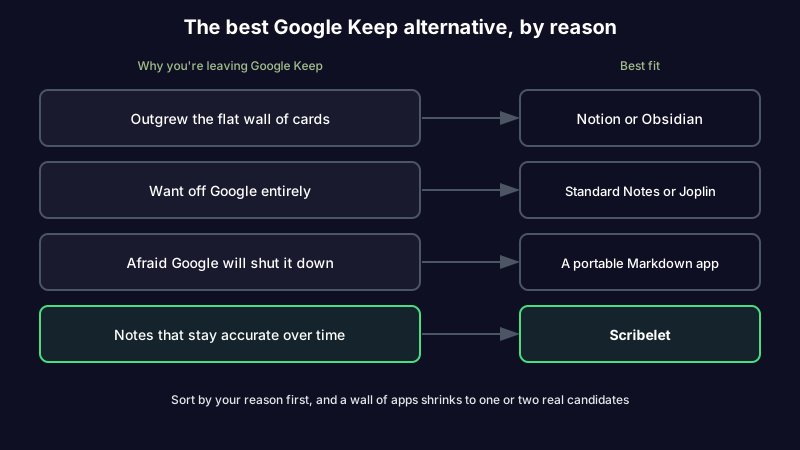
The most common one is simply outgrowing it. Keep was built for speed, not scale: a flat wall of cards, colors, and labels, with no folders, no note-to-note links, and no backlinks. It's wonderful for a grocery list and hopeless for the two hundred ideas, meeting notes, and clippings you actually accumulated. A second group wants out of Google's orbit, because Keep gives you no end-user encryption and Google can read your notes. A third group is spooked by the Google graveyard and wants a note format they can walk out with. And there's a fourth reason that rarely makes the lists, the one we built around: Keep shows you what you captured, but never tells you whether any of it is still true.
Sort by your reason and the field below shrinks to one or two real candidates.
If you outgrew the flat wall of cards
Notion
Pick it if you want real structure. Notion's pages, subpages, and databases give you the hierarchy and filtered views Keep's labels never could, and it's free for personal use.
Skip it if you want to open an app and just write. Notion asks you to design your system before it helps you, and your notes live in Notion's cloud rather than anywhere you own. It's also a stop plenty of people eventually leave, so read what actually sends people looking for a Notion replacement before you rebuild your whole life there.
Obsidian
Pick it if you want retrieval as a first-class feature. Instead of databases it gives you links, backlinks, and a graph, and it stores plain Markdown files on your own disk with no lock-in.
Skip it if you don't want to become the administrator of your own note-taking. The mobile app plus paid sync catch some Keep refugees off guard. Torn between the two structured picks? Our Notion vs Obsidian comparison goes deeper on which one fits which brain. Either way, check what true cross-platform note-taking takes first, because a painful share of migration regret is landing in a desktop-first app where mobile was an afterthought.
Microsoft OneNote
Pick it if you want free, deep structure and you already live in Microsoft's world. Tabbed notebooks handle everything from a sticky note to an organized research binder, and it runs on every platform Keep does. If you're weighing the two directly, we sorted the OneNote side of that decision too.
Skip it if you want something light. OneNote's freeform canvas gets messy fast, and your notes sit in Microsoft's cloud, which is a lateral move if leaving Google's orbit was the point.
If you loved the sticky-note wall and just want a better one
Zoho Notebook
Pick it if the thing you liked about Keep was the visual card wall. Zoho Notebook is the closest look-and-feel match on this list: colored cards, quick capture, checklists, and free across platforms.
Skip it if you're leaving to escape big-company ecosystems. You're trading Google's account for Zoho's, and sync can be uneven on the free tier.
Simplenote
Pick it if you want Keep's speed with none of the clutter. Simplenote is a free, fast, cross-platform app for plain text and lists that syncs everywhere and gets out of your way.
Skip it if you leaned on images, drawings, reminders, or color coding. Simplenote is text only, on purpose. It's minimalism as a feature, not an oversight.
Apple Notes
Pick it if every device you own has an apple on it. It's the cleanest direct swap for iOS and Mac, free, fast, with folders, checklists, and scribble built in.
Skip it if you touch Android or Windows regularly. The web version is thin and there's no real cross-platform story, so you're trading Google lock-in for Apple lock-in.
If you're trying to get off Google
This is the reason that fills r/degoogle. You want your notes out of a Google account and into something the vendor can't read.
Notesnook
Pick it if you want a de-Googled notebook that still feels like Keep. Notesnook is open source and end-to-end encrypted, so the company hosting your notes literally cannot open them, and it runs across every platform Keep does with a genuinely usable free tier.
Skip it if you want AI help with your notes. The same encryption that makes it private means no server-side feature, including AI, can read your content. That's the honest tradeoff of zero-knowledge, and it's worth making on purpose.
Standard Notes
Pick it if longevity is the point. Standard Notes is built to still be readable in twenty years, with zero-knowledge encryption and a deliberately boring, durable core.
Skip it if you want rich formatting for free. The free tier is plain text; the nicer editors and features sit behind a subscription.
Joplin
Pick it if you typed "google keep self hosted alternative" into the search bar. Joplin is open source with end-to-end encryption and the option to run your own sync server, which is the real answer for full ownership.
Skip it if you want polish out of the box. The interface is utilitarian and self-hosting is setup work, not a toggle. Before you commit to any encrypted pick, it helps to know which secure note app fits your threat model, because the strongest privacy choice is also the one that can never help you with your notes.
If you mostly used Keep for reminders and lists
Todoist
Pick it if you're honest that Keep was really your to-do list. Todoist is best-in-class for tasks, due dates, and recurring reminders, and it's far better at that job than Keep ever was.
Skip it if you actually keep notes, clippings, and long-form thoughts. Todoist is a task manager, not a notebook, and it will fight you the moment a note is longer than a line.
Bear
Pick it if you're on Apple and you want writing that looks good. Bear is a fast, tag-based Markdown app with a clean design that Keep never attempted.
Skip it if you need Android or Windows, or a free sync tier. Bear is Apple-only and cross-device sync sits behind its subscription.
If you're afraid Google will kill it, own a portable format
If the thing that drove you here was the fear that Keep will one day join the graveyard, understand what you're really protecting against: not a bad app, but a stranded archive. The defense isn't a specific competitor. It's owning your notes in a format you can walk out with.
That points at plain Markdown. A Markdown note is a text file you can read in any editor, on any operating system, for the next twenty years, with or without the app that made it. Our roundup of the best markdown note-taking apps weighs each option on exactly this: portability, no lock-in, and whether the app puts export front and center. Pick for the exit, and it stops mattering whether any one company sticks around.
Plain text is the closest thing to an escape hatch this whole category offers. It keeps your notes portable. It does not, on its own, keep them true.
The reason that isn't on the other lists: notes that stay accurate
If what you loved about Keep was firing a thought into a card in two seconds, and what wore you down is that "everything" became years of notes nobody weeds and nothing checks, the missing piece isn't a prettier grid or a folder tree. It's a tool that keeps your notes accurate without you auditing them by hand. That's the fourth reason, and the one Scribelet is built for.
Scribelet keeps the parts Keep users care about. Capture stays fast, notes connect with wikilinks instead of floating as isolated cards, and it runs natively on iOS, Android, and web, so there's no second-class platform. Then it adds the layer none of the others have: background agents search the web on a schedule you set, compare what they find against what you wrote, and surface the difference as a diff, green for new information, red for what's outdated, with a source link on every change. That's how background verification works.
Most AI in note apps is reactive. You ask a question, it answers from your notes. Google has started bolting Gemini onto Keep for exactly this kind of help. It's useful for drafting and search, but reactive AI only helps when you already suspect something is wrong and think to ask. The far more common case is the note you trust without checking, the one that quietly went stale months ago. Our guide to knowledge decay explains why this happens to every note, in every app, not just yours.
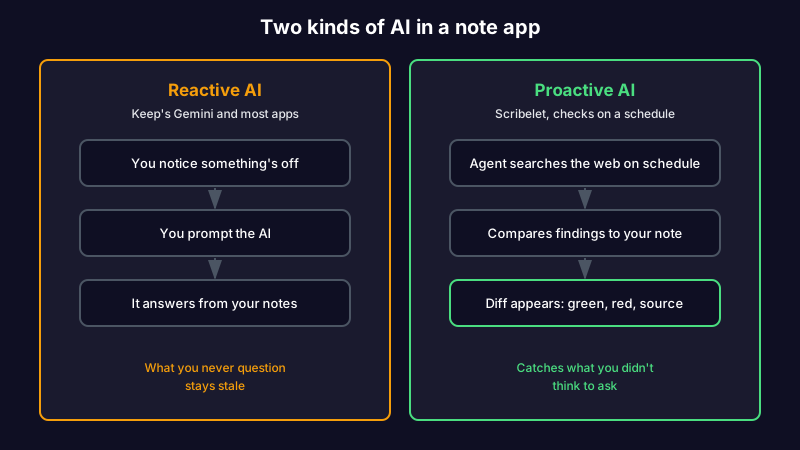
Picture a research note you dropped into Keep two years ago, citing a study that has since been retracted. According to Retraction Watch, paper retractions have grown roughly tenfold since 2000, so this is not a rare edge case. In Keep the card still looks fine. With scheduled verification, the retraction shows up as a diff before you build on it again.
You can also keep control of the AI itself. Bring your own key and route through OpenAI, Anthropic, or Gemini, with the key encrypted at rest, so your notes go to the provider you trust rather than one Google chose for you. It's optional; the AI works out of the box, and the free plan includes ten verifications a month, enough to point at your ugliest Keep exports before paying anything.
Tired of being your own maintenance department? Start free, run your first verification, and see what a diff actually catches. The Pro plan is $8/mo or $79/yr when you want the full set.
The honest tradeoff: Scribelet isn't free the way Keep is, it isn't a zero-knowledge vault, and it isn't a folder of local files you mold with plugins. If a truly free app, self-hosting, or handwriting is the point for you, Keep itself, Joplin, or Obsidian will fit better. Scribelet is for people who want their notes to stay accurate, not just stay captured.
Before you switch: what survives a Google Keep export
Here's the part that decides whether a migration is painless or a weekend lost. Google Keep has no in-app "export note" button. The only way out is Google Takeout, which hands you your notes as HTML and JSON files, one per note, plus your attachments in a folder. There is no format that carries everything across, so it pays to know what you'll lose before you pick a destination.
| Destination | Keep import path | What survives | What breaks |
|---|---|---|---|
| Notesnook | Built-in Google Keep importer (Takeout ZIP) | Note text, titles, labels become notebooks | Reminders, colors, note pinning |
| Joplin | Takeout via an importer or converter | Text and tags | Reminders, colors, layout |
| Obsidian | Community Takeout-to-Markdown importer | Text as Markdown, labels as tags, images as attachments | Reminders, colors, checkbox state can flatten |
| Notion | Convert Takeout HTML, then import | Text and basic structure | Labels (manual), image placement, reminders |
| Simplenote | Manual paste, or a text converter | Plain text only | Images, checklists, labels, colors |
| Apple Notes | Open Takeout HTML and copy, or a third-party tool | Text and most images | Labels, reminders, checkbox state |
| Scribelet | Import Markdown or plain text, then verify | Text, and background checks then flag anything stale | Colors and reminders (not the model), so re-tag on the way in |
The pattern is consistent: text always survives, and reminders, colors, and pinning almost never do. If those Keep extras matter to you, budget an hour to recreate them, and treat the move as the rare moment your whole archive is in front of you. That makes it the best chance you'll get to audit your notes while you move them instead of quietly rebuilding the same graveyard somewhere nicer.
Is Google Keep being discontinued?
No. Despite the recurring rumors, Google Keep is not being discontinued. Google gave it a Material 3 redesign, folded it deeper into Workspace, and has been adding Gemini-powered features rather than winding it down. The "is Google Keep being discontinued" searches are driven by Google's reputation, not by any announcement.
That distinction is exactly why so many people are still shopping. You don't have to believe Keep is dying to want out of it. A tool you're nervous about trusting is a tool you've already half-left.
Is there a better app than Google Keep?
There's no single better app, because "better" depends on the reason you're leaving. Keep is genuinely excellent at one thing: firing a short note or list into a card in two seconds, on any device, for free. If that's all you need, nothing here beats it. The apps above are better than Keep at structure (Notion, OneNote, Obsidian), at privacy (Notesnook, Standard Notes, Joplin), at looking like the old card wall (Zoho Notebook), at tasks (Todoist), and at keeping notes accurate over time (Scribelet). Match the app to your complaint and one of them is clearly better for you.
What are the best Microsoft alternatives to Google Keep?
If you're leaving Google specifically for Microsoft's ecosystem, the answer is Microsoft OneNote, which is free, cross-platform, and far more structured than Keep. Windows also syncs its built-in Sticky Notes to your Microsoft account and across devices, which is the closest one-to-one swap for Keep's quick-capture cards. Both keep your notes inside Microsoft's cloud rather than Google's, so choose them if the goal is switching ecosystems, not escaping big-company clouds entirely.
So which Google Keep alternative should you pick?
The right alternative is the one that fixes the specific reason you went looking. Sort by your reason, and the field of apps like Google Keep shrinks to one or two real candidates.
| Why you're leaving Google Keep | Best fit |
|---|---|
| Outgrew the flat wall of cards | Notion, Obsidian, or OneNote |
| Miss the card wall, just want it done right | Zoho Notebook or Simplenote |
| Want off Google entirely | Notesnook, Standard Notes, or Joplin |
| Want a free app you can self-host | Joplin |
| Afraid Google will shut it down | Any portable Markdown app |
| Really just needed a to-do list | Todoist |
| Notes that stay accurate over time | Scribelet |
The best Google Keep alternative isn't the one with the longest feature list or the most upvotes. It's the one that solves the exact thing that made you start searching. Sort by your reason first, and the choice gets a lot simpler.
If the thing that wore you out was watching a fast little capture app fill up with notes nobody ever checked, that's the reason worth fixing for good. Start writing with background verification and see your first diff.
Share this article