NotebookLM alternatives for personal notes
Table of contents
NotebookLM is easy to like until you try to make it your daily notebook.
It can summarize a dense PDF, turn a stack of sources into a study guide, and generate audio overviews that feel better than most AI summaries. But if you are comparing NotebookLM alternatives because you want editable personal notes, cross-note memory, wikilinks, mobile capture, or control over which AI provider reads your knowledge base, you are not looking for another research assistant. You are looking for a notebook with AI inside it.
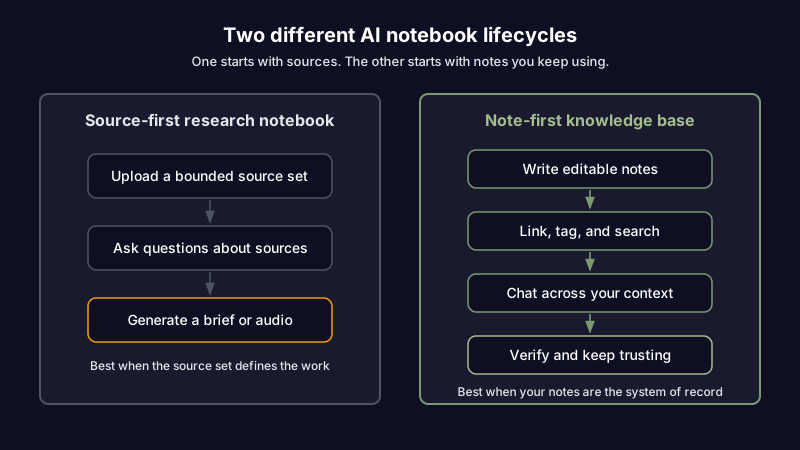
That distinction matters. NotebookLM is source-first. A personal note-taking system is note-first. Source-first tools help you understand uploaded material. Note-first tools help you keep your own knowledge usable after the first summary.
The useful comparison is by job: research, audio learning, private source chat, and living personal notes. From there, the choice gets cleaner. Some workflows still belong in NotebookLM. Others need a note-taking system that keeps changing as your knowledge changes.
If what you want is AI chat over notes you keep writing, linking, tagging, and revising, start with Scribelet's AI chat guide. It is the core difference between asking questions about uploaded sources and asking questions inside a notebook that keeps changing.
The real question: source library or living notes?
NotebookLM is a source-grounded research tool. You add sources, ask questions, generate summaries, create study material, and listen to audio overviews. Google's own source guide frames the workflow around source material, not a long-running notebook where notes themselves are the main object.
That makes NotebookLM excellent for temporary research containers:
- A semester's reading packet
- A folder of client PDFs
- A batch of interview transcripts
- A long report you need to understand fast
- A set of YouTube videos or web pages you want summarized
A personal note-taking app has a different center of gravity. The note is not an output from source material. It is the thing you keep using. You write into it, edit it, link it to other notes, tag it, search it later, and return to it months after the original source has changed.
That distinction is where a lot of NotebookLM frustration comes from. A user uploads 20 PDFs, gets a useful answer, and thinks: "I want this for all my notes." Then they discover that the product is better at analyzing a bounded set of sources than maintaining an evolving knowledge base.
Google has added note features to NotebookLM, including ways to save responses and create notes. But Google's note help page still describes notes as a layer inside a notebook built from sources, and it notes that mobile app support for creating or editing notes is not available at the time of writing. That does not make NotebookLM weak. It makes it a different tool.
Here is the practical test: if you delete the sources, does the system still make sense?
For NotebookLM, probably not. For a note-taking app, absolutely. Your notes are the system of record.
Best NotebookLM alternatives by job
The wrong way to choose a NotebookLM alternative is to ask, "Which tool is closest to NotebookLM?" That pushes you toward feature matching instead of workflow matching.
Ask what you are trying to preserve from NotebookLM and what you are trying to escape.
| What you need | Better-fit category | Why |
|---|---|---|
| Fast summaries of uploaded PDFs and web pages | Source-grounded research assistants | They are optimized around documents, citations, and synthesis. |
| AI audio from source material | Audio learning tools | They care more about listening flow, voice quality, and mobile playback. |
| Private or self-hosted source chat | Local-first AI knowledge tools | They keep files closer to your machine or your own infrastructure. |
| Editable personal notes with AI chat | AI note-taking apps | The notes remain editable, searchable, linked, and useful after the first summary. |
| A team workspace with AI summaries | All-in-one workspaces | They combine docs, projects, permissions, and shared knowledge. |
Those categories are a better starting point than feature matching.
One thing to keep in mind: NotebookLM alternatives are not interchangeable. A tool that is better at academic paper search may be worse at daily note capture. A tool with beautiful audio may have no concept of backlinks. A self-hosted tool may protect your data well but add enough setup work that you never use it.
The best alternative is the one whose failure mode you can live with.
When NotebookLM is still the right tool
NotebookLM deserves its popularity. If your workflow starts with a defined set of sources, it is hard to beat.
Say you have six PDFs for a literature review, two long YouTube lectures, and a few web pages. You want a briefing, a list of themes, and questions to ask before a meeting. NotebookLM is built for that. You are not trying to maintain a permanent notebook. You are trying to understand a source set quickly.
The audio feature is another real strength. Google's Audio Overviews announcement made NotebookLM feel different from ordinary summarizers because it turned source material into something you could listen to while walking, commuting, or doing chores. That is not a minor interface trick. For many people, listening is the only way they get through dense material.
NotebookLM is also a good fit when you want a clean separation between projects. Each notebook can hold a bounded set of material. That works well for a class, a research sprint, a report, or a single client engagement.
Use NotebookLM when the job looks like this:
- "Help me understand these sources."
- "Summarize this report and explain the key claims."
- "Turn this source set into an audio briefing."
- "Find where these documents agree or disagree."
- "Prepare me for a discussion about this material."
The boundary is simple. NotebookLM works best when the sources define the work. A personal note-taking system works best when your own evolving notes define the work.
Where NotebookLM starts to feel wrong for note-taking
NotebookLM starts to creak when you use it as a long-term personal knowledge management system. Not because it is badly designed, but because it is designed around a different lifecycle.
Your notes are not the center
In a living note system, you start with your own thinking. Sources support it. You write a note about a project, connect it to a meeting note, tag it with #client-research, and link it to a decision log. A month later, you update it with what changed.
NotebookLM reverses that. You start with sources. The AI helps you extract, summarize, and reason over them. Notes exist, but they are not the same as a full writing environment with backlinks, templates, tags, note history, and a knowledge graph.
That difference becomes obvious once the source material stops being the main thing.
A consultant uploads a market report, a pricing page, and interview notes before a strategy call. NotebookLM generates a useful brief. Two months later, the competitor changes pricing and the consultant has added four new client notes elsewhere. The original notebook still knows the old source set. The live knowledge now lives across multiple places.
The summary was useful. The system did not become the source of truth.
Cross-note memory is different from source chat
There is a meaningful difference between chatting with a source set and chatting with your whole knowledge base.
Source chat answers from the material you uploaded. Cross-note memory answers from the evolving context you have built over time: people, projects, terms, decisions, preferences, and prior conversations. That is why AI memory in a note-taking app has to behave differently from a research notebook.
If you ask, "What did we decide about the billing migration?" the answer should pull from meeting notes, architecture decision records, daily notes, and prior chat episodes. It should know that "Paddle migration," "RevenueCat cleanup," and "billing refactor" may refer to the same project context. That is not a PDF summary problem. It is a persistent memory problem.
Mobile capture matters more than mobile reading
NotebookLM's mobile apps are useful for reading, listening, and asking questions. But note-taking is capture-heavy. The important moment is often when you are walking between meetings, leaving a client call, or thinking through a bug on your phone.
If the mobile workflow is mainly "consume what I already prepared," it will not replace a notes app. A notes app needs fast capture, editing, offline tolerance, search, tags, links, and a path back to the desktop workflow. That capture-to-desktop loop only holds up in a genuine note app for iOS and Android and web, not a desktop tool with a companion viewer bolted on.
Voice is part of this. A raw transcript is not enough. A strong mobile note app should turn a voice memo into a structured note with a title, headings, action items, and tags. Otherwise you have traded typing for cleanup.
There is no note maintenance loop
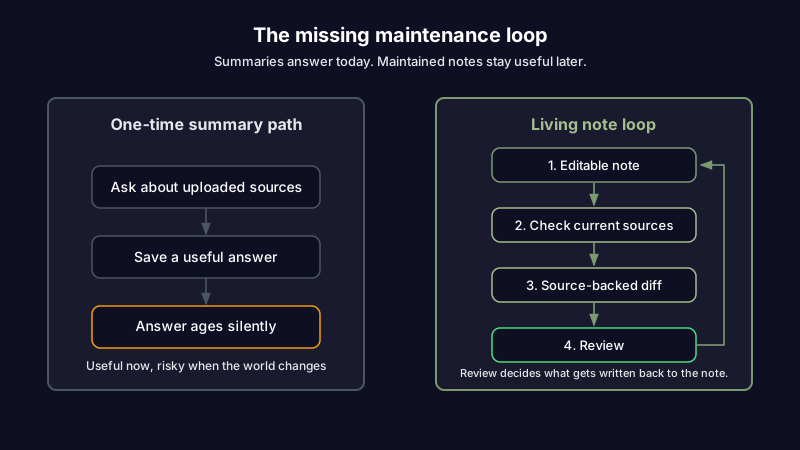
NotebookLM can help you analyze sources. It does not solve the problem that notes go stale.
That matters when notes contain claims that can drift: API behavior, pricing pages, citations, market data, policy details, competitor messaging, and internal decisions. Search and summary help you find and understand information. They do not tell you whether the information you wrote three months ago is still true.
This is the missing layer in most NotebookLM alternatives, too. They help you ask better questions. Fewer help you maintain better answers.
What to look for in a NotebookLM alternative for personal notes
If your real need is "NotebookLM for my notes," do not start with a generic feature checklist. Start with the lifecycle you need your knowledge to survive.
Editable notes as the system of record
The alternative should let you write real notes instead of save AI outputs. That means a proper editor, version history, note links, tags, search, and durable organization.
You should be able to create a note from scratch, revise it next week, link it to related notes, and trust that it still belongs in the same system a year later. Saved summaries are useful. They are not a notebook.
AI chat that searches your notes
AI chat should be grounded in your own notes and cite what it used. This is where a note-taking app can beat NotebookLM for personal knowledge. The AI should search across notes, fetch the relevant ones, compare them, and answer with enough traceability that you can check the source.
In Scribelet, AI chat searches your notes with semantic retrieval and source citations. It is built for questions like "What did I decide about this project?" or "Which notes mention this client risk?" instead of "Summarize these five uploaded PDFs."
Links, tags, and knowledge graph behavior
NotebookLM can help you reason over a source set. A note-taking system should help you build a connected web of thought.
That means [[wikilinks]], backlinks, inline #tags, and AI-assisted connection discovery. If you care about personal knowledge management, wikilinks and backlinks are not decorative. They are how old notes keep finding their way back into active work.
The AI layer should respect those connections. If two notes are linked, that relationship should help retrieval. If several notes mention the same project under slightly different wording, the system should learn that pattern.
Provider choice and BYOK
If an app is going to read your notes, you should care where those notes go.
Bring Your Own Key (BYOK) means you connect your own OpenAI, Anthropic, or Gemini key instead of using only the vendor's bundled AI path. It gives you provider choice, cost control, and clearer data routing. For personal notes, that matters more than it does for throwaway prompts, because your notes contain a long-running record of your work.
Scribelet supports BYOK across its AI features. If you want the deeper privacy and cost argument, read BYOK AI explained.
Verification beats another summary
The most useful AI note-taking feature is not always another summary. Sometimes it is a warning that a note is wrong.
For technical notes, that might mean an API endpoint changed. For research notes, it might mean a citation was updated or challenged. For client notes, it might mean a competitor pricing page no longer matches what you wrote.
Scribelet's AI verification is built around that loop. Background agents check notes against sources, compare findings to what you wrote, and show diffs when something changed. You review the diff instead of re-auditing the note from scratch.
That is the line between AI that helps you write more notes and AI that helps you keep trusting the notes you already have.
Want the note-first version of this workflow? Try Scribelet with a free desk, write a few notes, then ask AI chat what it can find across them. The difference shows up once your notes start connecting.
The shortlist: which alternative fits your workflow?
There is no single best NotebookLM alternative. There are better fits for specific workflows.
If you want NotebookLM as an actual notebook: Scribelet
Scribelet is the closest fit if your complaint is, "I want NotebookLM-style AI, but inside notes I can keep editing."
It gives you a real note-taking surface: rich markdown editing, wikilinks, backlinks, inline tags, semantic search, daily notes, voice-to-structured-note, and cross-platform access on iOS, Android, and web. The AI layer sits inside that notebook instead of beside it. You can chat with your notes, verify claims, build memory, and let background agents surface stale information.
This is not a replacement for NotebookLM's audio overviews. If your primary workflow is listening to generated podcasts from uploaded sources, NotebookLM or a dedicated audio tool will fit better. Scribelet is for people whose notes are the durable knowledge base.
If you want local-first control: Obsidian plus AI plugins
Obsidian is the strongest choice when file ownership matters above everything else. Your notes live as local markdown files. The plugin ecosystem is deep. The community has built workflows for almost every serious personal knowledge management method.
The tradeoff is assembly. AI depends on plugins, local models, API keys, and configuration choices. That can be exactly what a technical user wants. It can also become the thing that keeps the system from being used every day.
Choose Obsidian if you want maximum control and are willing to maintain your own stack.
If you want an all-in-one workspace: Notion
Notion is not a NotebookLM clone. It is a workspace with databases, docs, projects, permissions, and AI features layered across them. If your real need is a shared operating system for a team, Notion may be the practical choice.
The downside is that note-taking can become heavier than it needs to be. Databases, relations, views, permissions, and templates are useful until they make a simple note feel like a configuration task. Notion also does not give you BYOK for AI, so provider choice and data routing stay with Notion.
Choose Notion if collaboration and workspace structure matter more than note-native AI maintenance.
If you want academic research workflows: Elicit, Unriddle, or Paperguide
Academic research tools beat general note apps when the job is literature discovery, paper analysis, citation workflows, and evidence extraction. They are built around papers and claims, not daily notes.
This is the right category for a graduate student preparing a literature review or a researcher triaging dozens of PDFs. It is less compelling if you are trying to keep meeting notes, project decisions, and voice memos in one personal knowledge base.
Choose a research assistant when sources are the work.
If you want audio-first learning: NotebookLM, ElevenLabs Reader, or dedicated audio tools
If audio is the reason you love NotebookLM, do not force a note-taking app to become a podcast generator. Pick a tool designed around listening.
NotebookLM's Audio Overviews are still the reference point for conversational source summaries. ElevenLabs Reader and other audio-first tools may fit better when voice quality, long-form playback, and mobile listening matter more than note organization.
The only caution: audio summaries can feel productive while leaving little durable knowledge behind. If you listen, capture the decisions, ideas, and follow-up questions somewhere you will search later.
How Scribelet compares to NotebookLM
The cleanest comparison is not feature by feature. It is lifecycle by lifecycle.
| Question | NotebookLM | Scribelet |
|---|---|---|
| What is the main object? | Sources inside a notebook | Editable notes inside a desk |
| What is AI best at? | Summarizing and explaining uploaded material | Chatting with, connecting, and verifying your notes |
| Does it support audio overviews? | Yes | No dedicated podcast generator |
| Does it support wikilinks and backlinks? | No native PKM-style linking | Yes |
| Can you use your own AI provider key? | No | Yes, through BYOK |
| Does it check whether notes are stale? | No dedicated maintenance loop | Yes, through AI verification |
| Best use case | Researching a bounded source set | Maintaining a living knowledge base |
That is the decision.
Use NotebookLM when you have sources to understand. Use Scribelet when you have notes to keep using.
The overlap is real. Both products help you ask questions and synthesize information. But the center is different. NotebookLM is what you open when you need to understand a pile of material. Scribelet is where that understanding becomes part of your ongoing knowledge base.
The right alternative depends on what you want to trust
NotebookLM made source-grounded AI feel normal. That is a big shift. It taught people that AI answers are more useful when they can point back to the material they came from.
The next question is what happens after the summary.
If the work ends when you understand the sources, NotebookLM is still a strong choice. If the work continues for months, through meetings, decisions, notes, edits, links, and updates, you need a system built for living knowledge.
If you compare only AI features, you miss the real decision: what you want to trust later. A source notebook, an audio briefing, a local folder, a team workspace, and a personal knowledge base all age differently.
If your answer is the last one, start with Scribelet. Create a desk, write a few notes, connect them with wikilinks, and ask AI chat what it can find. Then turn on verification for anything that has to stay true.
Share this article