Obsidian Vault: How to Set One Up and Organize It
Table of contents
Open Obsidian for the first time and the very first thing it asks you to do is create a vault. Most people name it, click through, and then freeze on the next question that no menu answers: how am I supposed to organize this thing? An hour later they have five nested folders, a tagging scheme, and still no notes. The vault, which was meant to be a quiet folder of text, has become the project.
This guide is about the vault itself, not the app around it. What a vault actually is, whether you want one or several, where to keep it so you do not lose it, and the handful of structures that hold up over years instead of weeks. If you are brand new and want the click-by-click basics first, start with the practical guide to using Obsidian and come back here when you hit the "how do I structure this" wall. Everything below assumes you have a vault open and are staring at it.
What is an Obsidian vault?
An Obsidian vault is an ordinary folder on your computer where Obsidian keeps your notes. That is the entire definition, and it is worth taking literally. Inside that folder your notes are plain Markdown files with a .md extension, your images and PDFs sit in whatever subfolder you point them at, and a single hidden folder named .obsidian holds the vault's own settings: your enabled plugins, your theme, your hotkeys. There is no database and no proprietary container. If you deleted Obsidian tomorrow, the folder would still open in any text editor, and every note would still be readable.
That design is the reason to trust a vault with years of writing, and it also quietly answers a lot of structure questions. Because a vault is just a folder, you can move it, copy it, zip it, or put it under version control like any other folder. Because notes are files, the way you name and nest them is the way your operating system already works, with none of Obsidian's magic involved. The app layers a graph, a search index, and backlinks on top, but underneath it is files all the way down. If the only thing you want is for those files to stay readable and portable no matter which app you open them in next, you can try Scribelet free; it keeps your notes as real Markdown too, and adds a maintenance layer we will get to at the end.
One vault or many?
This is the first real decision, and it trips up more beginners than any plugin. Obsidian lets you create as many vaults as you like and switch between them, so the temptation is to make a vault per area of life: one for work, one for personal, one for a side project. Resist it for as long as you can. The single most useful feature in Obsidian is the link between two notes, and links do not cross vault boundaries. A note in your Work vault cannot link to, search, or show a backlink from a note in your Personal vault. Every vault you add is a wall through the middle of your own thinking.
For almost everyone, one vault for everything is the right answer. Search and links do the separating that folders and separate apps would otherwise do, and a meeting note that references a personal reading note is exactly the kind of connection a second vault would have made impossible. There are a few honest reasons to split: a vault you share with other people, a vault with genuinely sensitive material you want physically separate, or a performance ceiling (tens of thousands of notes and heavy plugins can slow the app, and splitting is one fix). Short of those, treat "I should make another vault" as a sign you are organizing instead of writing. The real goal is a vault you reach for every day, and a single lean one beats three tidy ones you forget to open.
Where to store your vault, and how to sync it safely
Because the vault is a folder, where you put it on disk matters more than it does in a cloud app. Two rules save most of the pain.
First, do not keep your only copy in a folder that syncs with naive file-by-file replication while Obsidian is open on two devices at once. iCloud Drive, Dropbox, and Google Drive all work as a sync method, and plenty of people run them happily, but they sync individual files on their own schedule. If two devices write to the same note before the service reconciles, you get a conflict copy, and the .obsidian settings folder is especially prone to it. The safer versions are to sync only when the app is closed on the other device, or to use the official Obsidian Sync add-on, which understands the vault and merges with end-to-end encryption, or to put the vault under Git if you are comfortable with it and want full history.
Second, a sync service is not a backup. Sync faithfully propagates a deletion or a bad edit to every device you own. Keep a real backup: a periodic zip of the vault folder somewhere the sync service cannot reach, or Git history, or a versioned backup tool. A vault is low-maintenance precisely because it is just files, so backing it up is the same as backing up any folder, and there is no excuse to skip it. If you would rather not run your own sync chain at all, a note app that works everywhere by default removes the question, but it is worth knowing the tradeoff before you build one.
How to structure a vault: four approaches, compared
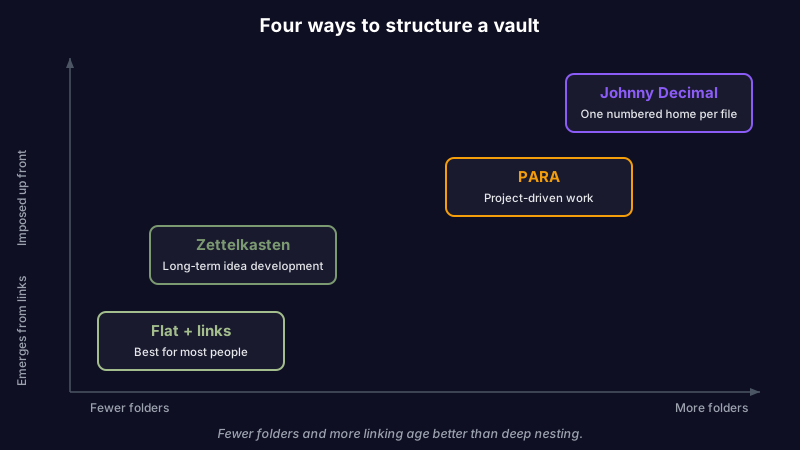
Here is the question the search results answer with a shrug: what folder structure should your vault use? The honest answer is that it depends on how much structure you want to impose up front versus let emerge from links, and there are four approaches worth knowing. Pick one deliberately rather than inventing a fifth at midnight.
| Approach | How it works | Best for |
|---|---|---|
| Flat + links | A handful of top-level folders (Inbox, Notes, Daily, Attachments), everything else organized by linking notes together | Most people; anyone who thinks in connections rather than hierarchies |
| PARA | Four folders: Projects, Areas, Resources, Archives, sorted by how actionable a note is | Action-driven people who live by current projects and want finished work archived out of sight |
| Johnny Decimal | A numbered system (10-19 Area, 11 Category, 11.01 note) giving every file one unambiguous numeric home | People who want a single obvious place for every note and will maintain the numbering |
| Zettelkasten | Few folders, atomic single-idea notes connected by dense links and unique IDs, structure emerging over time | Long-term thinkers building a web of ideas rather than filing reference material |
The pattern across all four is that fewer folders and more links age better than deep nesting. The moment you are debating whether a note belongs in Projects/Work/2026/Q4 or Areas/Career, you have rebuilt the filing problem Obsidian was supposed to dissolve. Start flat, add a folder only when a real pile demands it, and let backlinks carry the weight. If you want the full Zettelkasten version, the zettelkasten method explains why atomic notes and links beat folders for connected thinking, and why the manual linking is also where people quit.
A structure is also not plugins. You can run any of these approaches with zero community plugins, and you should for the first month. When a genuine need shows up, a shortlist of the Obsidian plugins actually worth installing keeps you from installing twenty and keeping three. The structure is the skeleton; plugins are optional muscle you add later.
When a vault gets too big, or too complex
Two kinds of trouble arrive with time, and they are different problems.
The first is size. Obsidian holds tens of thousands of notes without complaint, but very large vaults plus heavy plugins (live-updating dashboards, large graphs, aggressive indexers) can make the app feel sluggish on open or on search. The fixes, in order: turn off plugins you do not use, move rarely-touched material into an Archive folder so it stops cluttering search, and only as a last resort split into a second vault for a genuinely separate body of work, accepting that links will not cross the gap. If you are weighing that kind of split against another local-first app entirely, the file-storage differences in Obsidian versus Logseq are worth reading first, because they change what "splitting" even means.
The second is complexity of your own making, and it is the more common failure. The vault is fine; the problem is that configuring it has quietly replaced writing in it. More folders, more plugins, more AI routes, each one a thing that can break on an app update. If you want AI inside the vault, do it deliberately: there are several ways to add AI to Obsidian, each sending a different share of your notes to a model, and none of them is a day-one decision. The discipline that keeps a vault useful is the discipline to stop tuning it.
The gap a well-structured vault still has
Suppose you get all of this right. One vault, backed up, synced cleanly, a shallow structure you actually follow. There is still a gap, and no folder scheme or plugin on the community list closes it: a note can be perfectly captured, linked, and filed, and still be wrong. The price you wrote down changed. The library you documented got deprecated. The link you saved rotted. Obsidian will preserve that stale note forever, because checking whether a note is still true is simply not what a vault does. This is the same reason personal knowledge management systems quietly go stale: every framework solves capture and organization and skips maintenance.
That gap is what Scribelet is built around. Scribelet is not an Obsidian plugin; it is a notes app whose AI runs background checks against the web on a schedule you set and shows you a diff when something you wrote has gone out of date, with the source. Your notes stay plain Markdown, so you keep the portability a vault gives you, and you can bring your own API key for provider control or use the included AI out of the box. If the real reason you keep reorganizing your vault is a nagging sense that the notes inside need looking after, the honest move is a tool that does the looking after. You can try Scribelet free and see your first diff before you decide.
The short version
An Obsidian vault is a folder of Markdown files you own. Keep one vault, not several, so links and search can do their job. Store it somewhere you control, sync it in a way that will not corrupt the .obsidian folder, and back it up separately, because sync is not backup. Structure it with as few folders as you can stand, pick one of the four approaches above and stop there, and add plugins only when a real need appears. Do that and the vault stays what it was meant to be: a quiet, portable home for your thinking, not a project of its own.
And when the thing you want is not a better folder scheme but more confidence that what the vault holds is still true, that is a different tool. Try Scribelet free and let your notes check themselves.
Share this article