Best Note-Taking App for Windows (2026): 10 Rated
Table of contents
Picking the best note-taking app for Windows has a wrinkle the roundups skip: for most people the default is already very good. OneNote is free from Microsoft, handles a pen beautifully, and syncs through an account you probably already have. So the honest question is not "which Windows note app wins a feature chart." It is "is anything here worth switching to, and if I switch, what do I trade away?"
That changes how you should read a list like this. A Mac buyer picks among a dozen gorgeous native apps and agonizes over taste. On Windows the lineup is more down-to-earth: a strong free incumbent, a handful of power tools for people who outgrow it, one genuine Windows specialty the Mac world barely mentions (writing by hand with a pen), and the quiet question nobody's SERP answers, whether your notes will still be correct a year from now.
So this guide rates 10 apps that run well on Windows and groups them by the bargain each one asks you to make. If you want the short version, Scribelet's Free plan opens in any Windows browser and keeps the same notes on every device you own.
What actually matters in a Windows note app
Any of these can jot a thought on a PC. That is table stakes. Four questions actually predict whether you will still be using the app next year.
Is it free, or free with a catch? Windows users expect to pay nothing, and some apps honor that cleanly. Others feel free until a limit bites, like Evernote's roughly 50-note ceiling on its free tier. Check the free plan's real limits now, before a few hundred notes are stuck behind one.
Does it take a pen well? This is where Windows pulls ahead of other platforms. On a Surface or any touchscreen laptop with a stylus, good handwriting support turns the machine into a notebook, and the apps range from pen-first to barely-bothered. Type everything and you can skip this line. Write or sketch by hand and it is the one that matters most.
Does your writing survive leaving Windows or Microsoft? OneNote is easy precisely because it lives in your Microsoft account and OneDrive, which is also what makes it sticky. That is fine right up until you switch to a different machine or a team on another stack. Ask the blunt version: stop using Windows next month, and do your notes travel, or are you exporting all weekend?
Will the notes still be true later? Anything you save is correct only as of the day you wrote it. The steps you captured in spring get a redesigned screen by autumn, the figure you pasted moves, the link dies. Exactly one app on this list treats that as a feature rather than your problem, and we will get to why.
Quick picks for Windows (2026)
In a hurry? Find the line that matches you and skip to that app.
- Best free incumbent: Microsoft OneNote. A free download, excellent pen support, OneDrive sync.
- Best for handwriting and the pen: Nebo, for Surface and stylus users who think on paper.
- Best all-in-one workspace: Notion, when notes, tasks, and databases belong in one place.
- Best for files you fully own: Obsidian, plain Markdown stored on your disk.
- Best open-source choice: Joplin, free and local, for people who want to see the code.
- Best for fast, free capture: Google Keep or Simplenote, when you just want an inbox.
- Best for leaving Microsoft intact: Scribelet, which runs in any Windows browser, is native on iPhone, and flags notes that have quietly gone wrong.
Each pick below gets its reasoning, scored on the two columns most Windows roundups drop once an app proves it runs on a PC: whether the notes follow you off Windows, and whether they stay accurate.
The 10 best note-taking apps for Windows at a glance
Scan for a shortlist, then read the write-ups. "Pen support" grades real handwriting and ink-to-text, not just whether you can scrawl on the screen. Prices are late-2026 starting points and move constantly, so confirm before paying.
| App | Platforms | Pen support | Price | Best for |
|---|---|---|---|---|
| OneNote | Win, Mac, iOS, Android, Web | Strong | Free | The free incumbent |
| Notion | Win, Mac, iOS, Android, Web | Weak | Free personal; paid teams | All-in-one workspace |
| Obsidian | Win, Mac, Linux, iOS, Android | Weak | Free; Sync paid add-on | Local Markdown you own |
| Evernote | Win, Mac, iOS, Android, Web | Basic | Free (approx 50-note cap); paid | Legacy libraries |
| Google Keep | Web, Android, iOS | Basic | Free | Fast free capture |
| Simplenote | Win, Mac, Linux, iOS, Android, Web | None | Free | Plain-text capture |
| Nebo (MyScript) | Win, iOS, Android | Excellent | One-time purchase | Handwriting on a Surface |
| Joplin | Win, Mac, Linux, iOS, Android | Basic | Free, open source | Local, auditable notes |
| Zoho Notebook | Win, Mac, Linux, iOS, Android, Web | Basic | Free; AI add-on paid | Free cross-platform capture |
| Scribelet | Windows (web), iPhone, Web | Typing | Free plan; paid upgrades | Cross-platform, accurate notes |
Microsoft OneNote
OneNote is the app everything else has to beat, and it earns that spot. It is a free download from Microsoft (either from the Store or bundled with a Microsoft 365 subscription), its freeform canvas lets you drop text, images, and ink anywhere on a page, and its pen handling is among the best on Windows, which counts for a lot on a Surface. If you already pay for Microsoft 365, it is the natural place to start.
Two things nudge people toward a OneNote alternative eventually. Microsoft retired the old OneNote for Windows 10 app in late 2025 and folded everyone into a single OneNote app, so some longtime users have already been forced to move once. And the convenience has a string attached: your notebooks live in a proprietary format inside your Microsoft account and OneDrive, with no clean way to walk off with plain files. It is the strongest free pick here and the one whose gravity you may someday want out of.
Notion
Notion treats a note as the smallest piece of a workspace: pages nest into pages, and databases turn into task boards, trackers, or a team wiki. It runs on Windows, Mac, mobile, and the web, and a single person can get a lot done on the free plan, with paid tiers aimed at teams.
The compromises are consistent. The Windows desktop app is an Electron build, a browser packaged as an app, so it can feel sluggish next to something native, and everything sits in Notion's cloud, which weakens export and portability. The pen is an afterthought. It shines as a structured, shared workspace and frustrates as a two-second scratchpad, which is the usual trigger for weighing a Notion alternative.
Obsidian
Obsidian is for people who want their notes to be files they own. A vault is nothing more than Markdown files sitting in a directory you control, so nothing is locked in, and on top of that sit a large plugin ecosystem and a graph view that maps how your notes connect. It is free, including for work use.
Two things to know on Windows. The desktop app is Electron, capable but not feather-light, and getting your notes onto your phone means paying for the Obsidian Sync add-on or wiring up your own cloud folder. Pen support is thin, so Surface owners wanting handwriting should look elsewhere. The payoff is real and so is the assembly, and because a vault is plain Markdown, your writing stays portable no matter what, the same reason Obsidian leads our roundup of Markdown note-taking apps.
Evernote
Evernote wrote the rulebook a lot of these apps still follow, and its Windows client is genuinely powerful: deep search, web clipping, strong document handling. Years of notes already parked there exert a real pull.
It sits this low for one reason. The free plan now allows only about 50 notes in a single notebook, which rules it out as a free tool for most people, and the paid tiers have crept up in price while the Windows app, an Electron build, has grown heavier. Together the cap and the cost are why switching away from it is practically a cottage industry, and why we mapped the exits in our Evernote alternative guide.
Google Keep
Google Keep is the quickest way to grab a thought if you already live in a Google account. It is free, instant, and arranges notes as colored cards that sync between the web and Android. Keep is at its best on an Android phone, and for that platform specifically our Android note-taking roundup goes deeper. On Windows, though, there is no desktop app at all: you run it in a browser tab or pin it as a web app, which suits quick capture and little else.
The ceiling is structure. Keep offers no folders, no formatting past lists and checkboxes, and no serious export path, so notes you want to keep and organize outgrow it fast. That gap is exactly what sends people toward a Google Keep alternative with somewhere for notes to actually live.
Simplenote
Simplenote is honest about being small: free, plain-text notes that appear on every device almost instantly. It installs lightly on Windows, Mac, Linux, mobile, and the web, and opens the moment you click it, which makes it a fine capture inbox.
The trade is that there is nothing past the text. No rich formatting, no attachments, no pen, no structure beyond tags and search. Some people find that liberating and others find it a dead end on day two. For free, genuinely everywhere, zero-friction capture, it does its narrow job well.
Nebo (MyScript)
Nebo, now part of MyScript Notes, is the handwriting specialist, and on a pen-equipped Windows device it is the one to try first for ink. Writing in it feels responsive, and its handwriting-to-text conversion is strong enough to turn a scribbled page into clean, searchable text. Per MyScript's own FAQ, the Windows version is a one-time purchase through the Microsoft Store rather than a subscription, and it is bought separately from the mobile apps, with no free trial on Windows, so check the current Store price first.
The flip side of that focus is narrowness. Nebo is built around the pen, so if you mostly type it is more tool than you need, and its organization and sync are lighter than the general-purpose apps. For handwritten notes on a touchscreen Windows laptop, it is the standout.
Joplin
Joplin is the open-source answer: free, auditable, and local-first. It stores notes as Markdown, runs on Windows, Mac, Linux, and mobile, and lets you choose your own sync backend (a cloud drive, or an end-to-end encrypted option) instead of trusting a vendor's servers. For anyone who wants to read the code and keep their data in their own hands, it is the strongest free pick on the list.
What you give up is gloss and hand-holding. The interface is plainer than Notion or OneNote, a few setup choices land on you that other apps make silently, and pen support is basic. If control and a zero-dollar price matter more to you than polish, Joplin is worth the setup.
Zoho Notebook
Zoho Notebook is a free, ad-free app with a real Windows desktop build, tidy card-based notes, and clean sync across devices. As a no-cost place to capture things it is pleasant and does not constantly push you toward a paywall.
One point the marketing blurs, worth stating plainly: the AI meeting-notes and transcription features are not simply free. They live in a paid layer called Notebook AI, offered after a trial, and the richest recording works best on macOS rather than Windows. As a free, ad-free notebook that syncs everywhere, it is a solid choice. Just do not pick it for free AI transcription on Windows, because that part is not free.
Scribelet
Scribelet makes the opposite wager from OneNote. Rather than binding you to one operating system's account, it opens in any Windows browser as a desktop-grade web app, with a sidebar, search on Ctrl+K, and offline support, and it runs natively on iPhone, with the same notes reachable in a browser on Mac or Android. One login, one set of notes, on your PC and on whatever phone or laptop you carry. The cost of that reach is honest: you give up a dedicated Windows binary and a pen in exchange for notes that are never trapped on a single device.
What puts it on a Windows list is the column the others leave blank. In the background, Scribelet's AI agents re-check what you wrote against live sources and surface any note that has drifted out of date, with a corrected version you approve in a tap. Everything sits under AES-256-GCM envelope encryption, and the free plan covers the essentials. If the thing nagging you is less about ink quality and more about whether a year-old note can still be trusted, that is the gap it closes.
The question the AI overview skips
Search "best note-taking app for Windows" and Google now hands you a tidy five-app answer before you scroll. Every one of those apps, and every app above, settles the same question: where do I write? None of the Windows-native ones touch the harder one: how do I know what I wrote is still right?
A note records what was true the day you wrote it, and then the world moves on. The install steps you saved in March meet a redesigned screen by October. The price you pasted in was the first thing on this page we had to soften, because several of these apps keep rewriting theirs. Let that happen a couple hundred times over and a tidy OneNote notebook quietly fills with answers that are confident and wrong, while nothing on the canvas raises a hand.
This is the slow leak of knowledge that decays, and it is why Scribelet scores accuracy on a par with formatting. It is also why, if you are choosing for the long haul, "does it keep notes correct" belongs on the checklist right next to "is it free" and "does it take a pen."
How to choose your Windows note app
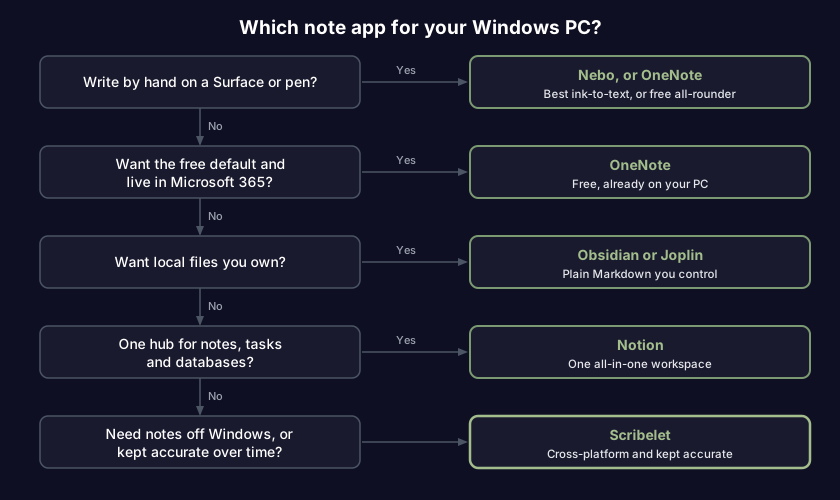
Take it in order:
- Do you write by hand on a Surface or touchscreen? Nebo for a dedicated ink tool, or OneNote if you want handwriting plus everything else at no cost.
- Do you just want the free standard and live in Microsoft 365? OneNote. It is hard to beat on price and it is one download away.
- Do you want to own your notes as plain files? Obsidian or Joplin, knowing that sync and setup ask a little effort.
- Do you need notes, tasks, and a database under one roof? Notion, if you can live with the Electron app and keeping everything in its cloud.
- Do you need your notes off Windows too, or do you care whether they stay accurate? Scribelet, which runs in the browser on your PC, natively on your iPhone, and keeps your notes honest.
If you bounce between more than one machine, our wider guide to cross-platform note-taking apps rates the same field on sync and offline behavior, weighted for people who move between a work PC and a personal laptop.
Frequently asked questions
What is the best free note-taking app for Windows? OneNote, for most people. It is a free download with no note cap, strong pen support, and OneDrive sync. For plain files you own, Joplin and Obsidian are free too, and Simplenote and Google Keep are free for quick capture. The best free app is simply the one you keep open.
Is there a Notes app built into Windows? Two small ones ship with it: Sticky Notes and Notepad. Sticky Notes can sync through a Microsoft account, but both are built for a phone number or a quick list, not for organizing hundreds of notes, which is why most people graduate to OneNote or one of the apps above.
What is the best Windows note app with a pen or stylus? Nebo (MyScript) for pure handwriting, with the sharpest ink-to-text on Windows, and OneNote as the free all-rounder with solid pen support. Both are at home on a Surface or any touchscreen laptop. Typing-first apps like Notion and Obsidian treat the pen as an afterthought.
Which Windows note app is best if I might move to a Mac later? Any app not welded to Microsoft: Obsidian and Joplin (your files travel with you), Simplenote, Notion, or Scribelet. The painful ones to leave are those tied to a single account or ecosystem, so if portability matters, rule those out first.
Nearly all of these apps will serve the job they were designed for. What you are really choosing is the compromise you can tolerate: OneNote's free convenience, a Surface and its pen, files you keep on your own disk, or notes that travel with you and get corrected when they drift. If the last one sounds like your problem, try Scribelet free and keep your Windows notes honest wherever you open them.
Share this article