GitHub issue templates: the fields worth requiring
Table of contents
Here is a bug report from a real repository. The issue template was added a year ago by someone who wanted better bug reports.
## Describe the bug
It doesn't work

## Steps to reproduce
1. open the app
2. see error

## Expected behavior
it should work

## Environment
- OS:
- Version:
Every heading has an answer under it. The reporter filled in the form. And the maintainer still has to open a comment thread to ask the three questions that would let anyone reproduce this: which version, which OS, and what the error actually said.
This is the normal outcome. A project gets noisy issues, someone copies a GitHub issue template from a popular repo, and a year later the template is a wall of prompts that reporters skim past and maintainers still have to chase. The usual diagnosis is that people write lazy bug reports. The real cause is in the template: it asks open questions a hurried reporter answers with "it doesn't work," when it could have required the two or three fields that make an issue actionable.
A good issue template is not a longer form. It is a shorter one that refuses to submit without the parts triage cannot work without. That distinction is the whole difference between a template that survives and one that becomes decoration, and the rest of this post is how to build the first kind. If you would rather keep your team's own troubleshooting notes in a place an AI assistant can actually read and check them, Scribelet is built for exactly that, but the template comes first.
What is a GitHub issue template?
A GitHub issue template is one or more files in your repository that pre-fill the body of a new issue, so every report arrives in the same shape. They live in a .github/ISSUE_TEMPLATE/ directory, and GitHub reads them when someone clicks "New issue."
There are two formats, and choosing between them is the first real decision:
- A Markdown template (
.md) drops a block of headings and prompts into the issue body. The reporter types over the prompts. Nothing is enforced; the whole thing is still a free-text box with some suggested structure. This is the same mechanism as a pull request template, just for issues instead of PRs, and it is a markdown file in your repository that the platform reads at issue-creation time. - A YAML issue form (
.yml) renders real form fields: dropdowns, checkboxes, and text areas you can markrequired: true. The reporter cannot submit until the required fields have content. This is the format that actually changes the quality of what you receive, because it can say no.
GitHub documents the mechanics of both well. GitHub's own guide covers where the files go and how the template chooser works, and the issue forms syntax reference lists every field type. What none of that tells you is which fields to require and which to cut, and that is the question that decides whether the template earns its place.
The template chooser most repos never set up
When you have more than one template, GitHub shows a chooser before the blank editor: a menu of "Bug report," "Feature request," and whatever else you define, plus links you control. Most repositories skip this and leave a single template plus the default blank-issue option, which means every reporter still starts from an empty box if they want to. Turning the chooser into an actual routing layer is a five-minute change with an outsized effect on triage.
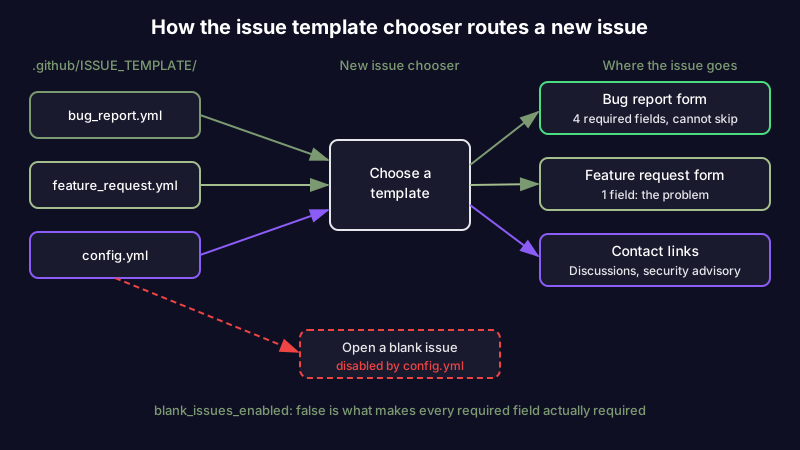
The routing is controlled by a single file, .github/ISSUE_TEMPLATE/config.yml, which most guides never mention. It does two things that matter: it can turn off the blank-issue escape hatch, and it can add contact links that send certain traffic somewhere other than your issue tracker.
# .github/ISSUE_TEMPLATE/config.yml
blank_issues_enabled: false
contact_links:
  - name: Question or usage help
    url: https://github.com/your-org/your-repo/discussions
    about: Ask and answer usage questions in Discussions, not Issues.
  - name: Security vulnerability
    url: https://github.com/your-org/your-repo/security/advisories/new
    about: Report security issues privately, never in a public issue.
Setting blank_issues_enabled: false is the line that makes the whole template system work. Without it, every field you carefully marked required is optional, because the reporter can always click "Open a blank issue" and skip the form entirely. The contact links then divert the two kinds of traffic that should never be plain issues: support questions, which belong in Discussions, and security reports, which belong in a private channel. Both are answers to a "People Also Ask" question that comes up constantly, "how do I stop getting the wrong kind of issue," and neither is in the template itself.
A bug report issue form worth copying
Here is a bug form that requires the three fields triage actually needs and asks for nothing it can infer. Save it as .github/ISSUE_TEMPLATE/bug_report.yml:
name: Bug report
description: Something is broken or behaves incorrectly.
title: "[Bug]: "
labels: ["bug", "needs-triage"]
body:
  - type: textarea
    id: what-happened
    attributes:
      label: What happened, and what did you expect?
      description: One sentence each is fine.
    validations:
      required: true
  - type: textarea
    id: repro
    attributes:
      label: Steps to reproduce
      placeholder: |
        1. ...
        2. ...
        3. ...
    validations:
      required: true
  - type: input
    id: version
    attributes:
      label: Version
      description: Exact release or commit SHA. "latest" is not a version.
    validations:
      required: true
  - type: dropdown
    id: os
    attributes:
      label: Operating system
      options: [macOS, Windows, Linux, iOS, Android, Other]
    validations:
      required: true
  - type: textarea
    id: logs
    attributes:
      label: Relevant logs or error output
      render: shell
    validations:
      required: false
Four required fields, one optional. The version field is required: true and its description refuses "latest," because a version you cannot pin is a bug you cannot close. The logs field uses render: shell so pasted output arrives as a formatted code block instead of mangled text. There is deliberately no "severity" dropdown and no "have you searched existing issues" checkbox, and the next section explains why.
A feature request form, and where to stop
Feature requests fail in the opposite direction from bug reports. Bug templates ask too little; feature templates ask too much, demanding acceptance criteria and mockups from someone who just wanted to suggest an idea. Save this as .github/ISSUE_TEMPLATE/feature_request.yml:
name: Feature request
description: Suggest an idea or improvement.
title: "[Feature]: "
labels: ["enhancement", "needs-triage"]
body:
  - type: textarea
    id: problem
    attributes:
      label: What problem would this solve?
      description: Describe the problem, not your proposed solution.
    validations:
      required: true
  - type: textarea
    id: proposal
    attributes:
      label: What would you like to happen?
    validations:
      required: false
One required field, and it asks for the problem rather than the solution, because the most useful thing a feature request can carry is a problem you had not heard framed that way. Everything downstream, the acceptance criteria and the scope, is your team's work once the idea is accepted, and asking a drive-by reporter to produce it up front just means fewer reports. That downstream work belongs in a technical spec or a design document, not in the intake form.
Markdown template or YAML issue form?
The two formats are not interchangeable, and the choice is not a matter of taste. Use this table to decide per template:
| Question | Markdown template (.md) | YAML issue form (.yml) |
|---|---|---|
| Can it require a field? | No, everything is optional | Yes, required: true blocks submit |
| Dropdowns and checkboxes? | No, plain text only | Yes |
| Reporter can delete the structure? | Yes, it is editable text | No, fields are fixed |
| Renders logs as code automatically? | No | Yes, with render: shell |
| Good for | A small internal repo where trust is high | Any public repo, or high issue volume |
| Setup effort | Lowest, one Markdown file | Slightly higher, YAML schema |
The short version: on a small team where everyone already writes good issues, a Markdown template is enough and costs the least to maintain. On a public repository, or anywhere the issue volume is high enough that triage is a chore, a YAML issue form is the only one that can actually enforce the fields, because it is the only one that can refuse to submit. The pattern is not unique to GitHub, either: GitLab offers the same idea as description templates, so a team on either platform is making the same choice about what to require.
A Markdown bug report template to copy
If the table points you at the Markdown route, here is a bug report template worth starting from. It drops the same structure the YAML form enforces into a plain, editable body, which is all a small, high-trust repo needs. Save it as .github/ISSUE_TEMPLATE/bug_report.md:
---
name: Bug report
about: Something is broken or behaves incorrectly.
title: "[Bug]: "
labels: ["bug", "needs-triage"]
---

### What happened, and what did you expect?
One sentence each is fine.

### Steps to reproduce
1.
2.
3.

### Version
Exact release or commit SHA. "latest" is not a version.

### Operating system
macOS, Windows, Linux, iOS, Android, or Other.

### Relevant logs or error output
Paste any error output here.
The block at the top (name, about, title, labels) is the front matter GitHub reads to label the template and show it in the chooser; everything below it is the body the reporter types over. It asks for the same four things the issue form requires, but it cannot refuse a blank answer. That is the trade: a bug report template in Markdown costs nothing to maintain and enforces nothing, so reach for it only where you trust everyone to fill it in. Everywhere else, the issue form above is the version that holds the line.
The fields to delete
The reason issue templates rot into decoration is that every field looks reasonable in isolation, so they accumulate. The discipline is subtractive. Delete these:
- "Have you searched for existing issues?" A checkbox everyone ticks and no one honors. It shifts blame to the reporter without preventing a single duplicate. Deduplication is triage's job, not the reporter's.
- A "severity" dropdown. Reporters rate almost everything as high. You will re-triage severity yourself the moment you read the issue, so requiring it up front adds a field and changes nothing.
- "Additional context." A polite way of saying "type more." If a field does not have a specific question, it collects filler.
- A code-of-conduct acknowledgment. It belongs in
CONTRIBUTING.mdand the repo's community health files, not stapled to every bug report. - Anything the platform already captures. GitHub records who opened the issue and when. Do not ask for a name, a date, or a "reporter" field.
A template that asks four sharp questions gets four real answers. A template that asks twelve gets twelve half-answers and a reporter who resents the form. Fewer required fields, each one load-bearing, is the entire craft.
What a good issue actually looks like
With the bug form above, the "it doesn't work" report from the opening becomes something a maintainer can act on without a single follow-up:
### What happened, and what did you expect?
Exporting a note to PDF produces an empty file. Expected the note's contents.

### Steps to reproduce
1. Open any note with images
2. File > Export > PDF
3. Downloaded PDF is 0 bytes

### Version
2.4.1

### Operating system
macOS
Nothing here is longer than the broken report. It is not more effort for the reporter; the form simply pointed the same effort at the parts that matter. That is what a good issue template does. It does not extract more from people, it aims what they were already willing to give.
Issue templates rot too
Here is the part almost no guide covers, and it is the reason to treat your templates as living files rather than set-and-forget config. An issue template is a small piece of documentation about your own project, and like every other piece, it drifts out of sync with the project it describes.
The os dropdown still lists a platform you dropped support for. The config.yml contact link points at a Discord server you migrated off a year ago, so reporters click it into a dead invite. A required "version" field references a versioning scheme you have since changed. The bug form auto-assigns needs-triage to a label your team renamed, so nothing gets triaged. None of this throws an error. The template keeps rendering, reporters keep filling it in, and it quietly routes issues to the wrong place. This is the same slow decay that turns any repository artifact stale: the code moved and the file that describes it did not.
The fix is the same fix that works for any documentation that lives beside your code. Put the templates in the review path. When a pull request renames a label, changes the supported platforms, or moves a community channel, the diff should also touch .github/ISSUE_TEMPLATE/, and a reviewer should be able to see that it did. Templates that are reviewed alongside the code they describe stay honest; templates that live in a folder nobody opens after the initial commit are the ones that rot.
This is also where an AI layer earns its place. A mechanical check can confirm the YAML parses and the links return a 200, but it cannot tell you that the platform you still list was deprecated two releases ago, or that the label you auto-assign no longer exists in the project. That kind of drift is a mismatch between the template and the world, and catching it means checking the artifact against a live source of truth rather than against its own syntax. Scribelet's approach to notes is the same idea pointed at your own knowledge: an assistant that reads what you wrote and flags where it has quietly gone out of date. You can try it free and keep your team's triage notes, runbooks, and templates somewhere they get checked instead of trusted.
Start with four fields
The temptation with any issue template is to add. Every maintainer who has been burned by a vague report wants to add one more required field to prevent the next one, and the sum of those additions is the wall of prompts nobody reads. Resist it. Start with a bug form that requires what happened, how to reproduce it, the exact version, and the operating system, and a feature form that requires only the problem. Turn off blank issues so the fields are real. Route questions and security reports out with config.yml. Then, every quarter, delete a field instead of adding one, and put the templates in front of a reviewer the same way you would any other file that describes how your project works.
A GitHub issue template cannot make people care. What it can do is take the care they already have and point it at the four things you cannot triage without, and refuse, politely, to accept anything less.
Share this article