Coda vs Notion in 2026: Now That Coda Is Superhuman Docs
Table of contents
If you searched for Coda vs Notion this year, you may have noticed something odd: half the articles call Coda by a different name. On July 8, 2026, Coda became Superhuman Docs, part of the same company that now owns Grammarly and Superhuman Mail. The product did not go away. Your docs moved to a new address, the design changed, and the way new customers buy it changed with it.
That rename is the least interesting part of the decision, though. Coda and Notion look alike from a distance: both are blank-canvas workspaces with pages, tables, and AI. Up close they are built from opposite ends. Notion starts from the page and puts databases inside it. Coda starts from the table and builds documents on top of it. Which end you start from decides which tool feels natural and which one you fight every day.
Searched as Notion vs Coda, or as Superhuman Docs vs Notion under the new name, the question is the same. This comparison goes round by round: the core model, formulas and automations, AI, pricing with a worked team example, mobile and desktop apps, and how hard each is to leave. At the end there is a decision flow and the one question neither tool asks about your docs.
Coda vs Notion at a glance
Notion is a page-first workspace: you write in blocks, and databases are one kind of block you can drop into a page. Coda, now Superhuman Docs, is a table-first doc: tables are the engine, and formulas, buttons, and automations read from them and write to them. The short version: Notion for writing and wikis, Coda for documents that behave like small apps.
| Dimension | Notion | Coda (Superhuman Docs) | Winner |
|---|---|---|---|
| Core model | Pages first, databases inside pages | Tables first, docs built on top | Depends |
| Writing and wikis | Clean editor, strong page linking | Capable, less polished for long text | Notion |
| Formulas and logic | Database formulas, buttons | Formula language across the whole doc, buttons, Packs | Coda |
| Automations | Database automations on paid plans | Automations on every plan, quota grows with tier | Coda |
| Built-in AI | Notion AI, full credits on Business and up | Docs AI (beta in 2026), high limits for paid Doc Makers | Depends |
| Pricing model | Per member | Per Doc Maker; editors and viewers free | Coda for big, mostly read-only teams |
| Ecosystem and templates | Very large community and template gallery | Smaller; Packs for integrations | Notion |
| Leaving | Markdown, HTML, CSV export | PDF, CSV, and plain-text export, no bulk Markdown | Notion |
Read the pricing row twice. It is the one that flips the decision for most teams, and it is covered with real numbers below. If what you actually need is a place where your own notes stay accurate rather than a team workspace, Scribelet is free to try.
What changed when Coda became Superhuman Docs
The rename matters for people comparing the two tools today, so it is worth being precise about what moved and what did not. According to Superhuman's own rebrand FAQ:
- Same product, new address. Docs now live at docs.superhuman.com, and old coda.io links redirect automatically. Tables, formulas, Packs, and automations work as before; no features were removed.
- Existing customers keep their plan. Current Coda subscribers are grandfathered at their price as long as they stay on their plan.
- New customers buy a bundle. New subscribers get Docs as part of the Superhuman suite (Docs plus Grammarly and Go, with Mail on Business and up) at the tier they choose. The old Coda Team plan is now called Business.
- The AI changed. The old AI credit system was paused on launch day and replaced by Docs AI, a chat assistant that can edit tables, draft content, and act across a whole doc.
- A Mac desktop app shipped, with Windows announced for later.
- Embeds and allow-lists may need updating. If your company allow-lists coda.io in a DLP tool or embeds Coda docs elsewhere, those settings need the new domain too.
What this means for the comparison: the Coda you read about in 2024 reviews is still the core of the product, but the buying decision now includes a bundle you may or may not want. If your team already pays for Grammarly, that tilts things toward Superhuman. If you only want docs, you are paying for a suite either way.
Round 1: Pages first vs tables first
This is the round that decides everything else.
In Notion, the unit is the page. You write, and when you need structure you add a database: a table, board, calendar, or timeline whose rows are themselves pages. That is why Notion is so good for wikis and knowledge bases. Every row can hold a full document, and pages link to each other naturally. If you are new to how this fits together, our guide on how to use Notion walks through pages, databases, and views from scratch.
In Coda, the unit is the table. A doc is a set of pages, but the tables underneath are what make it powerful: any table can be referenced from anywhere in the doc, filtered into views, and wired to buttons and formulas. A Coda doc for a product launch might hold a task table, a status dashboard that reads from it, a button that emails the owner, and a written brief, all reading the same data.
A useful test: open the last three documents your team made. If they are mostly prose (specs, meeting notes, onboarding guides, the kind of internal documentation that people read more than they edit), Notion fits. If they are mostly trackers, calculators, or forms with some text around them, Coda fits.
Winner: depends. Notion for documents with some data. Coda for data with some documents.
Round 2: Formulas, buttons, and automations
Coda's reputation comes from this round, and it has earned it.
Coda's formula language works across the entire doc, not just inside one table. A formula on a page can count rows in a table, a button can add a row or change a value, and automations run when something changes or on a schedule. Packs connect the doc to outside tools like Slack, Jira, Gmail, and Google Calendar, so a table can pull live data in or push actions out. Automations are on every plan, with a quota that grows from Free to Pro to unlimited on Business (Superhuman Docs plans).
Notion has closed much of the gap. Database formulas are capable, buttons can create and edit pages, and database automations can assign people, update properties, send Slack messages, and send Gmail when something changes. The limits are real, though: formulas live inside a database rather than across the workspace, and database automations require a paid plan; the Free plan only gets Slack notification automations (Notion help: database automations).
Winner: Coda. If your docs need to calculate, react, and push data around, Coda does it with less glue.
Round 3: AI
Both tools have bet heavily on AI, and both changed it this year.
Notion AI handles writing, Q&A across your workspace, meeting notes, and agents that can carry out multi-step tasks. Free and Plus workspaces get a limited trial; the full monthly AI allowance starts on the Business plan (Notion pricing).
Docs AI in Superhuman Docs is a chat panel that can act on the whole doc: draft content, build and update tables, organize data, and resolve comments. AI Views let you describe a custom view of a table ("a leaderboard of deals by owner") and have it built on the live data. As of the July launch, Docs AI was in beta, free users got a limited allowance, and paid Doc Makers got high limits under fair use, with pricing after beta still undecided. Superhuman Docs also offers an MCP server so tools like ChatGPT or Claude can read and edit your docs.
The difference is less about model quality and more about what the AI works on. Notion AI is strongest at finding and summarizing knowledge across many pages. Docs AI is strongest at building and changing structured things inside a doc.
Winner: depends. Knowledge Q&A favors Notion. Building trackers and views by asking favors Coda.
Round 4: Pricing, with a worked example
Here the two tools charge for different things, which is why headline prices mislead.
Notion charges per member. As of November 2026, Plus is about $10 and Business about $20 per member per month on yearly billing, and every person who edits the workspace as a member is a seat.
Superhuman Docs charges per Doc Maker: the people who can create docs and pages and use Docs AI. Editors (who can update existing pages but not create new ones) and viewers are free (billing basics). Pro is $12 per Doc Maker per month billed annually ($15 monthly), and Business is $33 billed annually ($40 monthly). New customers buy these tiers as part of the Superhuman bundle, so check the checkout screen for how your seats are counted.
That makes the answer depend on how many people in your team create versus contribute. A worked example for a 10-person team on annual billing:
| Scenario (10 people) | Notion Plus | Notion Business | Docs Pro | Docs Business |
|---|---|---|---|---|
| 3 people build docs, 7 only update or read | $100/mo | $200/mo | $36/mo | $99/mo |
| Everyone creates their own pages | $100/mo | $200/mo | $120/mo | $330/mo |
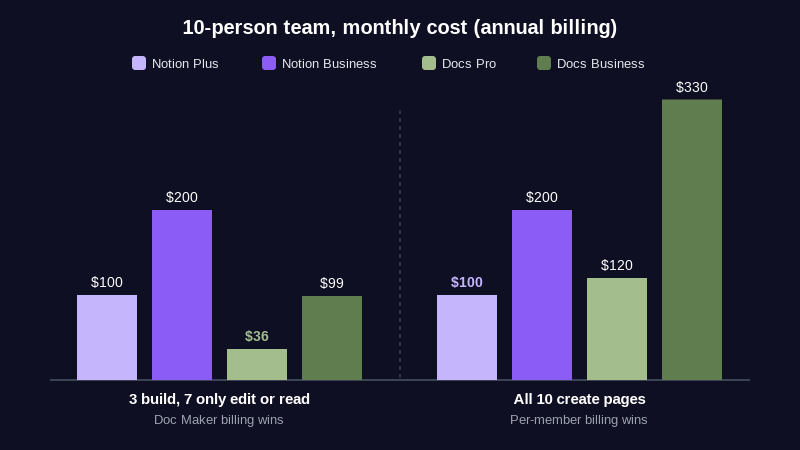
The pattern is simple. Coda is cheaper when a few people build and many people fill in, which is exactly how a tracker or an operations doc gets used. Notion is cheaper when everyone writes their own pages, which is how a wiki or a set of meeting notes gets used. The catch on Coda's side: "editor" really means editor. If your seven contributors ever need to start a new page, they become Doc Makers, and the bill moves to the second row.
Winner: depends on your ratio. Count who creates, not who logs in.
Prices like these are exactly the kind of fact that goes stale in a team doc within a quarter. Scribelet flags notes whose facts have changed since you wrote them, and the free plan is enough to see it work on your own notes.
Round 5: Apps, offline, and day-to-day use
Notion has mature desktop apps for Mac and Windows and mobile apps for iOS and Android, and you can choose pages to download for offline use. Its biggest day-to-day advantage is the ecosystem: a huge template gallery, years of community tutorials, and a good chance that anyone you hire has used it before.
Superhuman Docs launched a new Mac desktop app in July, with a Windows version announced for later in the year, and the mobile app was updated and renamed from Coda. Its community and template library are smaller than Notion's, which matters more for a team learning from scratch than for one that builds its own docs.
Winner: Notion. Broader apps, offline pages, and a much bigger pool of people who already know it.
Round 6: Leaving
Every workspace tool is easy to enter and harder to leave, so check the exit before you commit.
Notion can export any page, database, or the whole workspace as HTML, Markdown, or CSV for databases, with files included (Notion help: export). Markdown is the useful part: it is the format other tools import cleanly, which is why so many Markdown note-taking apps can take a Notion export.
Superhuman Docs exports pages as PDF, tables as CSV, and offers an account-level "Export My Data" that produces .txt and .csv files for the docs you own (Superhuman help: export). The data survives; the logic does not. Formulas, buttons, and automations are the reason you chose Coda, and none of them export into anything else. A Coda doc that works like an app has to be rebuilt as an app somewhere else.
Winner: Notion. Both lock you in, but Notion's exit door is wider.
Which should you pick? A decision flow
Google's own AI answer for this query ends by asking whether you want personal notes, a team wiki, or automated workflows. That is the right question, so here is the flow built on it.
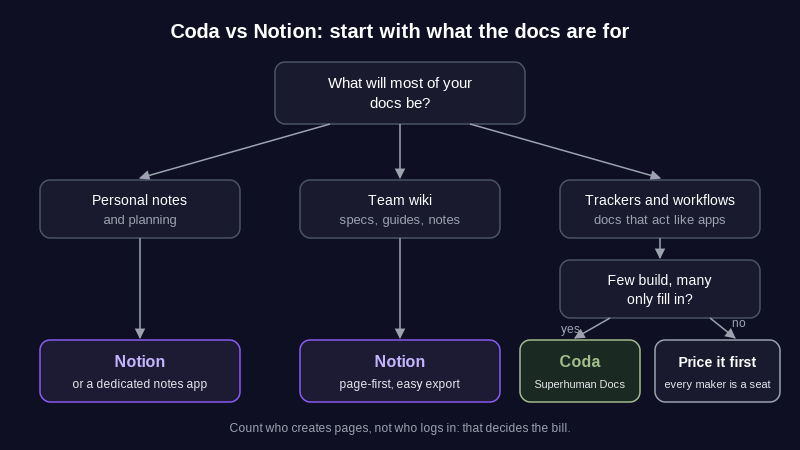
| Your situation | Pick | Why |
|---|---|---|
| Personal notes and planning | Notion (or a dedicated notes app) | Better writing, bigger template ecosystem |
| Team wiki and documentation | Notion | Page-first, easy linking, cheaper when everyone writes |
| Trackers, OKRs, and operations docs | Coda | Cross-doc formulas, buttons, and rules |
| A few builders, many contributors | Coda | Editors and viewers are free |
| Your Doc Makers would pay for Grammarly anyway | Coda | Superhuman plans bundle it for Makers (Pro: annual billing only) |
| You want to keep an easy exit | Notion | Markdown export |
If the choice is really about where your team's documentation should live, it is worth reading our Notion vs Confluence comparison too, since Confluence is the other tool that usually ends up on the shortlist. And if you have tried Notion and found it too heavy, the Notion alternatives roundup covers lighter options.
The question neither tool asks
Every round above is about how knowledge is stored and edited: pages or tables, formulas or blocks, per member or per maker. None of it asks whether the knowledge is still right.
A Coda doc can recalculate a total the moment a row changes, which makes it feel live. But the facts typed into it (a vendor's price, an API limit, a policy, a setup step) are frozen the moment someone types them. Notion's verified pages (on Business and up) let someone promise a page is correct, and Coda's page locking stops casual edits. Neither checks whether the content is still true. That gap is how teams end up with outdated documentation: a confident page, read by someone new, describing a world that changed months ago.
This is the problem we build Scribelet around. Scribelet runs background checks that compare your notes against current sources and shows you what changed, so a stale fact gets flagged before someone relies on it. It is a notes app for people who think and build with AI, not a team database, and it works well alongside whichever workspace your team picks. Try Scribelet free and see which of your notes have quietly gone out of date.
Bottom line
- Choose Notion if your team mostly writes: wikis, specs, meeting notes, and knowledge bases, and you want the biggest ecosystem and the easiest exit.
- Choose Coda (Superhuman Docs) if your docs are really small apps: trackers, calculators, and workflows, built by a few people and filled in by many.
- Count your builders before you compare prices. With few builders, Doc Maker billing can cost a third to a half of Notion's; when everyone builds, it runs 20 to 65 percent higher.
For more head-to-heads, our Notion vs Obsidian breakdown covers the matchup people usually check when the question shifts from team workspace to personal knowledge.
Share this article