Notion vs Confluence: Which Team Wiki Fits in 2026?
Table of contents
Every team that outgrows a shared Google Drive ends up in the same meeting. Someone wants Notion because it is pleasant to write in and does a bit of everything. Someone else wants Confluence because the engineers already live in Jira and "that is what real companies use." Both people are right about their own tool, and the meeting goes in circles because they are describing different problems.
Notion vs Confluence is not a contest between a good wiki and a bad one. Confluence is a documentation system with structure built in: spaces, page trees, templates, and a deep connection to Jira. Notion is a flexible workspace where you build the structure yourself out of pages and databases, and the wiki is one of many things it can be. Pick on feature count and you will choose the tool that looks better in a demo and fits worse on a Tuesday.
Searched the other way round, as Confluence vs Notion, the question is the same, and so is the answer. This comparison goes round by round: how each tool organizes knowledge, how they handle permissions and scale, what their AI actually includes, what they cost in November 2026, and how hard it is to leave. At the end there is a decision flow you can run in two minutes, and the one dimension both tools skip.
Notion vs Confluence at a glance
Confluence is Atlassian's team documentation platform, best for structured docs at scale, regulated organizations, and teams already running Jira. Notion is an all-in-one workspace built on flexible pages and relational databases, best for smaller teams that want docs, projects, and lightweight tools in one place. The short version: Confluence for documentation that has to stay organized, Notion for documentation that has to stay flexible.
| Dimension | Confluence | Notion | Winner |
|---|---|---|---|
| Core model | Spaces and page trees, structure built in | Blocks, pages, and databases you assemble | Depends |
| Writing experience | Capable editor with macros | Fast block editor, mixes content freely | Notion |
| Databases and project tracking | Databases and whiteboards added; Jira does the tracking | Relational databases with board, calendar, timeline views | Notion |
| Jira and dev tooling | Native, deep Jira integration | Integrations, but not native | Confluence |
| Permissions and governance | Space-level permissions, enterprise controls | Teamspaces and page permissions; granular controls on higher tiers | Confluence |
| Scale | Built for very large sites | Works well until the page tree sprawls | Confluence |
| Built-in AI | Rovo on every paid plan | Notion AI, full credits on Business and up | Depends |
| Offline | Browser-based, built around being online | Pages can be downloaded for offline use | Notion |
| Free plan | Up to 10 users, 2 GB storage | Free plan with limited block storage for teams | Depends |
| Export and lock-in | Document exports such as PDF and Word | Markdown, CSV, HTML, PDF exports | Tie (both lossy) |
| Keeping docs accurate | Manual (page owners update by hand) | Manual (page verification with an expiry, Business and up) | Neither |
Read the last row first. It is the one that decides whether a wiki is an asset in two years or a museum of confident, outdated pages. Most teams only notice it after a new hire follows a setup guide that stopped working months ago. That failure has a name, outdated documentation, and neither tool here prevents it. If you want notes that flag their own stale facts, Scribelet is free to try.
Now the rounds.
Round 1: Structure built in vs structure you build
This is the real decision, so it goes first.
Confluence gives you a shape before you write a word. Content lives in spaces, usually one per team or product. Inside a space, pages nest into a tree, and templates nudge everyone toward the same format for meeting notes, requirements, and retrospectives. A new person can open the engineering space and find the onboarding page, the architecture page, and the runbooks roughly where they expect them. The structure is opinionated, and that is the point.
Notion gives you a blank page and a box of parts. Any page can hold text, toggles, embeds, and databases, and any database can show the same rows as a table, a board, or a calendar. You can build a wiki, a project tracker, a hiring pipeline, and a content calendar, all linked to each other. The flexibility is real. So is the cost: someone has to design the structure, and someone has to keep enforcing it.
If your team has a person who enjoys designing systems, Notion rewards them. If nobody wants that job, Confluence's defaults will produce a more organized wiki a year from now than a Notion workspace built by committee.
Winner: depends. Confluence if you want structure handed to you. Notion if you want to design it.
Round 2: Writing and everyday editing
Notion is the nicer place to write, and most people feel it in the first ten minutes.
Its block editor lets you drag paragraphs around, turn any line into a toggle or a callout, and drop a database into the middle of a page without leaving the keyboard. Mixed content, a spec with a diagram, a table, and a checklist, feels natural.
Confluence's editor has improved a lot and is perfectly capable. It supports markdown-style shortcuts, tables, and a large library of macros, including the ones that pull live Jira issues into a page. But it still feels like editing a document inside a larger system, which it is.
Winner: Notion.
Round 3: Jira, engineering docs, and the Atlassian ecosystem
Here Confluence wins, and for engineering teams it is often the whole argument.
If your team tracks work in Jira, Confluence is the documentation layer that already knows about it. Link a requirements page to an epic, embed a live list of issues, create tickets from a page, and see the docs from inside Jira. Atlassian sells the two as a pair, and the integration shows.
This matters most for the documents engineers actually rely on: design docs, architecture decision records, and the runbook someone opens at 2 a.m. In Confluence those sit one click from the tickets that created them. Notion can connect to Jira and GitHub through integrations, and plenty of engineering teams run on Notion happily, but it is a connection rather than a shared system.
There is a third path worth knowing about. Many engineering teams keep technical docs next to the code instead, in Markdown, reviewed in pull requests. If that sounds closer to how your team works, the guide to docs as code covers the trade-offs.
Winner: Confluence, decisively, if you use Jira.
Round 4: Permissions, governance, and scale
Confluence was built for large organizations, and its permission model shows it. Access is set at the space level, with page restrictions on top, and the enterprise tooling is extensive: audit logs, data residency, and compliance options for regulated industries. Atlassian Guard, a separate subscription on every plan below Enterprise, adds SSO enforcement and security controls across Atlassian products. Atlassian also offers Data Center, a self-managed edition, for organizations that cannot use cloud at all.
Notion handles permissions through teamspaces and page-level sharing, and its higher tiers add permission groups, granular database permissions, audit logs, and admin controls. For most companies under a few hundred people, that is enough. The harder problem is not permission settings but sprawl: as a Notion workspace grows, duplicate pages and abandoned databases pile up unless someone actively curates them.
Winner: Confluence, for large or regulated organizations. For small teams this round barely matters.
Round 5: AI features
Both tools now ship AI, and the packaging differs more than the capability.
Confluence includes Rovo, Atlassian's AI, on every paid plan: search across your Atlassian tools, chat, and agents. Plans differ by how many Rovo credits come included each month (25 per user on Standard, 70 on Premium, 150 on Enterprise), and Rovo Search does not use credits at all. The Free plan has no Rovo (Atlassian, Confluence pricing).
Notion AI covers writing, Q&A across your workspace, meeting notes, and agents. Free and Plus workspaces get a limited trial; the full monthly allowance of AI credits starts on the Business plan (Notion pricing).
The caveat applies to both. An AI that answers questions from your wiki is only as good as the wiki. If the page it cites describes last year's deploy process, you get a fluent, confident, wrong answer, and nobody can tell from the response that the source has gone stale.
Winner: depends. Rovo is the better bundle if you are paying for Confluence anyway. Notion AI is stronger when your knowledge already lives in Notion databases.
Round 6: Pricing in November 2026
Confluence lists its prices openly, through a calculator that varies with team size and billing cycle. At the time of writing, the Free plan covers up to 10 users with 2 GB of file storage. Standard runs about $6 to $7 per user per month (around $7.15 on monthly billing, less on annual) and raises storage to 250 GB. Premium costs roughly twice that and adds unlimited storage, a 99.9% uptime SLA, and 24/7 support. Enterprise is annual-only and quoted by sales. Atlassian is also moving to usage-based billing for some features starting December 3, 2026, so check your included allowance if you rely heavily on Rovo or automation (Atlassian, Confluence pricing).
Notion charges per member across Free, Plus, Business, and Enterprise, with Plus at about $10 and Business at about $20 per member per month on yearly billing as of November 2026. The Free plan is fine for one person and tight for a team: limited block storage, 5 MB file uploads, and 7 days of page history. Business is where full Notion AI, longer history, and more admin controls arrive. Guests are free but can only see pages they are invited to (Notion pricing).
For a 10-person team the practical comparison is simple: Confluence is free up to that size, while Notion's free plan will start to pinch on storage and history. Past ten people, Confluence's entry tier is usually the cheaper per-seat line item, roughly $7 against Notion's $10 to $20, though SSO on Confluence below Enterprise means adding Atlassian Guard. Notion's value depends on how many separate tools it replaces for you.
Winner: Confluence on list price for small and mid-sized teams. Notion wins if it lets you cancel two other subscriptions.
Whichever you pay for, the expensive part is not the seat price. It is the hours your team loses to pages that were right once. That is the cost Scribelet is built to cut, and you can start with Scribelet free.
Round 7: Offline, speed, and leaving
Notion lets you choose pages to download for offline use, and paid plans download recents and favorites automatically. Confluence Cloud is a browser-based product built around being online, which rarely matters at a desk and matters a lot on a plane.
Leaving is painful in both directions, and it is worth thinking about before you commit years of knowledge. Confluence exports pages to document formats such as PDF and Word, but macros, Jira embeds, and page relationships do not survive the trip into anything else. Notion exports to Markdown, CSV, HTML, and PDF, which sounds friendlier, but databases flatten into CSV files, relations break, and nested pages scatter into folders.
Both are closed systems. The app is the door, and it only opens so far. If owning your knowledge in a portable format matters to you, that is a reason to look at a Notion alternative built on plain files rather than choosing between these two.
Winner: Notion on offline. Neither on lock-in.
Which should your team choose? A two-minute decision flow
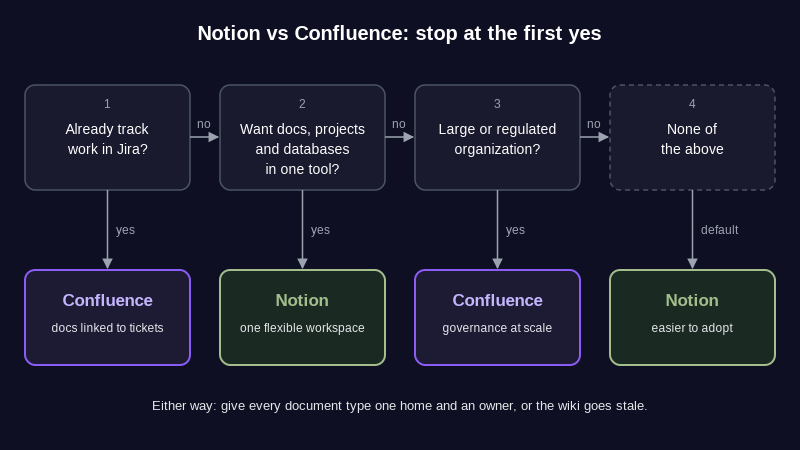
Run your team through these four questions in order and stop at the first "yes":
- Does your team already track work in Jira? Choose Confluence. The integration is worth more than any editor preference.
- Do you want docs, projects, and lightweight databases in one tool? Choose Notion. That is exactly what it is built for. If those databases are really trackers full of formulas and buttons, how Coda compares to Notion is the more useful matchup.
- Are you a large or regulated organization that needs space-level governance, compliance options, or self-hosting? Choose Confluence.
- None of the above? Start with Notion. It is easier to adopt, and a small team will feel the flexibility before it feels the sprawl.
A few common team shapes, mapped:
| Team | Pick | Why |
|---|---|---|
| 8-person startup, no Jira | Notion | Docs, roadmap, and hiring tracker in one place |
| 40-person engineering org on Jira | Confluence | Docs linked to the tickets that produced them |
| Agency or content team | Notion | Databases for clients, calendars, and briefs |
| Bank, hospital, or government contractor | Confluence | Governance, compliance, and Data Center |
| Mixed company, engineering on Jira, everyone else not | Often both | Confluence for engineering, Notion elsewhere, with a clear rule for where each kind of doc lives |
That last row is more common than either vendor admits. Running both is fine as long as every type of document has exactly one home. Without that rule you end up with two versions of the onboarding guide, and by spring at least one of them is wrong. The guide to internal documentation covers how to decide where each kind of doc should live.
The dimension neither tool measures
Every round above is about where knowledge lives and how you edit it. None of it touches whether the knowledge is still true.
Notion has a gesture toward this: on Business and Enterprise plans, a page owner can mark a page as verified until a date, and when that expires the owner gets a reminder to re-verify (Notion Help). In Confluence, keeping a page current is up to whoever owns it. Either way it is a person promising that a page is correct, not anything checking it. Nobody reads the deploy guide against the current pipeline, and nobody notices that the vendor quoted on the procurement page has since changed its rates.
This is the problem we build Scribelet around: knowledge has a half-life, and most tools pretend it does not. Scribelet runs background checks that compare your notes against current sources and shows you a diff when something has changed, so a page can be flagged as stale before someone trusts it. Shared team desks give you owner, admin, editor, and viewer roles, and everything is encrypted at rest with per-desk keys. It is not a Confluence replacement for a 2,000-person company. It is for the notes and docs you need to stay right. Try Scribelet free.
Bottom line
- Choose Confluence if you run Jira, need governance at scale, or want a documentation structure handed to you on day one.
- Choose Notion if you are a smaller team that wants docs, projects, and databases in one flexible workspace, and someone is willing to design how it fits together.
- Whichever you choose, give every document type one home and an owner, or the wiki will quietly go stale regardless of the logo on it.
If you are comparing Notion against more personal tools as well, our Notion vs Obsidian and Notion vs OneNote breakdowns cover the two matchups people usually check next. The right team wiki is not the one with the longest feature list. It is the one your team will still trust after everything in it has had a chance to change.
Share this article