Rubber Duck Debugging: Talk to the Duck, Write to the Duck, Ask the AI
Table of contents
You have been staring at the same twenty lines for an hour. The bug makes no sense. Then a coworker walks over, you start to explain what the code is supposed to do, and somewhere around the third sentence you stop mid-word, say "never mind," and go fix it. They never said anything. Explaining it was the fix.
That is rubber duck debugging, and the joke is that you do not even need the coworker. A rubber duck on your desk works just as well, because the person was never solving your problem. You were, the moment you were forced to say it out loud. Here is what the technique actually is, why the act of explaining finds bugs that silent re-reading never will, how to run it in writing so the insight does not evaporate, and what changes now that the duck can be an AI that talks back.
What is rubber duck debugging?
Rubber duck debugging is a problem-solving technique where you fix a bug by explaining your code, line by line and out loud, to an inanimate object such as a rubber duck. The point is not the duck. The point is that articulating each step in plain language forces you to examine assumptions you were silently skipping, and the flawed one usually reveals itself before you finish the sentence.
The name comes from an anecdote in The Pragmatic Programmer by Andy Hunt and Dave Thomas, in which a developer carried a rubber duck and debugged by forcing himself to explain the code, in detail, to the duck. The practice was already old folklore under other names (talking to the teddy bear, the cardboard programmer). The duck just gave it a memorable label, and the label stuck because every working programmer recognizes the experience.
It sounds like a gag, and the canonical joke site leans into that. But the mechanism underneath is real, well understood, and not limited to code. Anyone who thinks for a living can use it, which is the reason it belongs in a note-taking toolkit and not only in an IDE. If you keep your work in Scribelet, the duck can be a note, and that turns a throwaway trick into something you can reread later.
Why explaining out loud finds the bug
The technique works because reading and explaining are different cognitive acts, and only one of them catches your own mistakes.
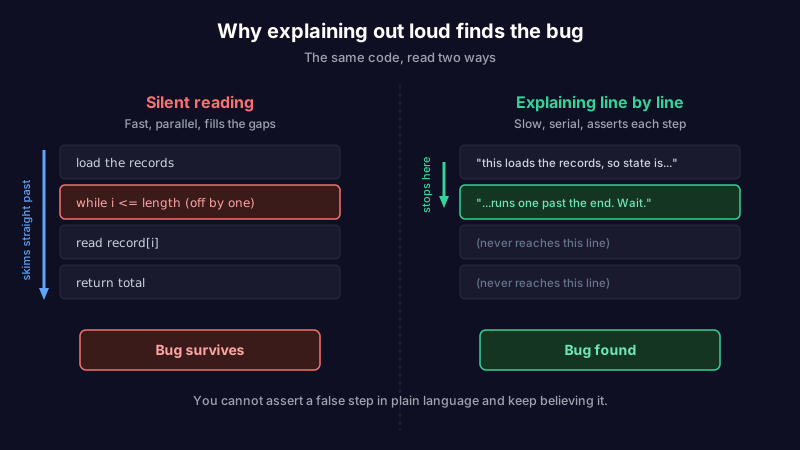
When you read your own code silently, you read what you meant to write. Your brain fills the gap between intention and text automatically, so the line that says >= reads as the > you intended, and you skim straight past it for the tenth time. Silent review runs on assumptions, and the bug is almost always hiding inside an assumption you never checked.
Explaining out loud breaks that. To say a line, you have to convert it from a thing you recognize into a claim you assert: "this loop runs while the index is less than or equal to the length, so on the last pass it reads one element past the end." The moment the sentence is spoken, the off-by-one is obvious, because you cannot say a false step in plain language and keep believing it. Speaking forces a slower, serial pass where reading allowed a fast, parallel skim.
There is a name for the underlying trap. Experts skip explanation precisely because they know the material, a bias called the curse of knowledge: the more fluent you are, the harder it is to see where a beginner (or your own future self) would get lost, and the more you gloss the step that is actually wrong. Rubber ducking is the cheapest known antidote. It drags the glossed step back into the open by refusing to let you assert it silently.
This is also why the technique generalizes far past debugging. Stuck on a design decision, a paragraph that will not come together, a data model that feels wrong: explaining it step by step to something that cannot help you is the same move, and it works for the same reason. It is a close cousin of second-order thinking, where the discipline is to keep asking "and then what" instead of stopping at the first plausible answer.
Three ducks: spoken, written, and AI
The classic duck is silent and spoken to. But the duck is just a forcing function for articulation, and there are now three practical forms, each with a different tradeoff.
| Duck | What it forces | Best for | The catch |
|---|---|---|---|
| Spoken duck | Real-time, serial explanation out loud | A live bug you are stuck on right now | Leaves no record; the insight is gone once you fix it |
| Written duck | Slower, more precise articulation you can reread | Harder problems, and anything worth keeping | Takes a few more minutes than talking |
| AI duck | Explanation plus a response that can probe back | Bugs where you want a second angle | It answers, so it can short-circuit the very self-explanation that does the work |
The spoken duck is fastest and the oldest. It is perfect for the everyday stuck moment, and it costs nothing. Its only weakness is that it is disposable: you solve the bug, and the reasoning that got you there disappears.
The written duck fixes that. Instead of talking to a toy, you explain the problem to a note, step by step, as if the reader knows nothing. This is slower than speaking, and that is the feature, not the bug: writing forces even more precision than talking, and it leaves a durable artifact. A "why I was stuck and what it turned out to be" note is worth far more later than the fix alone, because the fix is in the code and the reasoning is not. This is the same principle behind self-documenting code: the intent that lived in your head is the part that gets lost, so the discipline is to write it down where it survives.
The AI duck is the newest, and it is genuinely different. Explaining your bug to an assistant that can respond is not really rubber ducking anymore; it is a conversation. That is sometimes better and sometimes worse, and it is worth being clear about which.
The AI duck: better and worse
Google's own results for this topic now end with an offer to be the duck: paste your code and it will step through it with you. Every AI assistant makes the same offer. When the duck talks back, two things change.
It is better when you are genuinely stuck and want a second angle, or when explaining alone has not surfaced the flaw and you need something to ask the questions the spoken duck cannot. A responsive duck can point at the loop bound you skipped, propose a hypothesis, or notice a pattern you are too close to see. Used well, it compresses the loop.
It is worse in a specific and easy-to-miss way: the AI answers, and the answer can arrive before the act of explaining has done its work. The whole power of the classic duck is that you solve the problem in the process of articulating it. If you dump a half-formed description and the assistant produces a fix, you skipped the part that builds understanding, and you have traded a bug you understand for a patch you do not. Worse, the assistant is confident whether it is right or wrong, which invites the Gell-Mann amnesia effect: you catch it being wrong about the part you know, then trust it completely on the part you do not.
The move that keeps the benefit is to explain first and ask second. Write the problem out to the duck in full, as if it could not answer, and only then hand that explanation to the AI. Often you will fix it before you hit send, which is the ideal outcome. When you do send it, you are sending a precise description rather than a vague one, which gets a better answer, and you have primed yourself to check that answer instead of accepting it. If the assistant works over your own notes, the same caution applies as with any AI reading your material: treat its output as a draft to verify, not a verdict to trust.
How to rubber duck well
The technique fails in exactly one way: you go through the motions without actually asserting each step. "This function processes the data" is not an explanation, it is a label, and it hides the same assumptions your silent reading did. Ducking works only when you are specific enough that a wrong step would sound wrong.
A written duck session that actually catches bugs looks like this. It doubles as a note you can keep.
## Bug: [what is wrong, in one line]

Expected: [what the code should do]
Actual:   [what it does instead]

Walking through it:
1. This line does X, because [reason]. So after it, the state is [Y].
2. Then this line does Z, which assumes [assumption]. Is that true here?
3. ...

Where the story breaks: [the step where "expected" and "actual" diverge]

Fix: [what you changed, and why it was wrong]
Three things make the difference between a real session and theater. State the expected and the actual behavior before you start; the bug lives in the gap between them, and naming both makes the gap findable. Explain every line, especially the ones you are sure are correct, because the one you are sure about is the usual culprit. And write down the assumption behind each step explicitly ("this assumes the list is never empty"), because an unstated assumption is exactly what silent reading let you skip.
When ducking is the wrong tool
Rubber ducking is for problems where you have the information and cannot see it. It is not for problems where you are missing information. If the bug is in a library you have never read, in someone else's undocumented service, or in a system whose behavior you genuinely do not know, explaining your own code to a duck will not conjure the missing facts. That is a research problem, not an articulation problem, and the fix is to go read or to ask a human who knows.
It is also weaker on problems that are structural rather than local. A bug that comes from two teams making incompatible assumptions at a boundary is not something one person can talk their way to, because the mismatch lives in the org chart as much as the code, which is the lesson of Conway's law. Duck the part you own; escalate the part you do not.
And like every practice that produces a useful artifact, the written duck is only worth keeping if you can find it again. A folder of debugging notes you never reopen is just knowledge quietly decaying. The value is in the search: the next time the same class of bug appears, the note that explained the last one is the fastest way through.
The duck is a thinking tool, not a debugging trick
Strip away the toy and rubber duck debugging is a general method: when you are stuck, stop consuming the problem and start explaining it, in enough detail that a wrong step cannot hide. Say it to a duck, write it to a note, or hand it to an AI, in that order of increasing power and increasing risk. The spoken duck is free and disposable. The written duck is slower and durable. The AI duck is the most capable and the easiest to misuse, because it can answer before you have done the thinking that the answer was supposed to replace.
Scribelet is built for the written and AI versions of this: a place to explain a problem to yourself step by step, keep the explanation, and ask an assistant about it over your own notes without shipping them to anyone. The next stuck hour is going to happen. The question is whether the way out of it leaves anything behind. Try it free.
Share this article